EnterQuickMove
- By
Press Enter to shift-click the slot under your cursor. Collect furnace output, villager trades and crafting results without ever holding Shift.
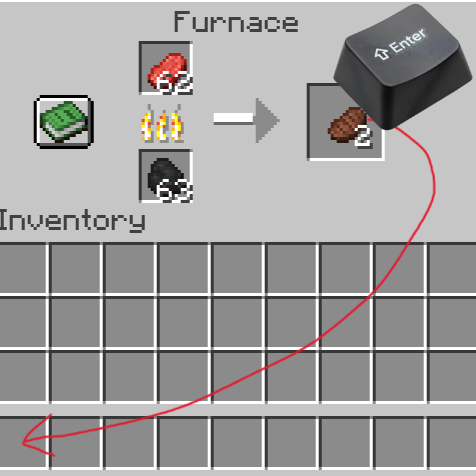
ã¹ã¯ãªã¼ã³ã·ã§ãã 2026-08-28 002142.png
Description
EnterQuickMove
Shift-clicking, on a single key.
Furnace output, the result slot of a villager trade, a finished craft — you shift-click to collect them dozens of times a day. EnterQuickMove is a client-side mod that makes Enter do exactly what Shift+click does on the slot under your cursor.
No more parking your left hand on Shift. Handy when one hand is busy, or when the bottom-left of the keyboard is awkward to reach.
What it does
Open any container, put the mouse over the item you want to move, and press Enter (or the numpad Enter). The same move happens as if you had shift-clicked it.
- Nothing happens when the cursor is not over a slot — Enter behaves as usual
- Nothing happens over an empty slot
- No config file. This mod is one key binding and nothing else
Where it works
There is no per-slot special casing. The mod issues the exact instruction vanilla issues for a shift-click, so every rule a screen has of its own — output slots you can only take from, trades that consume stock when collected — is handled by Minecraft itself.
Which means it works in all of these:
- Chests, trapped chests, ender chests, barrels, shulker boxes
- Furnaces, blast furnaces, smokers, brewing stands
- Villager and wandering trader trading
- Crafting tables, anvils, grindstones, looms, cartography tables, smithing tables, stonecutters
- Horse and llama inventories, the creative inventory
- Modded screens built on the vanilla screen classes — most storage mods included
Staying out of the way
- Typing still works. Enter never produces a character in a single-line text box (in vanilla, pressing Enter while renaming at an anvil does nothing at all). If you rebind this mod to some other key, a focused text box keeps priority over it
- Normal gameplay is untouched. The key only does anything while a container screen is open
- If you bind it to the same key as pick block, drop, or hotbar swap, vanilla wins
Controls
| Key (default) | Action |
|---|---|
Enter / numpad Enter |
Quick move the hovered slot |
Rebind it under Options → Controls → Key Binds → Inventory, as "Quick Move Hovered Slot".
The numpad Enter works alongside the main one only while the binding is left on its default, since the two are separate keys on the keyboard and a key binding can only hold one of them. Bind it elsewhere and only that key responds.
EnterQuickMove Team