EasyBuildUI
- By
EasyBuild – Building Holograms, Shape Generator, Litematica Files & a Build Notebook
banner.png
galerie-01-notizbuch.png
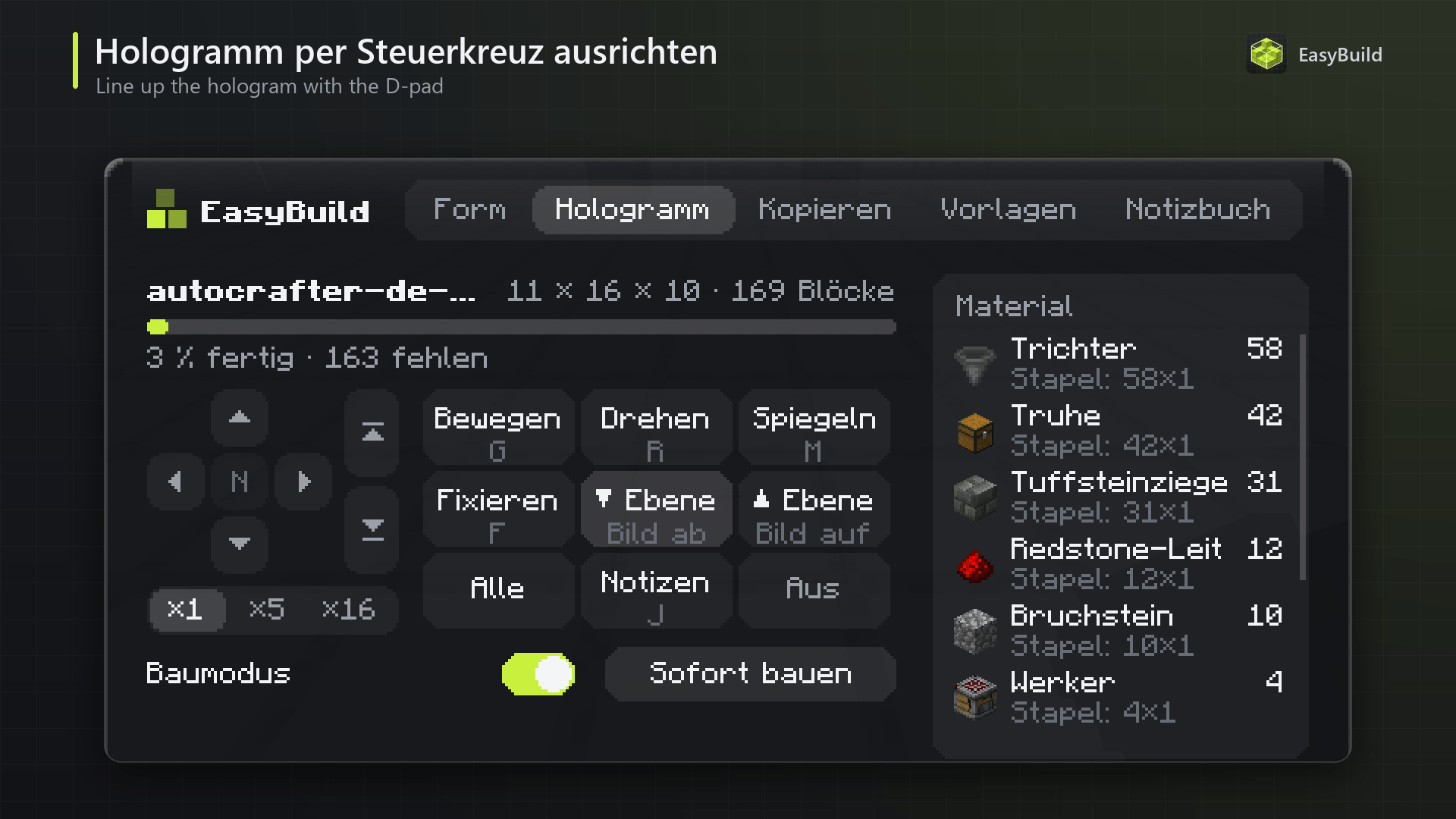
galerie-02-hologramm-steuerkreuz.png
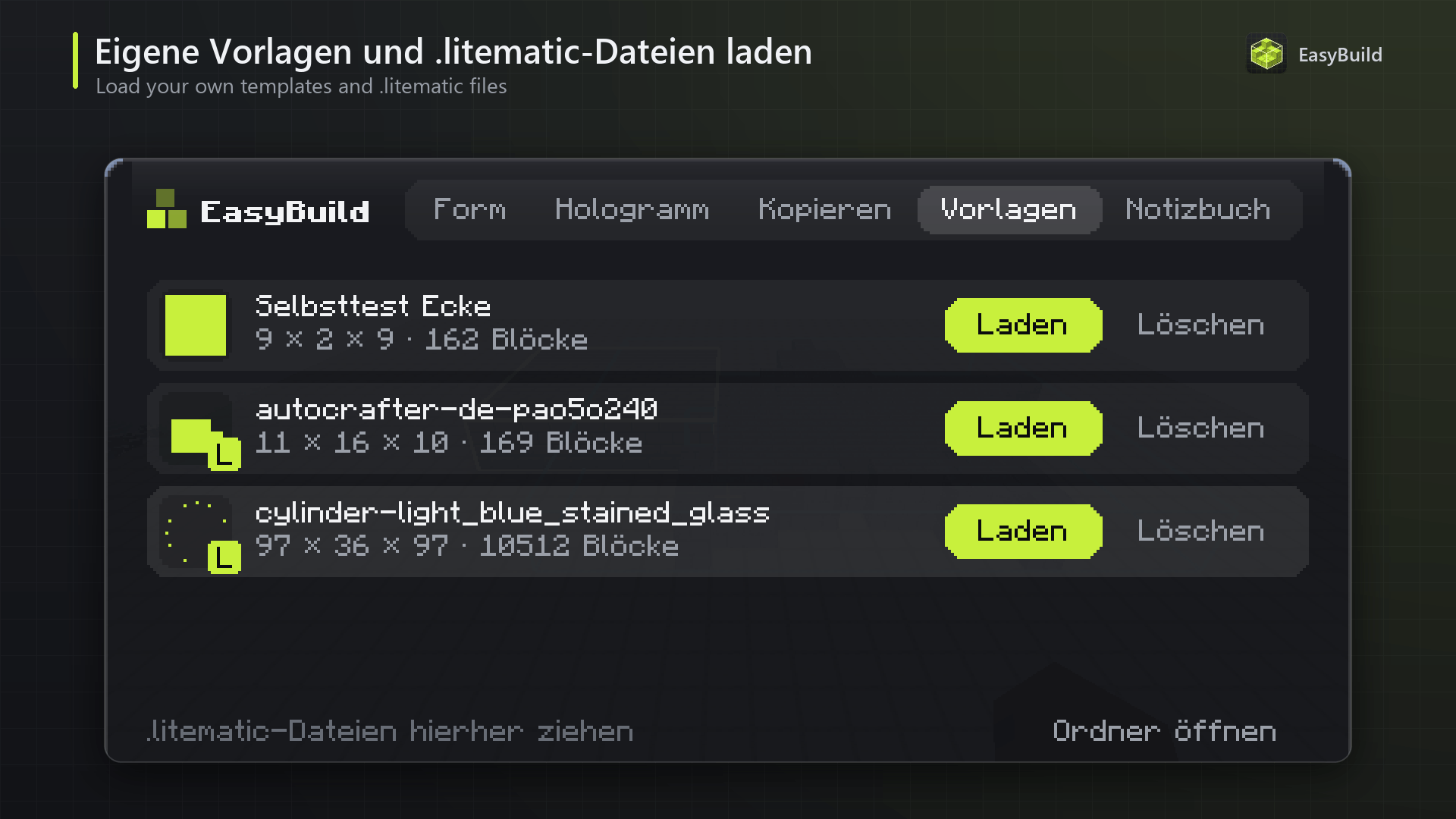
galerie-03-vorlagen-litematica.png
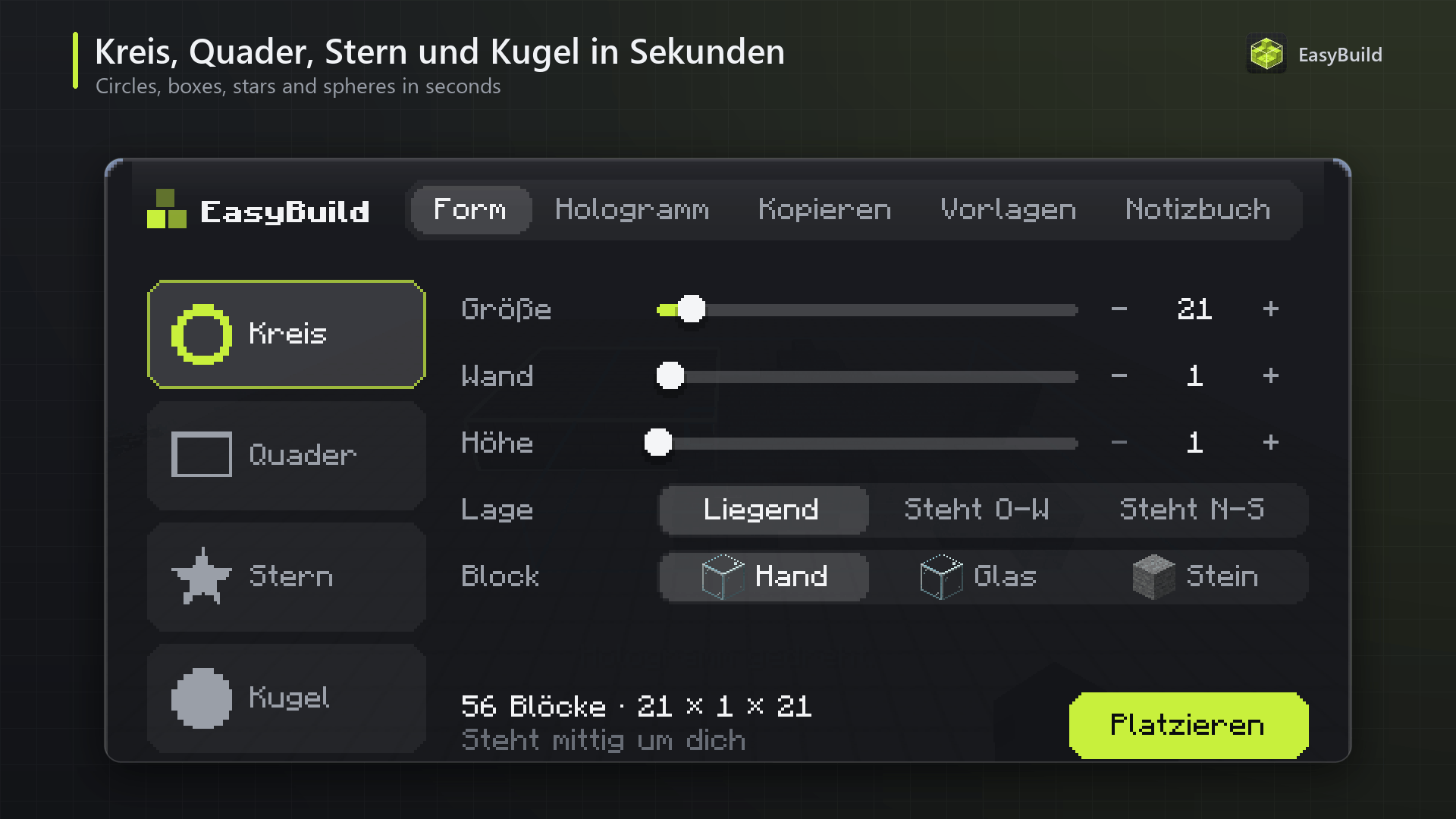
galerie-04-formen.png
Description
Build anything block by block – without learning a complicated tool. EasyBuild shows your building plan as a hologram of real, see-through blocks right in the world. Generate circles, spheres and stars in seconds, copy areas, load your .litematic files, and let the Build Notebook tell you exactly what is still missing.
EasyBuild is made for players who find schematic mods too complicated:
One key, one menu. Press B and everything is there – shapes, hologram controls, copying, templates and the notebook.
Shapes without calculators. Drag a slider and a perfect circle, sphere or star appears live around you.
Your Litematica schematics just work. EasyBuild reads
.litematic
files – drag one into the window and build it.Always know what's missing. The Build Notebook counts what you need, what is already placed and what's still in your inventory.
Client-side only – it works on every server, and the server never notices.
Holograms with real textures
Load a template or a shape and it appears as a translucent copy of the real blocks. Blocks you have placed correctly disappear from the hologram, wrong blocks are marked, and a progress bar shows how far you are.
|
Key
|
What it does
|
|---|---|
|
B
|
Open the EasyBuild menu
|
|
G
|
Grab the hologram – it follows your view. Click to drop it, scroll to lift or lower it
|
|
Arrow keys
|
Move the hologram one block (relative to where you look); with Shift: up / down
|
|
Left Alt + mouse wheel
|
Push the hologram along your view direction
|
|
R / M
|
Rotate / mirror
|
|
F
|
Lock the hologram so it can't be moved by accident
|
|
Page Up / Page Down
|
Show only one layer – perfect for building floor by floor
|
|
N
|
Build mode: only the block the hologram expects can be placed at each spot
|
|
J
|
Open the Build Notebook
|
Every key can be changed directly in the menu ("Change keys"). The Hologram tab also has a direction pad: left, right, forward, back, up and down in steps of 1, 5 or 16 blocks, plus rotate, mirror, lock and layer buttons – so you can also do everything with the mouse.
Build instantly places the whole hologram at once, but only where you are allowed to use commands (creative / your own world with cheats).
Shape generator
|
Shape
|
Options
|
|---|---|
|
Circle
|
Diameter up to 512, wall thickness (ring), height (cylinder)
|
|
Box
|
Up to 256 per side – filled, hollow walls or only the frame
|
|
Star
|
Number of points, inner and outer radius, height, filled or outline
|
|
Sphere
|
Diameter up to 256, filled or hollow; also as a dome
|
Shapes can lie flat or stand upright (north–south or east–west wall).
Choose the block: the one in your hand, glass or stone.
While you drag a slider, the menu fades out and the shape updates live around you, with a top-down view next to it. Click Place to keep it.
Copy areas
Look at a block and set two corners (in the Copy tab or with the optional Pos1/Pos2 keys). Give it a name, press Enter – the area is saved as a template you can place anywhere, rotate and mirror.
Litematica files
EasyBuild reads .litematic schematics, including multi-region files and files from older Minecraft versions (blocks are converted automatically; unknown blocks are counted and shown as a warning).
Put them into
config/easybuild/templates
or
config/easybuild/litematica
,or simply keep them in your normal Litematica
schematics
folder – EasyBuild finds them there (read-only),or drag a file from Explorer into the open menu – it is checked and copied for you.
Litematica files are marked with an L in the template list. Templates can be renamed and deleted with the trash button (click twice to confirm).
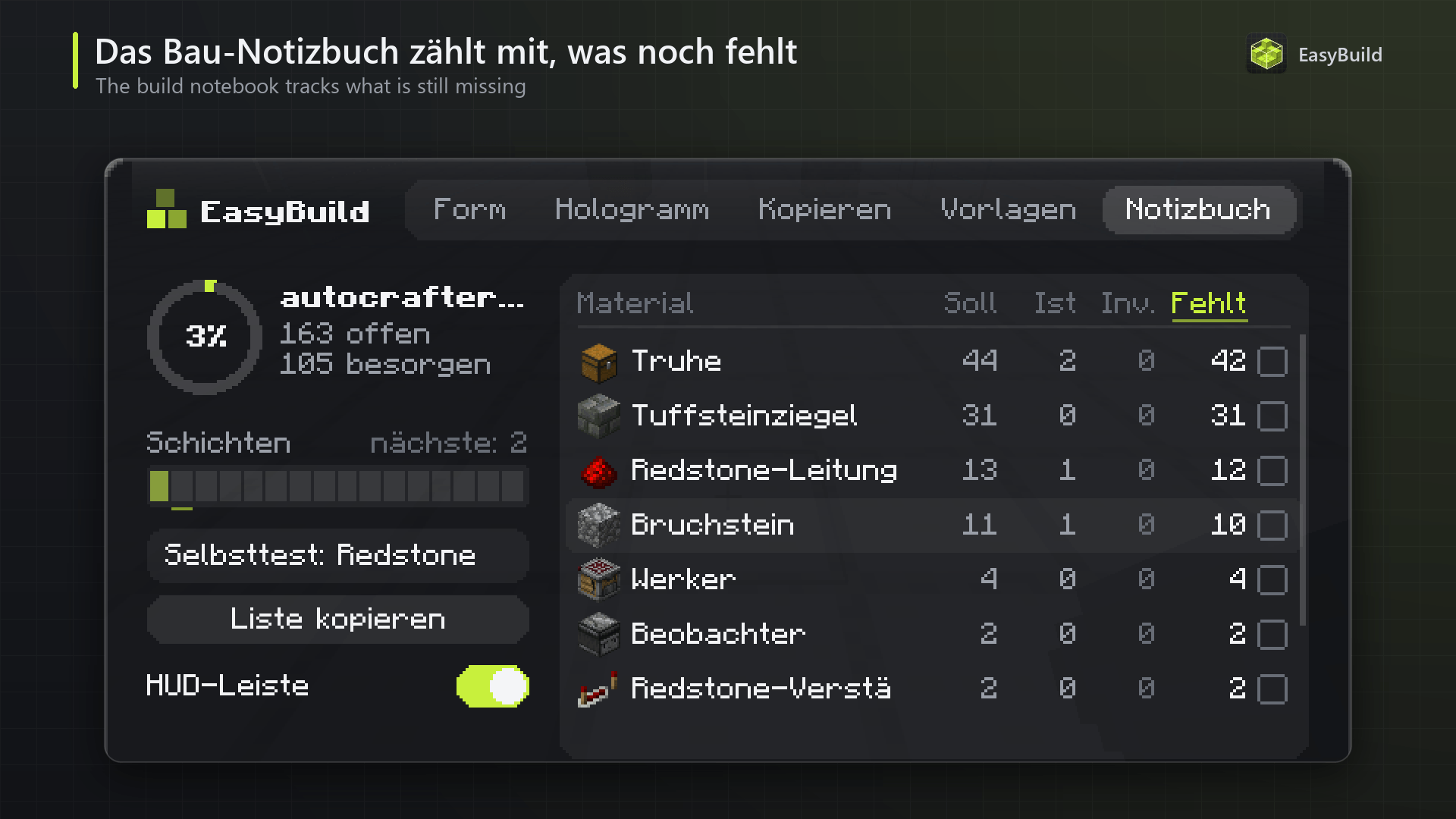
Build Notebook
Press J while a hologram is placed:
Progress in percent and per layer, with a clickable layer bar and the next unfinished layer
A material list with needed / placed / in inventory / still missing for every block – shulker boxes and bundles in your inventory count too. Wrongly placed blocks are listed separately.
Amounts in stacks, e.g.
1 shulker + 2 stacks + 44
Sort by missing, needed or name
Tick off what you have already collected and write a note for every project
Copy the list to the clipboard – great for sharing with friends
Everything is saved per template, so your notes are still there next time
HUD – where you want it
A small info box shows the active hologram, its progress and the most important keys; an optional bar shows the notebook progress and the block you are missing most. With "Move display" in the menu you can drag both anywhere on the screen – they snap to edges and the centre, so they never cover your minimap. Switch the info box to compact or hide it completely.
Better together with Chest Upgrade
EasyBuild and Chest Upgrade complement each other perfectly. With Chest Upgrade installed (and on the server), every missing block in the Build Notebook gets a "Where is it?" button: it shows which of your linked chests hold that block and outlines those chests through walls. Plan in EasyBuild, store in Chest Upgrade – and never search for building material again.
EasyBuild works perfectly without Chest Upgrade, too.
Commands
Everything also works without the menu via
/eb
:/eb kreis <diameter>
,
/eb quader <x> <y> <z>
,
/eb stern <points> …
,
/eb kugel <diameter>
,
/eb kuppel <diameter>
– create shapes/eb pos1
,
/eb pos2
,
/eb speichern <name>
– copy an area/eb laden <name>
– load a template/eb drehen
,
/eb fix
,
/eb schicht hoch|runter|alle
,
/eb aus
– control the hologramRequirements
Minecraft 26.3, 26.2 or 26.1.2 with Fabric Loader
Fabric API
Client-side only – nothing has to be installed on the server.
Optional: Chest Upgrade for the "Where is it?" feature
Please note
EasyBuild does not need Litematica – it only reads its file format. You can use both mods side by side (some default keys like M may overlap; change them in the menu).
Very large schematics (several million blocks) can take a moment to load; files above 4 million blocks are refused.
Build mode and Build instantly follow normal game rules – EasyBuild never places blocks for you on servers.
Languages: English, German.
EasyBuild is an independent mod and is not affiliated with or endorsed by Litematica or its authors. It only reads the
.litematic
file format.EasyBuildUI Team