Chest Upgrade – Bigger Chests, Upgrades, a Searchable Chest Network & an Auto-Sorter
- By
ive chest tiers like armor, upgrade kits that keep your items inside, sort buttons in every chest – and a chest network you can search with one key. No redstone sorting walls needed.
galerie-02-netherit-menue.png
galerie-03-suche.png
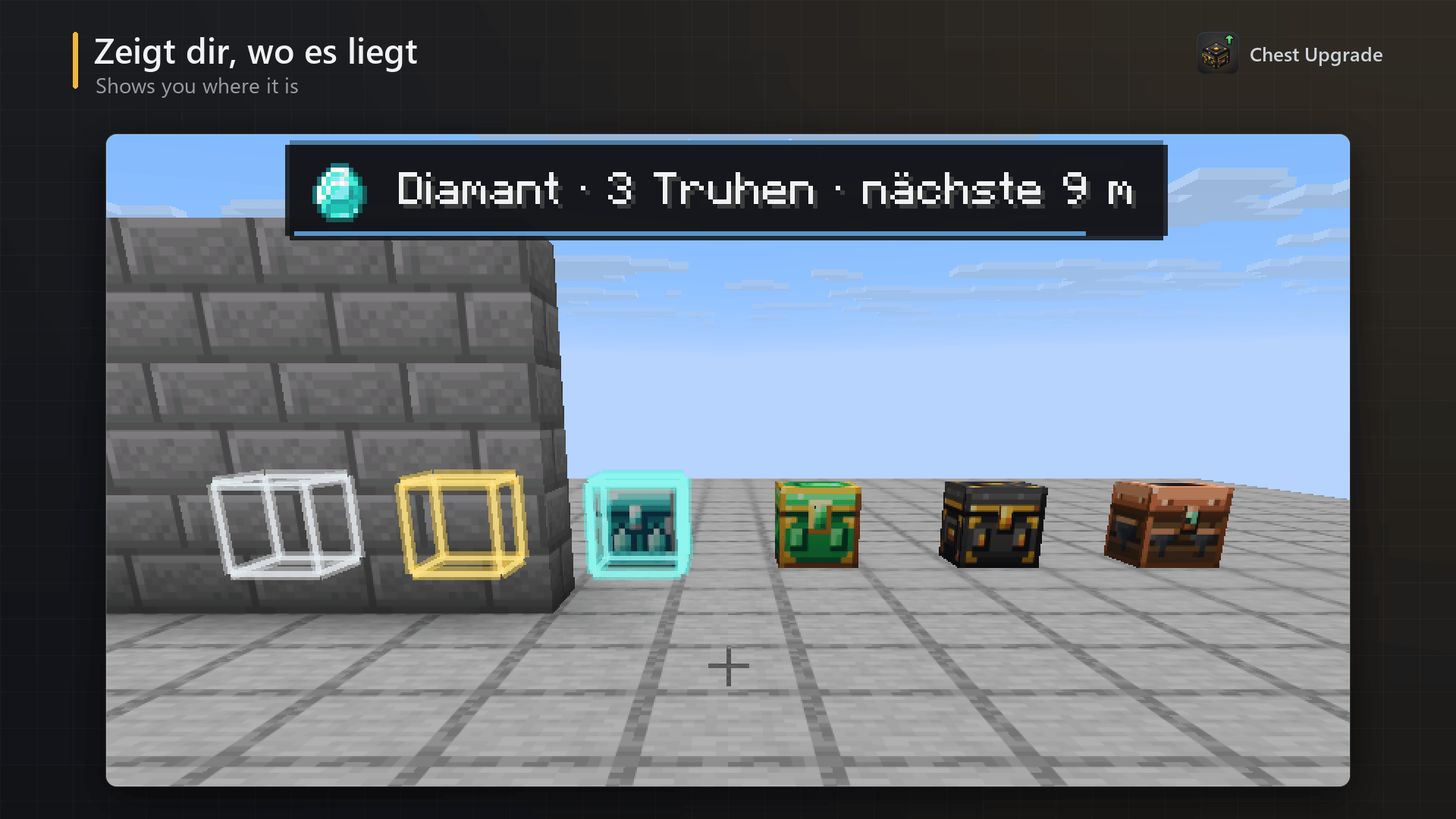
galerie-04-welt-markierung.png
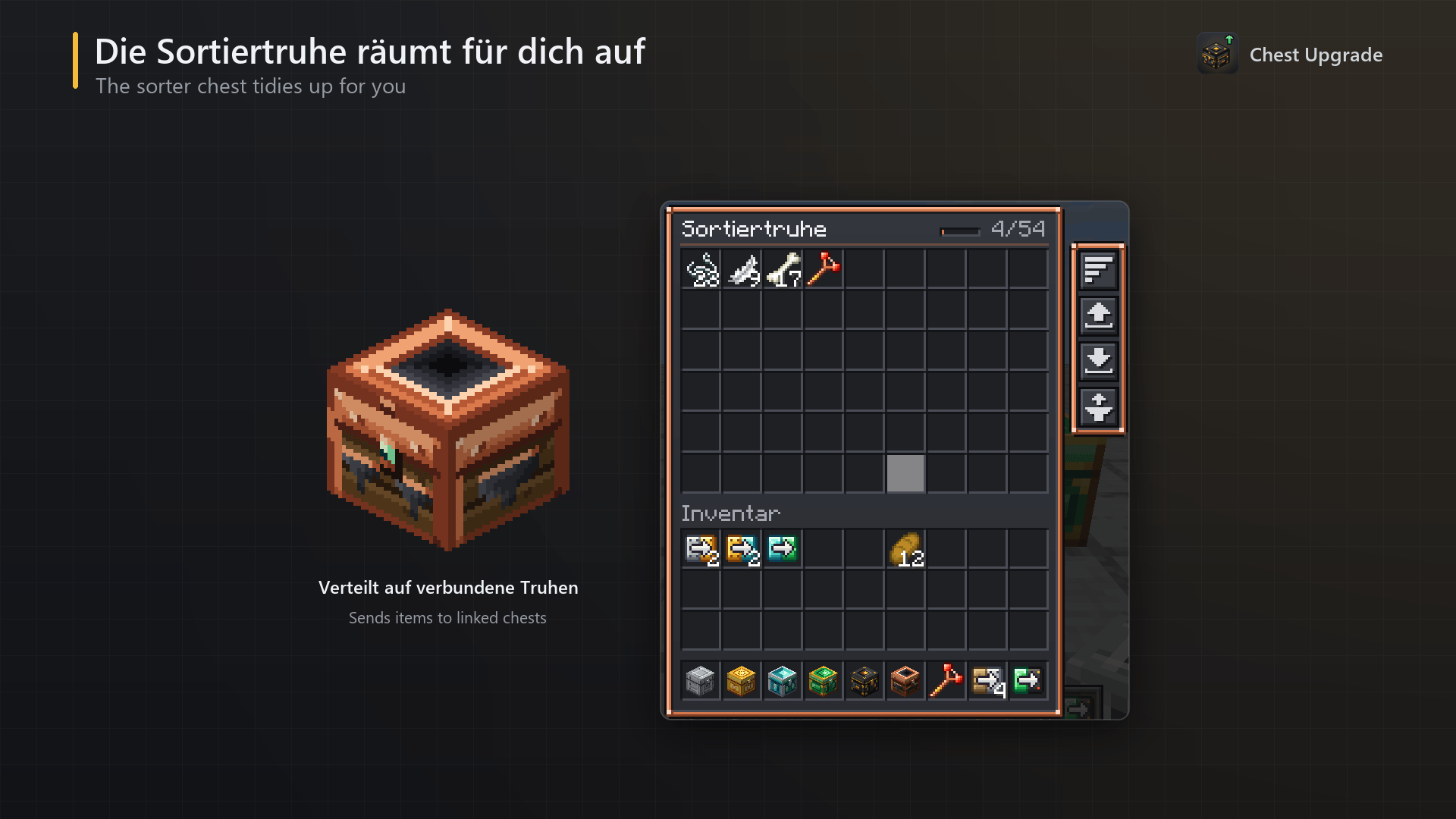
galerie-05-sortiertruhe.png
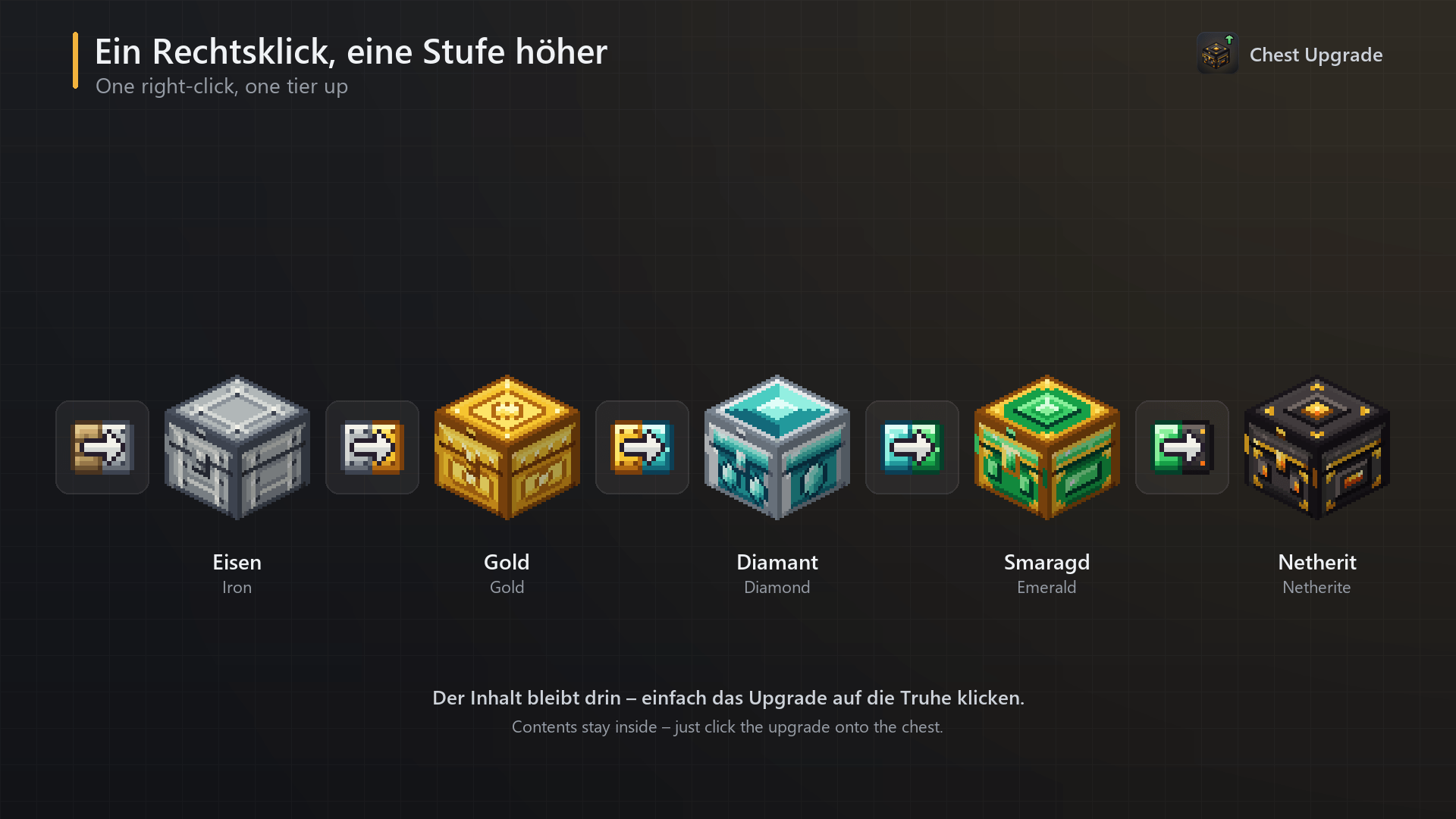
galerie-06-upgrades.png
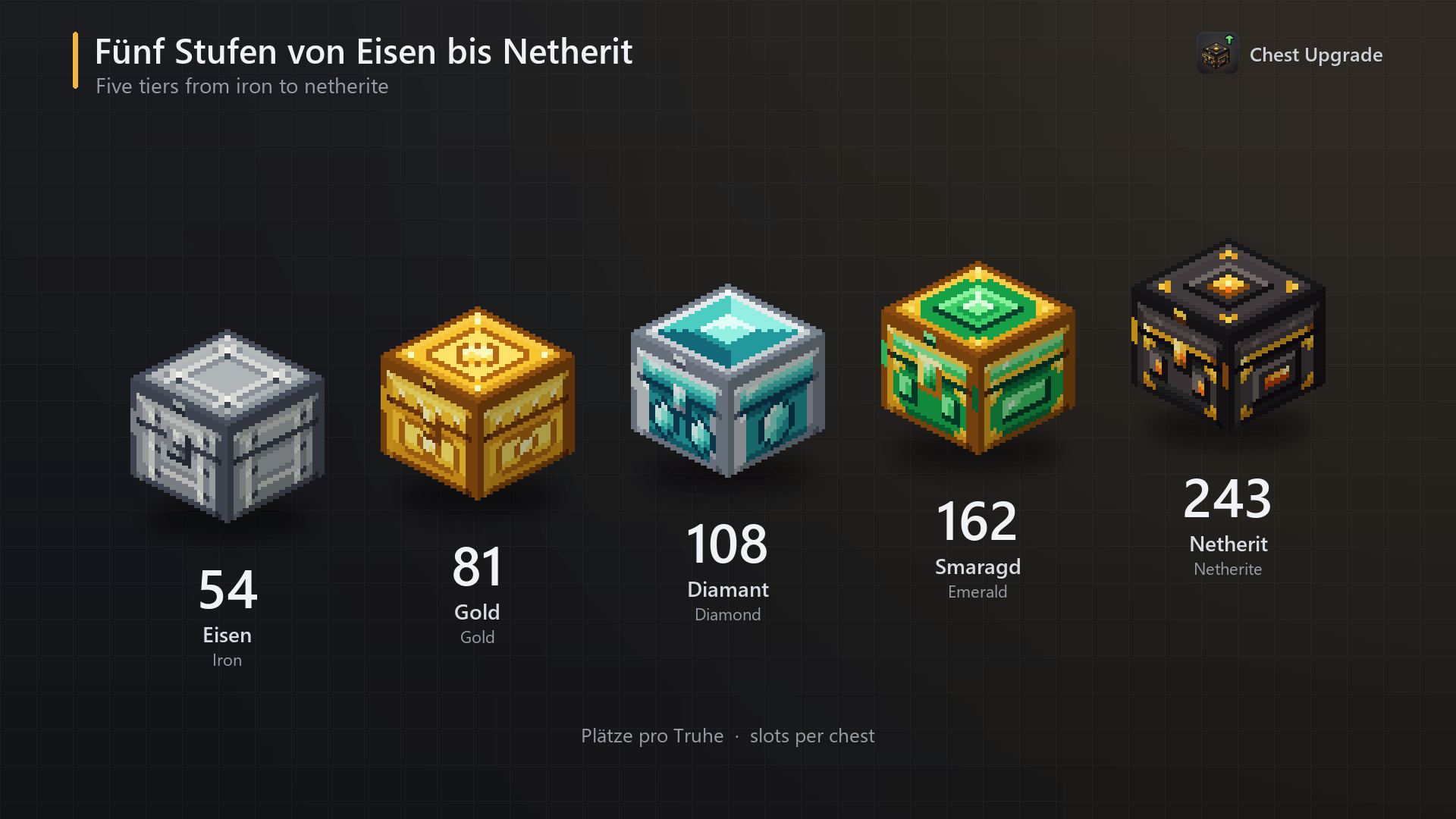
galerie-01-stufen.png
Description
Storage that grows with you. Chest Upgrade adds five chest tiers from Iron to Netherite, upgrade kits that turn a chest into the next tier without emptying it, handy buttons in every chest – and a chest network you can search with a single key.
Chest Upgrade solves four things that make every storage room annoying:
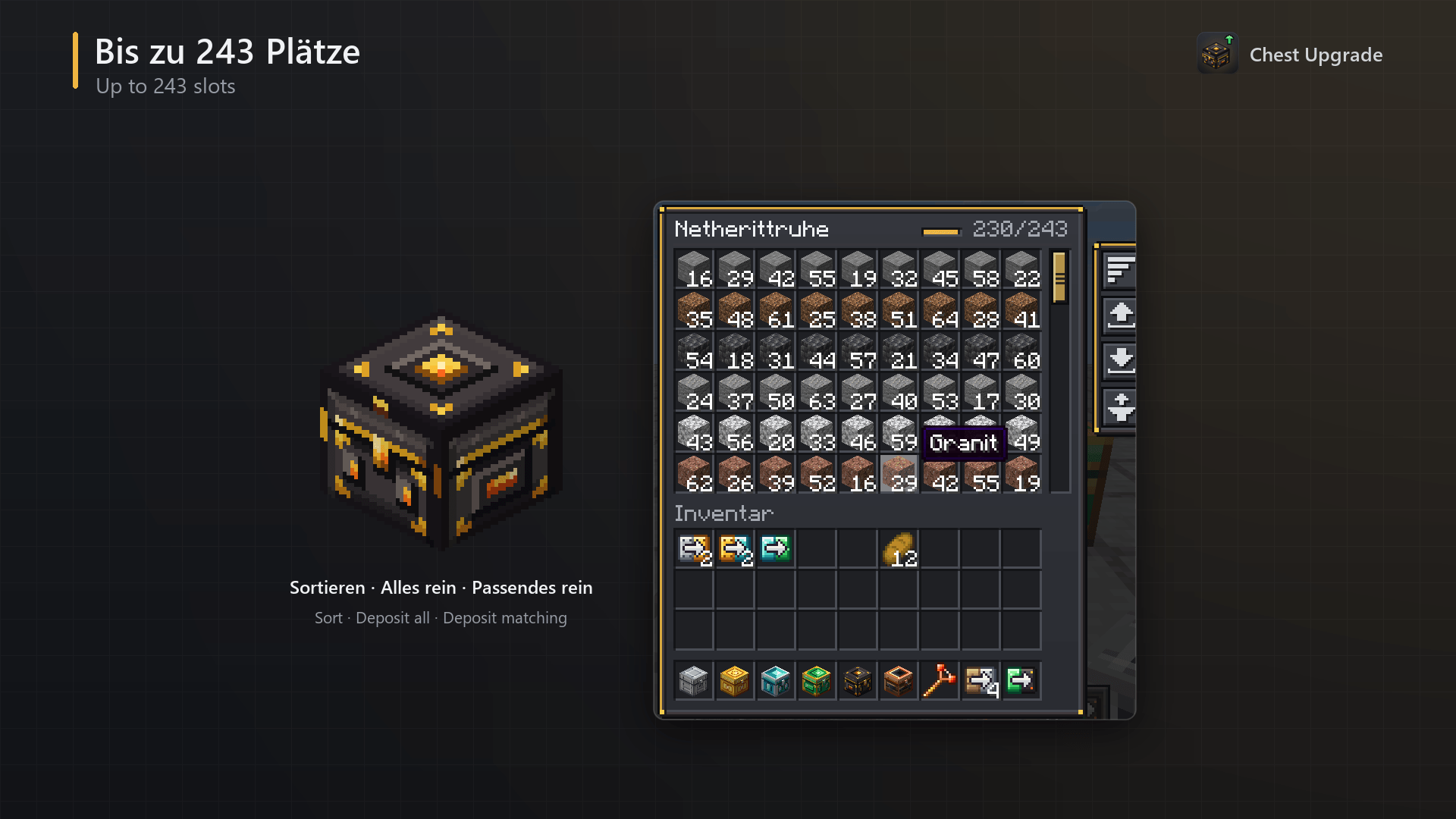
Chests are too small. The biggest chest holds 243 slots – 4.5 double chests in one block.
Upgrading means emptying. With an upgrade kit you right-click the chest and it becomes the next tier. Everything stays inside.
You never know which chest has your iron. Link your chests, press V, type "iron" – and the right chests light up through the walls.
Sorting needs huge redstone walls. The Sorter Chest moves items into the chest that already holds them. No redstone, no filters to set up.
Five chest tiers
|
Chest
|
Slots
|
Rows
|
Recipe (crafting table)
|
Mine with
|
|---|---|---|---|---|
|
Iron Chest
|
54
|
6
|
8 iron ingots around a chest
|
stone pickaxe
|
|
Gold Chest
|
81
|
9
|
8 gold ingots around an Iron Chest
|
iron pickaxe
|
|
Diamond Chest
|
108
|
12
|
8 diamonds around a Gold Chest
|
iron pickaxe
|
|
Emerald Chest
|
162
|
18
|
8 emeralds around a Diamond Chest
|
iron pickaxe
|
|
Netherite Chest
|
243
|
27
|
4 netherite ingots (corners) + 4 obsidian (sides) around an Emerald Chest
|
diamond pickaxe
|
Every tier has its own hand-drawn texture (riveted iron, ornate gold, crystal inlays, an emerald lock, dark netherite with glowing gold) and its own colour accent in the menu.
Big chests scroll: mouse wheel, draggable scrollbar or Page Up / Page Down. The menu shows as many rows as fit on your screen, so even 243 slots work on every window size and GUI scale. Shift-click, drag and double-click work as usual.
Hoppers, droppers and comparators work exactly like on a vanilla chest. Chests can be renamed in an anvil, and the name is shown in the menu.
Breaking a chest drops its contents. The Netherite Chest is blast-proof, and as an item it doesn't burn in lava.
The header of every chest shows how full it is (e.g.
230/243
).Upgrade kits – no emptying, no item juggling
|
Kit
|
Turns
|
into
|
Recipe
|
|---|---|---|---|
|
Wood → Iron
|
a normal (single) vanilla chest
|
Iron Chest
|
8 iron ingots around a plank
|
|
Iron → Gold
|
Iron Chest
|
Gold Chest
|
8 gold ingots around a plank
|
|
Gold → Diamond
|
Gold Chest
|
Diamond Chest
|
8 diamonds around a plank
|
|
Diamond → Emerald
|
Diamond Chest
|
Emerald Chest
|
8 emeralds around a plank
|
|
Emerald → Netherite
|
Emerald Chest
|
Netherite Chest
|
4 netherite ingots + 4 obsidian around a plank
|
Right-click the chest with the kit. It is replaced by the next tier and keeps all items, its custom name, its rotation and its network link. Anyone else who has the chest open gets the menu closed first, so nothing can be duplicated or lost. Using the wrong kit simply shows a short message and the kit is not used up. In creative mode kits are not consumed.
Buttons in every chest
On the right side of every chest menu:
|
Button
|
What it does
|
|---|---|
|
Sort
|
Merges half stacks and orders the chest by item (enchanted, named or otherwise different items stay separate)
|
|
Deposit all
|
Moves your whole inventory into the chest – your hotbar stays untouched
|
|
Take all
|
Moves the chest contents into your inventory, as far as there is room
|
|
Deposit matching
|
Moves only the items the chest already contains – also on the R key while the menu is open
|
Every button has a tooltip. All actions run on the server and are checked there, so they also work fine in multiplayer.
Linker & chest network
Craft the Linker (copper ingot, redstone and stick in a diagonal line).
|
Action
|
What it does
|
|---|---|
|
Right-click chest A
|
Remembers chest A (the Linker starts to glow)
|
|
Right-click chest B
|
Links A and B. If they already belong to networks, the networks merge
|
|
Sneak + right-click a chest
|
Removes that chest from its network
|
|
Sneak + right-click the air
|
Forgets the remembered chest
|
All Chest Upgrade chests and the Sorter Chest can be linked.
Up to 128 chests per network, up to 64 blocks between two chests you link, same dimension.
The remembered chest is stored in the Linker item itself, so it survives relogging.
Breaking a chest removes it from its network automatically.
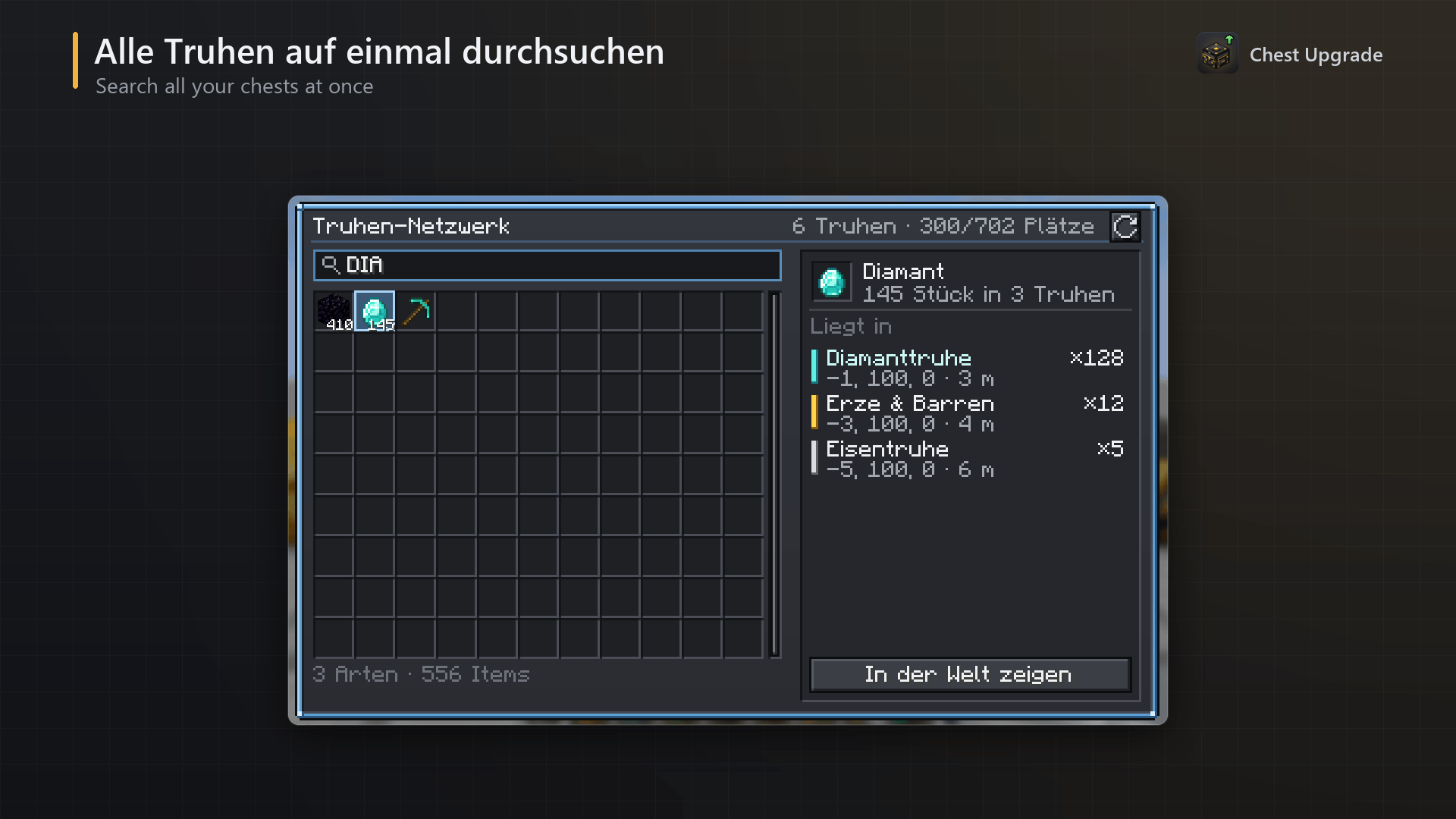
Search all chests at once (key V)
Stand near your storage and press V. The menu opens the network of the closest linked chest within 32 blocks:
Every item of every chest in one grid, merged and sorted by amount, with compact totals like
1.2k
A search field that filters instantly while you type –
@modid
filters by modClick an item: the "Found in" list shows every chest holding it, with tier colour, chest name, coordinates, amount and distance – closest first
Show in world (or double-click / Enter): the menu closes and those chests are outlined through walls for 20 seconds, with a small HUD line showing the item, the number of chests and the distance to the nearest one
The header shows how many chests and slots the network has, plus a refresh button
The search only shows and finds items – it does not take items out from a distance.
Sorter Chest – sorting without redstone
Recipe: a Diamond Chest in the middle, 4 hoppers on the sides, 2 comparators in the top corners and 2 eyes of ender in the bottom corners. It is expensive on purpose – you have to earn your auto-sorter.
Link the Sorter Chest into a network and throw anything in. Every half second it:
takes items out of itself,
finds the network chests that already contain this exact item (the chest with the most of it comes first),
fills existing stacks first, then free slots.
Items that no chest contains yet, or that don't fit anywhere, simply stay in the Sorter Chest – nothing is ever deleted. Other Sorter Chests are never used as a target, and only loaded chests are filled. To start sorting a new item, put one of it into the chest where it should go – from then on the sorter knows where it belongs. Hoppers can feed the Sorter Chest, so it also works at the end of a farm.
Better together with EasyBuild
Chest Upgrade and EasyBuild complement each other perfectly. EasyBuild's Build Notebook lists every block your building plan still needs. With Chest Upgrade installed, every missing block gets a "Where is it?" button: it shows which of your linked chests hold that block and outlines them in the world. Plan in EasyBuild, store in Chest Upgrade, build without searching.
Both mods work perfectly on their own, too.
Keys
|
Key
|
Action
|
|---|---|
|
V
|
Search the nearest chest network
|
|
R
|
Deposit matching items (while a Chest Upgrade menu is open)
|
Both keys can be changed in Options → Controls → Key Binds → Chest Upgrade.
Requirements
Minecraft 26.3, 26.2 or 26.1.2 with Fabric Loader
Fabric API
Chest Upgrade adds blocks and items, so it must be installed on both the client and the server. In singleplayer it just works.
Please note
The search finds chests in loaded chunks only. Chests far away stay in the network but don't appear until you come closer.
The Sorter Chest only sorts into chests that already contain an item. It does not create categories on its own.
Other mods that add their own sort buttons to every container (e.g. inventory sorting mods) may place their buttons on top of Chest Upgrade's menu.
Languages: English, German.
Chest Upgrade is inspired by the idea of tiered metal chests, but all code, textures and features are original.
Chest Upgrade – Bigger Chests, Upgrades, a Searchable Chest Network & an Auto-Sorter Team