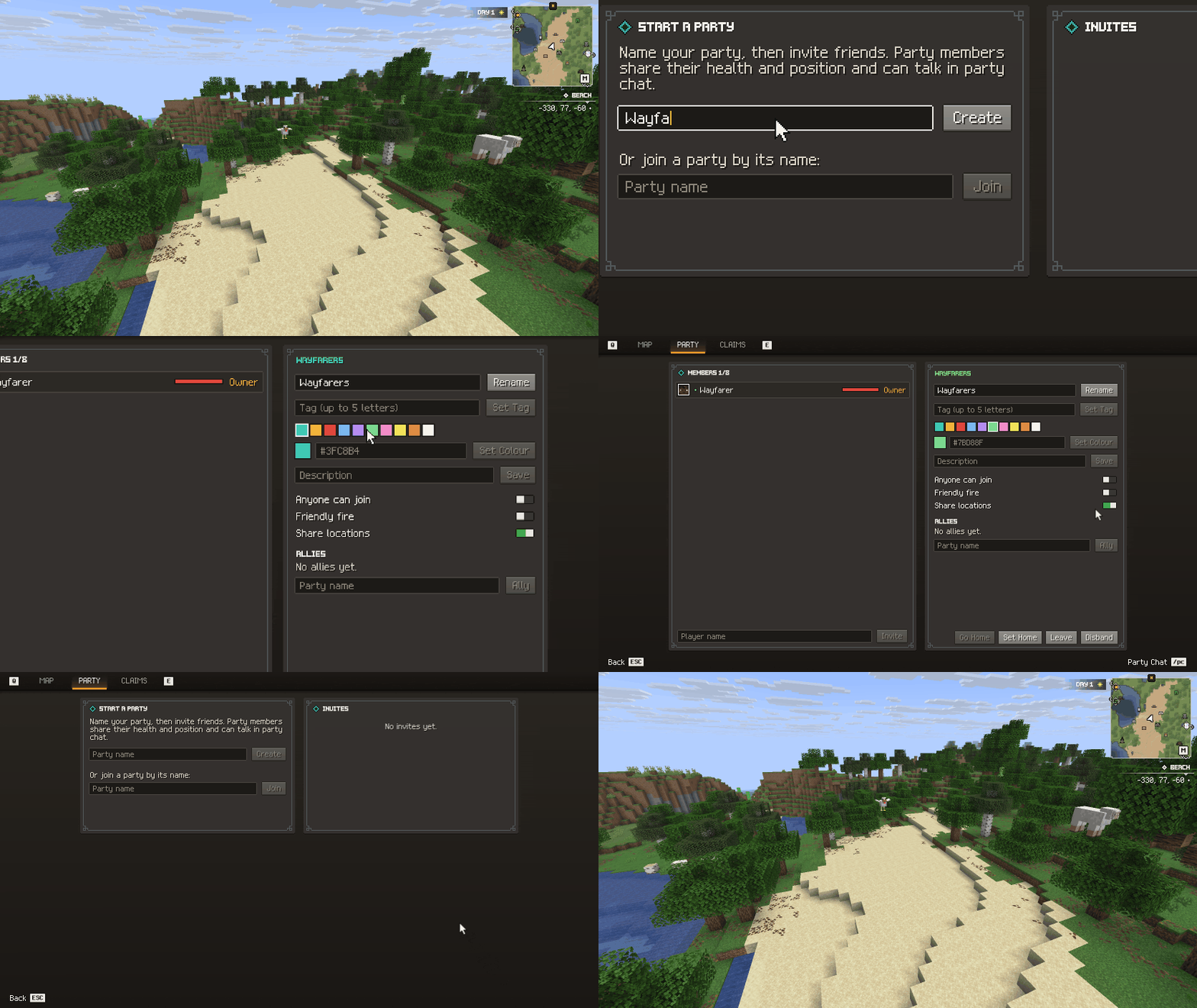

Dungeon Party adds parties with ranks, allies, party chat, a party home and pings. The parties live on the server, so players without the mod can use every command and still see party tags and colours in chat, in the tab list and over heads. Players with the mod also get the party screen, a party HUD and pings on their maps.
It needs Dungeon Config, which provides the settings screen.
Documentation · Dungeon Map · Dungeon Minimap · Dungeon Claims
Parties
A party has an owner, officers and members. Invite players with a clickable chat message, take join requests, or open the party to anyone. Officers invite, kick and manage allies; the owner also promotes, demotes and can hand the party over. Each party has a name, a tag, a description and a colour.
Every party is also a vanilla scoreboard team, which is how the tag and colour reach players without the mod, and how friendly fire follows the party's setting.
Allies, chat and home
- Alliances need both parties to agree. Enemies show in red.
- Party chat and ally chat, either as a mode you switch on or one message at a time.
/pcis a shortcut. - A party home with a warm-up and a cooldown, optionally across dimensions.
Pings
The ping key (mouse side button by default) or /party ping marks what you're looking at, a block or a mob, for your party: in the world, on Dungeon Map and on Dungeon Minimap. The server traces the look itself, so a ping can't be faked. Players without the mod get a chat line with the coordinates.
Shared quests
With FTB Teams installed, every party gets a matching FTB party, so FTB Quests shares progress inside it. Dungeon Party stays in charge and moves online members in and out as they join and leave. Parties are also Trailmark quest teams.
Switching from FTB Teams or Open Parties and Claims
The first time a world starts without FTB Teams or Open Parties and Claims, Dungeon Party reads what they left in the world folder and rebuilds every party: members, ranks, names, colours, descriptions, open parties and allies. Party ids are kept, so Dungeon Claims can give each party its land back. /ftbteams party ... and /oparties ... keep working while those mods aren't installed.
You can also keep Open Parties and Claims for its claims and let Dungeon Party run the parties, by setting primaryPartySystem to dungeonparty in its server config.
On the maps
Members show on Dungeon Map and Dungeon Minimap, and the map's top bar gets a Party page. On JourneyMap and Xaero's Minimap, the party home and members show as temporary waypoints in the party colour; they're never written into those mods' waypoint files.
Getting started
- Install Dungeon Party and Dungeon Config on the server. Players who want the party screen, HUD and pings install them too.
- Open the party screen with its key: <kbd>O</kbd>, or <kbd>I</kbd> or <kbd>'</kbd> when the game or another mod already uses O. The Controls screen shows which one you have.
/party create <name>works from chat too. - The documentation lists every command, setting and permission node.
Dungeon Party Team
Owner