Discord Status Role Forge
- By
A server-side mod which can give online players a temporary Discord role while they play
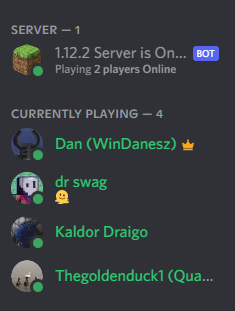
Example screenshot from the Discord client, showing the synced "Currently Playing" role. The role is assigned dynamically, it is granted when the player logs in and removed if they leave/server stops/server restarts.
Description

A mod to have a Discord role synchronized with the list of online players in a Minecraft server
Description
I've created this mod because I wanted to have a quick way to see who is online on my Minecraft server, just by taking a look at my Discord server.
This mod's aim is to provide an integration between a Minecraft server and a Discord server. This is achieved by giving players a temporary role while they are playing on your Minecraft server, and taking this role when they leave the server. Pretty much like having a scoreboard of names always synced to Discord.
This mod depends on ErdbeerbaerLP's Discord Integration Forge mod
This is a server-side only mod
Features
- Configurable role to indicate the online status of players (e.g. "@Currenty Playing")
- When a player logs in to the Minecraft server, give them the role
- When a player leaves the Minecraft server, the mod takes away the status role from them
- Status role resets on server stops and restarts
Steps to setup
- Configure ErdbeerbaerLP's Discord Integration Forge mod to your own liking, (wiki here), make sure that you have the "linking" feature (linking Discord accounts with Minecraft accounts) enabled
- Create a Discord role in your server, I think @Currently Playing is a fitting name, but use whatever you'd like
- Copy the role ID of the above created role (right click the role and click copy ID)
- Start the game, open the \config\DiscordStatusRole.cfg file and set the value of ROLE_ID to the ID of the above created role
The Discord Status Role Forge Team

Owner