Survival Debug Stick Local
Craft and use Minecraft's original debug stick in singleplayer Survival, without enabling cheats or switching to Creative.
Edit block properties such as stair orientation, wall shapes, and fence connections to add more detail to your builds.
Recipe
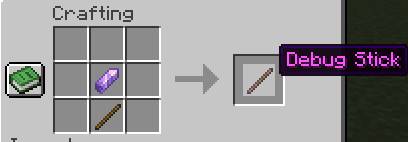
1 Stick + 1 Amethyst Shard = 1 Debug Stick
This shapeless recipe works in your inventory crafting grid or a crafting table.
Controls
Hold the debug stick in your main hand and aim at a block:
- Left-click: select a property without breaking the block.
- Right-click: change its value.
- Shift + click: cycle in reverse.
The selected property and value appear above the hotbar. Each stick remembers your selection for each block type.
Compatibility
- Minecraft Java: 1.21.11, 26.2, and 26.3.
- Loaders: Fabric, Forge, and NeoForge, with separate files for each combination.
- Fabric requires Fabric API for the matching Minecraft version.
Place the matching .jar in your mods folder and restart Minecraft.
Singleplayer only: install it on your client. It does not enable the debug stick on external multiplayer servers or Realms.
License: MIT.