Find your next Minecraft server without leaving the game.
Cornbread Finder is a client-side Fabric mod for Minecraft Java 26.3 and 26.2. Browse the Cornbread2100 database, check servers from your connection, and join with a click.
Search and join
-
Set a minimum and maximum online player count. Leave maximum blank for no limit.
-
Filter by whitelist, cracked/offline mode, and compatible protocol. Unknown whitelist or cracked states appear only with Any.
-
Search and More results seek 40 unique verified matches, checking additional candidate pages until the target is reached or the source is exhausted.
-
Query timeouts retry with backoff while keeping progress. Offline candidates are skipped; access denials and rate limits stop the search. Cancel whenever you want.
-
Search & join connects as soon as the first verified match arrives and cancels remaining checks.
-
Up to 12 status checks run concurrently. Refresh checks up to 200 saved servers from the selected list, excluding blocked entries.
Your servers, your names
Mark servers as favorites from … and find them in their own Favorites tab. Favorites remain saved when search results change.
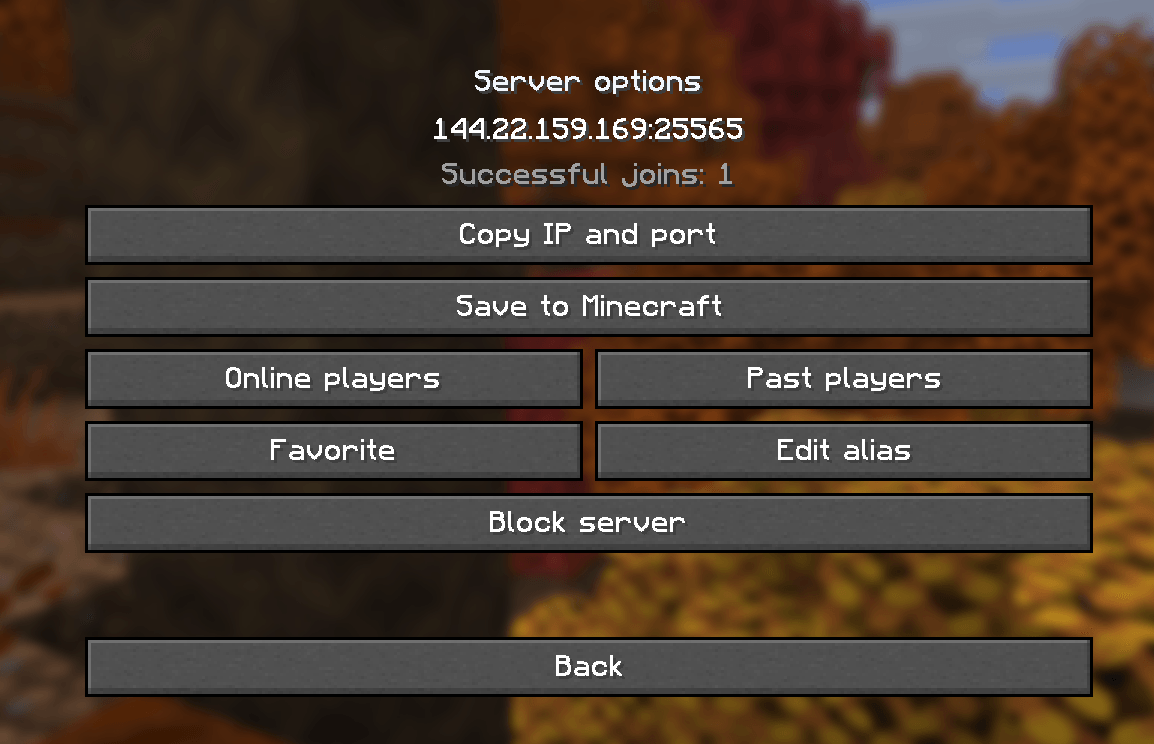
Use Edit alias to give any server a local name of up to 48 characters. Leave it empty to display the address again. Aliases are stored per IP and port, appear across the finder's lists, and never change the actual connection address. The address remains available in the join tooltip and server options.
Use … to copy the IP and port or save a server to Minecraft's normal Multiplayer list without duplicate addresses.
Block and move on
The square × button immediately to the left of … blocks a server in one click. Blocking is also available in server options. Blocked servers are hidden from results, history, failed attempts, and favorites, and skipped during status checks. Restore them in Blocked. Their favorite status and aliases are retained; vanilla server entries are not removed.
When a connection from the finder fails, Minecraft's error screen offers Block server, Find another server, and Block & find another, alongside the original error details. Finding another temporarily skips the rejected server; the combined action also blocks it permanently until you unblock it.
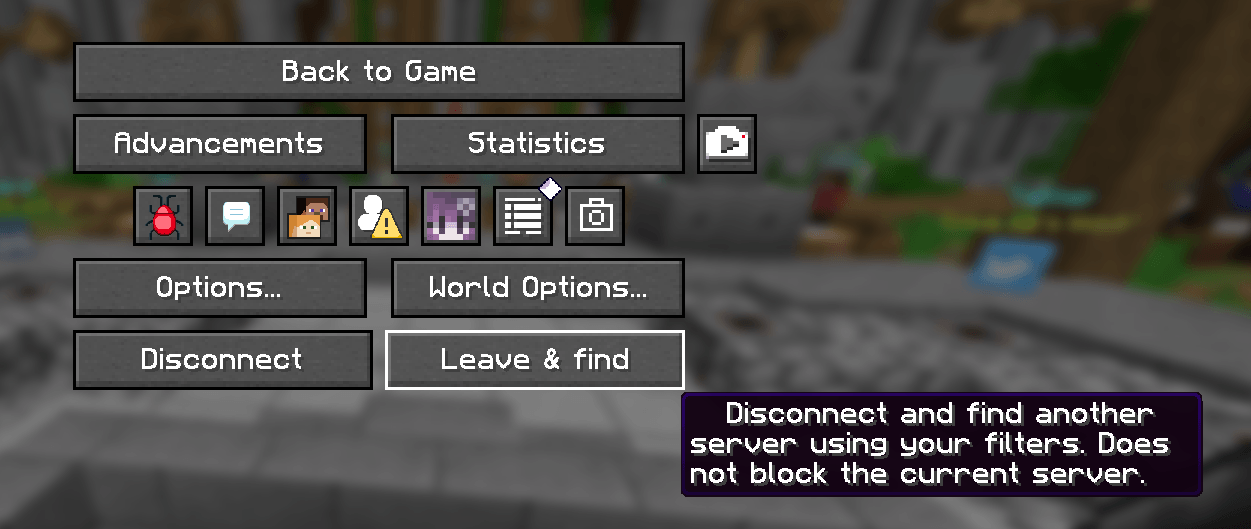
In the multiplayer pause menu, Leave & find disconnects normally and searches for the first match using your saved filters. It skips the server you just left without blocking it. The standard disconnect button stays available.
History that stays with you
Found preserves results and their last-check dates across menu visits and game restarts. Opening the menu does not reset or refresh them: search or refresh when you choose. Saved results may no longer be online.
History records successful joins, including Search & join, and shows local join counts. Known saved addresses also count when joined through normal Multiplayer. Failed keeps unsuccessful attempts separately with a count, date, and last error. Failed attempts, cancelled connections, and voluntary departures never add successful joins.
Found, successful history, and failed history each retain up to 200 servers. Favorites are stored separately. Migrated history may show a known minimum such as ≥1 when earlier visits were not counted.
Minecraft-style interface
Native Minecraft buttons and backgrounds, server icons, player counts, pagination, and progress indicators keep the finder familiar. Choose Normal, Compact, or List view; List hides filters to fit more servers. Layout adapts to window size.
Under …, view Online players or Past players. Online names come from the server's public status sample, which can be incomplete or customized. Past players combine Cornbread's public records and local observations with last-seen dates, up to 500 names per server. Past records may include currently connected players.
Switch between English and Español independently of Minecraft's language. Your language, view, filters, aliases, favorites, blocks, and history are saved. Server-provided descriptions are not translated.
Installation
-
Install Fabric Loader 0.19.5 or newer for Minecraft 26.3.
-
Install Fabric API for 26.3.
-
Put the mod JAR in your instance's mods folder.
-
Open Multiplayer → Find servers (Buscar servers in Spanish).
Requires Java 25. Client only; servers do not need the mod. To update, replace the previous JAR and keep config/cornbread-finder.json. Do not install two versions together.
How it works
Discovery uses Cornbread2100's database and depends on its availability. Candidates receive standard Minecraft server-list status requests from your connection. Manual joins check the server again; Search & join uses its freshly verified response.
Whitelist and cracked data may be outdated, and player information is reported by servers. Compatibility compares advertised protocols; some proxies may support additional versions. An online server can still reject you because of a whitelist, ban, capacity, version, or other requirements. The mod does not bypass restrictions or change your account's authentication.
Settings and saved lists stay locally in config/cornbread-finder.json. The mod contacts Cornbread's API and candidate servers for discovery and status checks.
An independent project, not affiliated with Cornbread2100, Mojang, or Fabric. Discovery is made possible by Cornbread2100's data.