Dead's Displays
- By
Display stands that show off any item in the world, with a 3D editor to move, rotate and scale it exactly how you want.
Description
Dead's Displays
MintServers Affiliate
 We’re an official MintServers Affiliate!
Looking for a Minecraft server to host your next project? MintServers offers reliable servers at competitive prices, with a variety of plans to choose from.
Support Dead Studios by using our affiliate link when purchasing:
Get a server from MintServers →
As an affiliate, Dead Studios may receive a commission from purchases made through this link.
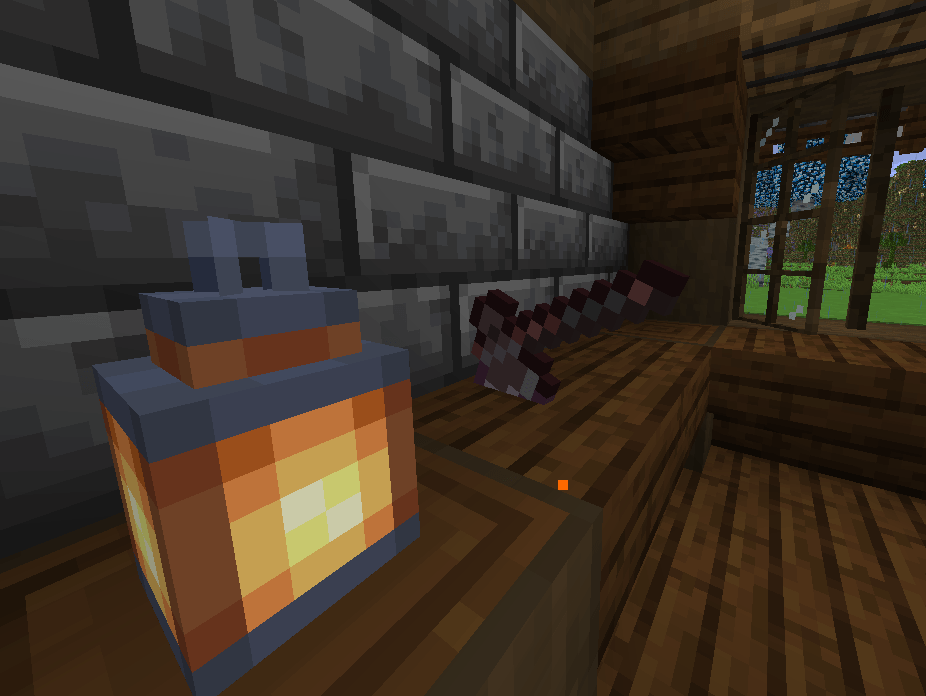
Dead's Displays is a small, focused decoration mod for Minecraft that gives you a proper way to show off your items in the world. Instead of shoving a sword into an item frame and hoping it looks right, you place a Display Stand, drop the item in, and then pose it exactly how you want with a built-in 3D editor: move it, spin it, shrink it, blow it up to four times its size, or hide the pedestal entirely so the item floats on its own.
It is built for museums, trophy rooms, shops, armouries, loot vaults, builder showcases, and anyone who has ever wanted a netherite sword to hang on the wall at the exact angle they pictured in their head.
The mod is available for Minecraft 1.21.1 (NeoForge) and Minecraft 1.20.1 (Forge). It has no dependencies beyond the mod loader, and it works on servers as well as in singleplayer.
What the mod adds
The Display Stand
The Display Stand is a compact deepslate pedestal that holds and renders exactly one item. It uses Minecraft's normal item renderer, so anything an item frame can show, a stand can show, only better:
- Vanilla items, modded items, tools, weapons, armour, food, potions, spawn eggs
- Blocks, which render as their full 3D block model
- Enchanted items keep their glint
- Renamed items keep their name
- Items with custom models from resource packs or other mods render as intended
You can place a stand on any block face:
- On the floor, where it faces the player who placed it
- On a wall, where it faces away from the wall
- On the ceiling, where it hangs the item below it
Right-click a stand to open its menu. The menu has a single slot for the item, a Show Holder toggle, a Reset Transform button, and a 3D Editor tab.
The 3D Editor
The 3D Editor is the heart of the mod. It shows a live preview of your stand and its item, complete with the block outline and colour-coded XYZ axes so you always know where you are.
There are three editing modes, and each one draws a gizmo directly on the item:
- Move draws arrows. Drag one to slide the item along that axis, anywhere within two blocks of the stand.
- Rotate draws rings. Drag one to spin the item around that axis, with full 360 degree control on all three axes.
- Scale draws boxes. Drag one to resize the item, from a tiny 0.1x up to a huge 4x.
Dragging a gizmo handle changes just that one value, so you never accidentally nudge something you did not mean to touch. Hold Shift while dragging for fine control. Dragging empty space orbits the camera around the stand, and scrolling zooms in and out, so you can inspect your pose from every angle before you commit to it.
If you prefer exact numbers, every value also has a slider that shows precisely
what it is set to (X: +0.37, Yaw: 45.0°, Scale: 1.37x) along with + and
- nudge buttons. Hold Shift on those for coarse steps instead.
The editor also includes:
- Presets for common arrangements: Centered, Floating, Against Surface, Horizontal, Vertical, Diagonal and Large Artifact
- Copy and Paste for poses, so once you have one display looking right you can match a whole row of them in seconds (only the pose is copied, never the item)
- Reset Pose to return the item to its default position
- Reset View to snap the camera back to its starting angle
Show Holder
Turning Show Holder off hides the pedestal completely. The item stays right where you posed it, floating in the air, and you can still click the stand to open it and break it as normal. This is how you get items hovering on a shelf, weapons mounted flat against a wall with no visible bracket, or a crown suspended above a throne.
Ownership and protection
The player who places a stand owns it. By default only the owner (or a server operator) can open the stand, change the item, or change the pose. Everyone else can look but not touch, which keeps public builds and shop displays safe from passers-by.
Server admins can tune this with the config:
| Option | Default | What it does |
|---|---|---|
displayStandExplosionProof |
true |
Stands resist explosions like obsidian |
displayStandOwnerProtection |
true |
Only the owner and operators can open or edit a stand |
displayStandOwnerOnlyBreak |
false |
Only the owner and operators can break a stand |
The config file is config/deads_displays-common.toml.
Item safety
Your displayed items are never lost. Whenever a stand is removed, whether it is broken by a player, destroyed by an explosion, or replaced with a command, the item inside drops to the ground. Pistons cannot push stands around, and stands are blast-resistant by default. Everything a stand holds, including its pose and owner, is saved with the world and survives chunk unloads, server restarts and dimension travel.
Stands are also deliberately isolated from automation. Hoppers, item pipes and other inventory-moving blocks cannot pull items out of a stand or push items into one.
Multiplayer
Dead's Displays is server-authoritative. When you edit a pose, your client shows the change instantly for a smooth editing experience, but the server has the final say: it only accepts edits from a player who currently has that stand open, re-checks ownership, and clamps every value to its allowed range. Other players on the server see your changes as you make them.
Crafting
One iron ingot over three polished deepslate crafts two Display Stands.
Future plans
Dead's Displays is a young mod, and version 1.0.0 is the foundation rather than the finish line. Development is focused on two directions.
More displays
The Display Stand is a general-purpose pedestal, and it works well for that, but different items and different builds call for different kinds of display. Future updates will add more display blocks, each with its own look and purpose, so you can pick the one that fits the item you are showing off and the room you are putting it in rather than making one pedestal do everything.
More abilities
Right now a display holds an item and lets you pose it. There is a lot more a display could do. Future updates will expand what displays are capable of, building on the existing editor and pose system so that anything new fits naturally alongside what is already there, and so that existing displays keep working exactly as they do today.
Staying compatible
Every version of the mod is intended to keep supporting both 1.21.1 NeoForge and 1.20.1 Forge with the same features and behaviour, and updates are designed so that stands placed in earlier versions carry forward without losing their item, pose or owner.
Summary
- One block, the Display Stand, that shows off any item in the world
- A full 3D Editor with drag gizmos, exact sliders, presets and copy/paste
- Move up to 2 blocks, rotate 360° on every axis, scale from 0.1x to 4x
- Hide the pedestal to make items float
- Owner protection, explosion resistance and guaranteed item drops
- Server-safe, multiplayer-ready, no dependencies
- Available for 1.21.1 NeoForge and 1.20.1 Forge
- Coming next: more displays and more abilities
Licensed under MIT.
Dead's Displays Team