Crosshair Sway
- By
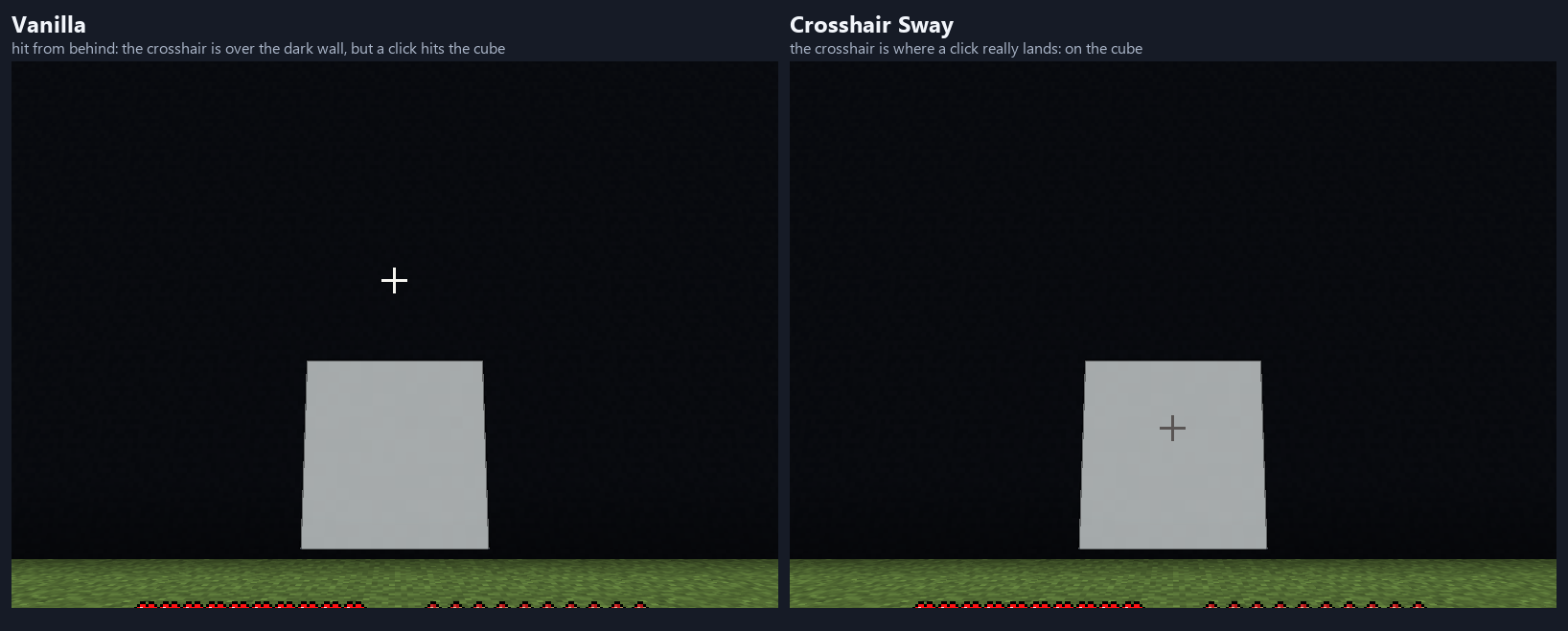
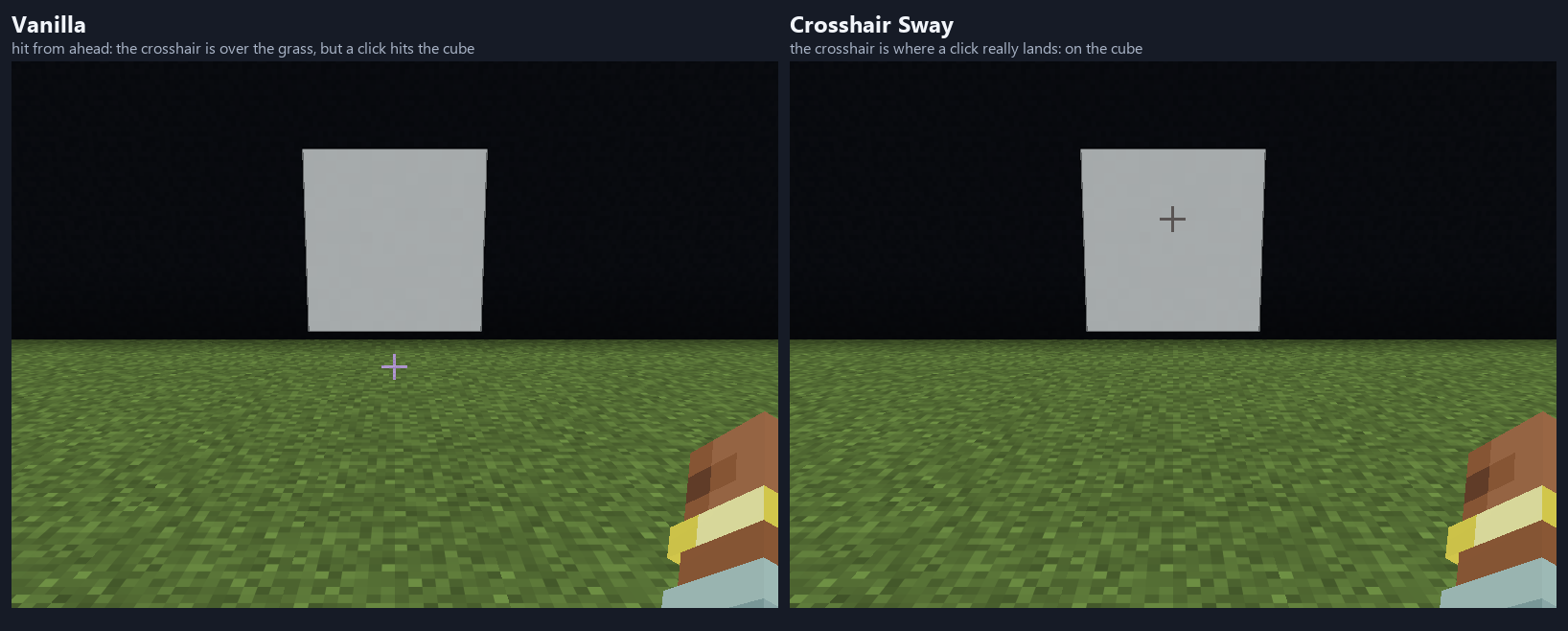
When you are hit or walk, the game moves the view but not the crosshair, so the crosshair briefly points at something a click would not hit. This draws it where your aim really is. Client-side only.
listing-image-2-hit-from-behind-vanilla-vs-crosshair-sway.png
listing-image-1-hit-vanilla-vs-crosshair-sway.png
Description
When something hits you, Minecraft nods your view, and when you walk it bobs the view. But the crosshair stays frozen in the middle of the screen. What you hit does not move: attacks, placing and breaking blocks always follow where the camera faces, before the shaking. So for a moment the crosshair sits over something you would not hit, and the thing you would hit is somewhere else on the screen. Crosshair Sway works out where your aim is on the screen and draws the crosshair there. It uses the very same numbers as the game's own view bobbing and damage tilt.
Your aim never changes. This only changes where the crosshair is drawn, and it shows nothing new: with the game's Damage Tilt set to 0 and View Bobbing off, the vanilla crosshair is already exact.
- Being hit: when something hits you from ahead or behind, the game nods your view. At the peak the vanilla crosshair is about a sixth of the screen height away from what a click would hit (53 GUI pixels at 1600x900, GUI scale 3, Damage Tilt at 100%). Crosshair Sway keeps the crosshair on it, at any distance. When something hits you from the side, the game only rolls the view around its middle, so nothing moves
- Walking: the crosshair swings and dips with each step. This is small on purpose (a few pixels). It is exact for things focus_distance blocks away (4 by default) and within a few pixels for anything inside your reach
- Steady while you use an item: the crosshair does not move while you draw a bow, block with a shield or eat (steady_when_using_item, on by default)
- Your game options are respected: nothing moves when View Bobbing is off, and the Damage Tilt option in Accessibility settings scales the hit part
- Settings in config/crosshair-sway.properties, written the first time you start the game: walk_percent and hit_percent (0 to 300), focus_distance (2 to 64 blocks, default 4), steady_when_using_item. Save the file while the game is running and it applies within a couple of seconds. 100 keeps the crosshair exactly on your aim; any other value for walk_percent or hit_percent is look only and moves the crosshair away from your aim
- Client-side only: it reads the numbers the game already has for your own view and draws the crosshair a few pixels away. Nothing is sent to the server, nothing on the server or in the world is changed, it shows nothing about anyone else, no network calls
- Requires Fabric Loader 0.19.5+ and Java 25, for Minecraft 26.3. Fabric API is not needed
- Checked by an automated client test on 26.3 with real screenshots (gallery): in a scene with a white cube 3.5 blocks ahead, the game's own bobbing and hit shake were forced to known values; the cube moved on screen by the amount predicted, the crosshair moved with it (within 2 pixels), at the start and middle of a step and when hit from ahead; at the peak of a hit the game's own hit result is the cube while the middle of the screen shows the grass, and the drawn crosshair is on the cube; hit from behind nods the other way; walk_percent 300 moves it three times as far and 0 not at all, hit_percent 50 half as far; nothing moves with the mod off, with View Bobbing off, or with a trident drawn back; the arithmetic equals the game's own bobHurt and bobView (run through reflection) on 352 inputs; a real sprint and a real hit moved the crosshair within the expected range; the settings file is read at start, changed while the game runs, and a broken file means the defaults
Known limitations:
- A hit from ahead or behind moves the crosshair a lot for a fraction of a second, because the view really moves that much. If you prefer the vanilla look, turn the game's Damage Tilt option down (it then also stops the view shaking) or set hit_percent=0 here.
- The walking effect is small by nature, and walking is exact only at focus_distance blocks. Things much farther away than about 6 blocks are off by a few pixels, which no click can reach anyway.
- Not included: the warping of nausea and the nether portal. While they are on, the crosshair is not corrected (vanilla is not either).
- Only the vanilla crosshair and the attack-strength indicator next to it are moved. Mods that draw their own crosshair, or replace the game's, are not tested and may not follow.
- First person only (the game draws no crosshair in third person). Flying with elytra, swimming and riding were not looked at separately.
- Not tested: shader packs, other crosshair or HUD mods, resolutions and GUI scales other than 1600x900 at scale 3 (the arithmetic scales with the GUI height, checked by unit tests only), Linux or macOS. Tested on Windows with Minecraft 26.3 only.
Disclosure: this mod was developed with AI assistance (Claude). It does not reuse code or assets from other mods. It does not collect or transmit any data.
Crosshair Sway Team