Create Aeronautics: Easy Pressure Curve
- By
Change the air pressure curve while the world is running
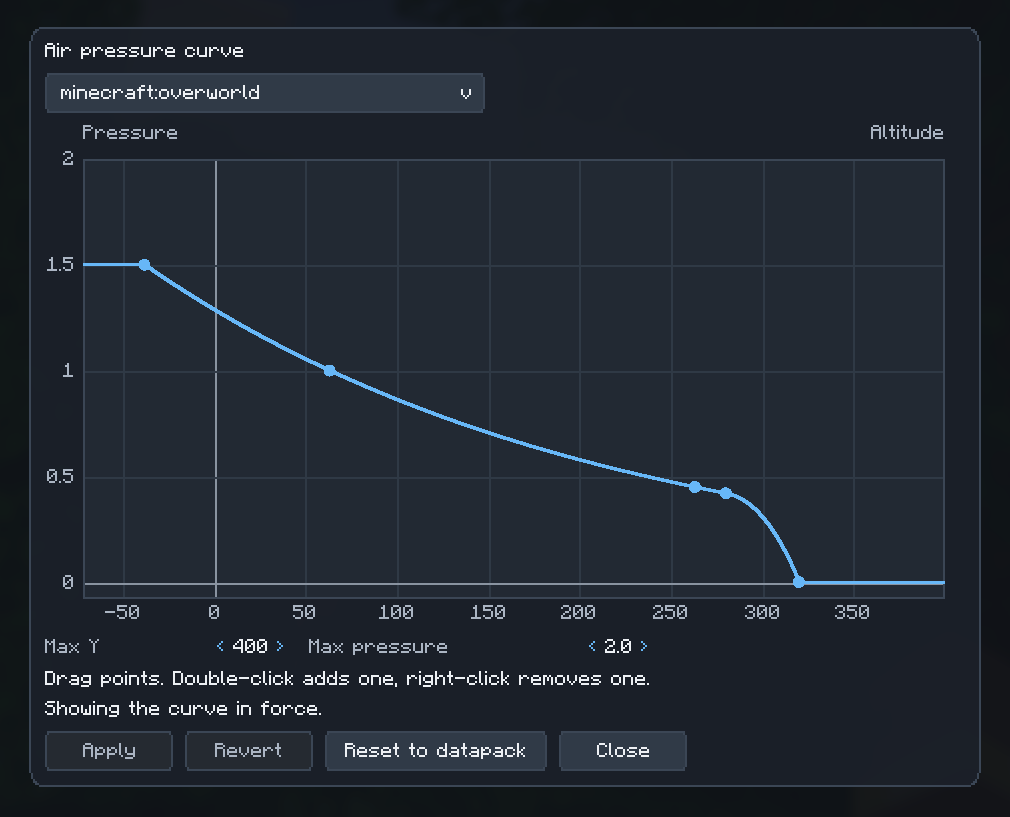
The client side editor
Description
A QOL addon for Create Aeronautics

Balloons, propellers and burners in Create Aeronautics all depend on how thin the air gets as you climb. Sable defines that air pressure curve in a datapack, so changing it normally means editing a JSON file and rebooting or reloading.
Easy Pressure Curve lets you change the curve while the world is running.
Set a new curve and it takes effect right away, on the server and on every connected
player, with no reboot, no world reload and no full /reload. Altitude sensors,
burner tooltips and balloon lift all follow the new curve immediately.
It adds no blocks, items or recipes.

Change the curve live
Edit the pressure at any altitude and see it work at once. The curve is a list of points; each point says how much pressure there is at a height.
- Applies to the server and all players the moment you set it.
- Works per dimension: the Overworld can have a different curve from the Nether.
- Only the pressure changes. Gravity, drag and everything else still come from the datapack.
Edit it on a graph
Press F9 (rebindable) to open the curve editor. It shows the curve in force as a graph,
already filled with its points, and you reshape it with the mouse.
- Drag a point to move it, drag its handles to change the slope, double-click the graph to add a point and right-click a point to remove it.
- A dimension dropdown at the top picks which dimension you edit; it opens on the one you are in.
- Slopes are capped so a handle cannot run the graph's scale away.
- Sable's built-in curve is drawn behind yours so you can see what changed.
- Apply sends it to the server, Revert drops your edits and Reset to datapack removes your curve.
- Only operators (level 2) can open the editor; for everyone else the key does nothing, so it stays free for other uses.
It sticks
Your curve is saved with the world. It survives closing and reopening the world,
server restarts and /reload. It wins over the datapack until you reset it.
- Players who join later get your curve automatically.
- Reset a dimension and it goes back to the datapack curve.
Start from what you have
Copy the datapack's curve, then tweak it. You can also add or remove single points instead of rewriting the whole curve, and check the pressure at any altitude.

You can edit the curve with the editor above or with the /pressurecurve command. Both need operator permission (level 2). The
dimension is optional in most commands and defaults to the one you are standing in.
| Command | What it does |
|---|---|
/pressurecurve show [dimension] |
Lists the curve's points and says whether it comes from the mod or the datapack. |
/pressurecurve sample <altitude> [dimension] |
Shows the pressure at that altitude. |
/pressurecurve set <dimension> <json> |
Replaces the curve. |
/pressurecurve point add <altitude> <value> <slope> [dimension] |
Adds a point to the current curve. |
/pressurecurve point remove <index> [dimension] |
Removes a point (the first one is 0, as shown by show). |
/pressurecurve copy-datapack [dimension] |
Turns the datapack's curve into an editable curve. |
/pressurecurve reset [dimension] |
Removes your curve and goes back to the datapack. |
A curve is a list of points in the same format Sable uses in pressure_function:
/pressurecurve set minecraft:overworld [{"altitude":0,"value":2.0,"slope":0.0},{"altitude":1000,"value":0.2,"slope":0.0}]- A curve has 1 to 64 points, with different altitudes, and
valuecannot be negative. valueis the real air pressure at that altitude (1.0 is the Overworld's usual sea level).
Heads up: a curve you set replaces the datapack's
base_pressurefor that dimension, so the numbers you type are the numbers that apply.copy-datapackalready takes that into account.
The mod also lets other mods (and a future editing screen) change the curve; see the developer guide.

- Minecraft 1.21.1 with NeoForge 21.1.236 or newer
- Sable 2.0.5 or newer (required)
- R-Ui Lib 0.10.0 or newer (only on clients that install the mod, for the editor screen)
- Create Aeronautics 1.3 or newer (optional: it is one of the mods that reads the curve)
Install it on the server (required). On the client it is optional: players without it join normally and the curve still applies to them; those who install it (with R-Ui Lib) also get the editor screen.

Open an issue on the issue tracker
with your Minecraft, NeoForge, Sable and mod versions, the command you ran and the log
(logs/latest.log).
Create Aeronautics: Easy Pressure Curve Team