Aeronautics: Fly by Instruments
- By
Stop guessing your altitude. Avionics sensors for Create Aeronautics that turn terrain into redstone signals and CC:Tweaked data.
Description

An addon for Create Aeronautics

Flying a Create Aeronautics ship is great until a mountain shows up out of the fog, or you try to land and have no idea how far the ground still is. Fly by Instruments adds avionics: sensor blocks you mount on your craft that measure the world around it and turn what they see into redstone signals and CC:Tweaked data.
Wire them into a lamp, a bell, a Create contraption or your own flight computer, and your ship can warn you, or react on its own, before you hit something.
Every sensor works on a moving ship as well as on the ground. It turns and tilts with your ship, never mistakes your own hull for an obstacle, and spots terrain, buildings and other ships alike.

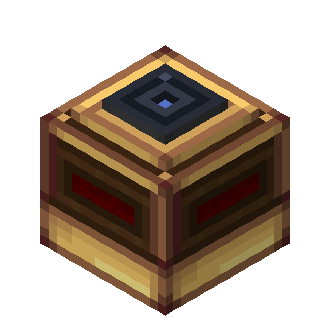
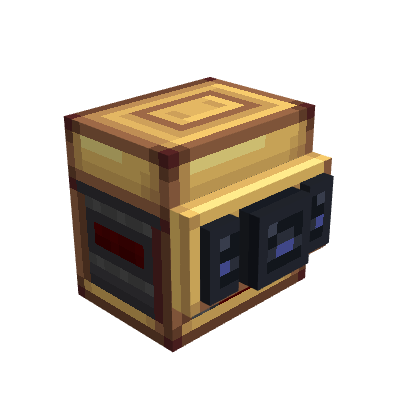
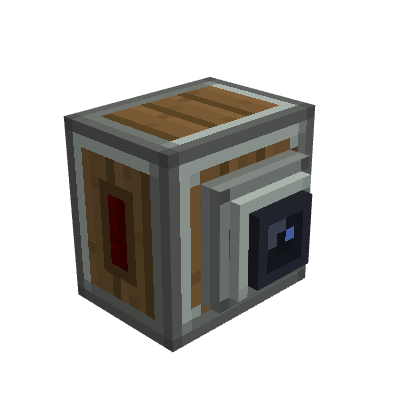
Three sensor blocks, each with a different job and each recognizable at a glance.
Radar Altimeter
Tells you how high you are above whatever is below you. Mount it with the glass lens facing down and it keeps track of the ground under your ship, without being fooled by a lone tree or lamp post.
- The higher you fly, the stronger the signal. You choose the altitudes where it starts and where it maxes out: a landing light that dims as you touch down, an alarm when you drop below your cruise floor, whatever you need.
- Sees up to 128 blocks down.
Terrain Scanner
Watches what's ahead of you. Point the nozzle where you're going and it keeps an eye on everything in front of the ship.
- The closer the obstacle, the stronger the signal. You choose how far out it starts warning you and how close is "too close". Nothing ahead, no signal.
- The signal comes out of every side, so it's easy to wire.
- Works mounted on a ceiling too. It still looks forward.
Advanced Terrain Scanner
Watches ahead and to the sides, separately. Three lenses for three directions: Front, Left and Right, each with its own warning distance and its own signal.
- Widen or narrow its view, from a tight beam straight ahead to a half-circle sweep.
- Each direction has its own side of the block: front from the front, left and right from the sides. Wire "obstacle left" and "obstacle right" to different lamps, bells or steering.
- Left and right only wake up once the view is wide enough to see them.
- Crafted by upgrading a regular Terrain Scanner.

Right-click a sensor to open its output screen.
- Range slider: drag the two handles to set where the output starts and where it reaches its maximum. The caption tells you exactly what you'll get, for example "15 at 4 m → 0 at 32 m" (1 block = 1 m).
- Block faces: by default, the signal comes straight out of the sensor. Put redstone, a lamp or a Create component next to it and you're done.
- Redstone Link: fill both frequency slots of a channel and that channel is broadcast through Create's Redstone Link instead. Your sensor can sit on the hull while the receiver sits in the cockpit. Pick frequency items without consuming them, straight from your inventory (or drag from JEI). The screen shows each channel's state: Block faces, Via Link or Incomplete pair.
- Advanced Scanner: use the Front / Left / Right tabs to give each channel its own range and frequencies, and the Aperture slider to set the opening.
Heads up: on the Advanced Scanner, once one channel uses Redstone Link, the whole sensor switches to Link. Give every channel you want to use a frequency pair.
Sensors can't see into unloaded chunks. A beam that reaches one simply doesn't count, so very long ranges near the edge of the loaded world may read less than you expect.

Every sensor is a CC:Tweaked peripheral of its own. Put a computer next to it, or connect it with a wired modem, and read the raw data:
| Peripheral | Readings | Events |
|---|---|---|
radar_altimeter |
getReading(): status and altitude in blocks |
radar_altimeter_reading_changed |
terrain_scanner |
getScan(): every contact, with distance and direction |
terrain_scanner_scan_changed |
terrain_scanner_advanced |
Same as above, plus getConfiguration() and setOpeningAngle(degrees) |
Same as above, plus terrain_scanner_configuration_changed |
All three also expose their redstone setup: getOutputs(), getOutputConfiguration(),
setOutputRange(channel, min, max) and setLinkFrequencies(channel, first, second).
local altimeter = peripheral.find("radar_altimeter")

while true do
  local _, _, reading = os.pullEvent("radar_altimeter_reading_changed")
  if reading.status == "valid" and reading.value < 6 then
    print("TOO LOW! " .. math.floor(reading.value) .. " m")
  end
end
Full API reference: Radar Altimeter · Terrain Scanners · CC:Tweaked API and Lua examples.
Browse the player guide for setup help and the technical documentation for sensor, network, FMS, Modular Table and GPWS references.

Yes. These server config options apply to every sensor in the world:
| Option | Default | What it does |
|---|---|---|
radarAltimeterMaxRange |
128 | Maximum altimeter range, in blocks (1–4096) |
terrainScannerMaxRange |
128 | Maximum scanner range, in blocks (1–4096) |
sensorScanIntervalTicks |
5 | How often sensors take a new sample, in ticks |
Longer ranges and shorter intervals cost more server time on big fleets.

- Minecraft 1.21.1 with NeoForge 21.1.236 or newer
- Create 6.0.10+
- Create Aeronautics 1.3+ (bundled)
- Sable 2.0.5
- CC:Tweaked 1.120.0+
- R-UI Lib 0.5.0+
The Modular Table, lamp and buzzer modules, FMS, Avionics Cable Network, Network Bridge and GPWS Computer are available as Experimental content without recipes. Their behavior may change between versions. See the technical guides before using these blocks in a world you rely on.

Open an issue on GitHub. Your Minecraft version, the mod versions and a description of what happened help a lot. A screenshot of your redstone setup helps even more.

Yes, go ahead! Fly by Instruments is released under the MIT License. A link back to this page is appreciated.
Getting started: player guide. Developer references: CC:Tweaked API and examples · sensor behavior · all technical guides. Development setup: source guide. What changed in each version: CHANGELOG.
Aeronautics: Fly by Instruments Team