promotional bannermobile promotional banner

Crash Link

Crash reports made easy for both clients and dedicated servers, with mclo.gs uploads and support packets.
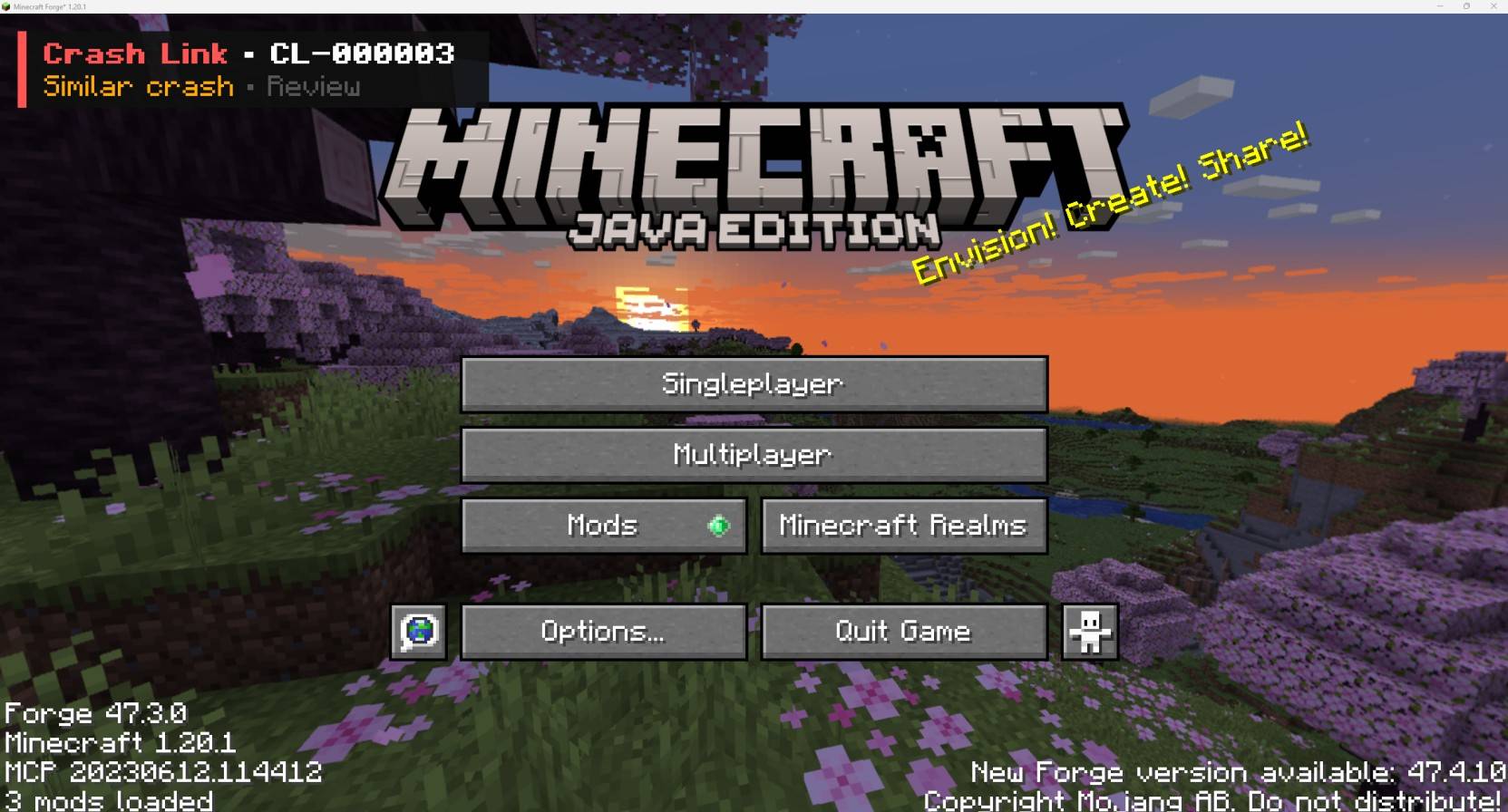
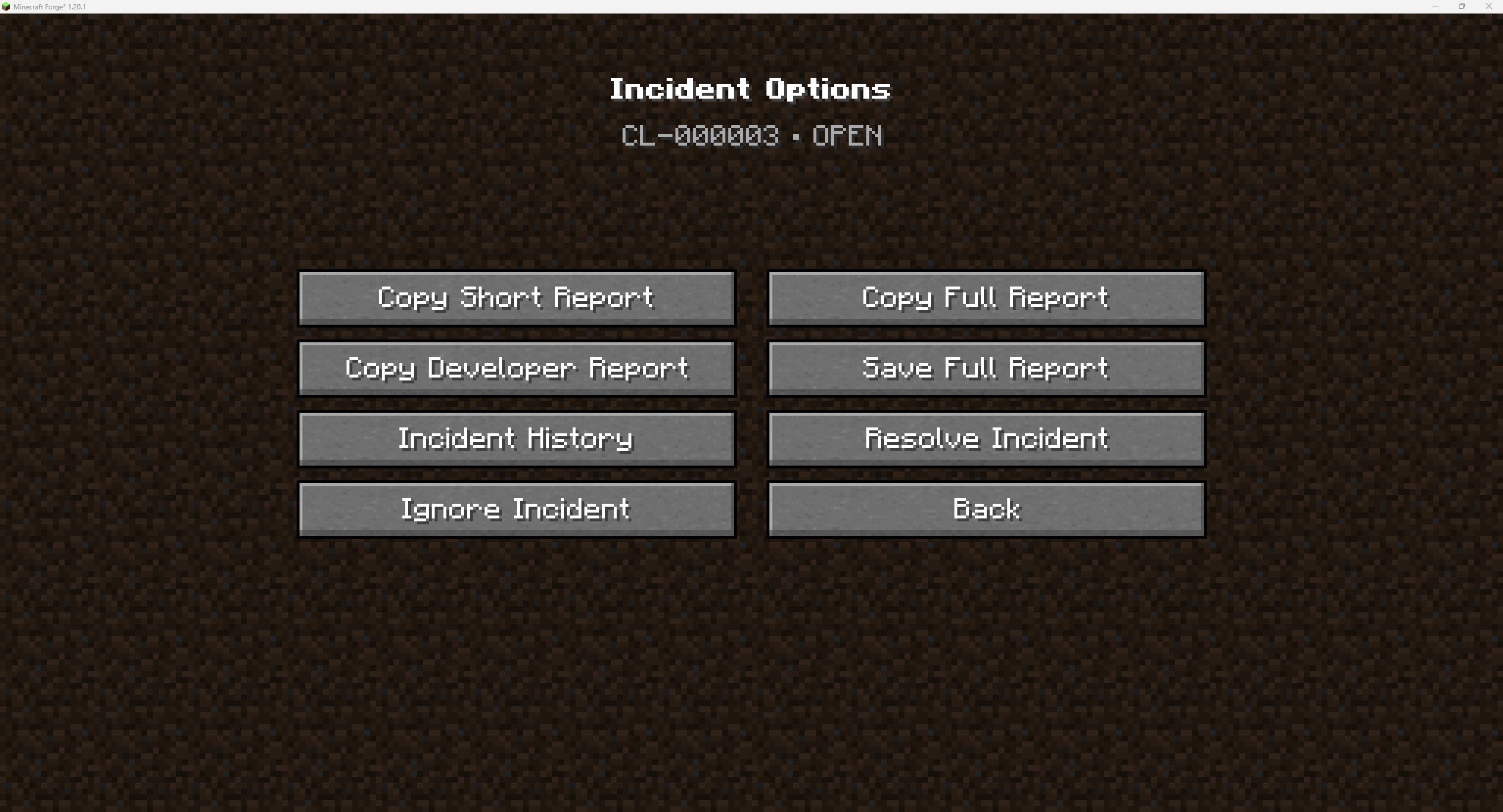
This is Crash Links UI

This is Crash Links UI

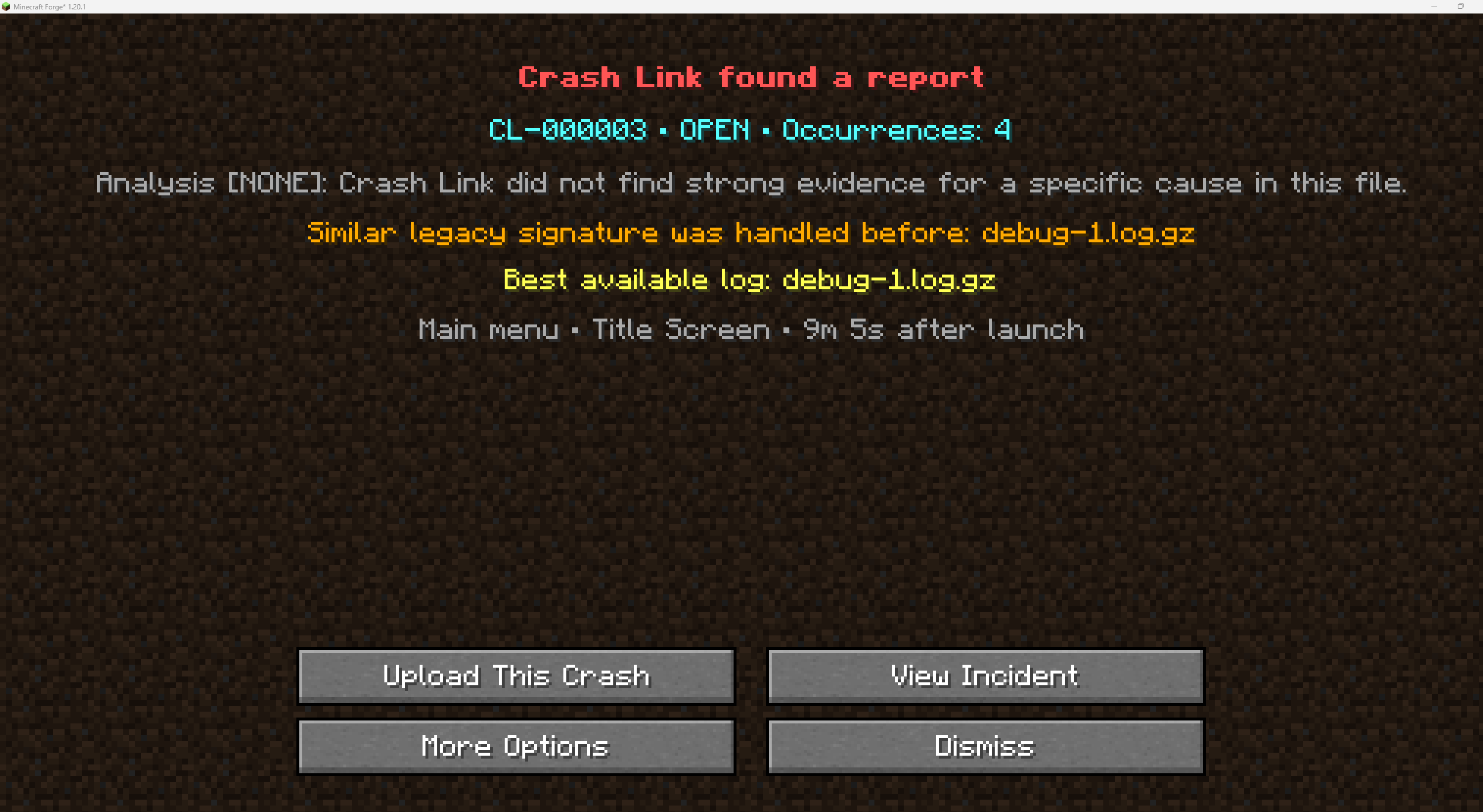
Crash was detected

Crash was detected

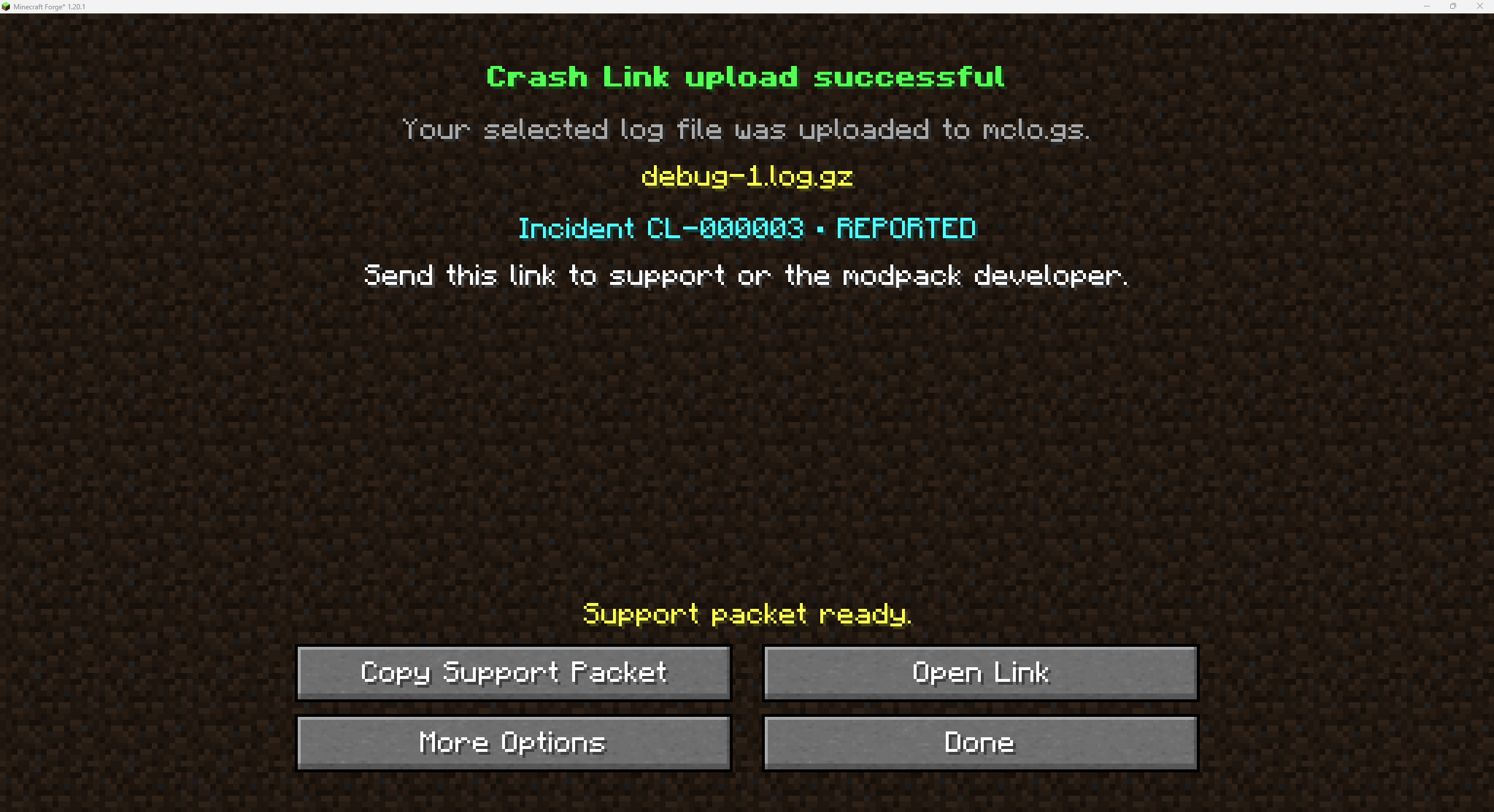
Upload was done correctly

Upload was done correctly

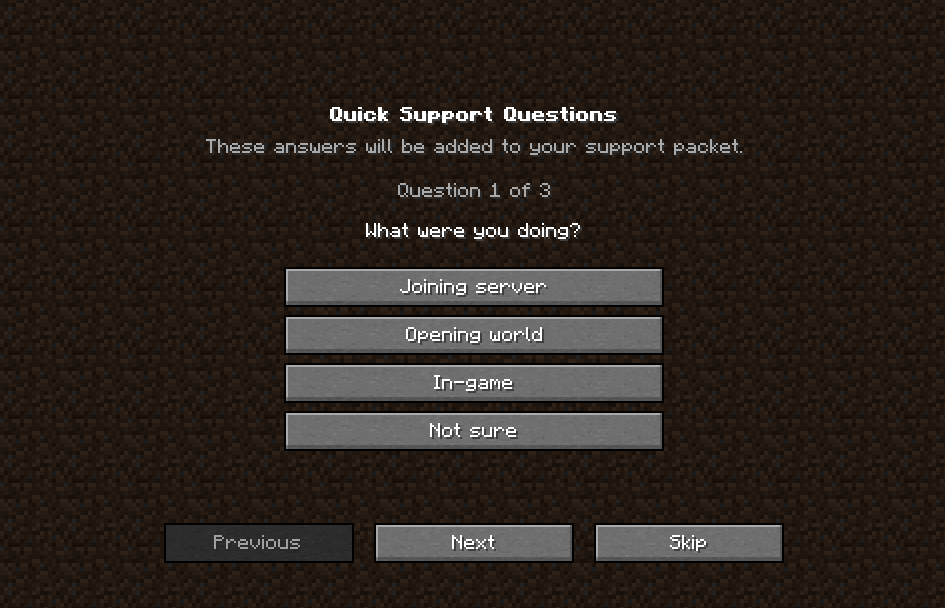
Default questions, can be configured

Default questions, can be configured

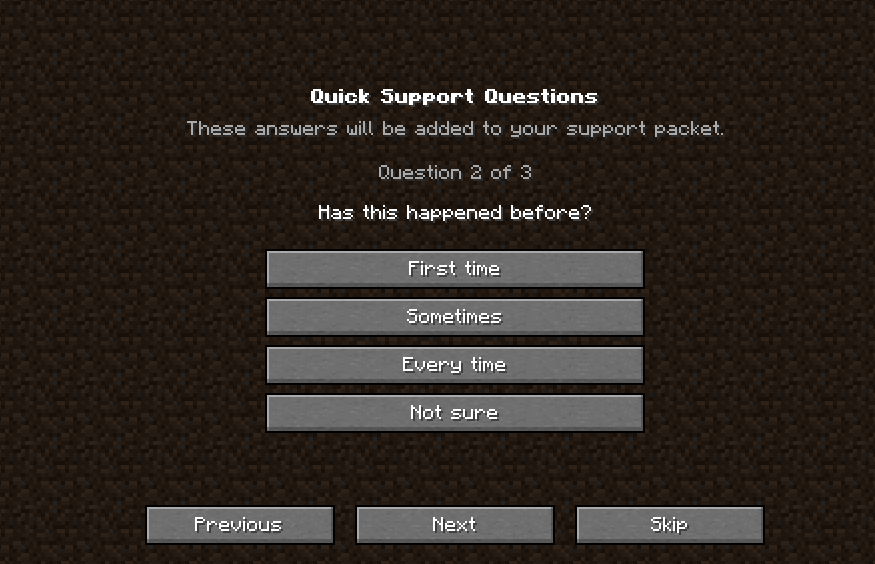
Question 2, all can be confugured
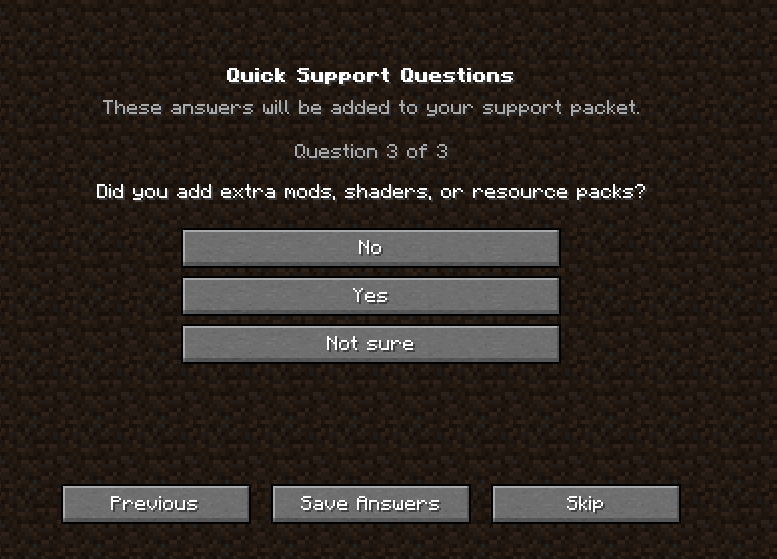
Question 2, all can be confugured

Finale question, more can be added
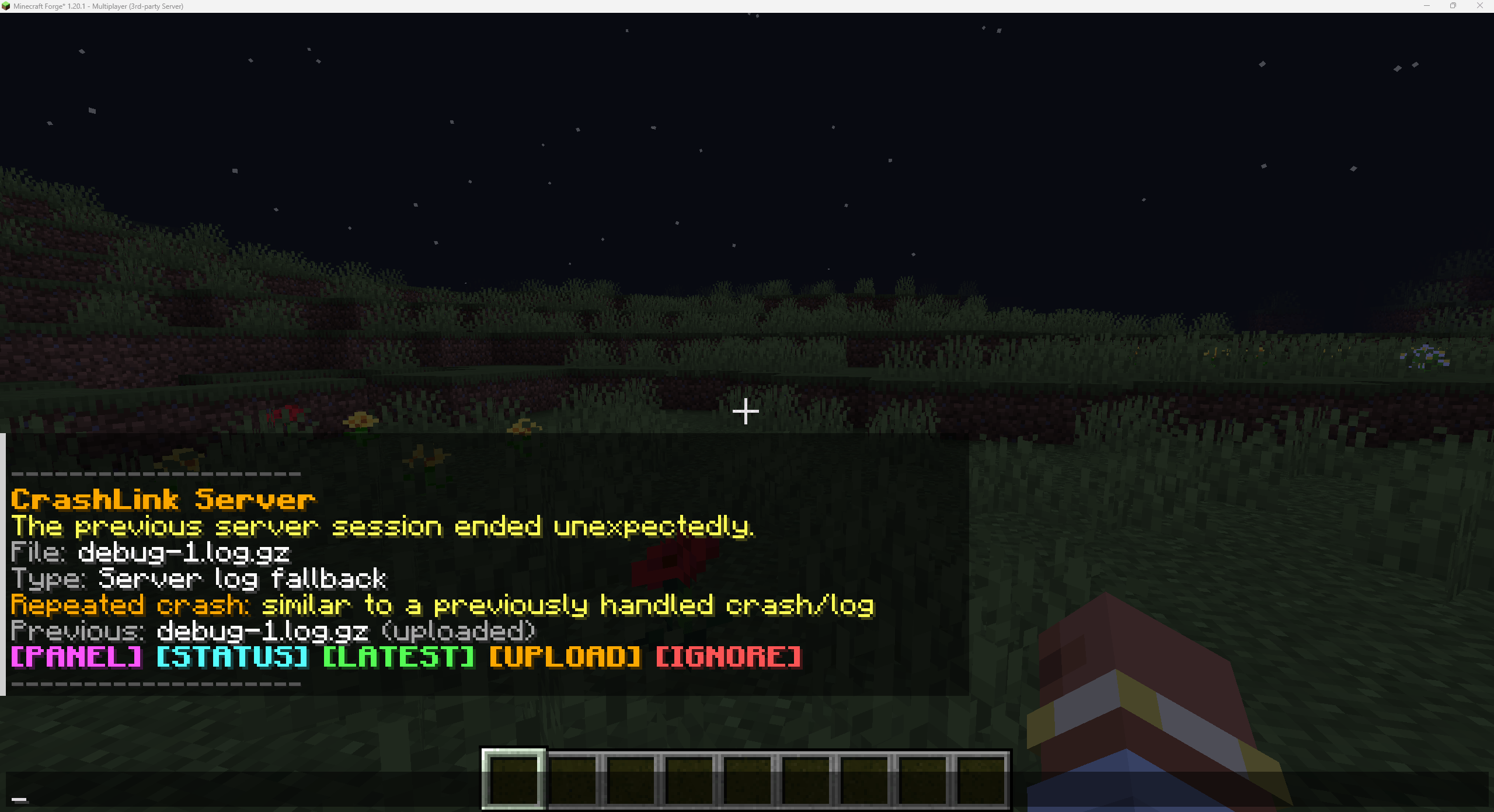
Finale question, more can be added

This is the notifications that staff or a specific roles should get on login.
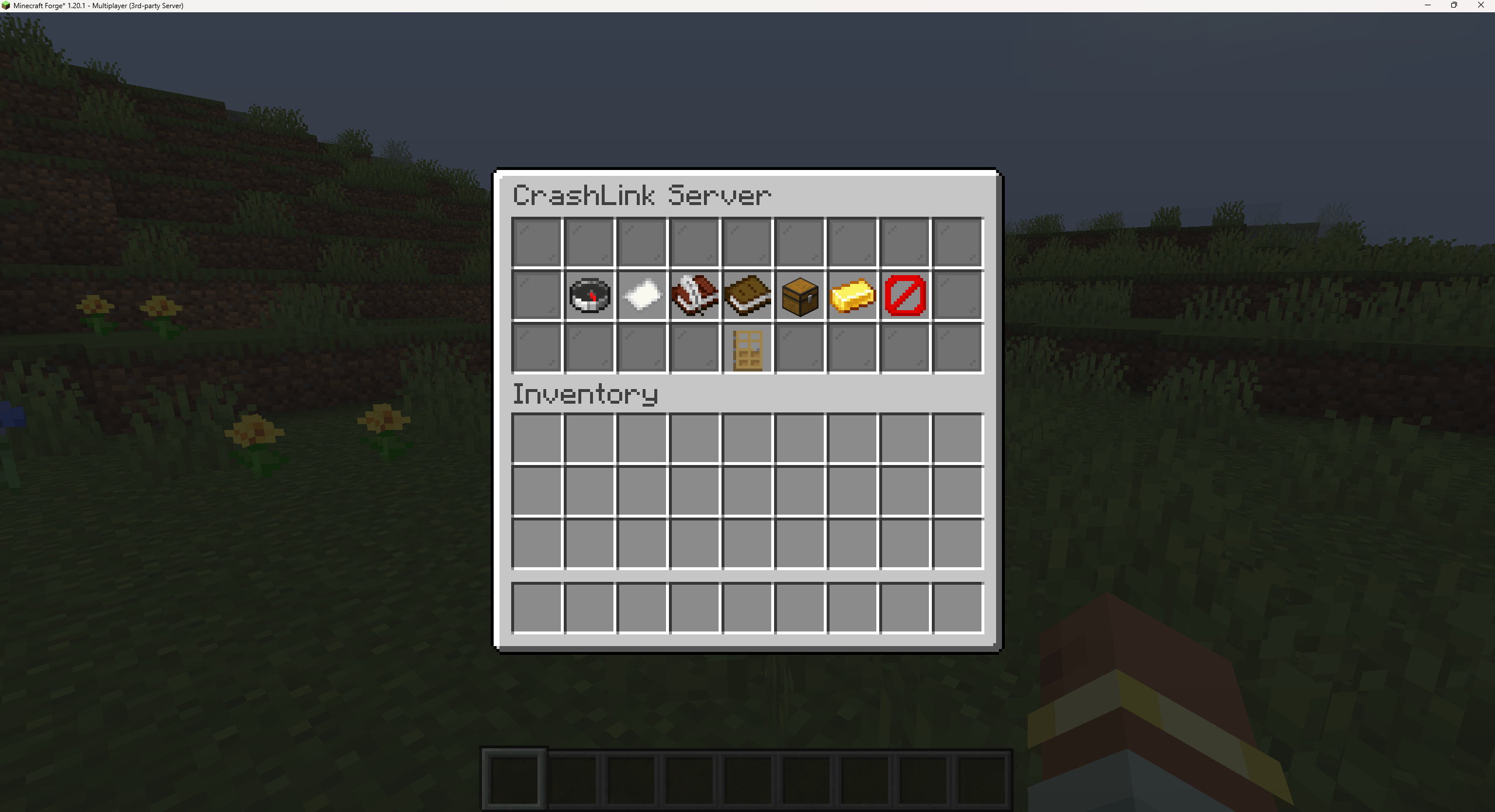
This is the notifications that staff or a specific roles should get on login.

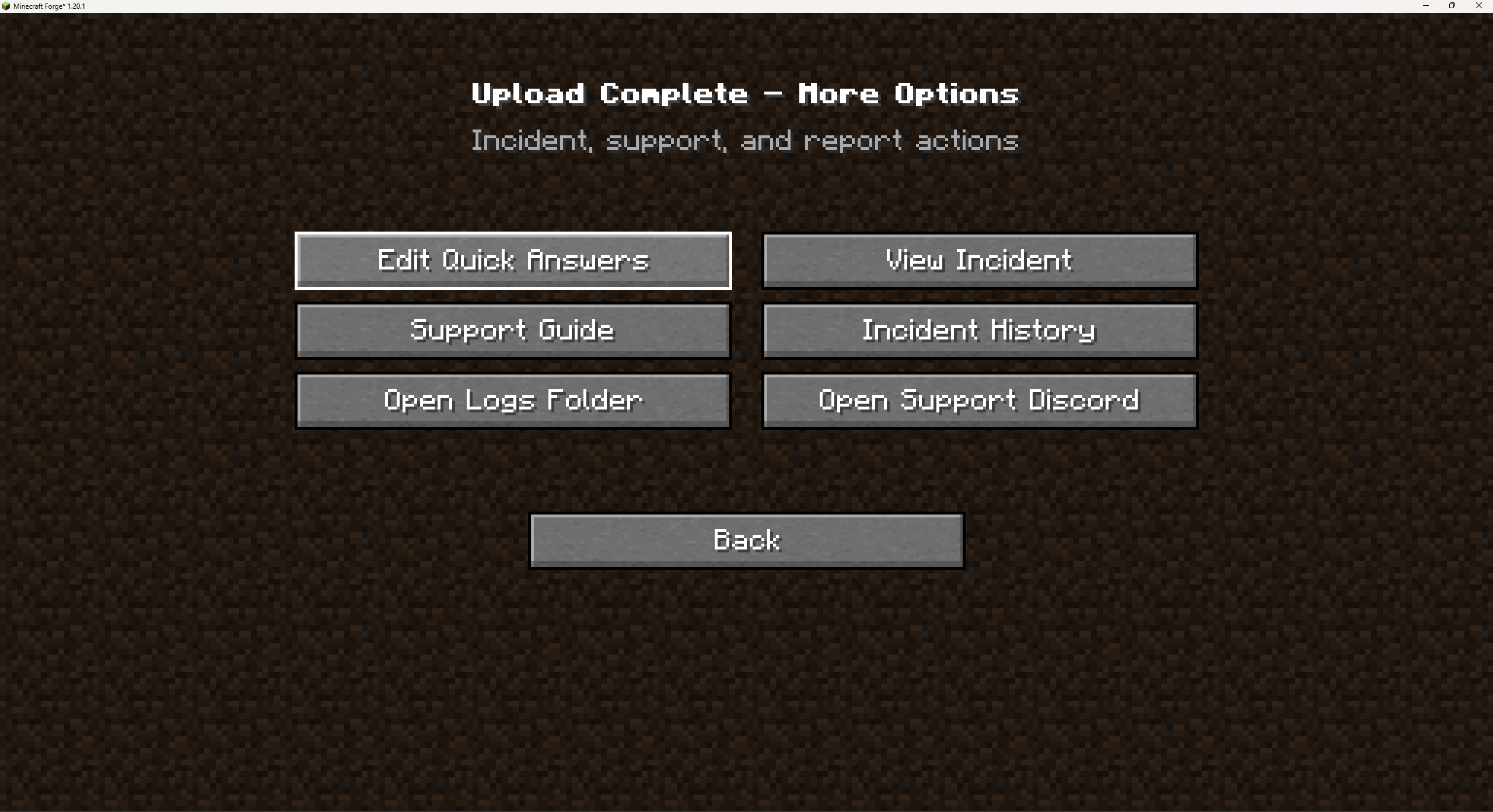
This panel is good if you are not 100% with commands, Mostly everything can be done from here.
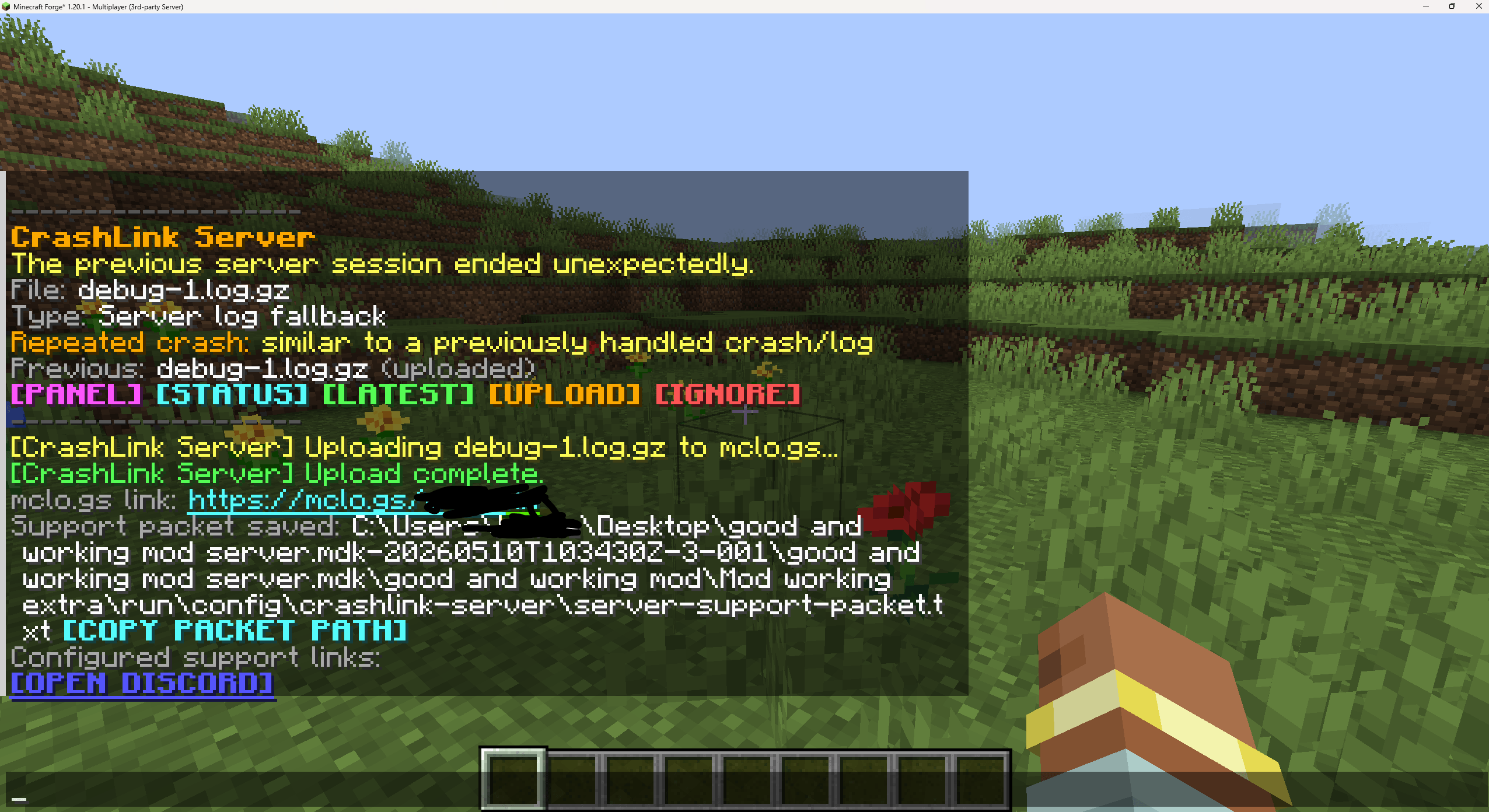
This panel is good if you are not 100% with commands, Mostly everything can be done from here.

Uploading crash to mclogs and showing a discord support link. Also shows a copy packet path for the support packet.
Uploading crash to mclogs and showing a discord support link. Also shows a copy packet path for the support packet.

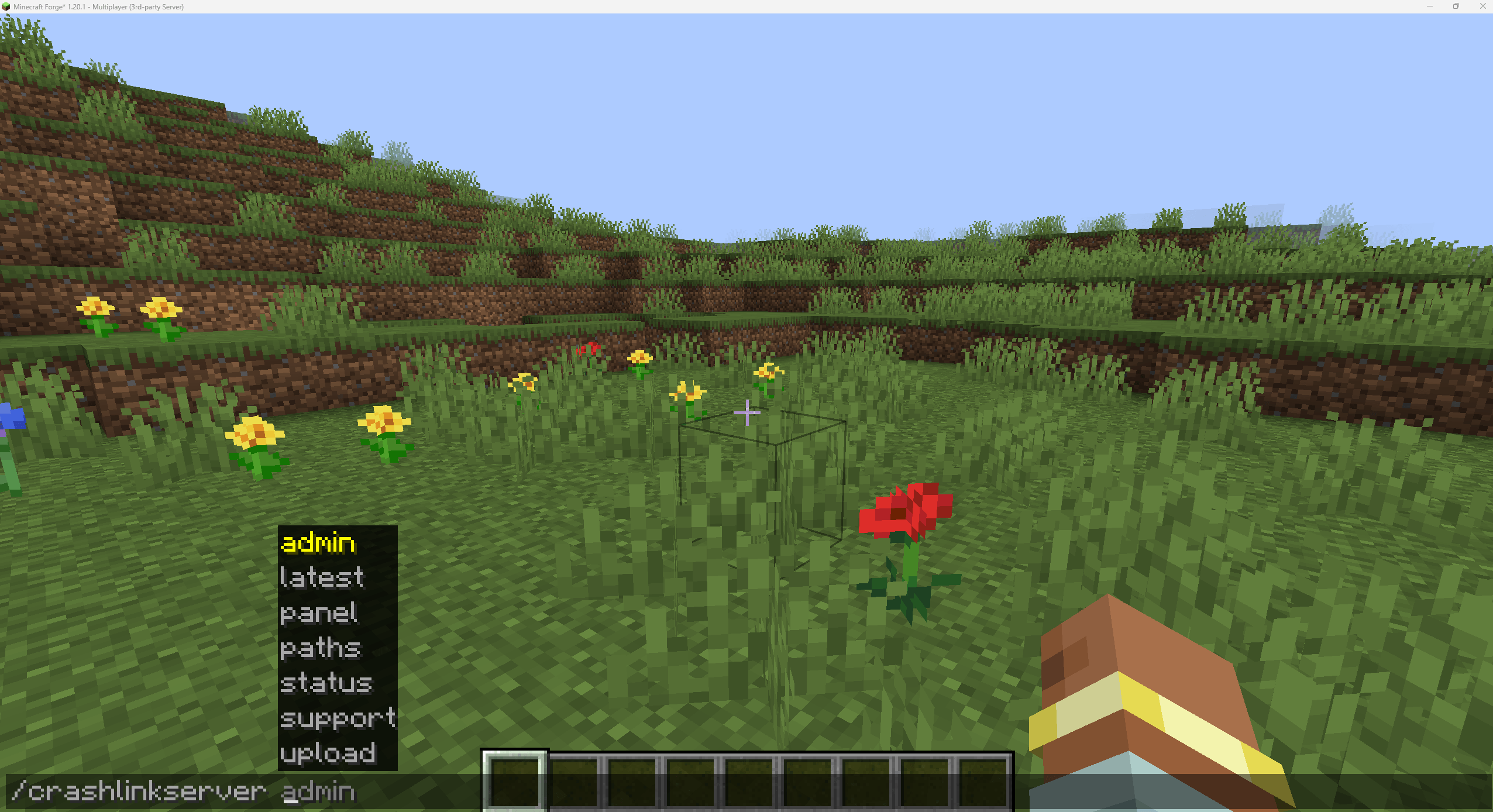
This shows most of the commands that are in this mod.
This shows most of the commands that are in this mod.

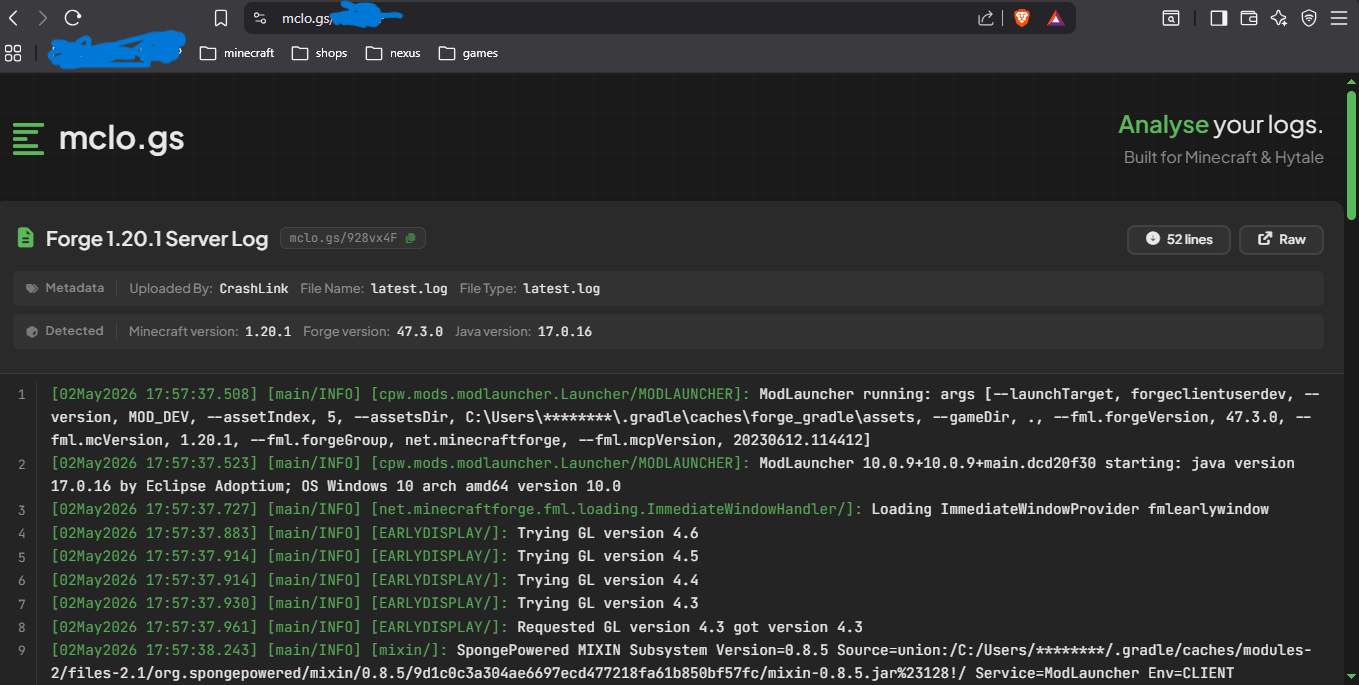
We can now view the log that Crash link has picked up in mclogs

We can now view the log that Crash link has picked up in mclogs

affiliate banner image

Description

Crash link


Crash reports made easy!


Crash Link is a lightweight mod that works with mclo.gs to make sharing Minecraft crash reports and logs much easier.

Crash Link now works in both places:

• On a client, it helps players upload client crash reports and logs
• On a dedicated server, it helps staff upload server crash reports and logs

The same jar can be used in a client instance or on a dedicated server. Crash Link automatically detects where it is running and starts the correct system.

On clients, Crash Link shows a small main-menu notification after an unexpected crash, force-close, or broken session. The player can click that notification to review the detected crash report or log file and upload it to mclo.gs.

On dedicated servers, Crash Link can notify staff when they join after the previous server session ended unexpectedly. Staff can then review the detected server crash report or fallback log using commands, clickable chat buttons, or the built-in vanilla panel.

After uploading, Crash Link creates a Support Packet. This is a support-ready message or file that includes the mclo.gs link, crash/server context, selected file information, repeated-crash status, trimmed upload status, recent timeline, and optional support answers.

This means players, server owners, modpack developers, and support teams can get useful crash information without digging through folders or guessing which log file is correct.


What Crash Link does

Crash Link can:

• Detect when the previous Minecraft/client session ended unexpectedly
• Detect when the previous dedicated server session ended unexpectedly
• Show a small main-menu notification on clients after a broken session
• Notify OPs/staff on dedicated servers after a broken server session
• Let players review and upload client crash reports/logs
• Let staff review and upload server crash reports/logs
• Look for the newest relevant crash report
• Fall back to the best available log file if no crash report exists
• Ask before uploading anything
• Upload the selected file to mclo.gs
• Create a Support Packet
• Open uploaded reports in a browser on clients
• Show clickable mclo.gs links after server uploads
• Open local crash/log folders on clients
• Show server folder paths with copy buttons on dedicated servers
• Avoid asking again for the same handled crash/log file
• Warn when a new crash looks similar to a previously handled crash
• Save useful crash context from the previous session
• Let players or staff answer quick support questions
• Let modpack developers configure custom support questions
• Show optional Discord/GitHub/custom support buttons if configured
• Trim oversized logs safely before upload
• Support OP fallback and permission nodes for server staff/rank systems


Client mode

When Crash Link is installed on a client, it behaves like the normal Crash Link client helper.

When Minecraft is relaunched after an unexpected crash, force-close, or broken session, Crash Link shows a small main-menu notification instead of immediately opening a large screen.

The player can click the notification to review the detected crash report or log file.

From there, the player can:

• Upload the latest relevant crash report
• Upload the latest log or best available fallback log
• Copy a support-ready packet
• Open the uploaded mclo.gs report in a browser
• Open the local crash/log folder
• Answer quick support questions
• Use configured Discord/GitHub support buttons

This helps players quickly send a useful crash report to a friend, modpack developer, server staff member, or support team.


Dedicated server mode

When Crash Link is installed on a dedicated server, it automatically starts the server-side Crash Link systems.

When the server is restarted after an unexpected stop, crash, force-close, or broken session, Crash Link can notify staff when they join.

Staff can then use:

• Clickable chat actions
• /crashlinkserver commands
• A vanilla chest-style CrashLink Server panel

From there, staff can upload the selected server crash report or fallback log to mclo.gs and generate a server Support Packet.

Players do not need to install the mod to use the server-side features. The server handles the crash/log workflow for staff.


Support Packet

Crash Link creates more than just a link.

The Support Packet can include:

• mclo.gs crash/log link
• Last known state
• Last screen, on client
• World type, on client
• Last dimension, on client
• Time since launch, on client
• Server uptime before stop, on dedicated server
• Minecraft version
• Forge version, on server packets
• Loaded mod count, on server packets
• Selected file name
• File type
• Repeated-crash status
• Trimmed upload status
• Trim reason, if applicable
• Recent session/server timeline
• Player or staff support answers, if provided
• Configured support links, if provided
• A clear note that this is not a diagnosis

Example client Support Packet:

Crash Report:
https://mclo.gs/xxxxxx

Crash Context:
Last state: Joining multiplayer server
Last screen: Connecting to Server
World type: Multiplayer
Time since launch: 38 seconds
Selected file: crash-2026-05-04-client.txt
File type: Crash report
Repeated error: Looks similar to a previous crash
Trimmed upload: No

Recent timeline:
• Main menu opened
• Multiplayer screen opened
• Started joining server
• Connecting screen opened
• Session ended unexpectedly

Player answers:
What were you doing?
Joining server

Note: This is not a diagnosis. It only combines crash context and the uploaded log.

Example server Support Packet:

Server Crash Report:
https://mclo.gs/xxxxxx

Support Message:
Send this packet to server support.

Support Links:
Discord: https://discord.gg/example
GitHub Issues: https://github.com/example/issues

Server Context:
Server state: Player joined
Uptime before stop: 12m 34s
Minecraft version: 1.20.1
Forge version: 47.3.0
Loaded mods: 124
Selected file: debug-1.log.gz
File type: Server log fallback
Repeated error: Looks similar to a previous server crash
Trimmed upload: No

Recent server timeline:
• Server session started
• Server starting
• Server started
• Player joined
• Server ended unexpectedly

Admin answers:
What was happening before the server stopped?
A player joined and the server stopped shortly after.

Note: This is not a diagnosis. It only combines server context, admin answers, and the uploaded log.


Crash Context / Flight Recorder

Crash Link saves useful facts from the previous session before Minecraft or the server stopped.

On clients, this can help support understand what the player was doing before the crash, such as:

• Sitting on the main menu
• Joining a multiplayer server
• Opening a singleplayer world
• Being in-game
• Opening menus
• Recently changing screens
• Last known dimension

On dedicated servers, this can help support understand what the server was doing before the crash, such as:

• Server starting
• Server started
• Player joined
• Player left
• Server stopping cleanly
• Server ended unexpectedly

Crash Link does not claim what caused the crash. It only records useful context.


Quick Support Questions

After uploading, players or staff can answer a few simple support questions.

Client default questions include:

• What were you doing?
• Has this happened before?
• Did you add extra mods, shaders, or resource packs?

Server default questions include:

• What was happening before the server stopped?
• Were mods, configs, datapacks, or the pack version recently changed?
• Has this happened before?

On clients, saving answers updates the copied Support Packet so players do not need to remember to copy it again.

On servers, staff answers are added to the generated server Support Packet.

━━━━━━━━━━━━━━━━━━━━

Support Link Intake Prompt

On clients, if a player clicks Open Support Discord or Open GitHub Issues before answering quick questions, Crash Link can gently ask if they want to answer questions first.

Players can choose:

• Answer Questions
• Open Anyway
• Back

If they answer questions first, Crash Link copies the updated Support Packet and then automatically opens the selected support link.

This helps players arrive in Discord or GitHub with useful crash information already copied and ready to paste.


Server staff join notice

When a dedicated server is restarted after a broken session, Crash Link can notify staff when they join.

The join notice can show:

• Detected crash/log file
• File type
• Repeated-crash warning, if applicable
• Quick clickable actions

Clickable actions can include:

• Panel
• Status
• Latest crash/log
• Upload
• Ignore

This gives staff a quick way to handle the crash without needing to search through server files manually.


CrashLink Server panel

On dedicated servers, Crash Link includes a simple vanilla panel for in-game staff.

The panel can provide quick access to:

• Status
• Latest Crash / Log
• Folders / Paths
• Support Questions
• Saved Answers
• Upload to mclo.gs
• Ignore this crash/log
• Close

The panel is a shortcut UI. Commands remain the real backend, so server console and staff commands still work normally.


Server commands

Crash Link Server uses a clean grouped command layout:

/crashlinkserver status
Shows the current CrashLink Server status.

/crashlinkserver latest
Shows details about the selected crash/log file.

/crashlinkserver paths
Shows server folder paths and copy buttons.

/crashlinkserver panel
Opens the in-game CrashLink Server panel.

/crashlinkserver upload latest
Uploads the selected crash/log file to mclo.gs.

/crashlinkserver support questions
Shows quick support questions.

/crashlinkserver support set <questionId> <answer>
Saves or updates a support answer.

/crashlinkserver support review
Shows saved support answers.

/crashlinkserver support clear
Clears saved support answers.

/crashlinkserver admin ignore latest
Ignores the current crash/log candidate.


Custom support questions

Modpack developers and server owners can configure custom support questions.

Client config:

config/crashlink/settings.json

Server config:

config/crashlink-server/settings.json

Client example:

{
"supportMessage": "Send this packet to our support Discord.",
"discordInviteUrl": "https://discord.gg/YOUR_INVITE_HERE",
"githubIssuesUrl": "",

"supportQuestions": [
{
"id": "official_server",
"question": "Were you joining the official server?",
"answers": ["Yes", "No", "Singleplayer", "Not sure"]
},
{
"id": "added_mods",
"question": "Did you add extra mods?",
"answers": ["No", "Yes", "Not sure"]
},
{
"id": "resource_packs",
"question": "Did you recently change resource packs or shaders?",
"answers": ["No", "Yes", "Not sure"]
}
]
}

Server example:

{
"supportMessage": "Send this packet to our support Discord.",

"supportQuestions": [
{
"id": "what_happened",
"question": "What was happening before the server stopped?",
"answers": ["Startup", "World loading", "Player joined", "Gameplay", "Not sure"]
},
{
"id": "recent_changes",
"question": "Were mods, configs, datapacks, or the pack version recently changed?",
"answers": ["No", "Yes", "Not sure"]
},
{
"id": "happened_before",
"question": "Has this happened before?",
"answers": ["First time", "Sometimes", "Every restart", "Not sure"]
}
]
}

Custom question rules:

• Maximum 5 questions
• Maximum 5 preset answers per question
• Blank or broken questions are ignored
• If no valid custom questions are configured, Crash Link uses default fallback questions
• Players can type their own short answer with the Other... field on clients
• Staff can type custom answers with the support set command on servers

━━━━━━━━━━━━━━━━━━━━

Support links for modpack developers

Crash Link includes config options for support links.

Developers can configure:

• Discord invite/support link
• GitHub Issues page
• Custom support message
• Custom quick support questions
• Custom support link, on dedicated servers
• Custom support label, on dedicated servers

Client support links are configured in:

config/crashlink/settings.json

Server support links are configured in:

config/crashlink-server/settings.json

Client example:

{
"supportMessage": "Send this packet to our support Discord.",
"discordInviteUrl": "https://discord.gg/YOUR_INVITE_HERE",
"githubIssuesUrl": "https://github.com/YOUR_NAME/YOUR_REPO/issues"
}

Server example:

{
"supportMessage": "Send this packet to our support team.",
"discordSupportUrl": "https://discord.gg/YOUR_INVITE_HERE",
"githubIssuesUrl": "https://github.com/YOUR_NAME/YOUR_REPO/issues",
"customSupportUrl": "https://example.com/support",
"customSupportLabel": "Support Page"
}

If these are configured, Crash Link will show support buttons after a successful upload. This helps guide players or staff directly to the correct place to report their issue.

By default, Crash Link still works normally without any custom links.


Repeat crash detection

Crash Link can avoid prompting again for the exact same handled crash/log file.

If a new crash appears to have the same or similar error signature as a previously handled crash, Crash Link can warn that the error looks similar instead of treating it as completely new.

This is useful when the same issue happens more than once.

The warning does not claim the cause. It only says the new crash/log appears similar to one already handled.


Oversized log handling

Normal-sized crash reports and logs are uploaded fully.

If a selected crash/log file is too large for mclo.gs limits, Crash Link keeps the beginning and end of the log while trimming only the middle.

This helps preserve important information from both parts of the log:

• The beginning usually contains Minecraft version, Forge version, Java version, mod loading, and environment details
• The end usually contains the actual crash, error, or stacktrace

The uploaded log includes clear Crash Link notes if trimming happened.

The original local crash/log file is never modified. Trimming only affects the uploaded copy.


Server paths and folders

Because the dedicated server side is server-side only, it cannot open the server machine’s folder on a remote staff member’s computer.

Instead, it provides:

/crashlinkserver paths

This shows:

• Game folder
• Crash reports folder
• Logs folder
• Selected crash/log file

Each path has a clickable copy button so staff can copy the server path when needed.


Server permissions

On dedicated servers, Crash Link works with OP permissions by default.

It also includes permission-node support designed for rank/permission mods such as FTB Ranks and LuckPerms.

Default permission nodes:

crashlinkserver.view
Allows viewing status, latest crash/log details, paths, panel, questions, and saved answers.

crashlinkserver.answer
Allows answering support questions.

crashlinkserver.upload
Allows uploading crash/log files to mclo.gs and generating a support packet.

crashlinkserver.admin
Allows full Crash Link Server access, including ignore and admin actions.

OP fallback is enabled by default and can be configured.

Note: Permission-node support is designed for rank/permission mods, but you should test your chosen permission mod setup on your own server.


Privacy

Crash Link does not silently upload logs.

When a broken client or server session is detected, the player or staff member is asked before anything is uploaded to mclo.gs.

Support answers are only added when the player or staff member saves them.

The original local crash/log file is never modified.

Crash Context and Support Packet wording avoids diagnosis or blame.

Crash Link uses the public mclo.gs API when the player or staff member chooses to upload a crash report or log.


Client and dedicated server support

Crash Link can be installed on clients and dedicated servers.

On a client, it runs the client crash helper.

On a dedicated server, it runs the server crash helper.

The same jar can be used in both places, and Crash Link automatically changes behavior depending on the environment.

For client-side crashes, install Crash Link on the client.

For dedicated server crashes, install Crash Link on the dedicated server.


Why use this?

Crash Link is useful for:

• Modpack developers
• Players
• Friends helping each other troubleshoot
• Server owners
• Server staff
• Support teams
• Private modded servers
• Public modded servers

A lot of crash troubleshooting starts with finding the right crash report or log file. This can make debugging take much longer, especially when players or staff are unsure what file to send.

With Crash Link on clients, the process becomes much faster:

  1. Minecraft crashes or closes unexpectedly
  2. Relaunch Minecraft
  3. Click the Crash Link notification
  4. Click Upload
  5. Answer quick support questions, if needed
  6. Copy or send the Support Packet
  7. Send it to support

With Crash Link on dedicated servers, the process becomes much faster:

  1. Server stops unexpectedly
  2. Restart the server
  3. Staff join and see the CrashLink Server notice
  4. Open the panel or run a command
  5. Upload the crash/log to mclo.gs
  6. Answer quick support questions, if needed
  7. Copy the Support Packet path
  8. Send the packet or links to support

Notes

Crash Link works best for crashes or unexpected closes that happen after the mod has loaded.

Very early launcher, Forge, dependency, or mod-loading crashes may happen before Crash Link has a chance to track the session.

If no crash report is found, Crash Link will try to use the best available log file instead.

Known Issue Notices are planned for a future update, but are not included yet.

Crash Link uses the public mclo.gs API to upload logs when the player or staff member chooses to do so.

Crash Link is not affiliated with or endorsed by mclo.gs or Aternos.

The Crash Link Team

profile avatar
  • 1
    Followers
  • 7
    Projects
  • 2.4K
    Downloads

More from Setokaiba218View all

  • Block Memory project image

    Block Memory

    • 519
    • Mods

    Block Memory is a lightweight, server-side Forge mod designed for moderators and administrators who need clear, reliable block, incident, and live activity alert information without digging through logs.

    • 519
    • May 12, 2026
    • Mods
    • +2
  • Streaming Reminders project image

    Streaming Reminders

    • 52
    • Mods

    A funny client-side reminder mod for hydration, posture, food, focus, and goblin maintenance, with custom reminders, config options, and chaotic streamer energy.

    • 52
    • May 11, 2026
    • Mods
    • +1
  • Fantasy Exhibition project image

    Fantasy Exhibition

    • 623
    • Modpacks

    Unearth ancient monoliths, brave alien dimensions, and dive into abyssal trenches—but beware the creeping Corruption.

    • 623
    • March 13, 2026
    • Modpacks
    • +4
  • Fantasy Exhibition S2 project image

    Fantasy Exhibition S2

    • 192
    • Modpacks

    Venture into the unknown—where ancient monoliths whisper secrets and ocean abysses hide unspeakable horrors.

    • 192
    • August 10, 2025
    • Modpacks
    • +4
  • Block Memory project image

    Block Memory

    • 519
    • Mods

    Block Memory is a lightweight, server-side Forge mod designed for moderators and administrators who need clear, reliable block, incident, and live activity alert information without digging through logs.

    • 519
    • May 12, 2026
    • Mods
    • +2
  • Streaming Reminders project image

    Streaming Reminders

    • 52
    • Mods

    A funny client-side reminder mod for hydration, posture, food, focus, and goblin maintenance, with custom reminders, config options, and chaotic streamer energy.

    • 52
    • May 11, 2026
    • Mods
    • +1
  • Fantasy Exhibition project image

    Fantasy Exhibition

    • 623
    • Modpacks

    Unearth ancient monoliths, brave alien dimensions, and dive into abyssal trenches—but beware the creeping Corruption.

    • 623
    • March 13, 2026
    • Modpacks
    • +4
  • Fantasy Exhibition S2 project image

    Fantasy Exhibition S2

    • 192
    • Modpacks

    Venture into the unknown—where ancient monoliths whisper secrets and ocean abysses hide unspeakable horrors.

    • 192
    • August 10, 2025
    • Modpacks
    • +4