Block Memory
- By
Block Memory is a lightweight, server-side Forge mod designed for moderators and administrators who need clear, reliable block, incident, and live activity alert information without digging through logs. :D
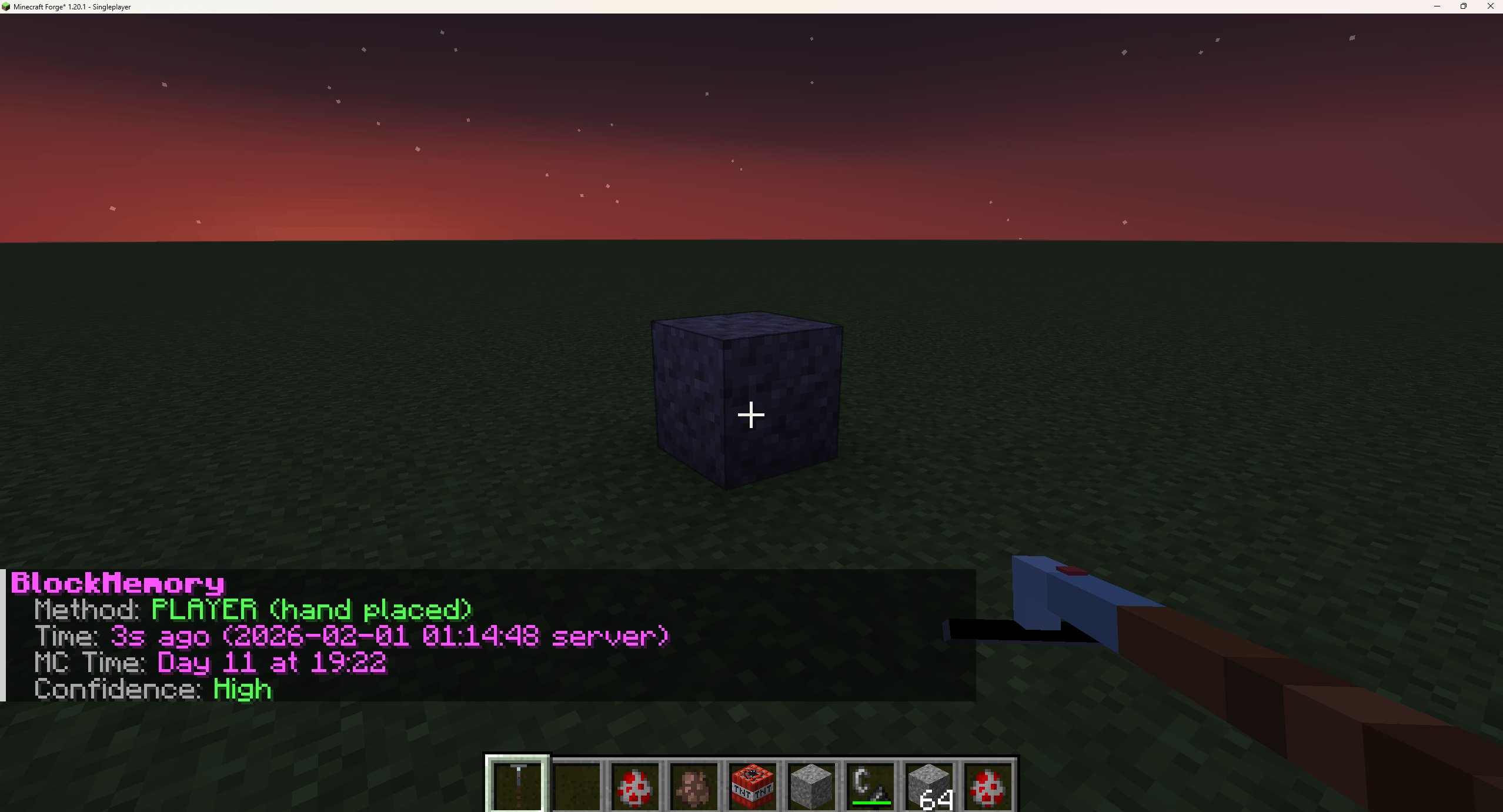
Inspecting a block
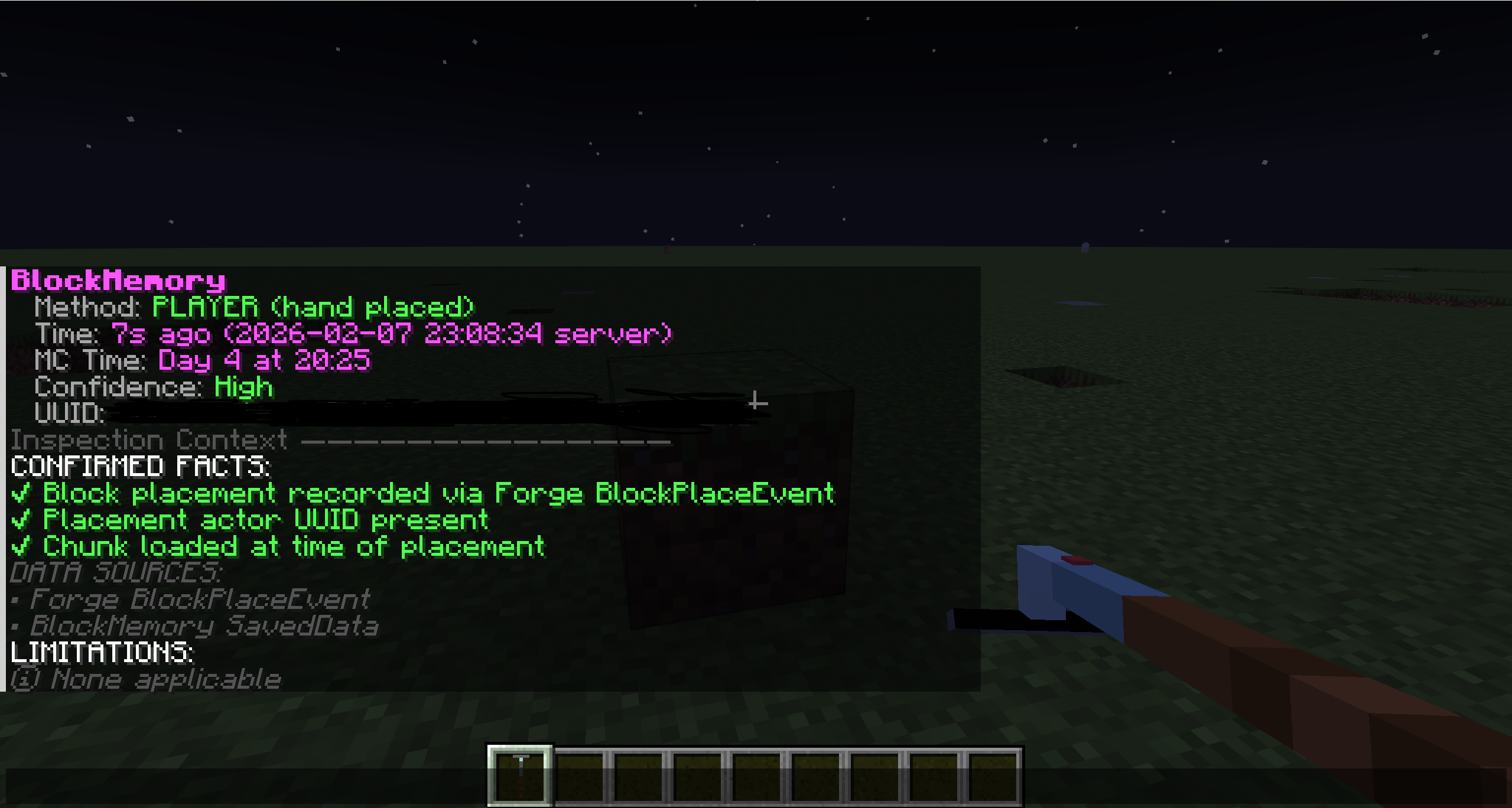
Closer Inspection at a block shows UUID + Inspection context
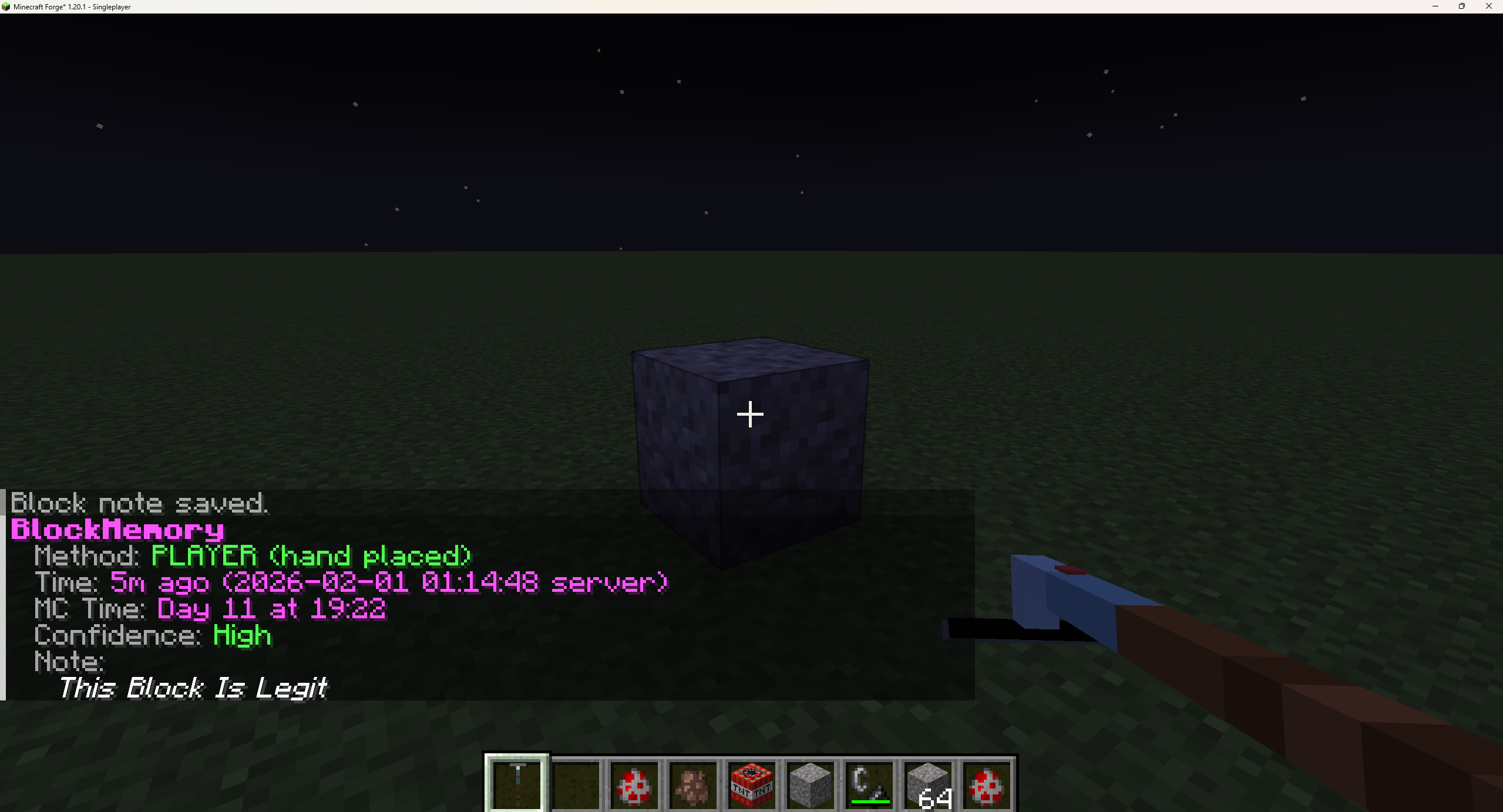
Adding notes to blocks (Other staff can see)
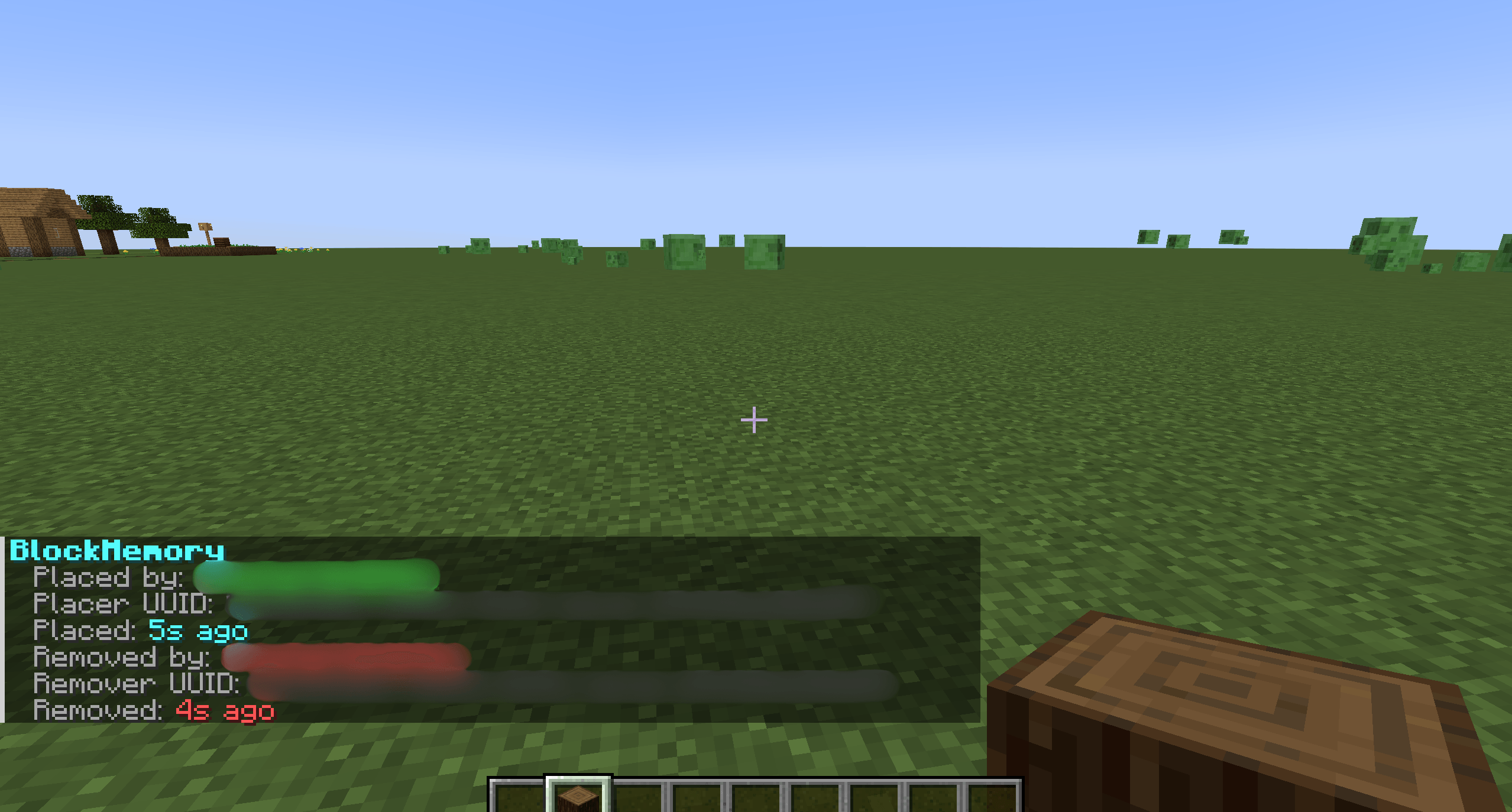
Inspecting a location of when a block was placed then broke
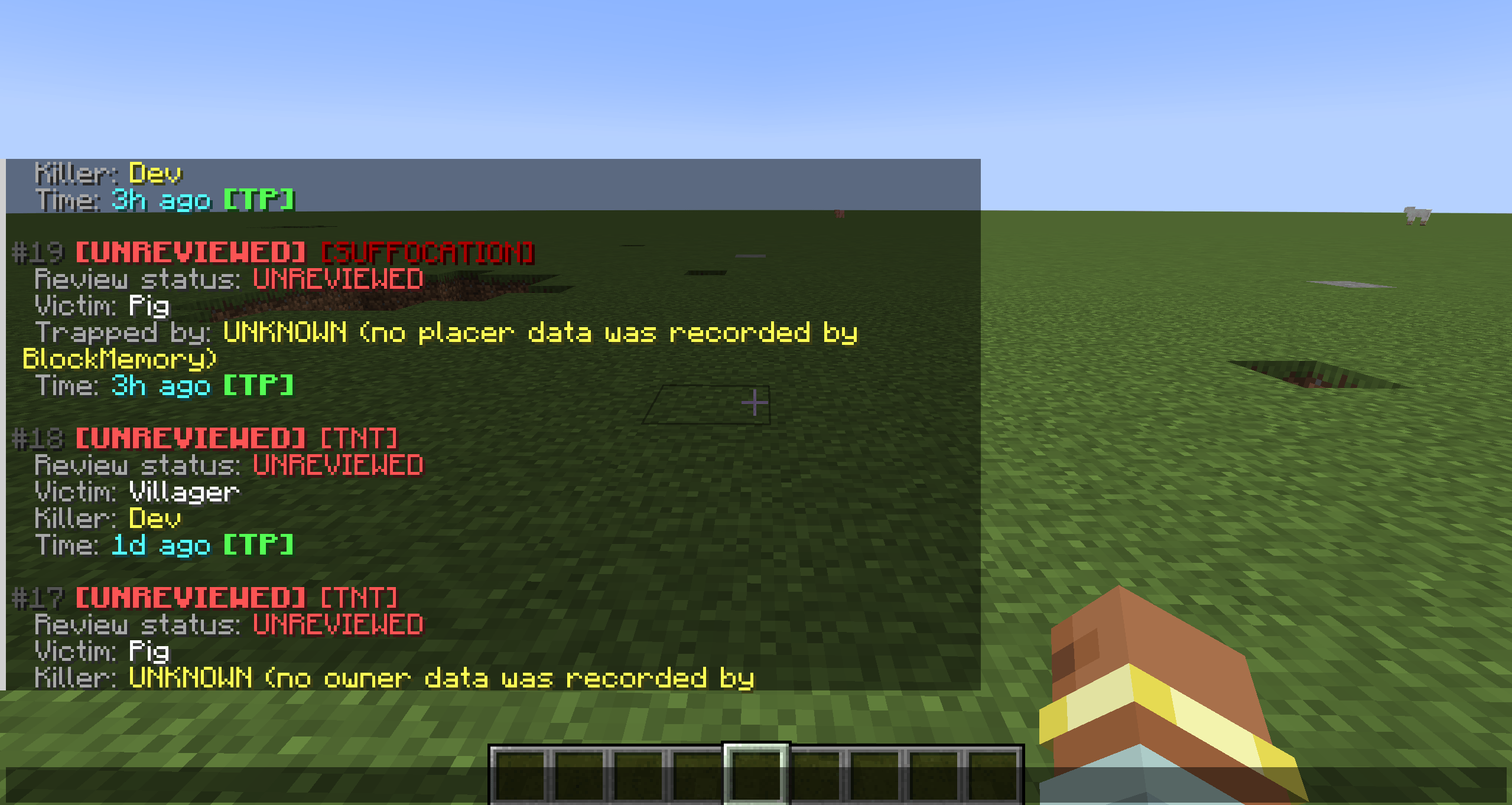
View recent incidents(TNT+ suffocation deaths) shows the victim, killer, status of said incident and the time with a TP. With a full review system for admins.
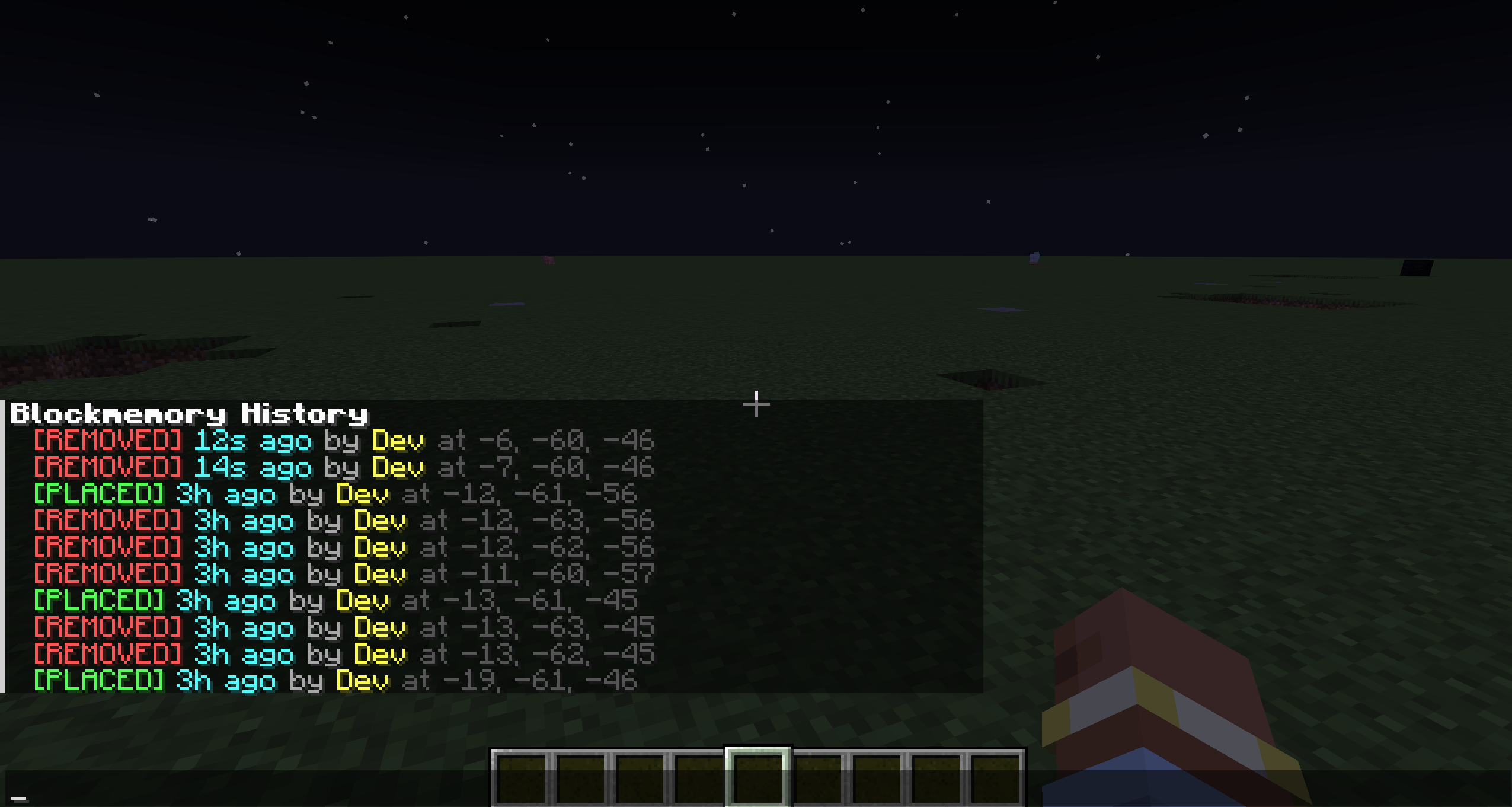
See recent placed and removed blocks, there locations, time and who placed them
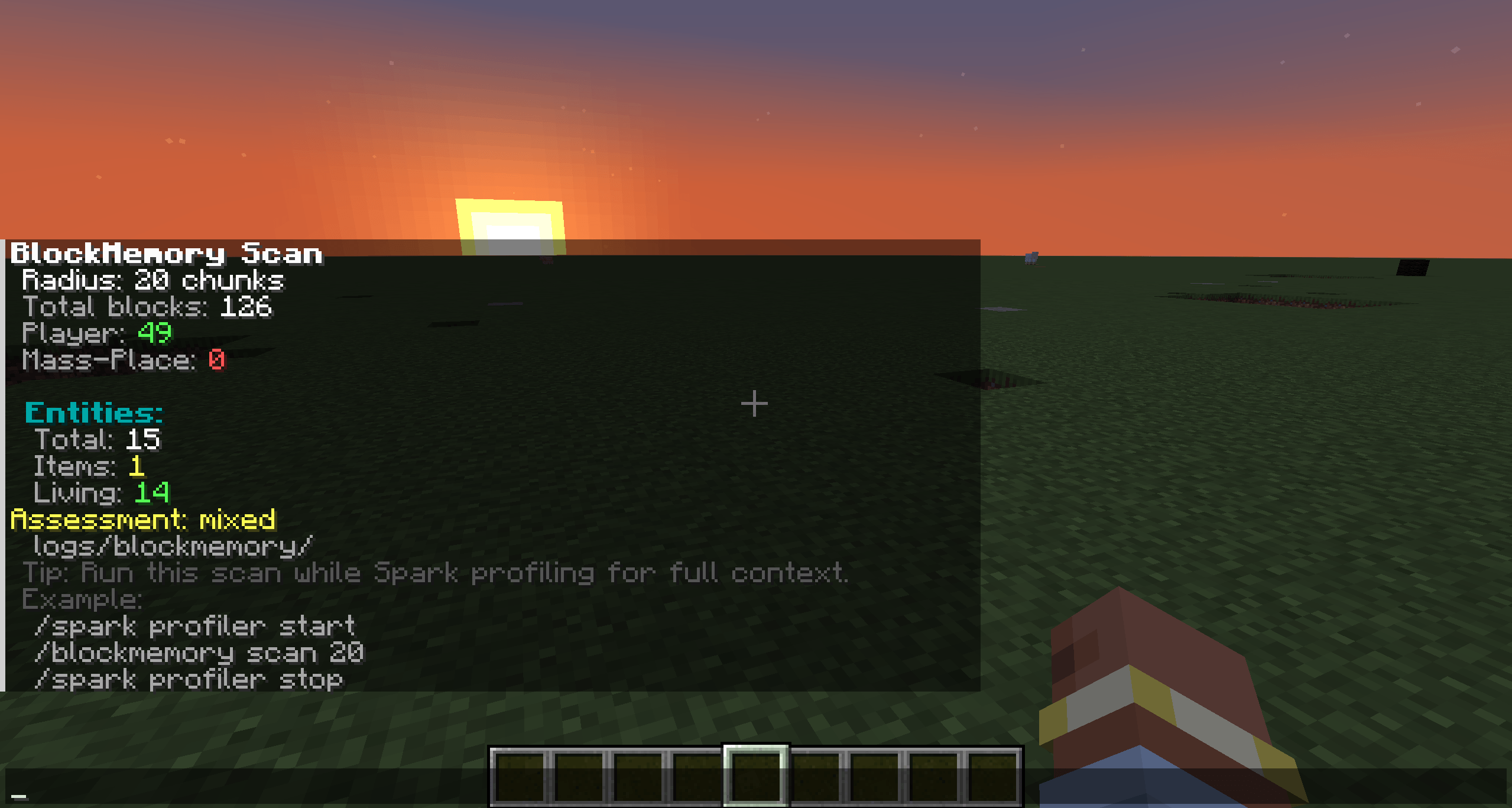
Scan chunks for total blocks, player placed blocks, entities + its saved into logs
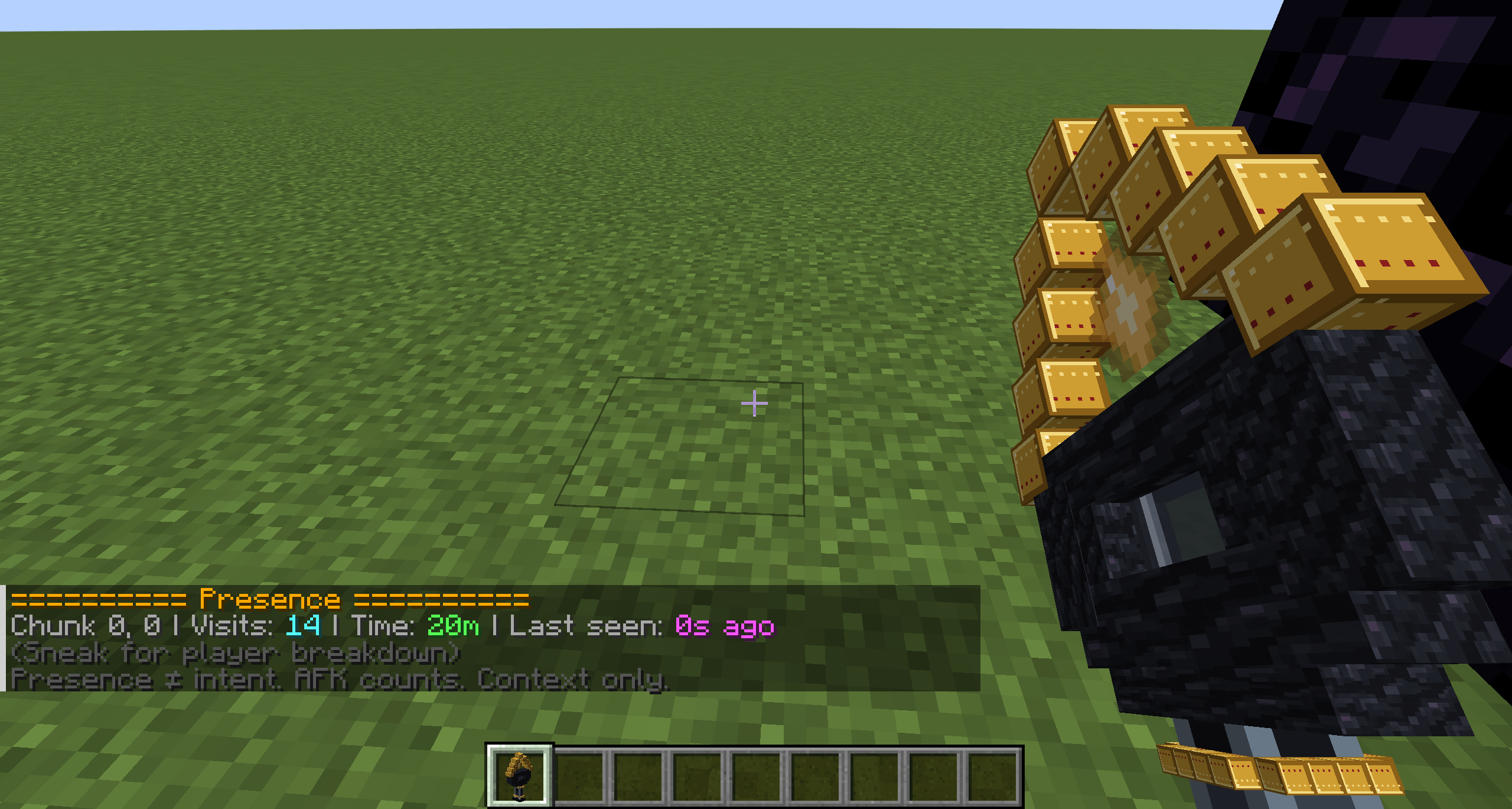
Looking at total visits for the chunk and time spent in the chunk for a player
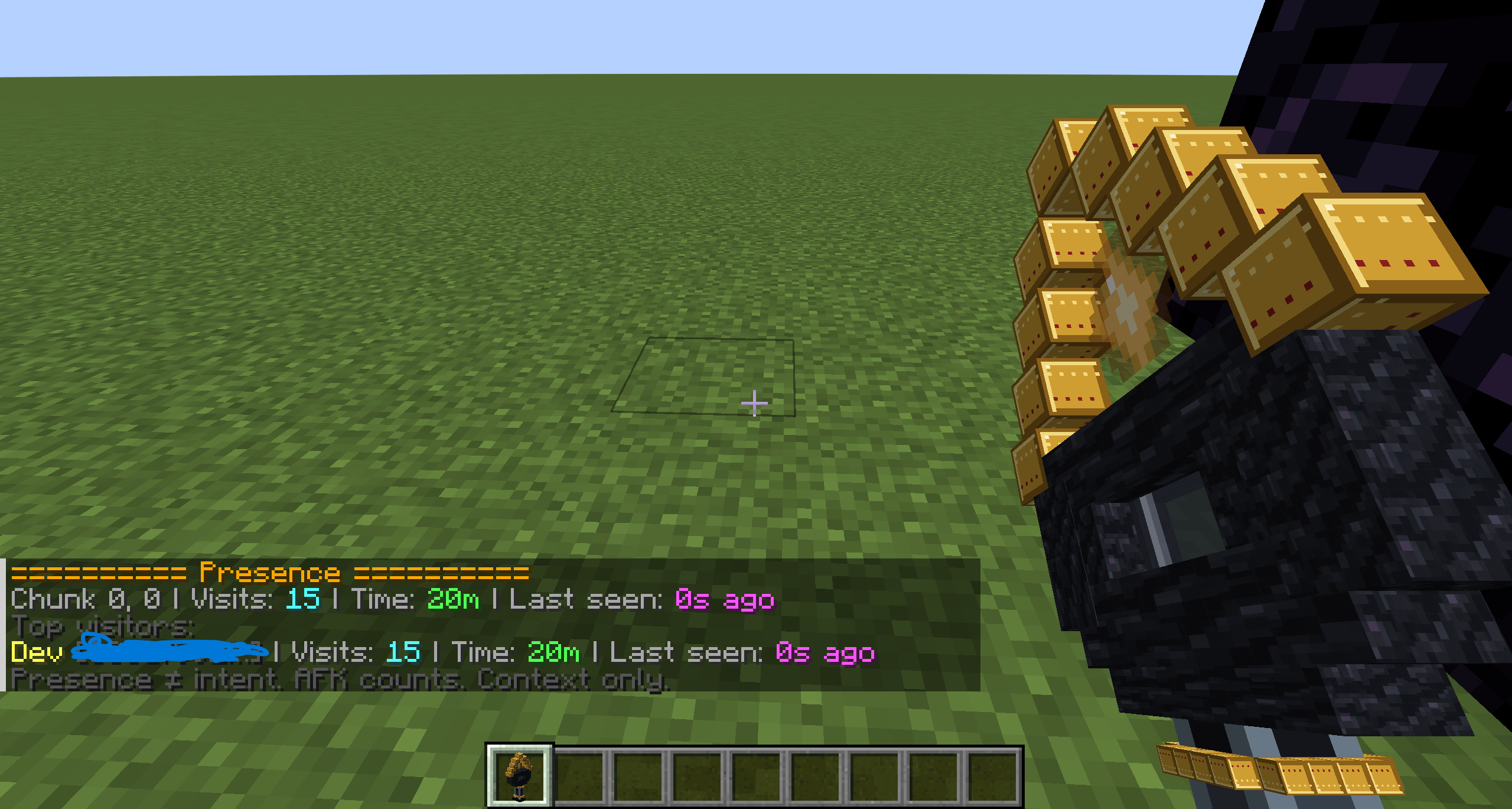
Shift+ right click shows each person that visited, there UUID, time spent and the time they were last seen and the amount of time they went into the same chunk
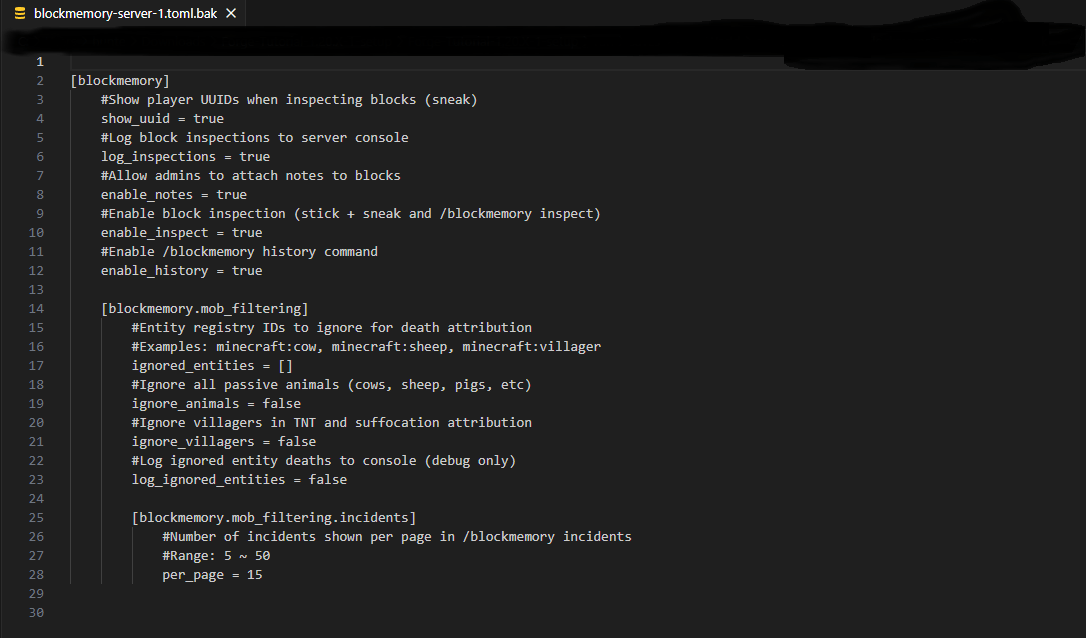
Config most stuff in the config file
Description

This Mod was brought to you by the RoughDayGames Development group. To get help with the mod join the discord: RoughDayGames
Block Memory
Block Memory is a server-side moderation and investigation mod made to help staff work out what happened on a server without having to dig through huge log files. This can be a nightmare for a lot of people.
The idea behind it is simple: if Block Memory knows something, it tells you. If it cannot know for sure, it says that instead of guessing.
It is not meant to be a rollback mod or something that automatically decides a player is guilty. It gives staff the information they need to investigate things themselves and then staff can make their own decision.
What can it help with?
- See who placed or removed tracked blocks
- Check when block activity happened
- Look at nearby activity and player presence
- Track TNT and suffocation incidents
- Detect unusual bursts of block removal
- Create watched and suppressed areas
- Save and inspect alerts and incidents
- Add staff notes, claims and reports
- Keep track of work through the staff queue
- Review important staff actions with the audit log
- Use `/Blockmemory Doctor` to help diagnose problems
Block Memory also includes tools such as the Block Scanner, Presence Wand, saved-area previews and other investigation tools designed around giving staff useful information without making assumptions for them.
Block Memory 1.10
Version 1.10 adds safer staff workflows, including archive and restore support, confirmation before permanent deletion, staff audit history, data retention/pruning tools, improved Doctor diagnostics and saved-data migration support.
Existing Block Memory 1.9 worlds can be upgraded to 1.10 while keeping their existing investigation data.
Minecraft: 1.20.1
Loader: Forge 47+
Block Memory: 1.10.0
Java 17
Block Memory only needs to be installed on the server.
The Fabric version is maintained separately and the forge version will be out first.
Block Memory uses the custom Setokaiba218 Project Licence and is not licensed under MIT.
Any and all feedback is really appreciated!
Full Feature List:
Block Memory is built around giving staff useful evidence and context without pretending to know more than it actually does.
It tries to show you what happened, who was involved where that can be confirmed, and what activity happened nearby — then leaves the actual moderation decision to staff.
Block investigation
- Tracks direct player block placement and removal.
- Shows who placed or removed tracked blocks where that information is known.
- Stores placement and removal times.
- Supports player and UUID information.
- Shows method and confidence information where available.
- Lets staff inspect tracked blocks directly with the Block Scanner.
- Supports nearby activity scans.
- Supports configurable scan ranges.
- Includes player activity and history tools.
- Includes recent activity summaries.
- Includes top actor summaries.
- Supports Y-level-aware matching.
- Can generate investigation/report output for easier staff use.
- Includes clickable and copyable investigation information where supported.
Context and presence
- Builds local activity context around investigated events.
- Can show nearby placed and removed blocks around the same time.
- Includes the Presence Wand for checking player presence information.
- Tracks chunk visit information.
- Can show visit counts.
- Can show total time present.
- Can show when a player was last seen in an area.
- Presence information is treated as context only.
- Block Memory does not treat someone being nearby as proof that they caused an event.
Incidents
- Persistent incident records.
- TNT-related incident tracking.
- Suffocation-related incident tracking.
- Incident inspection.
- Incident reports.
- Claim and unclaim support.
- Persistent claim information.
- Review information.
- Staff notes.
- Staff note clearing.
- Archive and restore support.
- Confirmed permanent deletion.
- Archived incidents can still be investigated or restored.
- Incidents containing important staff notes are protected from normal pruning.
Alerts
- Persistent alerts.
- Stable alert IDs.
- Alert history.
- Alert inspection.
- Alert reports.
- Claim and unclaim support.
- Saved area information where relevant.
- Neutral burst-removal alerts.
- Configurable burst thresholds and time windows.
- Alerts report unusual activity without automatically accusing a player.
- Archive and restore support.
- Confirmed permanent deletion.
- Archived alerts no longer count as active Queue work.
Saved areas
- Saved watched areas.
- Saved suppressed areas.
- Areas can be identified by ID or name.
- Inspect saved-area information.
- Check which saved area you are currently standing in.
- Particle previews for checking area boundaries.
- Rename areas.
- Resize areas using player position.
- Expand areas by chunk radius.
- Shrink areas by chunk radius.
- Configurable area Y ranges.
- Watched areas can be used to highlight activity in important locations.
- Suppressed areas can reduce noise from expected high-activity locations.
- Areas can be archived and restored.
- Permanent area deletion requires confirmation.
- Archived areas no longer participate in watched/suppressed area matching.
Useful area tools include:
/Blockmemory Area Here
/Blockmemory Area Preview <idOrName>
/Blockmemory Area Rename <idOrName> <newName>
/Blockmemory Area Resize <idOrName> Pos1
/Blockmemory Area Resize <idOrName> Pos2
/Blockmemory Area Expand <idOrName> <chunks>
/Blockmemory Area Shrink <idOrName> <chunks>
Staff Queue
- Central Queue for investigation work that may still need attention.
- Shows relevant alerts and incidents.
- Claim status information.
- Cleaner staff workflow for unresolved work.
- Staff join notifications where configured.
- Clickable Queue shortcuts.
- Archived alerts and incidents are removed from active Queue work.
Staff audit log
- Persistent staff audit history.
- Records important moderation actions.
- Records the staff member responsible.
- Records the action performed.
- Records the target.
- Records the dimension.
- Records the time.
- Stores a short action summary.
- Supports filtering by staff member.
- Supports filtering by alert.
- Supports filtering by incident.
- Supports filtering by saved area.
- Audit history remains available even if the original record is later permanently deleted.
- Older actions are not fabricated when upgrading an older world.
Use:
/Blockmemory AuditSafer destructive actions
Block Memory 1.10 adds extra protection around destructive staff actions.
- Alerts must be archived before permanent deletion.
- Incidents must be archived before permanent deletion.
- Areas must be archived before permanent deletion.
- Permanent deletion requires confirmation.
- Confirmation expires after 60 seconds.
- Confirmation is tied to the same staff member.
- Confirmation is tied to the same record.
- Confirmation is tied to the same dimension.
- Pending confirmations disappear when the server restarts.
- Archived records can be restored before permanent deletion.
Data management and retention
- Data statistics command.
- Prune preview.
- Confirmed manual pruning.
- Configurable retention periods.
- Different types of data can use different retention times.
- A retention value of
0means that data is never eligible for normal pruning. - No automatic background pruning.
- Active block records are protected.
- Staff-note records are protected.
- Active alerts are protected.
- Active incidents are protected.
- Archived incidents with notes are protected.
- Audit history is kept permanently by default.
- Pruning has a safety limit per run.
- Prune actions are recorded in the staff audit log.
Useful commands include:
/Blockmemory Data Stats
/Blockmemory Data Prune Preview
/Blockmemory Data Prune
Doctor and diagnostics
Block Memory includes /Blockmemory Doctor to help with support and troubleshooting.
Doctor can check and report things such as:
- Minecraft version.
- Forge version.
- Block Memory version.
- Saved-data schema version.
- Migration state.
- Configuration sanity checks.
- Saved-data health checks.
- Malformed-data checks.
- Active record counts.
- Archived record counts.
- Audit history count.
- Queue health.
- Retention settings.
- Prune eligibility.
- Saved-area overlaps.
- Permission information.
- OP fallback information.
- Startup diagnostics.
- TXT diagnostic reports.
- JSON diagnostic reports.
Use:
/Blockmemory DoctorSaved data and upgrades
- Investigation data is stored with the world.
- Supports persistent alerts.
- Supports persistent incidents.
- Supports persistent staff notes.
- Supports persistent claims.
- Supports saved areas.
- Supports presence information.
- Supports block history.
- Supports persistent audit history.
- Block Memory 1.10 adds formal saved-data schema versioning.
- Older supported data can be migrated forward.
- Existing Block Memory 1.9 worlds can upgrade directly to 1.10.
- Existing history, alerts, incidents, claims, notes, presence data and saved areas are preserved during migration.
- Older staff actions are not invented and added to the new audit log.
Permissions and server use
- Designed primarily for server-side use.
- Players do not normally need Block Memory installed on their client.
- Uses per-world server configuration.
- Includes staff permission nodes.
- Includes operator fallback where an external permission system is not handling access.
- Investigation tools are intended for trusted server staff.
Utility tools
Block Memory also includes its own utility items and investigation tools, including:
- Block Scanner.
- Presence Wand.
- Memory Stick.
- Block Memory creative tab.
- Custom Block Memory item textures and icon.
- Helpful copy and report actions.
Important design idea
Block Memory is not meant to automatically decide whether somebody is guilty.
It is made to give staff useful information such as block history, nearby activity, presence, alerts, incidents and context so staff can make that decision themselves.
If Block Memory cannot confirm something, it should say that instead of guessing.
Block Memory Team