Clean Outline
- By
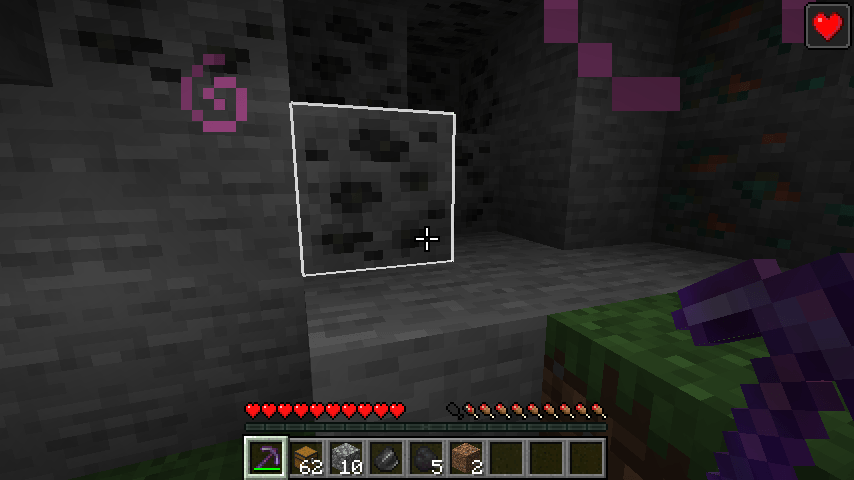
Make the block selection outline and your crosshair your own: any color, thicker lines, a soft fill, rainbow mode and crosshair styles. Client Side
2026-11-11_18.01.51.png
2026-11-11_18.01.32.png
Description
---------------------------------------------------------------------
DESCRIPTION (paste into the description editor)
---------------------------------------------------------------------
## Your own outline and crosshair
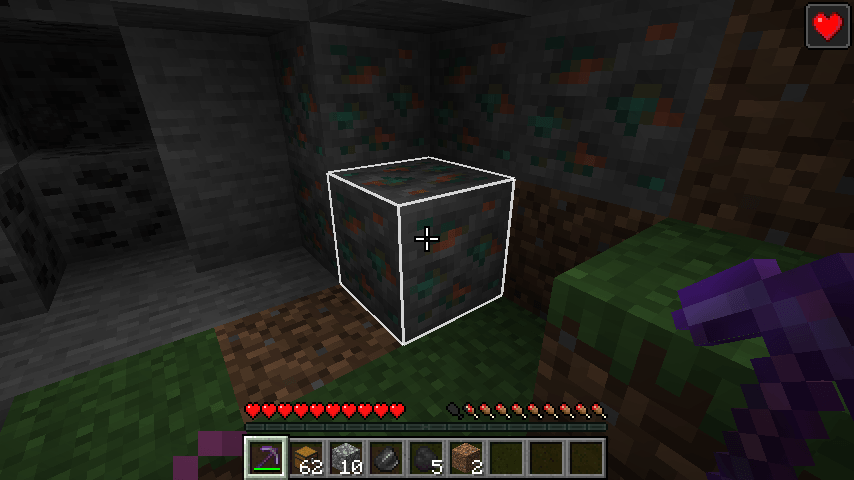
The thin black line around the block you're looking at is hard to see in dark caves, and the vanilla crosshair is the same for everyone. **Clean Outline** lets you style both.
## Block outline
- **Any color** - pick a color with transparency (`#AARRGGBB`).
- **Thicker lines** - 1 to 10 (vanilla is about 2.5), great for big screens and recording.
- **Soft fill** - an optional see-through color inside the selected block.
- **Rainbow mode** - the outline slowly cycles through all colors.
- Works with every block shape: stairs, slabs, fences, flowers, chests.
## Crosshair
- **Styles** - cross, dot, or cross with a dot.
- **Size, gap and thickness** - make it tiny and precise or big and clear.
- **Any color**, with an optional thin **black border** so it's visible on snow and in the dark.
- Vanilla's attack cooldown indicator under the crosshair still works.
No key bindings - nothing to set up and no conflicts with other mods.
## Settings
The file `config/cleanoutline.properties` is created on first launch. Colors are `#RRGGBB` or `#AARRGGBB` (AA = transparency, 00-FF):
- `outlineEnabled` (true), `outlineColor` (#CCFFFFFF), `outlineThickness` (3.0)
- `rainbow` (false), `fill` (false), `fillColor` (#26FFFFFF)
- `crosshairEnabled` (true), `crosshairStyle` (cross / dot / cross_dot)
- `crosshairColor` (#FFFFFFFF), `crosshairSize` (4), `crosshairGap` (1), `crosshairThickness` (1), `crosshairBorder` (true)
Set `outlineEnabled=false` or `crosshairEnabled=false` to keep the vanilla look for that part.
## Works on servers
This is a **client-side only** mod. It only changes how the outline and crosshair look on your screen - no gameplay advantage, nothing visible through walls. Works in singleplayer, on Realms and on any server, including PvP servers.
## Honest limitations
- Line thickness depends on your graphics driver; on some systems very thick lines are capped by the driver.
- Shader packs (Iris) may draw the outline their own way.
- Other mods that change the crosshair or block outline may conflict; use one of them.
- The settings are in a config file; there is no in-game settings screen yet.
## Requirements
- Minecraft 1.21 / 1.21.1
- Fabric Loader 0.16 or newer
- Fabric API
- Java 21
## Installation
1. Install Fabric Loader for Minecraft 1.21.1.
2. Put **Fabric API** and **Clean Outline** in your `mods` folder.
3. Start the game.
## Modpacks
You are welcome to include this mod in any modpack. No need to ask.
## Also by this author
- **Clean Item Mover** - Shift + drag and scroll to move items faster in any inventory
- **Clean Chat Heads** - player faces next to chat messages, optional timestamps
- **Light Level Overlay** - press F7 to see where mobs can spawn
- **Clean Ping Display** - real ping numbers in the Tab list
- **Clean Horse Stats** - a horse's speed, jump and health at a glance
- **Clean Info HUD** - coordinates, facing, biome and FPS in a tidy panel
- **Status Effect Timers** - your potion effects as a clean list with countdowns
- **Death Location Helper** - an on-screen arrow back to where you died
- **Item Pickup Notifier** - see everything you pick up at the side of the screen
- **Smooth Zoom** - hold a key to zoom, scroll to change the zoom level
- **Item Container Preview** - see Shulker Box contents in the tooltip
- **Clean Tooltip Enchants** - color-coded enchantments with (MAX) tags
- **Smart Torch Placer** - place torches with one key, optional Auto-Light for mining
- **Smart Crop Harvest** - right-click ripe crops to harvest and replant
- **Floating Damage Indicators** - damage, heal and crit numbers above mobs
- **Smart Tool Safety** - durability warnings and tool break protection
- **Smart Chest Organizer** - sort buttons and quick deposit for chests
- **Dynamic Armor HUD** - armor, held item and arrow durability on screen
- **Smart Auto-Trash** - quickly trash or auto-throw junk items
- **Dynamic Item Glow** - rarity colors and glow for items
## About the images
The project logo is an illustration created with AI assistance; it is not an in-game screenshot. The screenshots in the gallery are real, unedited in-game captures.
Clean Outline Team