Clean Auto Reconnect
- By
Server restarted or your connection dropped? This mod rejoins automatically with a clear countdown - or press Reconnect now. Client side
reconnect.jpg
Description
## Back in the game without the clicking
The server restarts every night at 4 am, your Wi-Fi hiccups, or you get "Connection timed out" in the middle of building. In vanilla you click "Back to server list", find the server, click Join... and if it's still restarting, do it again and again.
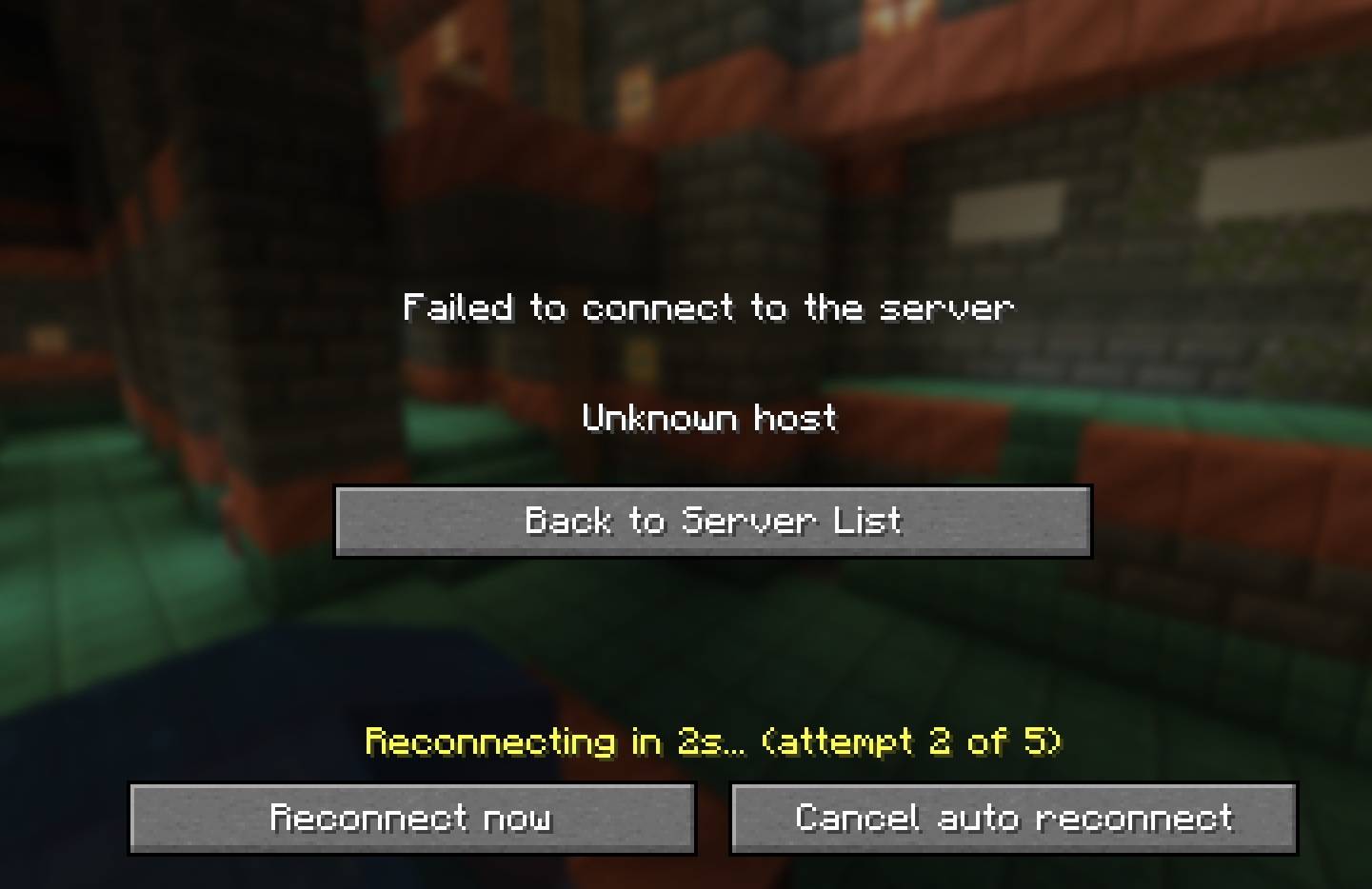
**Clean Auto Reconnect** does that for you. The "Disconnected" screen shows a countdown and tries again on its own.
## Features
- **Automatic retries** - "Reconnecting in 5s... (attempt 1 of 5)" right on the Disconnected screen.
- **Smart waiting** - waits a bit longer after each try (5s, 10s, 15s...), so restarting servers have time to come back.
- **Reconnect now** button - skip the countdown.
- **Cancel** button - stay on the screen and stop retrying.
- **Doesn't nag after a ban** - if the reason mentions a ban or the whitelist, it won't keep retrying.
- **Only when you didn't leave yourself** - quitting with "Disconnect" in the menu never triggers it.
- **Multiplayer only** - never kicks in for singleplayer or Realms.
No key bindings - nothing to set up and no conflicts with other mods.
## Settings
The file `config/cleanautoreconnect.properties` is created on first launch:
- `enabled` - auto reconnect on or off (default: true)
- `maxAttempts` - tries before giving up (default: 5)
- `delaySeconds` - wait before the first try (default: 5, minimum 3)
- `increasingDelay` - wait longer after each try (default: true)
- `skipWhenBanned` - don't retry after a ban/whitelist message (default: true)
## Works on servers
This is a **client-side only** mod. Reconnecting works exactly like pressing "Join Server" yourself, with a sensible wait between tries so it never spams a server. Please respect server rules - if a server asks players not to auto-rejoin after a kick, turn it off with `enabled=false`.
## Honest limitations
- Realms are not supported (they use a different way of joining).
- The ban check looks for the words "banned" or "whitelist" in the message; servers with unusual wording may still get a few retries (up to `maxAttempts`).
- If you were in a modded server's special screen (e.g. a queue mod), the server may handle reconnecting differently.
- The settings are in a config file; there is no in-game settings screen yet.
## Requirements
- Minecraft 1.21 / 1.21.1
- Fabric Loader 0.16 or newer
- Fabric API
- Java 21
## Installation
1. Install Fabric Loader for Minecraft 1.21.1.
2. Put **Fabric API** and **Clean Auto Reconnect** in your `mods` folder.
3. Start the game.
## Modpacks
You are welcome to include this mod in any modpack. No need to ask.
## Also by this author
- **Clean Keystrokes** - WASD, mouse buttons and CPS on screen for PvP and streaming
- **Clean Item Mover** - Shift + drag and scroll to move items faster in any inventory
- **Clean Outline** - custom block outline and crosshair: color, thickness, rainbow
- **Clean Chat Heads** - player faces next to chat messages, optional timestamps
- **Light Level Overlay** - press F7 to see where mobs can spawn
- **Clean Ping Display** - real ping numbers in the Tab list
- **Clean Horse Stats** - a horse's speed, jump and health at a glance
- **Clean Info HUD** - coordinates, facing, biome and FPS in a tidy panel
- **Status Effect Timers** - your potion effects as a clean list with countdowns
- **Death Location Helper** - an on-screen arrow back to where you died
- **Item Pickup Notifier** - see everything you pick up at the side of the screen
- **Smooth Zoom** - hold a key to zoom, scroll to change the zoom level
- **Item Container Preview** - see Shulker Box contents in the tooltip
- **Clean Tooltip Enchants** - color-coded enchantments with (MAX) tags
- **Smart Torch Placer** - place torches with one key, optional Auto-Light for mining
- **Smart Crop Harvest** - right-click ripe crops to harvest and replant
- **Floating Damage Indicators** - damage, heal and crit numbers above mobs
- **Smart Tool Safety** - durability warnings and tool break protection
- **Smart Chest Organizer** - sort buttons and quick deposit for chests
- **Dynamic Armor HUD** - armor, held item and arrow durability on screen
- **Smart Auto-Trash** - quickly trash or auto-throw junk items
- **Dynamic Item Glow** - rarity colors and glow for items
## About the images
The project logo is an illustration created with AI assistance; it is not an in-game screenshot. The screenshots in the gallery are real, unedited in-game captures.
Clean Auto Reconnect Team