Clean Horse Stats
- By
Know a horse's speed, jump height and health before you ride it - just look at it, ride it, or open its inventory. Client side
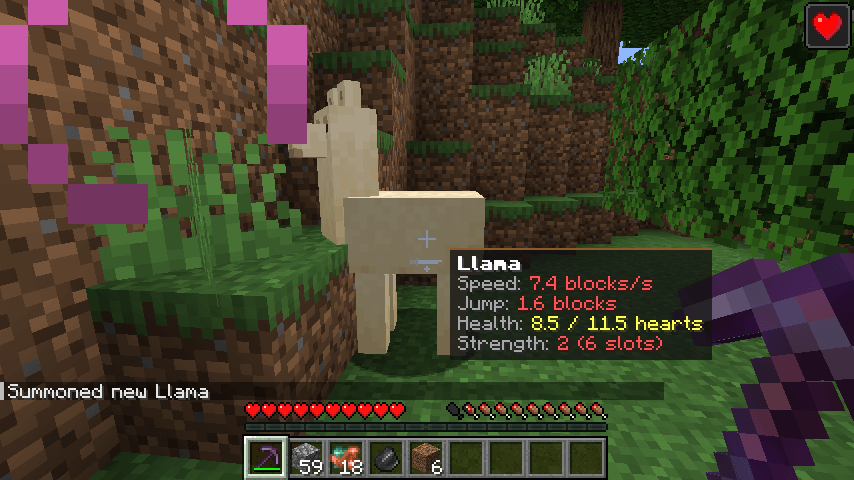
2026-11-10_18.59.21.png
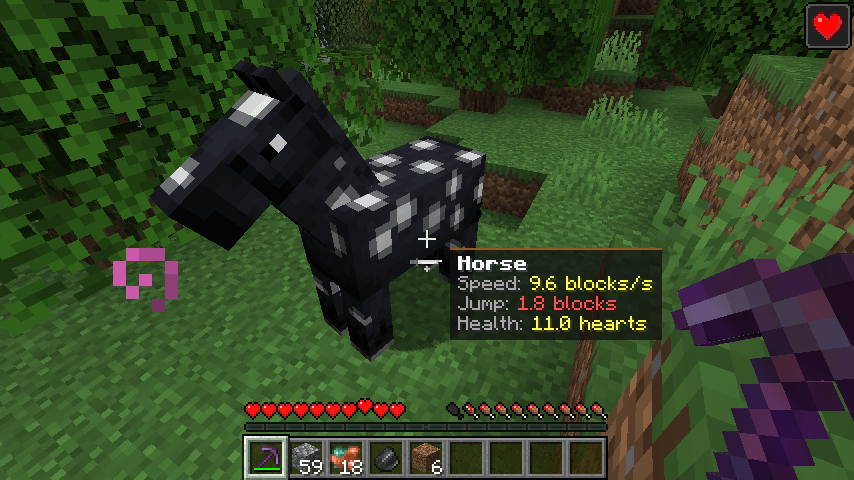
2026-11-10_18.58.38.png
Description
## Is this horse any good?
Every horse looks about the same, but some run twice as fast and jump five blocks high while others can barely clear a fence. In vanilla you have to guess - or test them one by one.
**Clean Horse Stats** shows the real numbers:
- **Speed** in blocks per second
- **Jump height** in blocks
- **Health** in hearts
- **Strength** for llamas (how many chest slots they carry)
Each value is colored: **green** = among the best, **yellow** = average, **red** = below average.
## Features
- **Look at a horse** - a small panel appears next to your crosshair (up to 10 blocks away, not through walls).
- **While riding** - your horse's stats stay visible at the right side of the screen.
- **In the horse inventory** - stats next to the inventory window.
- **All horse types** - horses, donkeys, mules, llamas, trader llamas, skeleton and zombie horses, camels.
- **Baby note** - foals show "Baby - stats grow with it".
- **Breeding helper** - compare parents quickly to breed faster, higher-jumping horses.
No key bindings - nothing to set up and no conflicts with other mods.
## Settings
The file `config/cleanhorsestats.properties` is created on first launch:
- `showWhenLooking` - panel next to the crosshair (default: true)
- `showWhenRiding` - stats while riding (default: true)
- `showInInventory` - stats next to the horse inventory (default: true)
- `lookDistance` - how far away a horse can be (default: 10)
## Works on servers
This is a **client-side only** mod. A horse's speed, jump strength and health are already sent to your game by the server (they control how the horse moves on your screen); this mod only shows them as numbers. Works in singleplayer, on Realms and on any multiplayer server.
## Honest limitations
- Speed and jump height are calculated with the standard formulas; real results can differ slightly with soul sand, potions, armor or terrain.
- Some servers/plugins change horse stats in their own way; the mod shows what the server sends.
- The settings are in a config file; there is no in-game settings screen yet.
## Requirements
- Minecraft 1.21 / 1.21.1
- Fabric Loader 0.16 or newer
- Fabric API
- Java 21
## Installation
1. Install Fabric Loader for Minecraft 1.21.1.
2. Put **Fabric API** and **Clean Horse Stats** in your `mods` folder.
3. Start the game.
## Modpacks
You are welcome to include this mod in any modpack. No need to ask.
## Also by this author
- **Clean Chat Heads** - player faces next to chat messages, optional timestamps
- **Light Level Overlay** - press F7 to see where mobs can spawn
- **Clean Ping Display** - real ping numbers in the Tab list
- **Clean Info HUD** - coordinates, facing, biome and FPS in a tidy panel
- **Status Effect Timers** - your potion effects as a clean list with countdowns
- **Death Location Helper** - an on-screen arrow back to where you died
- **Item Pickup Notifier** - see everything you pick up at the side of the screen
- **Smooth Zoom** - hold a key to zoom, scroll to change the zoom level
- **Item Container Preview** - see Shulker Box contents in the tooltip
- **Clean Tooltip Enchants** - color-coded enchantments with (MAX) tags
- **Smart Torch Placer** - place torches with one key, optional Auto-Light for mining
- **Smart Crop Harvest** - right-click ripe crops to harvest and replant
- **Floating Damage Indicators** - damage, heal and crit numbers above mobs
- **Smart Tool Safety** - durability warnings and tool break protection
- **Smart Chest Organizer** - sort buttons and quick deposit for chests
- **Dynamic Armor HUD** - armor, held item and arrow durability on screen
- **Smart Auto-Trash** - quickly trash or auto-throw junk items
- **Dynamic Item Glow** - rarity colors and glow for items
## About the images
The project logo is an illustration created with AI assistance; it is not an in-game screenshot. The screenshots in the gallery are real, unedited in-game captures.
Clean Horse Stats Team