Blabby World
- By
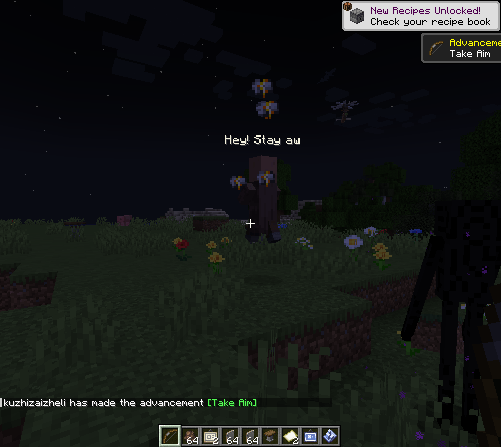
Blabby World gives Minecraft mobs configurable speech and ordered A/B conversations based on combat state, time, weather, and nearby entities.
Blabby World
Blabby World gives Minecraft mobs configurable speech and ordered A/B conversations based on combat state, time, weather, and nearby entities. It is designed for modpack authors and includes an in-game visual editor, so users do not need to type entity IDs or edit JSON manually.
Using the visual editor(Press B)
B
The left panel lists registered mob types and supports searching by display name or entity ID. The right panel contains five pages: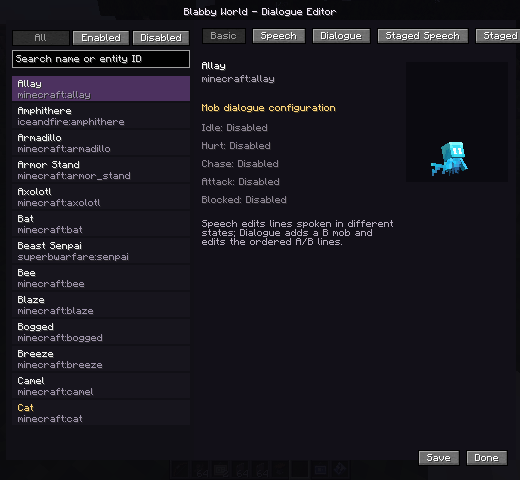
- Basic: shows the selected mob and which speech triggers are configured.
- Speech: edits single-mob lines for idle, hurt, chase, attack, and blocked states.
- Dialogue: adds a B mob for the selected A mob and edits an ordered A/B exchange.
- Staged Speech: edits single-mob lines for day, night, rain, snow, and thunder.
- Staged Dialogue: edits environment-specific A/B conversations.
Adding and editing lines
- Select a mob in the left list.
- Open Speech, Dialogue, Staged Speech, or Staged Dialogue.
- Select a trigger, stage, and B mob where applicable.
- Press
+beside the text editor to add a line. - Select the line and edit it in the input box.
- On dialogue pages, use the A/B control to choose the speaker.
- Right-click a line to set its repeat frequency:
- Fast: eligible again after about 1 second
- Medium: about 5 seconds
- Slow: about 10 seconds
- Press Save. The server writes and reloads the rules immediately.
Use /blabby reload to reload rules from disk.
Triggers
- Idle: the mob has no hostile target.
- Hurt: the mob actually loses health.
- Chase: the mob has a visible attack target.
- Attack: the mob attacks a target.
- Blocked: the mob hates a target but remains unable to see or attack it.
- Dialogue / Meet: A is close to the configured B mob; neither participant is hostile or already in another conversation.
During an A/B conversation, both mobs stop navigation, look at each other, and play the current speaker's ambient sound. After a line finishes, the other speaker starts after a random 0.5–1 second pause.
Text priority
The default trigger order is:
- Hurt
- Attack
- Blocked
- Chase
- A/B dialogue
- Idle
Environment specificity and the rule's own priority are added to this base score. Weather and time are not mutually exclusive: during daytime rain, a rain rule wins when present, while a day rule remains a valid fallback.
Higher-priority text may interrupt lower-priority text. Lower-priority packets cannot replace text that is currently more important.
Built-in localized dialogue
The mod includes a small set of example lines for villagers, zombies, skeletons, creepers, iron golems, wolves, cats, cows, pigs, and sheep, plus a few A/B exchanges.
Built-in text is stored in:
assets/blabby_world/lang/en_us.jsonassets/blabby_world/lang/zh_cn.json
It automatically follows each client's language. Built-in rules are not written to the user's rule file and do not clutter the visual editor.
Set enableDefaultDialogues=false in the common config to disable and hide every built-in line with one option.
Configuration
Common configuration:
enableDefaultDialogues: master switch for built-in localized lines.debugLogging: trigger and packet diagnostics; disabled by default.conversationDistance: distance at which A/B conversations may begin.playMobSounds: plays the speaking mob's ambient sound.
Client configuration:
textDistance: maximum text rendering distance.maxVisibleMobs: maximum number of mobs with visible text.textScale: base text scale; collision-box scaling is still applied.animationSpeed: global typewriter and fade speed.
Custom rules are stored in config/blabby_world/conversations.json. The in-game editor is the recommended way to modify them.
License and contributions
Blabby World is licensed under the GNU General Public License v3.0. Modified distributions must comply with GPL-3.0 source and license requirements.
Read CONTRIBUTING.md before contributing.
github
https://ifdian.net/a/kuzhi
1.1
What's New
- Rebuilt the in-game editor with entity-grouped rules and per-line trigger, phase, speed, and enabled controls.
- Added idle and combat dialogue states; combat dialogue no longer pauses the fight.
- Added NBT, name, and UUID matching plus AI prompt import/export.
- Restored optional DeepSeek runtime lines with request limits, caching, and fallback; disabled by default.
- Added localized default lines for popular mobs including zombies, skeletons, creepers, endermen, witches, pillagers, and piglins.
The original DeepSeek integration was contributed by GitHub user [yiyuyan (commonplace)](https://github.com/yiyuyan) in [PR #1](https://github.com/Ku00115/blabby-world-forge/pull/1). Version 1.1 adapts that work to the new dialogue engine and adds request limits, caching, and failure fallback.
Blabby World Team

Owner