promotional bannermobile promotional banner

BedAlarm

Sleep at any time of day and wake up exactly when you want.
スクリーンショット 2026-05-16 125539.png

スクリーンショット 2026-05-16 125539.png

Description

BedAlarm

Tired of waiting until nightfall just to skip to morning? BedAlarm lets you sleep at any time of day and wake up exactly when you want.

How it works

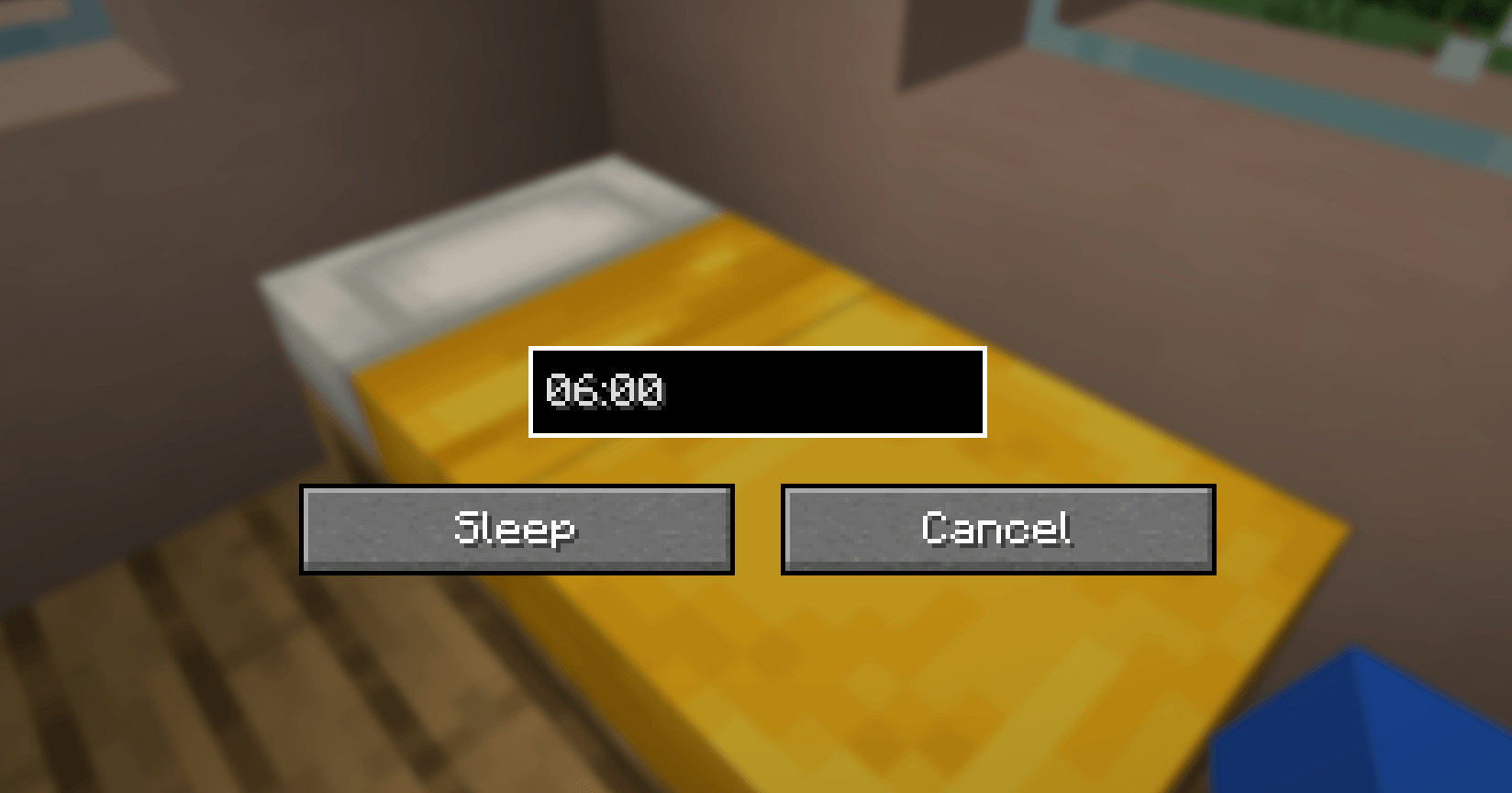
Shift + right-click any bed to open the alarm screen. Enter your desired wake-up time in HH:MM format (e.g. 06:00), click Sleep, and your character will doze off — even in broad daylight. When everyone in the world has gone to sleep, time skips directly to your chosen hour instead of the default sunrise.

Right-clicking a bed normally still works as in vanilla, so you only get the alarm behavior when you want it.

Features

  • Custom wake-up time in 24-hour format (HH:MM)
  • Sleep during the day, at dusk, at midnight — any time
  • Time skips to your specified hour, not just the next morning
  • Remembers your last-entered time within the session for quick re-use
  • Non-intrusive: vanilla bed behavior is preserved for normal right-clicks
  • Lightweight and works in both single-player and multiplayer

Compatibility

BedAlarm only modifies sleep timing behavior and adds a single GUI screen, so it should be compatible with most other mods. Other sleep-related mods that override CanPlayerSleepEvent, CanContinueSleepingEvent, or SleepFinishedTimeEvent may conflict.

Feedback

Found a bug or have a feature request? Please report it on the project page so it can be fixed in the next update.

The BedAlarm Team

profile avatar
  • 2
    Followers
  • 11
    Projects
  • 10.1K
    Downloads

More from NEKOZAME_GaroView all

  • WeatheringBlocks project image

    WeatheringBlocks

    • 962
    • Mods

    Blocks in your world naturally age over time — stone cracks under your feet, cobblestone grows mossy in the rain, and wet sponges dry in the sun.

    • 962
    • April 27, 2026
    • Mods
    • +1
  • EffectTimerHUD project image

    EffectTimerHUD

    • 984
    • Mods

    Displays remaining duration timers below each potion effect icon on your HUD.

    • 984
    • March 23, 2026
    • Mods
  • WeatherForecast project image

    WeatherForecast

    • 275
    • Mods

    Adds a toggleable HUD overlay showing current weather and time until the next weather change.

    • 275
    • March 6, 2026
    • Mods
  • DayAlert project image

    DayAlert

    • 362
    • Mods

    Displays the current day number on your screen with a sound notification whenever a new day begins or you wake up from bed.

    • 362
    • March 5, 2026
    • Mods
  • WeatheringBlocks project image

    WeatheringBlocks

    • 962
    • Mods

    Blocks in your world naturally age over time — stone cracks under your feet, cobblestone grows mossy in the rain, and wet sponges dry in the sun.

    • 962
    • April 27, 2026
    • Mods
    • +1
  • EffectTimerHUD project image

    EffectTimerHUD

    • 984
    • Mods

    Displays remaining duration timers below each potion effect icon on your HUD.

    • 984
    • March 23, 2026
    • Mods
  • WeatherForecast project image

    WeatherForecast

    • 275
    • Mods

    Adds a toggleable HUD overlay showing current weather and time until the next weather change.

    • 275
    • March 6, 2026
    • Mods
  • DayAlert project image

    DayAlert

    • 362
    • Mods

    Displays the current day number on your screen with a sound notification whenever a new day begins or you wake up from bed.

    • 362
    • March 5, 2026
    • Mods