Auto Run
- By
This mod adds a movement toggle and automates player movements towards chosen waypoints.
🏃 Auto Walk & Smart Pathing
Effortless navigation and smart obstacle avoidance
Auto Walk is the ultimate navigation utility for modern Minecraft. Whether you need a simple hands-free forward lock or a sophisticated pathfinding engine that can navigate ravines and forests, this mod has you covered with a sleek, vanilla-style interface.
✨ Features
Toggleable Auto-Move
Press K to lock your movement. If you are walking, it keeps walking; if you are sprinting, it maintains that sprint—even if you bump into blocks. It respects hunger rules, automatically downgrading to a walk if you get too hungry.
Smart Pathfinding
The advanced pathing engine calculates the safest route to your destination. It automatically avoids hazards like lava, fire, and cacti, while intelligently navigating around steep drops and hostile mobs.
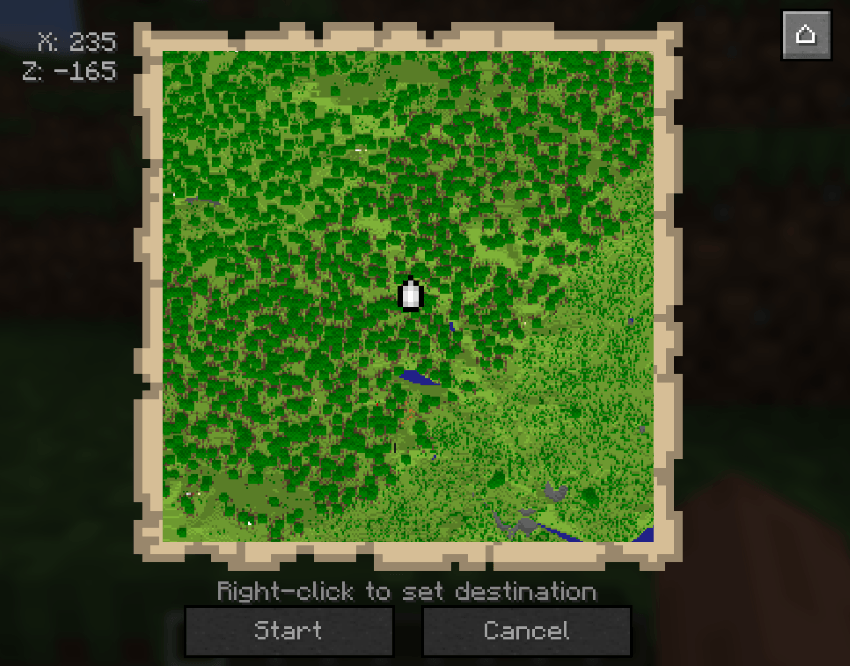
Interactive World Map
Press M to open a beautiful, full-screen map. Right-click anywhere to set a waypoint, and the mod will visualize a cyan pathing line directly to your target. Features smooth panning, zooming, and a "Center on Player" function.
Obstacle & Hazard Protection
Never fall into a ravine again. The mod constantly scans 2 blocks ahead; if it detects a dangerous drop or a wall you can't fit through, it automatically avoids it.
Vanilla Navigation Icon
Uses the exact pixel-perfect 8x8 player marker from vanilla Minecraft on the map, including proper rotation to match your player's actual facing direction.
Smooth Camera Transitions
Smart-pathing uses a custom easing algorithm for camera rotation. No more jagged, robotic snapping—just smooth, cinematic movement toward your next waypoint.
Input Override
Once activated, the mod ignores accidental mouse bumps or key presses until you press K again to regain manual control.
🎮 How to Use
- Toggle basic move — Press K while moving to lock your current speed.
- Open the map — Press M to view the surrounding terrain.
- Set a destination — Right-click any point on the map and click Start.
- Manual Override — Press K at any time to immediately cancel auto-movement.
📦 Installation
- Install NeoForge or Fabric for Minecraft 26.1.2
- Drop the jar into your
modsfolder - Launch the game — check your controls menu to customize keybinds
🔧 Compatibility
Minecraft: 26.1.2
Loaders: NeoForge & Fabric
Side: Client-side focused (Safe for Vanilla Servers)
Multiplayer: ✅ Fully supported
❓ FAQ
Does this work on servers?
Yes! Since it mimics player inputs, it works on any server. However, always check server rules regarding "Auto-Run" or "Pathfinding" mods.
Will it jump for me?
Yes, the mod includes an auto-jump feature that triggers when it detects a 1-block obstacle in your direct path.
Can I use it with other map mods?
Yes, the keybinds are configurable to avoid conflicts with Xaero's, JourneyMap, or other utilities.
📜 License
MIT — Source available on GitHub.
Made with ❤️ by warwa.
Auto Run Team

Owner