Ascension Parties : RPG teams
- By
Create persistent parties, protect teammates from friendly fire, track their health, and share Ascension Paths kill rewards according to actual damage dealt.
Ascension Parties brings persistent groups, friendly fire protection, a compact party menu to Minecraft 1.21.1.
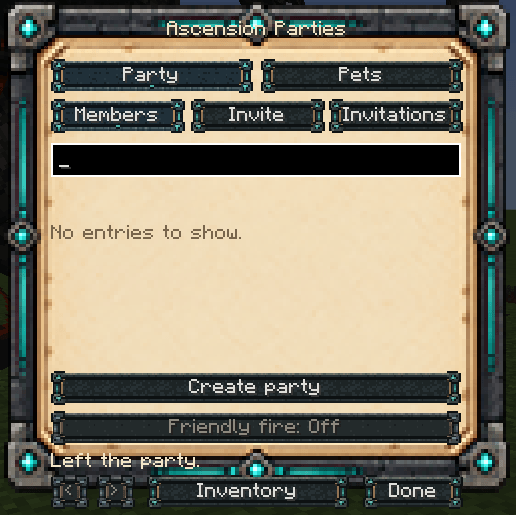
Invite your friends, manage your group, and keep track of everyone's health while you explore and fight together. Add Ascension Paths to share its combat kill rewards according to each member's contribution, or use Parties on its own for team management and protection.
Build Your Party
- Create a named party and invite online players.
- Accept or decline invitations from the party menu.
- Remove members, leave the group, or transfer leadership.
- Keep your party across dimensions, world saves, and server restarts.
- Manage offline members without needing everyone online at once.
The default party size is 5 players, including the leader. Server owners can adjust the limit from two to 64 players and configure invitation expiry.
Fight Together Safely
Friendly fire is disabled by default. Party members are protected from supported attacks attributed to their teammates, including direct hits, projectiles, and attacks from owned creatures.
The leader can enable friendly fire when the server allows it. Harmful effects from supported damage sources are blocked while beneficial effects remain available. Third-party abilities that do not identify their attacker may need additional compatibility support.
With Ascension Pets, pet owners can manage incoming owner and teammate damage separately for each pet. These permissions belong to the pet owner.
Share Rewards According to Contribution
With Ascension Paths, Parties distributes the base Ascension kill reward in proportion to the actual health damage dealt by eligible party members.
For example, 80% of the party's damage earns 80% of the base kill reward, while the remaining 20% goes to the member who contributed it. Each recipient's own Paths XP modifiers still apply.
- Armor and absorption are accounted for.
- Overkill cannot inflate a member's contribution.
- Members who dealt no damage receive no share.
- Moving away or changing dimensions does not erase a recorded contribution.
- Leaving or being removed from the party invalidates that member's earlier contribution.
- Rewards require an eligible living, online member; there is no offline reward queue.
This feature shares Ascension Paths kill XP. Vanilla experience orbs and personal XP earned from mining, sprinting, eating, mana use, or damage events remain separate.
Keep Your Team in View
The transparent party HUD displays member names, leader and offline status, red health bars, and current/max health.
When Paths is installed, actual awarded XP appears as floating text above the relevant member's name. Level-up and stat-point notifications show your team's progress. Large parties are automatically paginated.
Compact Controls
Open the party menu with P, /party, or the Parties logo in the collapsible Ascension inventory menu. The menu provides invitations, member management, leadership transfer, and friendly fire controls, with navigation back to your inventory.
The interface supports English and Turkish. Server settings control party size, invitation duration, protection, leader permissions, and XP sharing.
Requirements and Integrations
- Minecraft 1.21.1
- NeoForge 21.1.248+, using a compatible 21.1.x build
- Java 21
- Install the mod on both client and server.
Ascension Paths is optional. If installed, version 1.37.0 or newer is required. Without Paths, party management, friendly fire protection, and the health HUD still work.
Ascension Pets is optional. It adds the pet menu connection and individual pet damage permissions. Use the current Suite releases together for the shared inventory interface.
License: All Rights Reserved.
Ascension Parties : RPG teams Team