Agent Bridge
- By
A modular in-game AI assistant. Connect Codex or Claude, then add reports, navigation and machine tools.
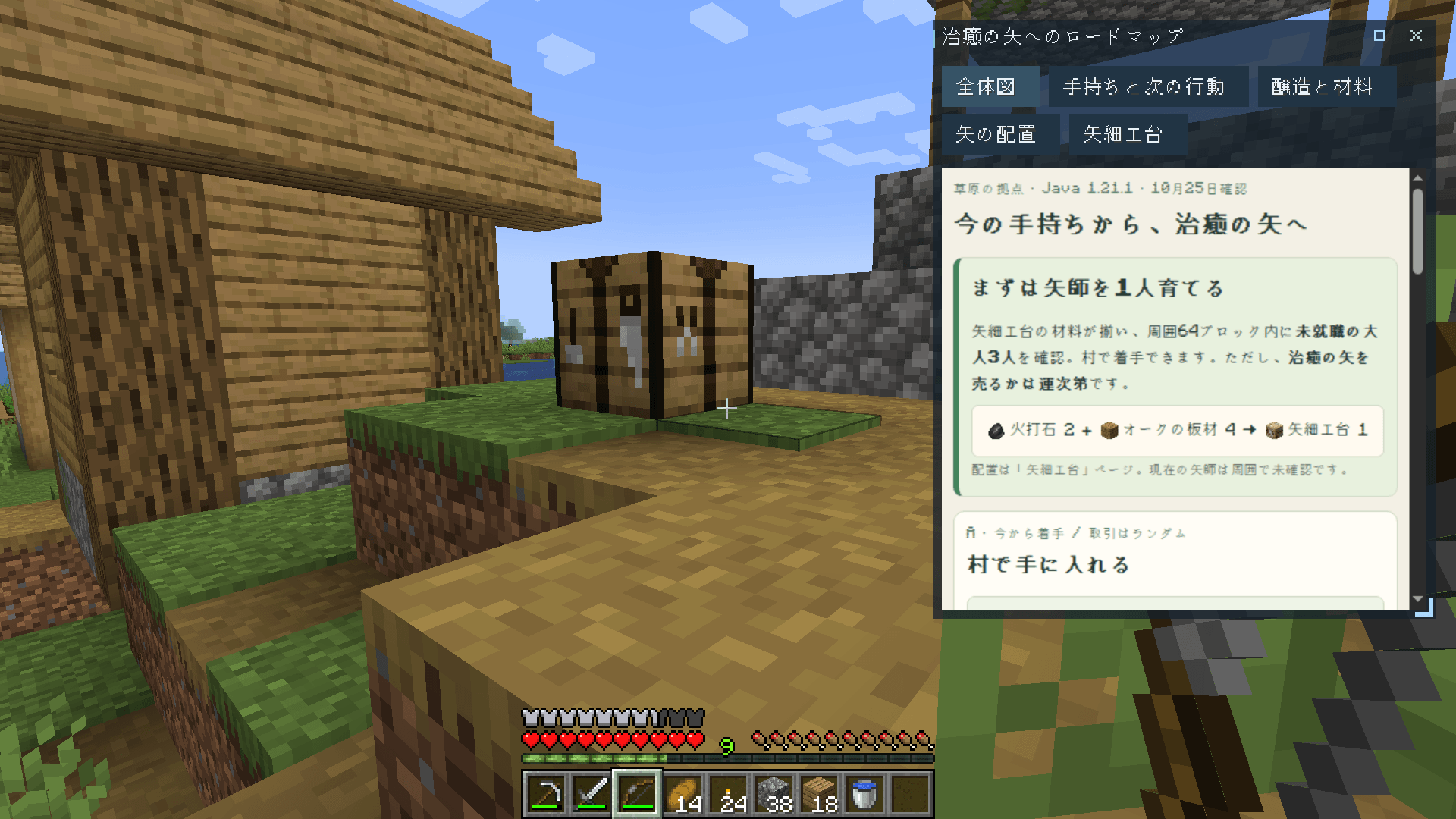
A real AI report uses this player's materials to plan how to obtain Arrows of Healing. Keep it open beside the village workbench. 実AIが手持ちの材料を確認し、治癒の矢の入手計画を作成。村の作業台で準備しながら、HUDで確認できます。
Description
An AI assistant in your Minecraft world
Agent Bridge is the base for an in-game AI assistant. Add Codex or Claude to connect your AI, then choose extensions for reports, navigation and machine readings.
日本語の説明はページ後半にあります。
Client-side · AI connection extension required. The mod is free; AI service plans and API usage are separate.
Included in the base mod
- Ask and research. Chat with your connected AI using inventory and nearby world information. When permitted, the AI can also use local files and the internet.
- Get notified. Ask to be told when a matching block or entity is found nearby.
Start with a connection
Agent Bridge is modular. The base mod alone cannot connect to an AI. Add Agent Bridge: Codex or Agent Bridge: Claude to get started.
Recommended extensions
- Agent Bridge: Reports: keep plans, images and item references in movable HUD windows and an inbox, with 3D views when useful. Requires Rinku.
- Agent Bridge: Navigation: ask for routes to places or moving entities, including known portal and teleport connections.
- Agent Bridge: Industry: let the AI read items, fluids and energy from supported equipment in local worlds.
The following screenshots show Reports and Navigation in use. You move and interact yourself.
Reports: an AI-generated plan for Arrows of Healing beside the workbench. / Reports:作業台で、AIがまとめた治癒の矢の入手計画を確認。
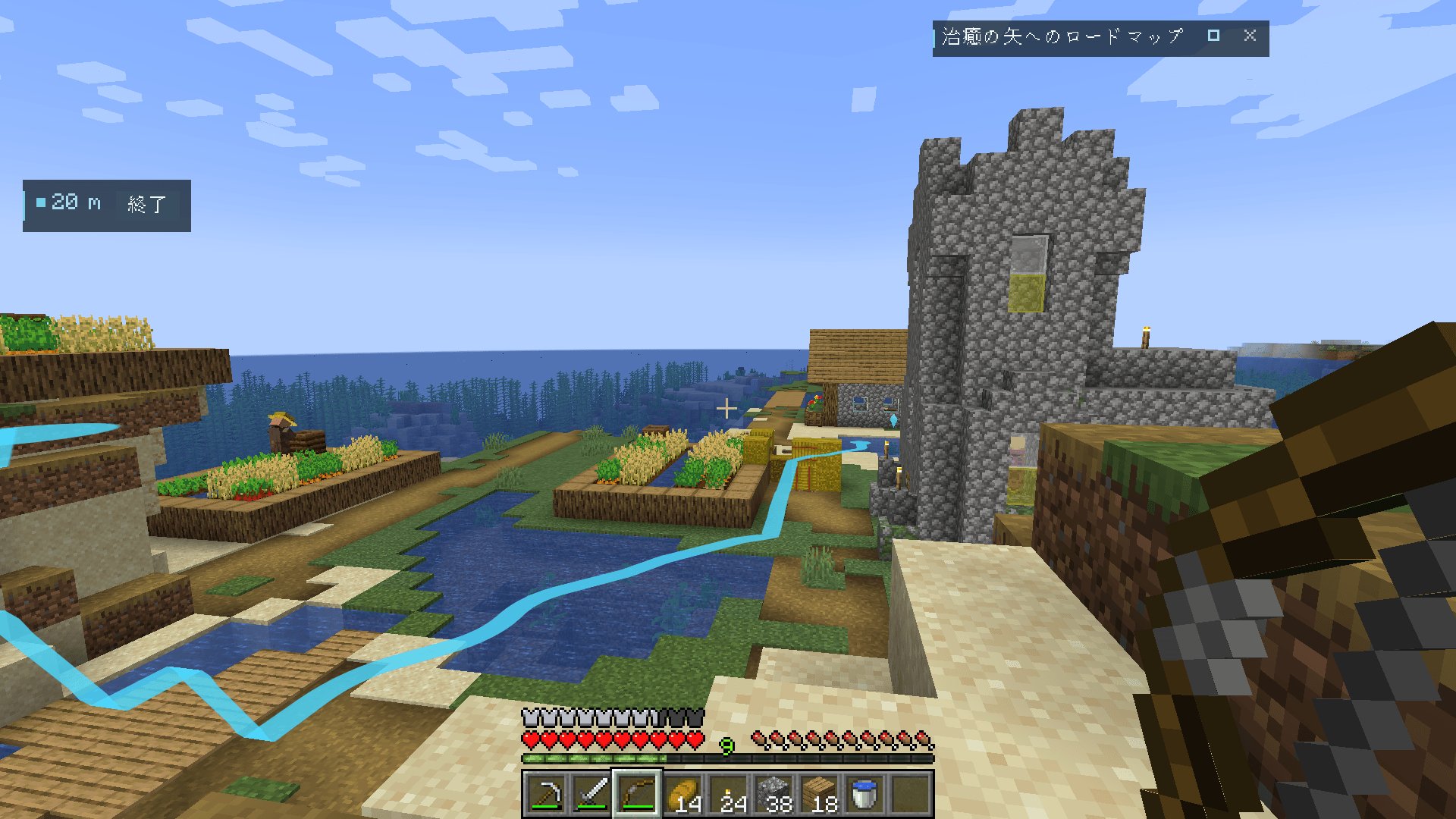
Navigation: a route to the brewing stand. / Navigation:醸造台のある建物へ案内。
An experimental mod for adventurous players who want to make bold use of AI.
AI use and responsibility
You use AI features and external AI services entirely at your own risk. This mod is provided as is, without guarantees about AI accuracy, safety, outcomes, token consumption, or charges.
The author accepts no liability for unexpected or excessive token consumption, API usage or charges; disclosure of personal or confidential information; loss or corruption of files, worlds or save data; system damage or disruption; or other losses, including those arising from bugs or malfunctions in this mod or from agent behavior.
If you wish to avoid problems associated with AI behavior, do not use this mod.
Connect and ask
- Install an AI connection extension and prepare its account or API key.
- Enter a world and press G to open setup. Choose the connection and review its permissions.
- Press G and type your request.
Example requests:
- “How many more diamonds do I need for a full set of diamond armor?”
- “Guide me to the surface.” (Navigation)
- “Make a roadmap for getting Arrows of Healing.” (Reports)
Default controls; bindings can be changed in Minecraft's controls settings.
| Control | Action |
|---|---|
| G | First-time setup, then type a request or a free-text answer |
| Shift + G | Use the cursor on HUD windows; press again in mouse mode to open settings |
| H | Open the report inbox (Reports required) |
Answer questions by clicking the choices or text field in mouse mode. HUD controls also work while Minecraft chat is open.
HUD layout is available from settings; its dedicated shortcut is unassigned by default.
Use Codex or Claude Code for the standard agent harness. Claude is a beta integration. The Codex extension also includes a direct OpenAI API mode, which is not recommended because it lacks local file analysis, shell execution and web search. Available models, allowances and pricing follow your provider agreement. Agent Bridge does not switch connections automatically.
Permissions and data
The AI client's selected or inherited permissions apply, including local file access and command execution where allowed. Being an in-game assistant does not restrict its access to your computer. Review the connection and permissions in settings before your first request.
Your requests, relevant game information, tool results, and content the agent reads may be sent to the selected AI provider. That provider's data handling and account settings apply.
Minecraft command execution is off by default. Cheat mode enables command tools within your existing server permissions; each execution requires confirmation unless you enable “always allow”. This setting is separate from the AI client's permissions.
Compatibility and limitations
The base mod requires Fabric API on Fabric. Reports requires Rinku; the base mod itself does not.
The server does not need Agent Bridge. On remote servers, game tools can only use information available to your client. With Navigation, nearby target outlines can be visible through blocks; check the server's rules before using navigation, search, or tracking.
AI answers and routes can be wrong or incomplete. Modded teleport routes need known connections and instructions; travel mods are not all detected automatically. Back up important data before updating.
Feedback and credits
Report issues in the CurseForge comments with your mod, Minecraft and loader versions, OS, and steps to reproduce. /ai diagnostics exports a support report; check it for sensitive information before sharing.
Agent Bridge is developed with extensive AI assistance, with humans responsible for the concept, design, review, and playtesting. The screenshots show an actual AI-generated plan and in-game navigation in a village, using a prepared survival inventory. Scenes were arranged for photography; no UI or AI results were composited.
Not an official Minecraft product. Not approved by or associated with Mojang or Microsoft. Agent Bridge is also not an official OpenAI or Anthropic product.
Minecraftの世界で使うAIアシスタント
Agent Bridgeは、MinecraftでAIアシスタントを使うための本体MODです。CodexまたはClaudeでAIに接続し、資料・経路案内・設備の情報取得は、用途に合う拡張を追加して使います。
クライアント専用・AI接続用の拡張が必要です。 MODは無料ですが、AIサービスのプラン料金やAPI利用料金は別です。
本体の機能
- 質問・調べもの。 接続したAIがインベントリや周囲の状況を踏まえて答えます。権限と接続方式に応じて、ゲーム外のファイルやインターネットも使えます。
- 見つけたら通知。 条件に合うブロックやエンティティが近くで見つかったときに知らせます。
まずはAI接続を選ぶ
Agent Bridgeは拡張を組み合わせて使うMODです。本体だけではAIに接続できません。 Agent Bridge: CodexまたはAgent Bridge: Claudeを組み合わせて使います。
おすすめの拡張
- Agent Bridge: Reports:計画・画像・アイテム参照を、動かせるHUDウィンドウと一覧に保存。必要に応じて立体表示も使えます。Rinkuが必要です。
- Agent Bridge: Navigation:場所や移動中のエンティティへの経路を依頼。既知のポータルやテレポートも使えます。
- Agent Bridge: Industry:ローカルワールドの対応設備から、アイテム・液体・エネルギーをAIが取得できます。
上の画像はReportsとNavigationの利用例です。作業台で治癒の矢の入手計画を確認し、醸造台のある建物へ案内しています。移動や操作はプレイヤーが行います。
AIを大胆に使いたいチャレンジャー向けの実験的なMODです。
AIの利用と責任について
AI機能と外部AIサービスは、すべて利用者の自己責任で利用してください。 本MODは現状有姿で提供し、AIの正確性・安全性・動作結果や、トークン消費量・利用料金を保証しません。
作者は、本MODの不具合・誤動作やエージェントの挙動に起因するものを含め、予期しない、または過剰なトークン消費・API利用・料金の発生、個人情報・機密情報の漏洩、ファイル・ワールド・セーブデータの消失や破損、システムの破損・障害、その他の損害について一切責任を負いません。
AIの動作に関連したトラブルを避けたい場合、利用を避けてください。
使い方
- AI接続の拡張を導入し、そのアカウントやAPIキーを準備します。
- ワールドに入り、G で初回セットアップを開き、接続先と権限を確認します。
- G を押し、依頼を入力します。
依頼の例:
- 「ダイヤ装備一式つくるのにダイヤは後何個必要?」
- 「地上まで案内して」(Navigation)
- 「治癒の矢を手に入れるまでのロードマップを作って」(Reports)
初期のキー割当です。Minecraftの操作設定から変更できます。
| 操作 | 機能 |
|---|---|
| G | 初回セットアップ。接続後は依頼や自由回答を入力 |
| Shift + G | HUDをカーソルで操作。マウスモード中にもう一度押すと設定画面 |
| H | レポート一覧を開く(Reports導入時) |
質問には、マウスモードで選択肢や入力欄をクリックして回答できます。Minecraftのチャット入力中もHUDを操作できます。
HUD配置は設定画面から開けます。配置専用のショートカットは初期状態では未割当です。
標準ハーネスを使えるCodexまたはClaude Code接続をおすすめします。ClaudeはBeta版です。 Codex拡張に含まれるOpenAI APIへの直接接続は、ローカルファイル解析・シェル実行・Web検索を利用できないため非推奨です。利用できるモデル・利用枠・料金はプロバイダーの契約条件に従います。接続方式を自動で切り替えることはありません。
権限とデータ
AIクライアントで選択した権限、または引き継いだ権限が適用されます。 許可されていれば、ローカルファイルへのアクセスやコマンド実行も可能です。ゲーム内アシスタントという役割は、コンピューターへのアクセスを制限するものではありません。最初の依頼を送る前に、設定画面で接続と権限を確認してください。
依頼、関連するゲーム情報、ツールの結果、エージェントが読み取った内容は、選択したAIプロバイダーへ送信される場合があります。データの扱いには、そのプロバイダーの規定やアカウント設定が適用されます。
Minecraftのコマンド実行は標準でオフです。チートモードをオンにすると、サーバーで与えられた権限の範囲でコマンドを使えます。「常に許可する」をオンにしない限り、毎回実行を確認します。AIクライアントの権限とは別の設定です。
対応環境と制約
本体のFabric版はFabric APIが必要です。ReportsにはRinkuが必要で、本体だけなら不要です。
サーバー側にAgent Bridgeを入れる必要はありません。リモートサーバーでは、そのクライアントが取得できる情報だけをゲーム内ツールで利用できます。Navigationには近くの目標の輪郭がブロック越しに見える機能があるため、ナビ・検索・追跡の利用時はサーバーのルールを確認してください。
AIの回答や経路は、間違っていたり不完全だったりする場合があります。MODの転送経路には既知の接続先と操作手順が必要で、すべての移動MODを自動検出するわけではありません。更新前に大切なデータをバックアップしてください。
フィードバック・開発について
不具合は、MOD・Minecraft・ローダーのバージョン、OS、再現手順を添えてCurseForgeのコメント欄へお願いします。/ai diagnostics でサポート用の情報を書き出せます。共有前に機密情報が含まれていないか確認してください。
Agent Bridgeは、人がコンセプトを考え、設計・レビュー・プレイ試験を行いながら、AIを広く活用して開発しています。画像は、撮影用にサバイバルの持ち物と構図を準備した村で、実AIが作った計画とゲーム内の案内を表示した実画面です。UIやAIの成果を画像に合成していません。
Minecraftの公式製品ではありません。MojangまたはMicrosoftの承認・提携によるものではありません。OpenAIまたはAnthropicの公式製品でもありません。
Agent Bridge Team