Keep the AI's plans and explanations beside your Minecraft world. Reports adds an inbox and compact HUD windows to Agent Bridge.
日本語の説明はページ後半にあります。
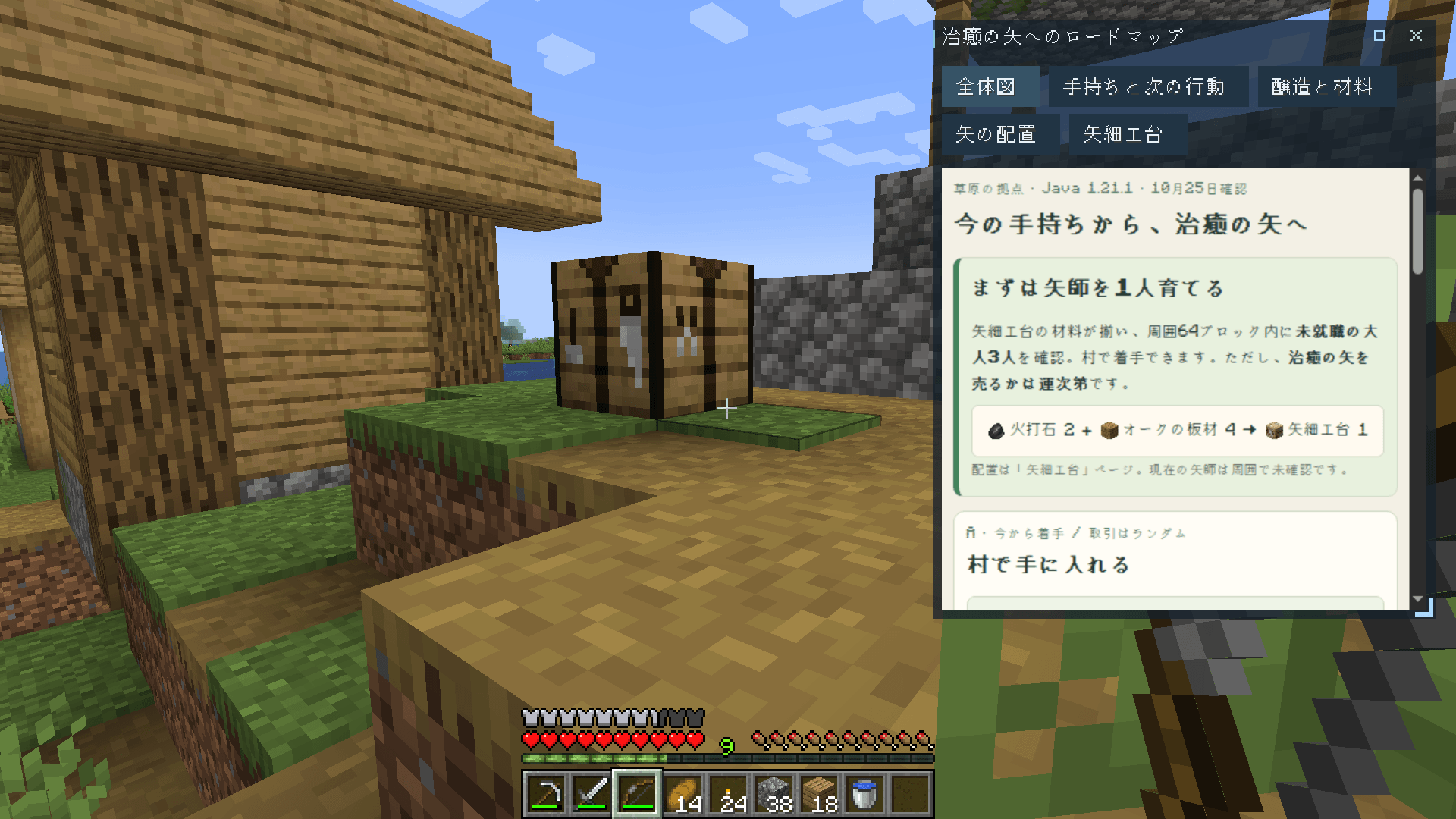
A plan for Arrows of Healing, beside the workbench. / 作業台で、治癒の矢の入手計画を確認。
What it adds
- Small until you need it. A report arrives as a title on the HUD, with a notification sound. Click to expand it or open the full view.
- Revisit and revise. Keep reports in the inbox, pin them to the HUD, or ask the AI to update an existing report.
- See the details. Read formatted text, images and item references; inspect 3D builds, entities and recipe layouts when the AI provides them.
Use it
Requires Agent Bridge and Rinku. To create reports with AI, also use Agent Bridge: Codex or Agent Bridge: Claude.
Ask with G, for example: “Make a roadmap for getting Arrows of Healing.” Press H to open the inbox, or Shift + G to use the cursor on HUD windows.
Closing a HUD window keeps its report in the inbox. The trash button deletes the report. Reports and pinned windows are saved for each world.
Keep in mind
AI-generated instructions can be wrong. Reports shows what the agent creates; it does not guarantee recipes or automatically design a build. AI use and the responsibility terms on the Agent Bridge page apply.
The photograph uses a prepared survival scene and an actual AI-generated report. No UI or AI results were composited.
Works well with
Pair it with Agent Bridge: Navigation and Navi to follow a route while keeping your plan open. Agent Bridge: Industry can supply equipment readings for factory reports.
Agent Bridge: Reports
AIが作った計画や説明を、Minecraftの画面で見返せる拡張です。Agent Bridgeにレポート一覧と小さなHUDウィンドウを追加します。
上の画像は、村の作業台で治癒の矢の入手計画を確認している場面です。
追加する機能
- 普段は小さく、見たいときに開く。 通知音とともに、HUDへタイトルだけで届きます。クリックで展開したり、全画面で読んだりできます。
- 読み返す・書き直す。 一覧に保存してHUDへPin。AIに同じレポートの改訂も頼めます。
- 見て確認する。 整えられた文章、画像、アイテム参照を表示。AIが用意した立体構造・エンティティ・レシピ配置も確認できます。
使い方
Agent BridgeとRinkuが必要です。AIにレポートを作ってもらうには、Agent Bridge: CodexまたはAgent Bridge: Claudeも使います。
G で「治癒の矢を手に入れるまでのロードマップを作って」などと依頼。H で一覧を開き、Shift + G でHUDウィンドウをカーソル操作できます。
HUDで閉じても、レポートは一覧に残ります。ゴミ箱ボタンは永久削除です。レポートとPinしたウィンドウはワールドごとに保存します。
利用上の注意
AIの説明が間違っている場合があります。レポートはエージェントが作成した内容を表示するもので、レシピの正しさや建築の自動設計を保証しません。AIの利用には、Agent Bridgeのページにある免責の説明も適用されます。
画像は、撮影用にサバイバルの持ち物と構図を準備し、実AIが作ったレポートを表示した実画面です。UIやAIの成果を合成していません。
組み合わせるなら
Agent Bridge: NavigationとNaviを組み合わせると、計画を開いたまま目的地へ向かえます。工場の資料には、設備の数値を取得するAgent Bridge: Industryも役立ちます。
Agent Bridge: Reports Team