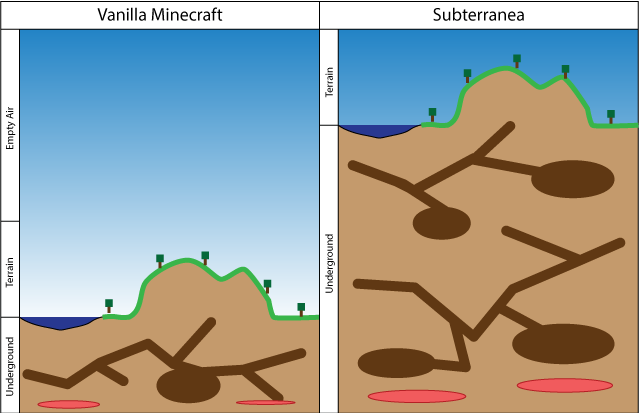
Instead of 64 layers below ground, you now get 192.
Description
With the death of Bukkit, I will no longer be supporting this plugin. If it still works for you, fantastic. If not, you are on your own. All the source will remain available on GitHub. Farewell, -DeltaHat
Overview
Subterranea is a modification of the Vanilla terrain generator that switches the above and below ground spaces so your world has 192 layers below sea level and 64 layers above. Great for Mole Man worlds.
The Subterranea world generator supports a number of options. Options are passed into the generator using the
[:options] string in the above examples. Always put a colon between the word Subterranea and the options string.
-underground-biomes: (true or false, default true) Enables or disables underground bionme creation
-silverfish: (true or false, default true) Enables or disables silverfish colony creation hidden in the stone.
-giant-caves: (default sxz=500,sy=175,cutoff=65,miny=40,maxy=160) Enables or disables the Giant Caves plugin. An optional configuration string can be passed into this option to configure the Giant Caves generator. See the Giant Caves documentation for a description of each setting and how it affects cave creation. You need to install Giant Caves for this to work!
-ore-multiplier: (default 3) Sets how many passes the ore populator should make over each chunk. A value of three keeps about the same or density as vanilla. A value above ten may significantly slow down chunk creation.
Using Subterranea with Giant Caves
Subterranea is compatible with Giant Caves. To add Giant Caves to a Subterranea world, just add -giant-caves to the [:options] string.
Using Subterranea with Multiverse
To use Subterranea with Multiverse, use the following sequence of commands
mv create world_name NORMAL -g "Subterranea[:options]"
mv tp world_name
Notes:
[:options] can be omitted to use the default settings. See below for details.
If you plan on using Subterranea in conjunction with Giant Caves _and_ Multiverse, delete the contents of the Giant Caves config.yml file.