✿ Bloom Bounty
A little charm. Every rivalry.
Every target has a price. Bloom Bounty brings player bounties, automatic cash rewards, and a clean pink menu to your server.
 Choose a target. Set the reward. No resource pack required.
 A name. A price. A reason to hunt.
Place a bounty with /bounty add <player> <amount>, review your contribution, and confirm.
 Put a reward on another player’s head.
 Add to an existing bounty and raise the stakes.
 Check the target and amount before spending.
 Changed your mind? Cancel before confirming.
Contributions combine into one reward. The more players contribute, the more valuable the target becomes.
 Win the fight. Claim the reward.
Defeat a player with an active bounty to receive their reward automatically.
 Rewards go directly to your economy balance.
- ✿ No manual claim command required.
 Players cannot collect their own bounty by killing themselves.
 Active bounties remain saved across server restarts.
A little rivalry can make every encounter more exciting.
 Your next target, at a glance.
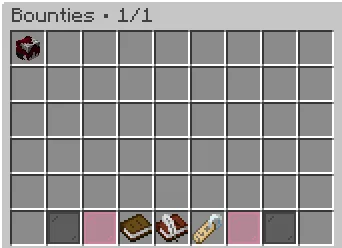
Open /bounty to browse active rewards in a simple inventory menu.
 View targets and their bounty amounts.
 Sort by reward or player name.
 Filter the list to narrow your search.
 Search for a specific player.
- Browse multiple pages as the bounty board grows.
Sorting and filtering options appear together, with the active selection clearly marked.
 Your server. Your rules.
Give your bounty system the Bloom look—or adjust it to fit your community.
- ✿ Customize messages, menu titles, and descriptions.
- ✿ Adjust theme colors and gentle sound effects.
- ✿ Configure contribution limits and cooldowns.
- ✿ Choose between English and Turkish language files.
Soft pink details, readable menus, and a gentle amethyst chime bring everything together.
Connected to your economy
Bounties use your server’s existing money through Vault and a compatible economy provider.
The contributor funds the bounty. The successful hunter receives the reward.
One familiar balance, from placing a bounty to collecting it.
Simple commands
| Command |
Description |
| /bounty |
Open the bounty browser. |
| /bounties |
Alias for the bounty browser. |
| /bounty add <player> <amount> |
Place or contribute to a bounty. |
| /bounty view <player> |
View a player’s current bounty. |
| /bounty help |
Show command help. |
| /bloombounty reload |
Reload configuration and language files. |
 A little control. The right access.
| Permission |
Description |
| bloombounty.use |
Access the bounty browser and player help. |
| bloombounty.add |
Place and contribute to bounties. |
| bloombounty.admin.reload |
Reload plugin settings. |
 What you’ll need
- A supported Minecraft server.
- Vault.
- A compatible economy provider.
Check the release’s compatibility information for supported Minecraft versions and server platforms. Folia requires a compatible economy setup.
✿ A little rivalry. A rewarding victory.
Let every hunt Bloom.