Visual Furnaces – See Smelting Progress in Real Time
- By
See live Furnace, Blast Furnace, and Smoker information with customizable action-bar displays, floating text, progress visuals, and an in-game settings UI.
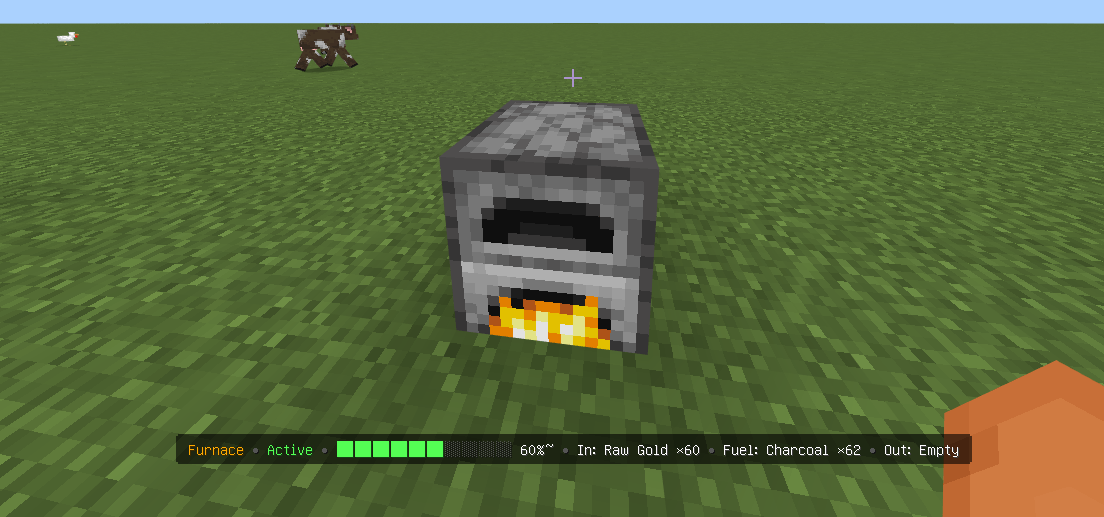
image_2026-09-27_180833557.png
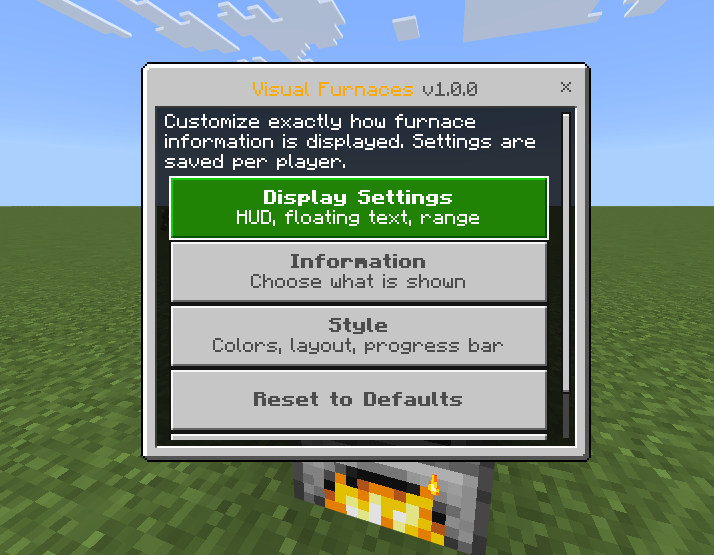
image_2026-09-27_180925145.png
Description
Visual Furnaces
Visual Furnaces is a lightweight Minecraft Bedrock addon by Nexium Labs that makes Furnaces, Blast Furnaces, and Smokers easier to monitor without constantly opening their inventories.
Look directly at a supported furnace to see live information through a customizable Action Bar, floating text, or both. Every player can configure their own display through an in-game settings UI.
Features
- Supports Furnaces, Blast Furnaces, and Smokers.
- Optional Action Bar display.
- Optional floating text above the furnace.
- Displays the current input, fuel, and output slots.
- Displays exact stack quantities directly from the furnace inventory.
- Shows whether the furnace is Active or Idle.
- Optional estimated smelting progress bar.
- Adjustable viewing distance from 3 to 16 blocks.
- Adjustable refresh interval for performance or responsiveness.
- Configurable progress bar size.
- Compact or detailed Action Bar layouts.
- Toggle Minecraft formatting colors on or off.
- Optional furnace coordinates.
- Option to hide inactive furnaces.
- Settings are saved per player and persist with the world.
- Multiplayer and Realm-friendly design.
In-Game Configuration
Use:
/vf:settings
The command opens the Visual Furnaces settings menu.
Display Settings
Configure:
- Enable or disable Visual Furnaces.
- Action Bar display.
- Floating text display.
- Whether inactive furnaces are shown.
- Maximum viewing distance.
- Update interval.
Information Settings
Choose exactly what is displayed:
- Furnace type.
- Active / Idle status.
- Estimated smelting progress.
- Input item.
- Fuel item.
- Output item.
- Item stack counts.
- Block coordinates.
Style Settings
Customize:
- Minecraft text colors.
- Compact Action Bar mode.
- Progress bar length.
Installation
Singleplayer / Local Worlds
- Download
Visual-Furnaces-v1.0.0.mcaddon. - Open the file with Minecraft Bedrock Edition.
- Wait for both packs to finish importing.
- Edit or create your world.
- Open Behavior Packs and activate Visual Furnaces.
- The required Visual Furnaces resource pack is included and linked as a dependency.
- Enter the world.
- Look directly at a Furnace, Blast Furnace, or Smoker.
- Use
/vf:settingsto customize the addon.
Existing Worlds
The addon can be added to an existing world. Make a world backup before installing or updating any behavior pack.
Bedrock Dedicated Server
Install both included packs in the server's behavior_packs and resource_packs folders, then add their pack UUID/version entries to the world's behavior/resource pack JSON files as you normally would for Bedrock addons.
Minecraft Version
Visual Furnaces v1.0.0 is built for Minecraft Bedrock 26.50 and newer, including the current 26.52 stable release.
The addon uses:
@minecraft/server2.10.0@minecraft/server-ui2.2.0
Experimental Features / Beta APIs
No Beta APIs are required.
You do not need to enable:
- Beta APIs
- Holiday Creator Features
- Upcoming Creator Features
- Experimental Creator Camera Features
Visual Furnaces intentionally uses stable Script API versions for the production release.
The /vf:settings command is registered with cheatsRequired: false, so the addon itself does not require cheats simply to open its configuration menu.
How the Progress Bar Works
Minecraft Bedrock's stable Script API provides access to the furnace's real inventory and lets the addon determine whether the furnace is using its lit block variant. However, the API does not currently expose the exact internal vanilla cook-progress value.
Because of that, Visual Furnaces displays smelting progress as an estimate, marked with ~ in the display.
The estimate uses vanilla furnace cycle timing and automatically re-synchronizes as items complete while the furnace is being observed. Input, fuel, output, and stack quantities are not estimates; those values are read directly from the actual furnace inventory.
Floating Text Note
Floating text uses a tiny invisible custom entity with an always-visible name tag. This is required because Bedrock does not currently provide a dedicated stable text_display-style entity API equivalent for this use case.
Floating displays are therefore world entities and can be visible to other nearby players while active. Visual Furnaces automatically creates and cleans these temporary displays as needed.
Performance
Visual Furnaces is designed to avoid scanning every furnace in the world.
Instead, it raycasts from each player's view and only processes a supported furnace when the player is actually looking at one. The update interval can also be increased through the settings menu for larger multiplayer environments.
Supported Blocks
- Furnace
- Lit Furnace
- Blast Furnace
- Lit Blast Furnace
- Smoker
- Lit Smoker
Usage
Once installed, simply look at a supported furnace within your configured range.
Default settings use the Action Bar and show:
- Furnace type
- Active / Idle state
- Estimated progress
- Input
- Fuel
- Output
- Stack quantities
Floating text is disabled by default and can be enabled from /vf:settings.
Troubleshooting
Nothing appears when I look at a furnace
- Confirm Visual Furnaces is active under Behavior Packs.
- Make sure the world is running Minecraft Bedrock 26.50 or newer.
- Run
/vf:settingsand verify the addon and at least one display method are enabled. - Increase the maximum viewing distance if needed.
/vf:settings does not appear
Make sure the behavior pack loaded successfully. Visual Furnaces uses the stable custom-command API introduced in the Script API version used by Bedrock 26.50+.
Floating text does not render correctly
Confirm the included Visual Furnaces Resources resource pack is active. The behavior pack declares it as a dependency, but server owners should also verify that both packs are installed and enabled correctly.
The progress percentage is slightly different from the furnace GUI
This is expected. The exact internal furnace cook timer is not exposed by the stable Bedrock Script API, so Visual Furnaces uses a synchronized cycle estimate rather than pretending the value is exact.
Credits
Created by Nexium Labs.
Visual Furnaces is an independent Minecraft Bedrock addon and is not affiliated with or endorsed by Mojang Studios or Microsoft.
The Visual Furnaces – See Smelting Progress in Real Time Team