Spectral Essentials.
- By
Spectral Essentials is a Minecraft Bedrock server Essentials add on

MCPEDL
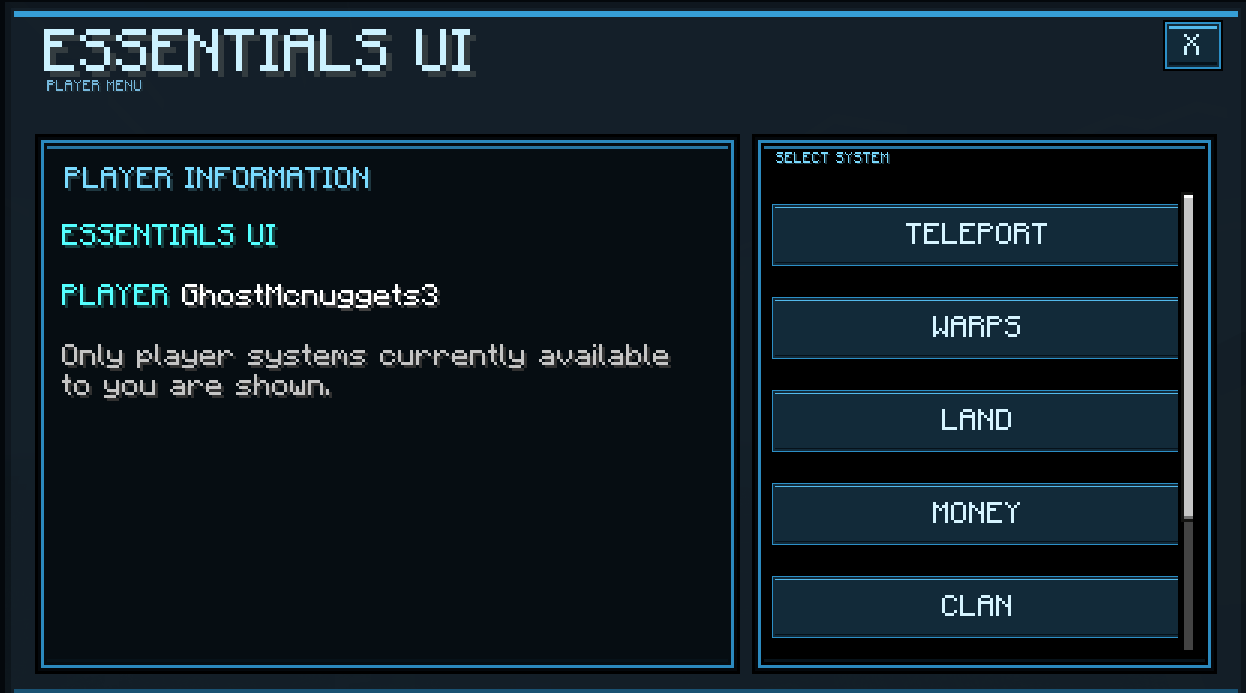
Player UI
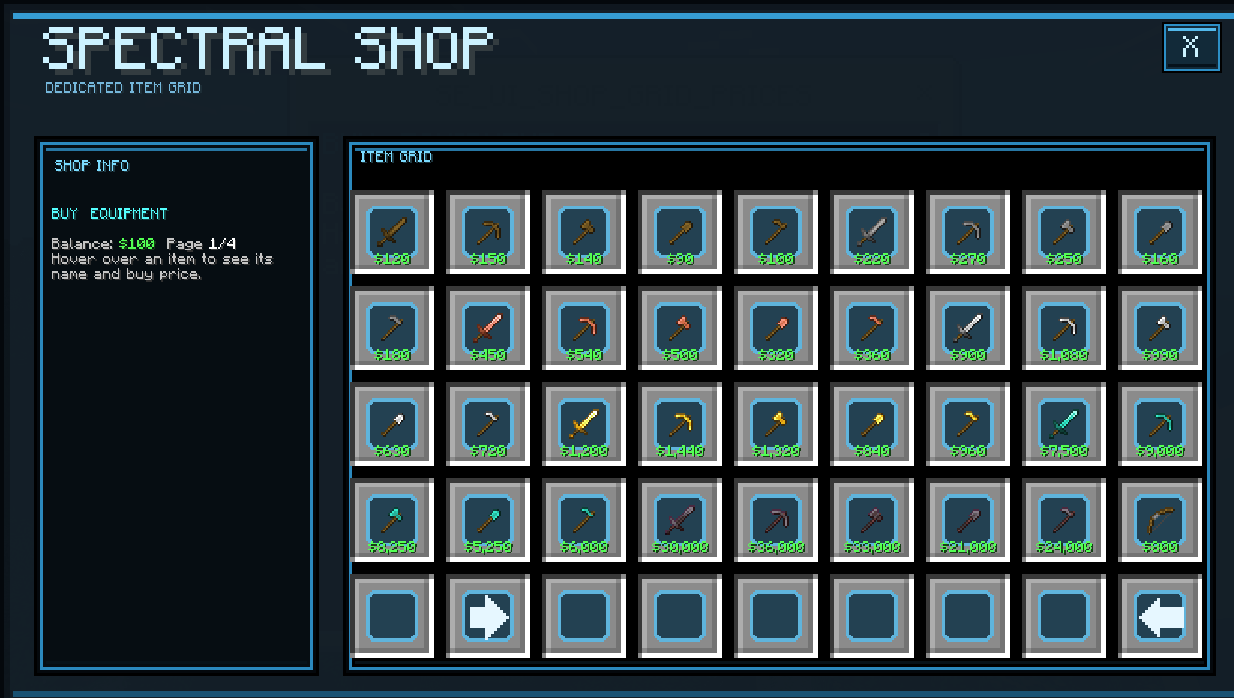
Shop UI
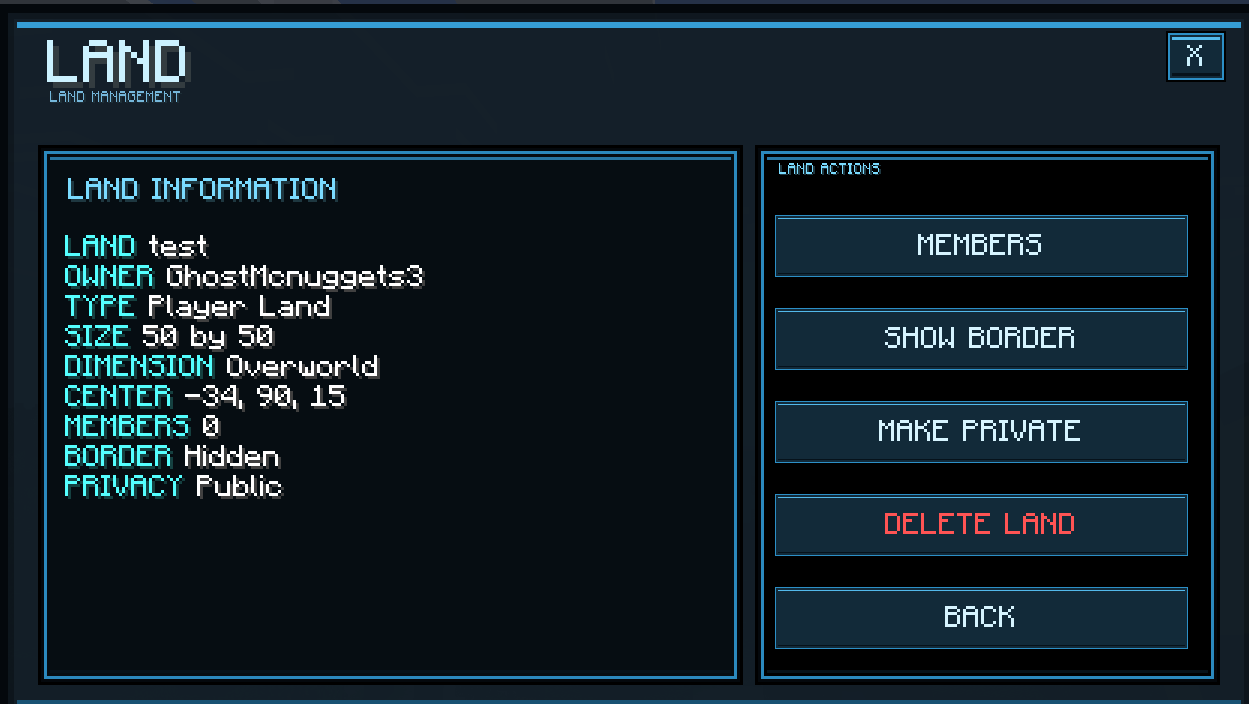
Land UI
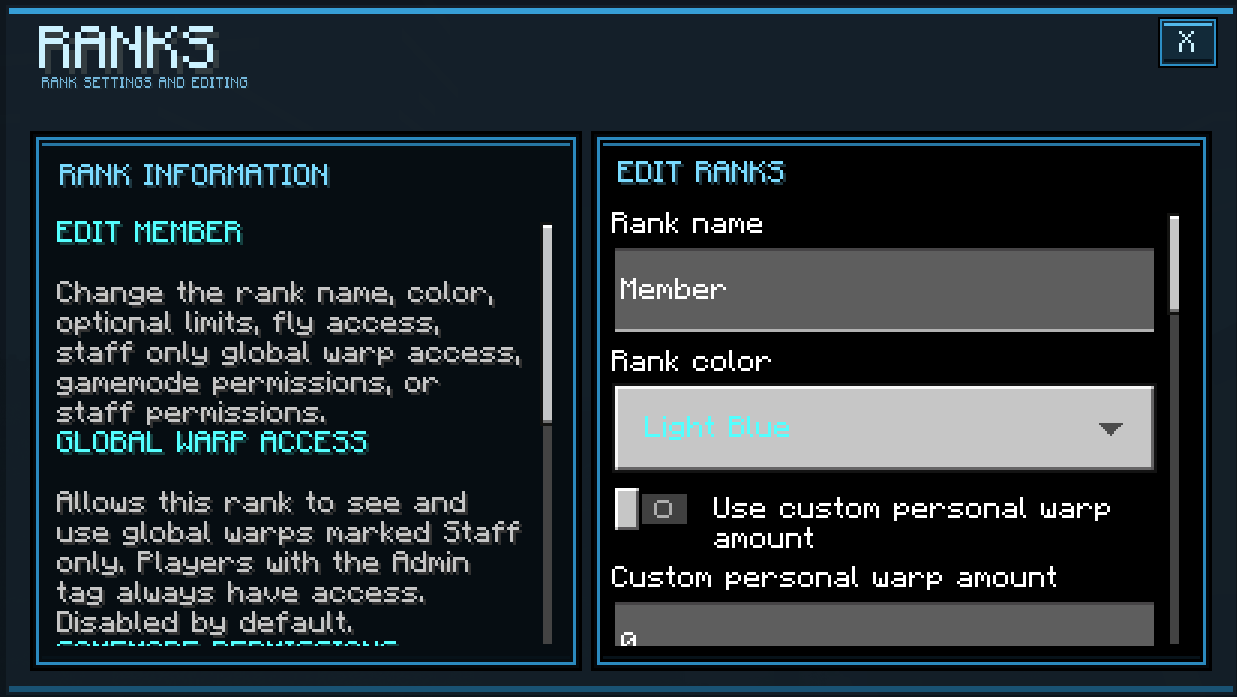
Ranks UI
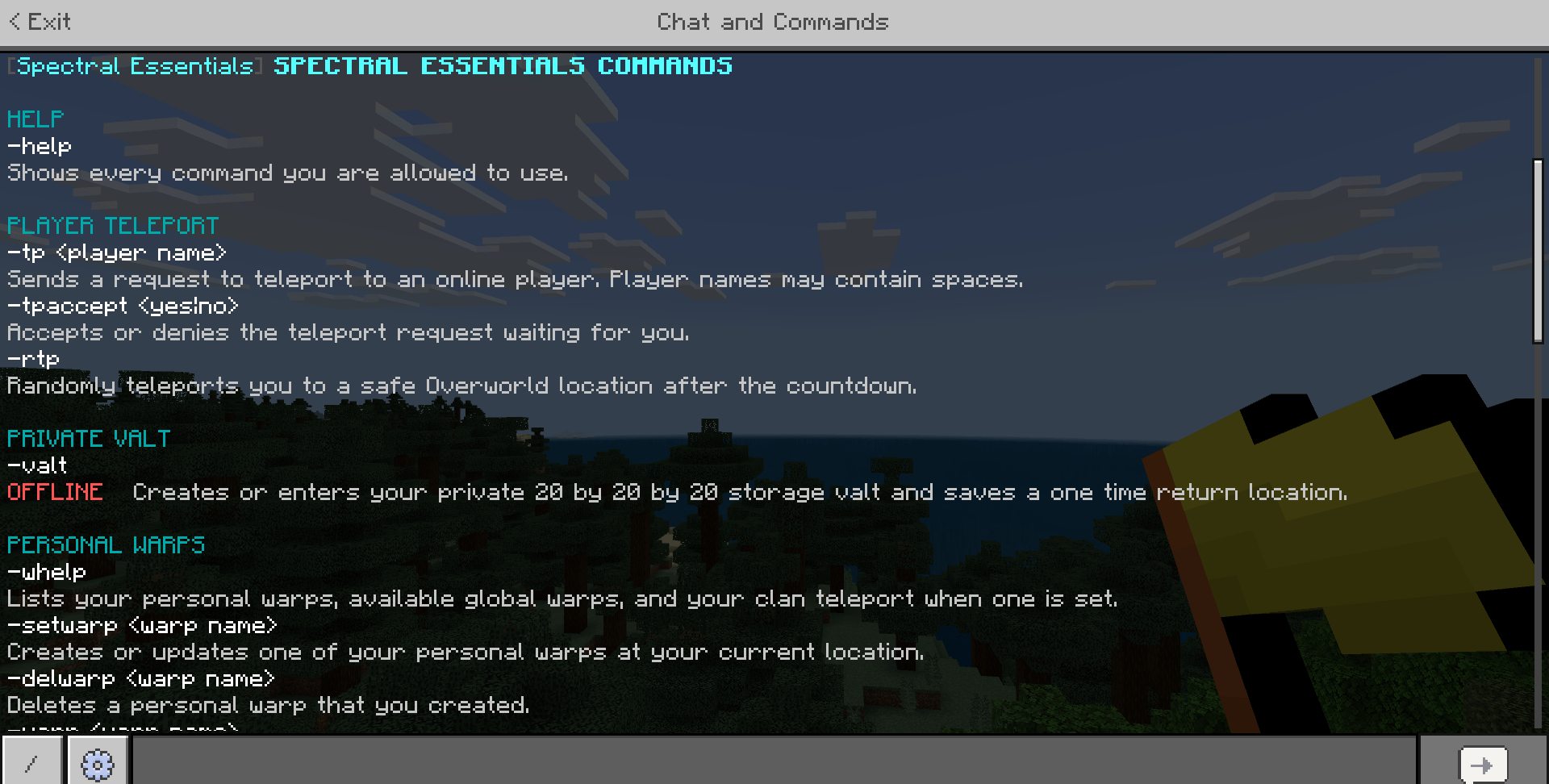
Commands 1
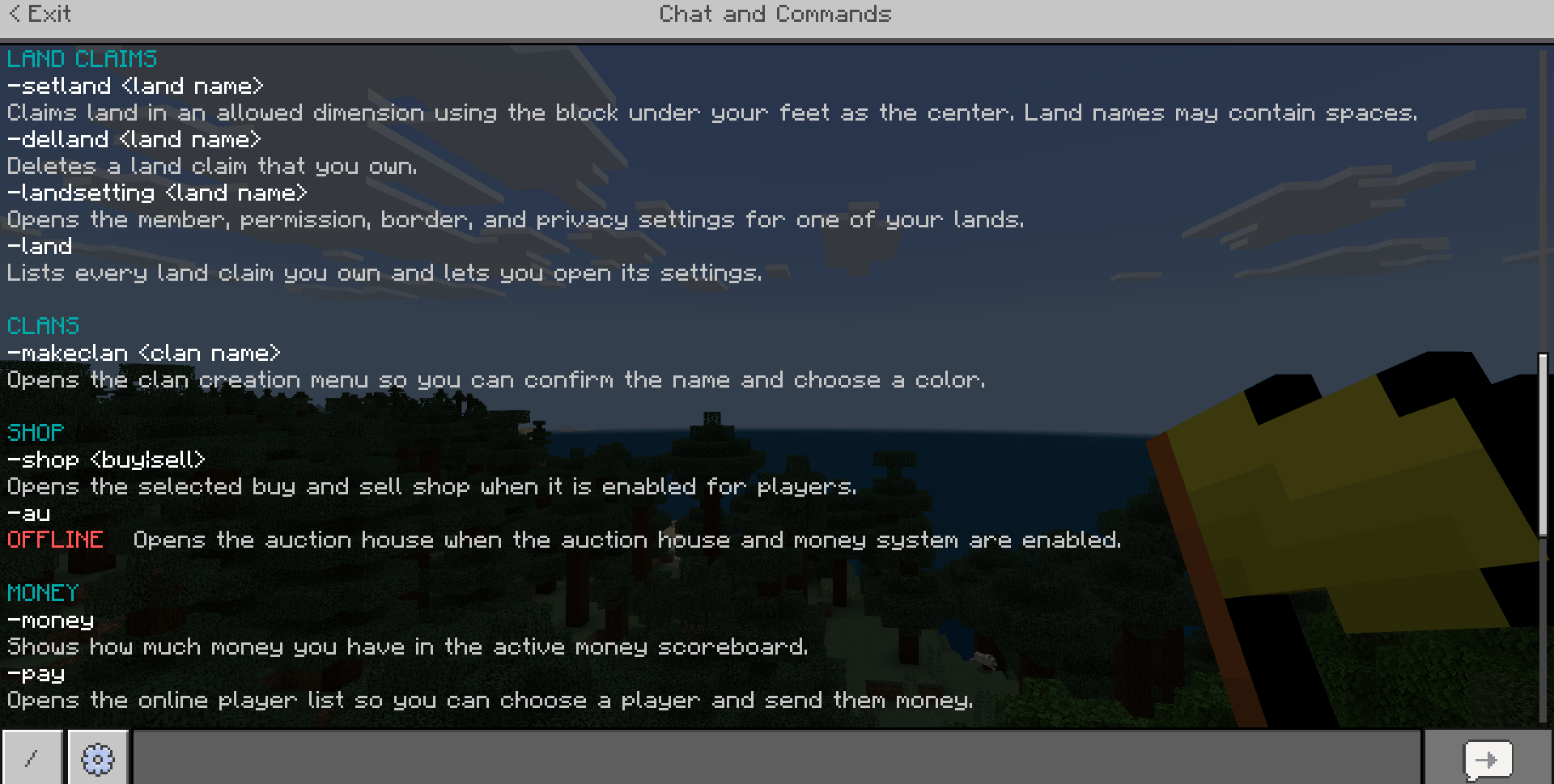
Commands 2
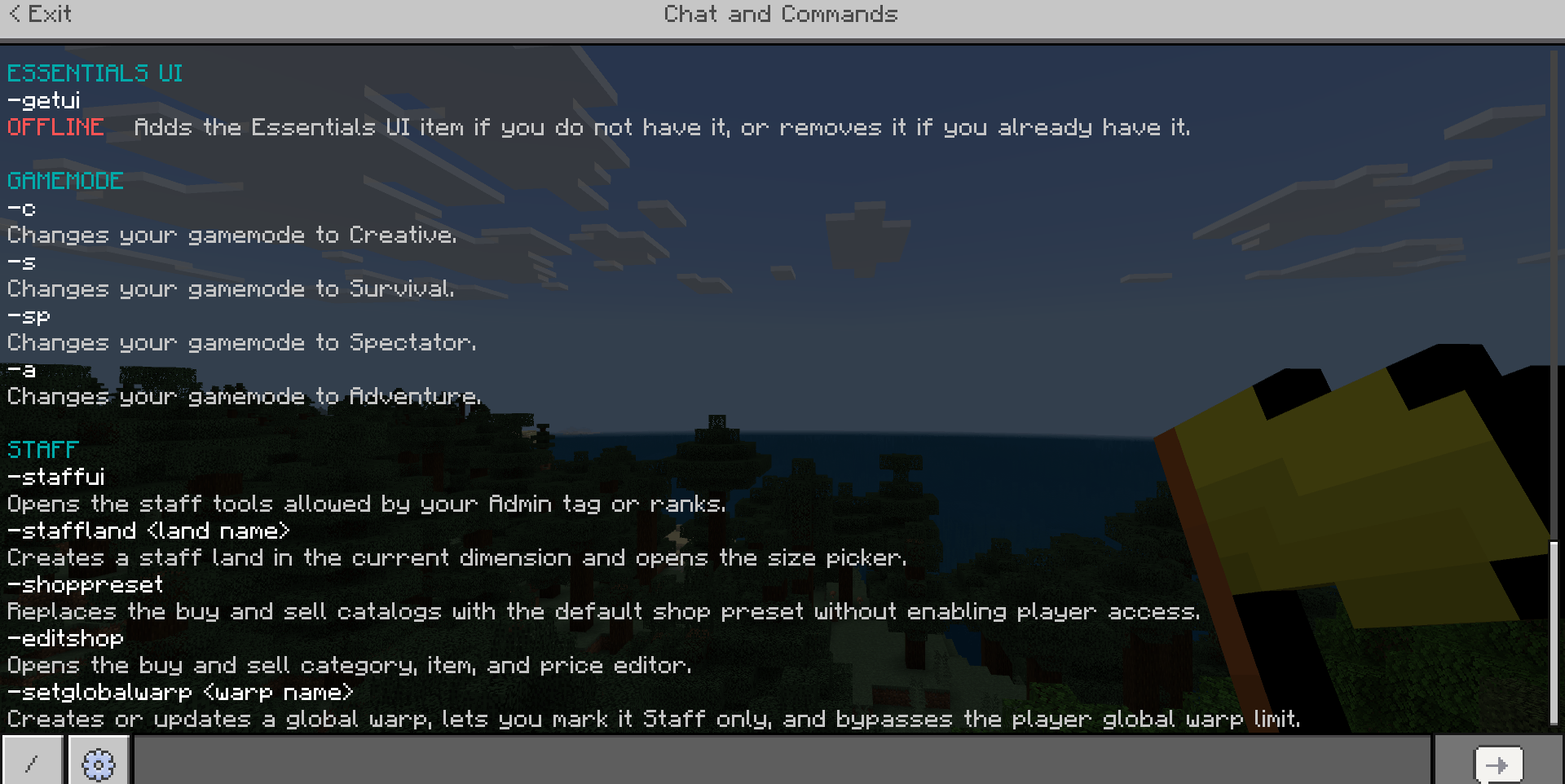
Commands 3
Description
Spectral Essentials
━━━━━━━━━━━━━━━━━━━━━━━━━━━━
REQUIRED WORLD SETTINGS
━━━━━━━━━━━━━━━━━━━━━━━━━━━━
The following settings must be active for the addon to work correctly:
-
Cheats must be enabled.
-
Beta APIs must be enabled under Experiments.
-
Minecraft Education Edition must be enabled under Cheats.
Need help or want to ask something? Join the Discord: Spectral Ascension HQ
━━━━━━━━━━━━━━━━━━━━━━━━━━━━
BUILD COMPATIBILITY
━━━━━━━━━━━━━━━━━━━━━━━━━━━━
There are two versions of Spectral Essentials.
Spectral Essentials Not Realm Friendly
Spectral Essentials Not Realm Friendly is meant for solo worlds and BDS, also known as Bedrock Dedicated Servers.
This version includes the Server Transfer system, which allows server owners to add different Bedrock servers that players can transfer between directly through Spectral Essentials.
Because the Server Transfer system does not work on Minecraft Realms, this version should not be used on a Realm.
If you are playing on a solo world or BDS and want the Server Transfer system, use the Not Realm Friendly version.
Spectral Essentials Realm Friendly
Spectral Essentials Realm Friendly is made for Minecraft Realms.
The Server Transfer system has been fully removed from this version because that system prevents the addon from working correctly on Realms.
If you are using a Minecraft Realm, use the Realm Friendly version.
━━━━━━━━━━━━━━━━━━━━━━━━━━━━
COMMAND PREFIX
━━━━━━━━━━━━━━━━━━━━━━━━━━━━
The default Spectral Essentials command prefix is:
-
For example:
-help
Staff can change the command prefix through the Staff UI.
If the prefix is changed, every Spectral Essentials command will use the new prefix instead.
All commands below use the default - prefix.
━━━━━━━━━━━━━━━━━━━━━━━━━━━━
GENERAL COMMANDS
━━━━━━━━━━━━━━━━━━━━━━━━━━━━
-help
Displays every Spectral Essentials command the player is currently allowed to use.
The help menu changes depending on the player's permissions, enabled systems, clan status, land claims, and other settings.
Staff members may also see commands from disabled systems marked as offline.
-pui
Opens the main Spectral Essentials Player UI.
This allows the player to access available Spectral Essentials systems without needing the Essentials UI item.
-getui
Adds the Essentials UI item to the player's inventory.
Using the command again removes the item if the player already has it.
Staff can enable or disable player access to this command.
━━━━━━━━━━━━━━━━━━━━━━━━━━━━
PLAYER UI
━━━━━━━━━━━━━━━━━━━━━━━━━━━━
The Spectral Essentials Player UI gives players one place to access the systems currently available to them.
Only systems the player can actually use are shown.
Depending on the server settings and player permissions, the Player UI can include:
-
Teleport
-
Warps
-
Land
-
Money
-
Shop
-
Auction House
-
Orders
-
Clans
-
Private Vault
-
Gamemodes
-
Duels
-
Servers
-
Player Settings
The Player UI can be opened with:
-pui
It can also be opened using the Essentials UI item.
━━━━━━━━━━━━━━━━━━━━━━━━━━━━
PLAYER SETTINGS
━━━━━━━━━━━━━━━━━━━━━━━━━━━━
Every player has their own Player Settings menu.
Players can customize how normal chat appears to them and can change the color used for:
-
Their own normal chat messages
-
Other players' normal chat messages
These settings do not recolor Spectral Essentials system messages, player names, or rank displays.
Players can also manage blocked players.
A full player block prevents that player from sending normal chat to the blocker and prevents Spectral Essentials requests such as:
-
Teleport requests
-
Clan invites
-
Duel requests
-
Other supported player requests
Players can also block only duel requests without completely blocking the player.
Incoming duel requests can also be enabled or disabled entirely from Player Settings.
━━━━━━━━━━━━━━━━━━━━━━━━━━━━
GAMEMODE COMMANDS
━━━━━━━━━━━━━━━━━━━━━━━━━━━━
Gamemode commands require the correct gamemode permission from a rank or the Admin tag.
-c
Changes the player's gamemode to Creative.
-s
Changes the player's gamemode to Survival.
-sp
Changes the player's gamemode to Spectator.
-a
Changes the player's gamemode to Adventure.
━━━━━━━━━━━━━━━━━━━━━━━━━━━━
PLAYER TELEPORT COMMANDS
━━━━━━━━━━━━━━━━━━━━━━━━━━━━
-tp <player name>
Sends a teleport request to an online player.
Players can be found using their real Minecraft name or their Spectral Essentials nickname.
Names and nicknames containing spaces are supported.
If the target accepts the request, the normal teleport countdown begins.
-tpaccept <yes|no>
Accepts or denies the teleport request currently waiting for the player.
Use:
-tpaccept yes
to accept.
Use:
-tpaccept no
to deny.
-rtp
Randomly teleports the player to a safe location in the Overworld after the configured teleport countdown.
Random Teleport has its own configurable cooldown.
Staff can enable or disable Random Teleport.
━━━━━━━━━━━━━━━━━━━━━━━━━━━━
WARP COMMANDS
━━━━━━━━━━━━━━━━━━━━━━━━━━━━
-whelp
Displays the player's personal warps, available global warps, and their clan teleport if their clan has one configured.
-setwarp <warp name>
Creates a personal warp at the player's current location.
If a personal warp with that name already exists, the warp is updated to the player's current location.
Warp names can contain spaces.
-delwarp <warp name>
Deletes a personal warp owned by the player.
-warp <warp name>
Teleports the player to one of their personal warps or an available global warp after the configured teleport countdown.
-btp
Teleports the player to their Minecraft bed spawn point after the configured teleport countdown.
Bed Teleport can be enabled or disabled by staff.
-dtp
Teleports the player to their saved death location after the configured teleport countdown.
The saved death location is cleared after a successful Death Teleport.
Death Teleport can be enabled or disabled by staff.
-setglobalwarp <warp name>
Creates or updates a global warp at the player's current location.
For staff with the Teleport permission, the global warp can be made public or Staff only.
Staff global warps bypass the normal player global warp limit.
Staff can also allow regular players to create a limited number of public global warps.
Players with the Admin tag can access Staff only global warps.
Ranks can also be given permission to access Staff only global warps.
━━━━━━━━━━━━━━━━━━━━━━━━━━━━
TELEPORT SETTINGS
━━━━━━━━━━━━━━━━━━━━━━━━━━━━
Staff can configure:
-
Player teleport requests
-
Warps
-
Bed Teleport
-
Death Teleport
-
Random Teleport
-
Teleport countdown
-
Player teleport request cooldown
-
Warp cooldown
-
Random Teleport cooldown
-
Maximum personal warps
-
Player-created global warps
-
Maximum global warps per player
Staff can also inspect and manage warps belonging to online and saved offline players.
Reducing a warp limit does not delete warps a player already owns.
Players who are already above the new limit simply cannot create more until they are under the limit.
━━━━━━━━━━━━━━━━━━━━━━━━━━━━
PVP & DUEL COMMANDS
━━━━━━━━━━━━━━━━━━━━━━━━━━━━
Spectral Essentials includes both normal PvP management and a separate one on one Duel system.
-duel <player name>
Sends a one on one duel request to an online player.
Players can be found using their real Minecraft name or nickname.
-eduel
Ends the player's current duel if they are currently in one.
-accduel <yes|no>
Accepts or denies a duel request.
Use:
-accduel yes
to accept.
Use:
-accduel no
to deny.
━━━━━━━━━━━━━━━━━━━━━━━━━━━━
PVP SYSTEM
━━━━━━━━━━━━━━━━━━━━━━━━━━━━
Staff can configure PvP separately for:
-
Overworld
-
Nether
-
The End
The system also includes configurable combat protection.
Staff can configure:
-
Combat timer
-
Golden Apple use during combat
-
Enchanted Golden Apple use during combat
-
Ender Pearl use during combat
-
Teleports during combat
-
Warps during combat
-
Duel system
-
Combat logging punishments
Combat logging punishments can include:
-
Killing the player
-
Removing money
-
Wiping the player's inventory
-
Multiple punishments at the same time
━━━━━━━━━━━━━━━━━━━━━━━━━━━━
PRIVATE VAULT COMMANDS
━━━━━━━━━━━━━━━━━━━━━━━━━━━━
Spectral Essentials includes private player storage vaults.
Each player's vault is a private 20 by 20 by 20 storage area.
-vault
Creates or enters the player's Private Vault.
When entering the vault, Spectral Essentials saves a one-time return location.
-vaultleave
Leaves the Private Vault and returns the player to their saved return location.
After the return location is successfully used, it is cleared.
-leavevault
An alternate command for:
-vaultleave
Both commands perform the same action.
━━━━━━━━━━━━━━━━━━━━━━━━━━━━
PRIVATE VAULT SYSTEM
━━━━━━━━━━━━━━━━━━━━━━━━━━━━
Staff can enable or disable player access to Private Vaults without deleting existing vault data.
Staff can also:
-
View online player vaults
-
Teleport to a player's vault
-
Reset a player's vault
Resetting a vault clears the vault so it can be rebuilt cleanly.
Private Vault protection prevents players from escaping the vault using unsupported methods such as:
-
Ender Pearls
-
Chorus Fruit
━━━━━━━━━━━━━━━━━━━━━━━━━━━━
LAND CLAIM COMMANDS
━━━━━━━━━━━━━━━━━━━━━━━━━━━━
Spectral Essentials includes a full land claim and protection system.
-setland <land name>
Creates a protected land claim using the block beneath the player as the center of the claim.
Land names can contain spaces.
Depending on staff settings, players may be allowed to choose the size of their claim before creating it.
-delland <land name>
Deletes a land claim owned by the player.
-landsetting <land name>
Opens the settings for one of the player's land claims.
Land settings can include:
-
Public permissions
-
Members
-
Individual member permissions
-
Mob protection
-
Land borders
-
Land privacy
-
Land expansion
-land
Displays every land claim owned by the player.
The player can select one of their claims and open its settings.
-staffland <land name>
Creates a Staff owned land claim in the current dimension.
This command requires the Land staff permission.
Staff land claims bypass normal player land limits.
Staff lands also use the land's name in enter and leave messages instead of showing the staff owner's name.
Staff can choose the exact size of the Staff land.
━━━━━━━━━━━━━━━━━━━━━━━━━━━━
LAND PROTECTION
━━━━━━━━━━━━━━━━━━━━━━━━━━━━
Land permissions can independently control things such as:
-
Placing blocks
-
Breaking blocks
-
Opening containers
-
Using doors and gates
-
Using buttons and levers
-
Other block interactions
-
Entity interactions
Land claims can also use mob protection.
Hostile mob protection can remove hostile mobs from protected land.
Friendly mob protection can protect friendly entities inside the claim.
Staff lands can keep their mob protection active even when the Staff land owner is offline.
━━━━━━━━━━━━━━━━━━━━━━━━━━━━
LAND SETTINGS
━━━━━━━━━━━━━━━━━━━━━━━━━━━━
Staff can configure:
-
Land claim system
-
Dimensions where land claims are allowed
-
Maximum player claims
-
Maximum claims in the world
-
Default claim size
-
Maximum claim size
-
Player claim size selection
-
Ender Pearl land entry protection
-
Player land PvP protection
-
Clan land PvP protection
-
Staff land PvP protection
-
Clan land claims
-
Paid claim expansion
-
Inactive land cleanup
Inactive land cleanup can remove saved claims after the configured number of real world days.
Cleanup settings can be configured for supported player, clan, and Staff land records.
━━━━━━━━━━━━━━━━━━━━━━━━━━━━
MONEY COMMANDS
━━━━━━━━━━━━━━━━━━━━━━━━━━━━
-money
Displays the player's current balance using the active Spectral Essentials money scoreboard.
-pay
Opens a list of online players.
The player can select someone and send them money.
Player payments must be enabled by staff.
━━━━━━━━━━━━━━━━━━━━━━━━━━━━
MONEY SYSTEM
━━━━━━━━━━━━━━━━━━━━━━━━━━━━
Staff can:
-
Enable or disable the money system
-
Choose the scoreboard objective used for money
-
Configure starting money
-
Enable or disable player payments
-
Manage online player balances
-
Manage saved offline player balances
Starting money is given when a new money record is created.
━━━━━━━━━━━━━━━━━━━━━━━━━━━━
MONSTER KILL MONEY
━━━━━━━━━━━━━━━━━━━━━━━━━━━━
Spectral Essentials can optionally reward players for killing supported hostile mobs and bosses.
The player must deal the lethal damage for the reward to be given.
Staff can configure the money reward for each supported mob.
━━━━━━━━━━━━━━━━━━━━━━━━━━━━
SHOP COMMANDS
━━━━━━━━━━━━━━━━━━━━━━━━━━━━
-shop <buy|sell>
Opens the selected player shop.
Use:
-shop buy
to open the Buy Shop.
Use:
-shop sell
to open the Sell Shop.
The Sell Shop allows players to sell supported items directly from their inventory.
The money system and the selected shop must be enabled.
━━━━━━━━━━━━━━━━━━━━━━━━━━━━
AUCTION HOUSE
━━━━━━━━━━━━━━━━━━━━━━━━━━━━
-au
Opens the Auction House.
Players can:
-
View active listings
-
Buy listed items
-
List an item from their inventory
-
View their own listings
-
Remove their own listings
Players can have up to five active auction listings at one time.
The Auction House requires the money system.
When an auction item sells, the seller can receive their money through the saved money system even if they are not currently online.
━━━━━━━━━━━━━━━━━━━━━━━━━━━━
SHOP SYSTEM
━━━━━━━━━━━━━━━━━━━━━━━━━━━━
Staff can independently enable or disable:
-
Buy Shop
-
Sell Shop
Staff can create and manage:
-
Shop categories
-
Shop items
-
Item icons
-
Buy prices
-
Sell prices
A built in default shop preset can also be loaded.
━━━━━━━━━━━━━━━━━━━━━━━━━━━━
PLAYER ORDERS
━━━━━━━━━━━━━━━━━━━━━━━━━━━━
Spectral Essentials includes a Player Orders system.
-order
Opens Player Orders.
Players can create, edit, fill, delete, and claim orders.
Each player can have one active order.
When creating an order, the player selects:
-
Item
-
Quantity
-
Payment per item
The money needed for the unfilled part of the order is reserved when the order is created.
Other players can fill the order using matching items from their inventory.
The player filling the order is paid for the items accepted by the order.
If an order is edited, Spectral Essentials automatically charges or refunds the difference in reserved money.
If the order is deleted, the owner is refunded for the unfilled part of the order.
-gorder
Claims filled order items that are waiting for the player.
The Order system requires the money system.
━━━━━━━━━━━━━━━━━━━━━━━━━━━━
KIT SHOP COMMAND
━━━━━━━━━━━━━━━━━━━━━━━━━━━━
-kitshop
Opens the player Kit Shop.
The money system and Kit Shop must be enabled.
━━━━━━━━━━━━━━━━━━━━━━━━━━━━
STARTER KIT
━━━━━━━━━━━━━━━━━━━━━━━━━━━━
Staff can create a one time Starter Kit for players.
The Starter Kit can contain up to 18 item stacks.
Staff can manually build the kit or load the included Starter Kit preset.
━━━━━━━━━━━━━━━━━━━━━━━━━━━━
KIT SHOP SYSTEM
━━━━━━━━━━━━━━━━━━━━━━━━━━━━
Staff can create up to 100 Kit Shop kits.
Each kit can contain up to 18 item stacks.
Each kit can have:
-
Custom name
-
Price
-
Free price
-
One-time purchase setting
-
Repeatable purchase setting
━━━━━━━━━━━━━━━━━━━━━━━━━━━━
CLAN COMMANDS
━━━━━━━━━━━━━━━━━━━━━━━━━━━━
-makeclan <clan name>
Opens the clan creation menu using the entered clan name.
The player can confirm the clan name and select its display color and text style before creating the clan.
-editclan
Opens the management menu for the player's current clan.
What the player can manage depends on their clan role.
Clan management can include:
-
Inviting players
-
Viewing clan members
-
Managing member roles
-
Kicking members
-
Clan teleport settings
-
Clan land
-
Ownership transfer
-leaveclan
Leaves the player's current clan.
The clan owner must transfer ownership before leaving unless they are the only remaining clan member.
-claninv <yes|no>
Accepts or denies the clan invitation currently waiting for the player.
Use:
-claninv yes
to accept.
Use:
-claninv no
to deny.
-clantp <clan tp name>
Teleports the player to their clan's saved teleport after the configured teleport countdown.
Only members of that clan can use its Clan Teleport.
-editclanland
Opens the Clan Land management menu.
This command is available to the clan owner when Clan Land is enabled.
━━━━━━━━━━━━━━━━━━━━━━━━━━━━
CLAN SYSTEM
━━━━━━━━━━━━━━━━━━━━━━━━━━━━
Clan roles are:
-
Member
-
Elder
-
Co
-
Owner
Higher clan roles receive additional clan management permissions.
The clan owner can transfer ownership to another member.
After transferring ownership, the previous owner becomes a Co.
Staff can configure:
-
Clan creation
-
Clan display in chat
-
Clan display above player names
-
Maximum clan members
-
Clan land
-
Clan land settings
Staff can also manage and delete saved clans.
━━━━━━━━━━━━━━━━━━━━━━━━━━━━
CLAN LAND
━━━━━━━━━━━━━━━━━━━━━━━━━━━━
Clan Land uses the Spectral Essentials Land Claim system.
Clan Land can have:
-
Public permissions
-
Individual clan member permissions
-
Mob protection
-
Privacy
-
Borders
-
Paid expansion when enabled
━━━━━━━━━━━━━━━━━━━━━━━━━━━━
RANK SYSTEM
━━━━━━━━━━━━━━━━━━━━━━━━━━━━
Spectral Essentials includes custom player ranks.
Staff can:
-
Create ranks
-
Edit ranks
-
Delete ranks
-
Assign ranks
-
Remove ranks
-
Configure player rank displays
The default rank can be edited but cannot be deleted.
Players can have multiple assigned ranks.
Up to three selected ranks can be displayed at the same time in a configurable order.
Ranks can appear:
-
In normal chat
-
Above player name tags
Each rank can have its own:
-
Name
-
Minecraft text color
-
Bold formatting
-
Italic formatting
-
Personal warp limit
-
Player land limit
-
Fly permission
-
Staff-only global warp access
-
Gamemode permissions
-
Staff UI permissions
Giving a rank a Staff UI permission allows players with that rank to access the Staff UI sections connected to that permission.
They do not automatically receive access to every Staff tool.
━━━━━━━━━━━━━━━━━━━━━━━━━━━━
SCOREBOARD LEADERBOARDS
━━━━━━━━━━━━━━━━━━━━━━━━━━━━
Staff can create floating Scoreboard Leaderboards connected to scoreboard objectives.
Leaderboards can:
-
Display up to 10 entries
-
Sort scoreboard values
-
Automatically refresh
-
Be moved
-
Be edited
-
Be deleted
━━━━━━━━━━━━━━━━━━━━━━━━━━━━
TEXT HOLOGRAMS
━━━━━━━━━━━━━━━━━━━━━━━━━━━━
Staff can create floating multi line Text Holograms.
Text Holograms can:
-
Be edited
-
Be moved
-
Be deleted
Holograms can use billboard behavior or a configured facing direction.
━━━━━━━━━━━━━━━━━━━━━━━━━━━━
NPC SYSTEM
━━━━━━━━━━━━━━━━━━━━━━━━━━━━
Spectral Essentials can spawn ready to use Minecraft NPCs for player systems.
Available Spectral Essentials NPCs include:
-
Random Teleport NPC
-
Shop NPC
-
Auction House NPC
-
Order NPC
-
Kit Shop NPC
The NPCs are created with the correct Spectral Essentials Script Event buttons already configured.
The Shop NPC includes separate Buy Shop and Sell Shop buttons.
━━━━━━━━━━━━━━━━━━━━━━━━━━━━
SERVER TRANSFER SYSTEM
━━━━━━━━━━━━━━━━━━━━━━━━━━━━
The Server Transfer system is available in:
Spectral Essentials Not Realm Friendly
It is intended for solo worlds and BDS, also known as Bedrock Dedicated Servers.
It does not work on Minecraft Realms.
Staff can save up to 50 server destinations.
Each saved server can have:
-
Server name
-
IP address or hostname
-
Port
-
Description
Servers can be:
-
Public
-
Staff only
Staff only servers are only visible to players with the Admin tag.
A saved destination can also be marked as:
This Server
This prevents Spectral Essentials from attempting to transfer a player to the same server they are already playing on.
Players can access available server destinations through the SERVERS section of the Player UI.
Selecting a server starts the server transfer.
The Server Transfer system is removed from Spectral Essentials Realm Friendly so that version can work on Minecraft Realms.
━━━━━━━━━━━━━━━━━━━━━━━━━━━━
STAFF SHOP COMMANDS
━━━━━━━━━━━━━━━━━━━━━━━━━━━━
-shoppreset
Replaces the current Buy Shop and Sell Shop catalogs with the addon default shop preset.
Loading the preset does not automatically enable either shop for players.
This command requires the Shop staff permission.
-editshop
Opens the Staff Shop editor.
Staff can manage:
-
Buy categories
-
Sell categories
-
Items
-
Item icons
-
Prices
This command requires the Shop staff permission.
━━━━━━━━━━━━━━━━━━━━━━━━━━━━
STAFF UI COMMAND
━━━━━━━━━━━━━━━━━━━━━━━━━━━━
-staffui
Opens the Spectral Essentials Staff UI.
Only Staff sections the player has permission to use are displayed.
Access can come from:
-
Admintag -
Assigned rank permissions
━━━━━━━━━━━━━━━━━━━━━━━━━━━━
STAFF UI - TELEPORT
━━━━━━━━━━━━━━━━━━━━━━━━━━━━
Staff can configure teleport systems and manage player warps.
This includes settings for:
-
Teleport requests
-
Warps
-
Bed Teleport
-
Death Teleport
-
Random Teleport
-
Cooldowns
-
Teleport countdowns
-
Warp limits
-
Global warps
━━━━━━━━━━━━━━━━━━━━━━━━━━━━
STAFF UI - PVP SETTINGS
━━━━━━━━━━━━━━━━━━━━━━━━━━━━
Staff can configure:
-
PvP
-
Dimension PvP
-
Combat timer
-
Combat restrictions
-
Duels
-
Combat logging punishments
━━━━━━━━━━━━━━━━━━━━━━━━━━━━
STAFF UI - LAND
━━━━━━━━━━━━━━━━━━━━━━━━━━━━
Staff can configure the Land Claim system and manage land owners and claims.
━━━━━━━━━━━━━━━━━━━━━━━━━━━━
STAFF UI - MONEY
━━━━━━━━━━━━━━━━━━━━━━━━━━━━
Staff can configure the money system and manage online and saved offline player balances.
━━━━━━━━━━━━━━━━━━━━━━━━━━━━
STAFF UI - RANKS & CLANS
━━━━━━━━━━━━━━━━━━━━━━━━━━━━
Staff can manage:
-
Ranks
-
Rank displays
-
Rank permissions
-
Clans
-
Clan members
-
Clan teleport
-
Clan land
━━━━━━━━━━━━━━━━━━━━━━━━━━━━
STAFF UI - HOLOGRAMS
━━━━━━━━━━━━━━━━━━━━━━━━━━━━
Staff can create and manage:
-
Scoreboard Leaderboards
-
Text Holograms
━━━━━━━━━━━━━━━━━━━━━━━━━━━━
STAFF UI - SHOP
━━━━━━━━━━━━━━━━━━━━━━━━━━━━
Staff can configure:
-
Buy Shop access
-
Sell Shop access
-
Shop categories
-
Shop items
-
Prices
-
Default shop preset
━━━━━━━━━━━━━━━━━━━━━━━━━━━━
STAFF UI - KITS
━━━━━━━━━━━━━━━━━━━━━━━━━━━━
Staff can configure:
-
Starter Kit
-
Kit Shop
-
Existing Kit Shop kits
━━━━━━━━━━━━━━━━━━━━━━━━━━━━
STAFF UI - NPCS
━━━━━━━━━━━━━━━━━━━━━━━━━━━━
Staff can spawn ready to use:
-
Random Teleport NPCs
-
Shop NPCs
-
Auction House NPCs
-
Order NPCs
-
Kit Shop NPCs
━━━━━━━━━━━━━━━━━━━━━━━━━━━━
STAFF UI - SERVER TRANSFER
━━━━━━━━━━━━━━━━━━━━━━━━━━━━
Staff can:
-
Create server destinations
-
Edit server destinations
-
Delete server destinations
-
Manage saved server destinations
This section only exists in Spectral Essentials Not Realm Friendly.
━━━━━━━━━━━━━━━━━━━━━━━━━━━━
STAFF UI - AUCTION SETTINGS
━━━━━━━━━━━━━━━━━━━━━━━━━━━━
Staff can:
-
Enable or disable the Auction House
-
Manage active auction listings
━━━━━━━━━━━━━━━━━━━━━━━━━━━━
STAFF UI - ORDER SETTINGS
━━━━━━━━━━━━━━━━━━━━━━━━━━━━
Staff can:
-
Enable or disable Player Orders
-
Manage active player orders
━━━━━━━━━━━━━━━━━━━━━━━━━━━━
STAFF UI - PLAYER MANAGE
━━━━━━━━━━━━━━━━━━━━━━━━━━━━
Staff can:
-
Ban players
-
Unban players
-
Mute players
-
Unmute players
-
Inspect inventories
-
Inspect Ender Chests
-
Take items
-
Clear items
-
Set nicknames
-
Edit nicknames
-
Color nicknames
-
Remove nicknames
━━━━━━━━━━━━━━━━━━━━━━━━━━━━
STAFF UI - VAULT SETTINGS
━━━━━━━━━━━━━━━━━━━━━━━━━━━━
Staff can:
-
Enable or disable Private Vaults
-
Inspect player vaults
-
Teleport to player vaults
-
Reset player vaults
━━━━━━━━━━━━━━━━━━━━━━━━━━━━
STAFF UI - ESSENTIALS ITEM
━━━━━━━━━━━━━━━━━━━━━━━━━━━━
Staff can configure:
-
Automatic Essentials UI item distribution
-
Player access to
-getui
━━━━━━━━━━━━━━━━━━━━━━━━━━━━
STAFF UI - COMMAND PREFIX
━━━━━━━━━━━━━━━━━━━━━━━━━━━━
Staff can change the command prefix used by every Spectral Essentials command.
The default prefix is:
-
━━━━━━━━━━━━━━━━━━━━━━━━━━━━
BAN SYSTEM
━━━━━━━━━━━━━━━━━━━━━━━━━━━━
A normal ban keeps the player's saved Spectral Essentials data.
Staff can also use a permanent Full Wipe ban.
A Full Wipe ban removes supported saved Spectral Essentials player data and live inventory data before the player is kicked.
The data removed by a Full Wipe is not restored if the player is later unbanned.
━━━━━━━━━━━━━━━━━━━━━━━━━━━━
MUTE SYSTEM
━━━━━━━━━━━━━━━━━━━━━━━━━━━━
Muted players cannot send normal Minecraft chat messages.
Spectral Essentials commands continue to work while the player is muted.
A muted player must be online before Staff can unmute them.
━━━━━━━━━━━━━━━━━━━━━━━━━━━━
INVENTORY MANAGEMENT
━━━━━━━━━━━━━━━━━━━━━━━━━━━━
Staff can inspect an online player's:
-
Inventory
-
Ender Chest
Staff can take an exact item stack into an empty inventory slot or clear selected storage.
━━━━━━━━━━━━━━━━━━━━━━━━━━━━
NICKNAME SYSTEM
━━━━━━━━━━━━━━━━━━━━━━━━━━━━
Staff can give players cosmetic nicknames.
Nicknames can also use Minecraft text colors.
Nicknames change the name displayed:
-
Above the player
-
In normal chat
Spectral Essentials continues using the player's real Minecraft name internally for saved player identity and addon data.
━━━━━━━━━━━━━━━━━━━━━━━━━━━━
ESSENTIALS UI ITEM
━━━━━━━━━━━━━━━━━━━━━━━━━━━━
Spectral Essentials includes an Essentials UI item that players can use to open the Player UI.
Staff can configure:
-
Automatic Essentials UI item distribution
-
Player access to
-getui
━━━━━━━━━━━━━━━━━━━━━━━━━━━━
COMPLETE COMMAND REFERENCE
━━━━━━━━━━━━━━━━━━━━━━━━━━━━
Spectral Essentials registers the following 44 command names:
-
-help -
-getui -
-pui -
-c -
-s -
-sp -
-a -
-whelp -
-tp -
-tpaccept -
-rtp -
-setwarp -
-delwarp -
-warp -
-btp -
-dtp -
-duel -
-eduel -
-accduel -
-setglobalwarp -
-setland -
-delland -
-landsetting -
-land -
-staffland -
-shop -
-kitshop -
-au -
-order -
-gorder -
-money -
-pay -
-makeclan -
-editclan -
-leaveclan -
-claninv -
-clantp -
-editclanland -
-vault -
-vaultleave -
-leavevault -
-shoppreset -
-editshop -
-staffui
Some commands only appear to a player when the related system is enabled, the player has the correct permissions, or the command is currently relevant to them.
━━━━━━━━━━━━━━━━━━━━━━━━━━━━
STAFF TAG
━━━━━━━━━━━━━━━━━━━━━━━━━━━━
The Staff tag is:
Admin
Spectral Essentials. Team