Smart Hole Filler - Fill Holes Instantly with a Throwable Smart Ball
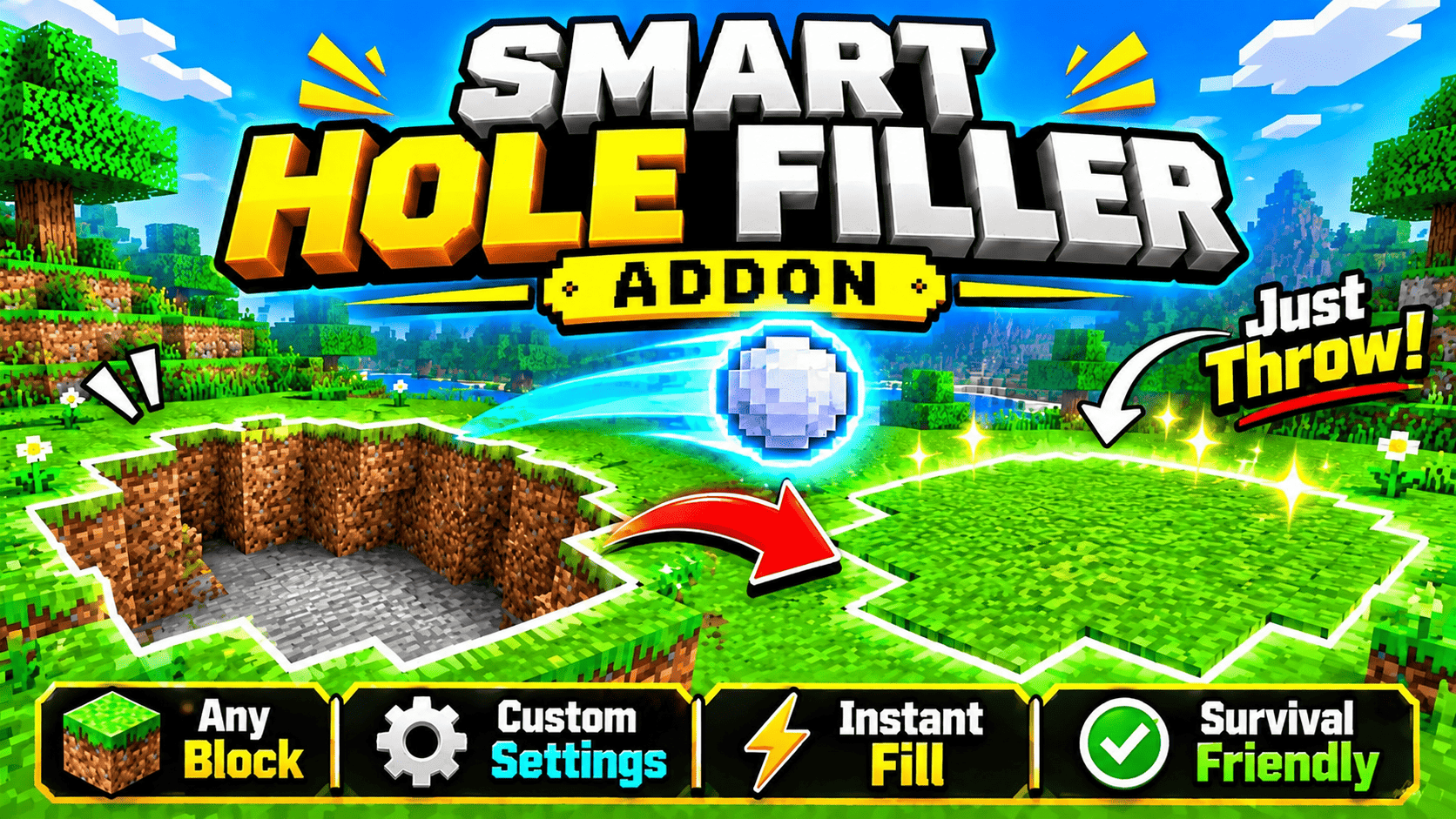
Tired of holes, pits, ravines and ugly gaps in your world? Smart Hole Filler lets you throw a Smart Ball at any hole and it fills up automatically, with the right block and a cool animation.
Made for Minecraft Bedrock Edition. No Beta APIs or experiments needed, so your achievements stay ON. Works in survival, creative and multiplayer.
Created by Sampadcarft
✨ Features
- Throw and fill: throw the Smart Ball at the bottom or the wall of a hole and it fills the hole for you.
- Smart hole detection: it only fills the connected hole around the spot you hit, not random air in the sky.
- Smart Auto Detect block: it looks at the blocks around the hole and fills with the most common one, so the fill blends in. Grass becomes dirt.
- 40 blocks to choose from: stone, cobblestone, andesite, diorite, granite, deepslate, tuff, dirt, sand, gravel, sandstone, netherrack, end stone, obsidian, bedrock, all wood planks, glass, terracotta, wool colors, ice, snow, glowstone, sea lantern and metal blocks.
- 7 fill animations: Instant, Wave, Expanding Sphere, Rise Up, Pour Down, One By One (Snake) and Random.
- Adjustable settings: patch radius (2 to 12 blocks), fill height (Auto or manual) and animation speed.
- Undo last fill: filled the wrong place? Undo it from the settings menu.
- Custom notifications: choose Chat message, Action Bar, or turn them Off completely.
- Saved settings: every player keeps their own settings, even after leaving the world.
- Multiplayer friendly: every player gets their own kit and settings.
- Light on performance: blocks are placed in small batches (max 6000 blocks per throw) to avoid lag.
- Custom items with their own icons: Smart Ball and Patcher Settings.
- No Beta APIs: achievements stay enabled.
🎮 Survival Friendly: Get Smart Balls Without Cheats
You do not need cheats to get Smart Balls:
| Way | Details |
|---|---|
| Starter kit | 16 Smart Balls + Patcher Settings the first time you join the world |
| Mob drops | Hostile mobs killed by a player (zombie, skeleton, spider, creeper, witch, pillager, enderman and more) have a 15% chance to drop 1 to 2 Smart Balls |
| Chest loot | Naturally generated chests (villages, dungeons, mineshafts) have a 40% chance to hold 2 to 6 Smart Balls. Each chest is rolled only once. Chests placed by players never give balls, so it cannot be farmed |
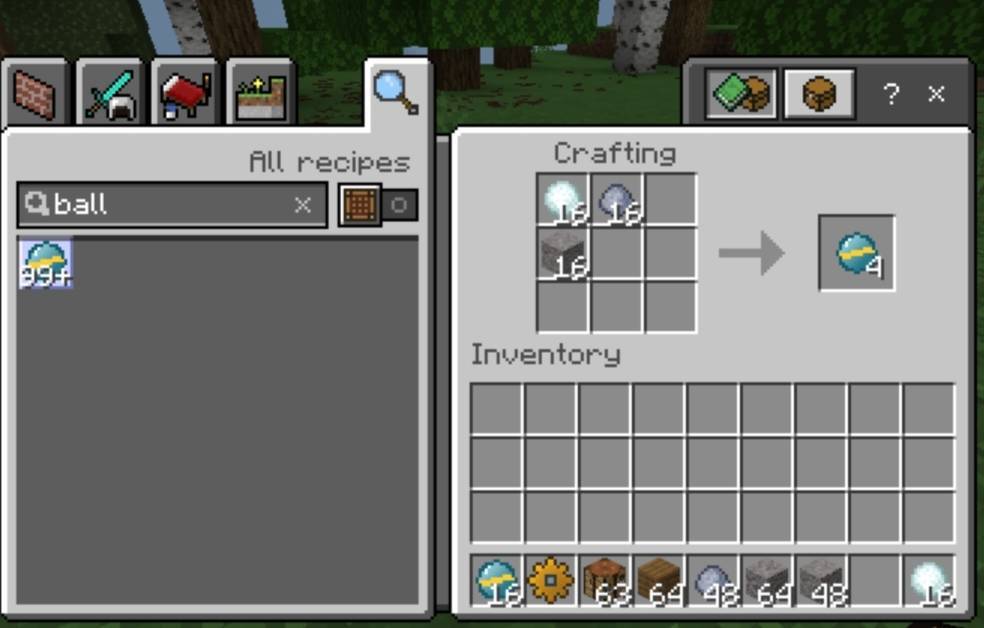
| Crafting | 1 Snowball + 1 Clay Ball + 1 Gravel = 4 Smart Balls (shapeless recipe, crafting table) |
!!
🧰 How to Use
- Get a Smart Ball (starter kit, mob drop, chest or crafting).
- Throw it at the bottom or the wall of a hole.
- The hole fills automatically.
- Right click the Patcher Settings item to change the block, animation, radius, fill height, notifications, or to undo your last fill.
Tips
- For best results hit the bottom of a pit or the wall inside a cave hole.
- Use a bigger radius for wide holes and a smaller radius to stay precise.
- Use "Smart Auto Detect" to make the fill match the surrounding terrain.
- If notifications annoy you, switch them to Action Bar or Off.
⚙️ Settings Menu
Open it by right clicking the Patcher Settings item:
- Fill Animation: 7 styles
- Animation Duration: from fast to slow
- Patch Radius: 2 to 12 blocks
- Fill Height: 0 means Auto, or set it manually
- Filling Block: Smart Auto Detect or any of the 40 blocks
- Notifications: Chat Message, Action Bar, or Off
- Undo last patch: restores the blocks of your last fill
- Get Smart Balls / Tools: gives you the Smart Ball and Patcher Settings
⌨️ Commands (optional, need cheats)
/give @s sc:smart_ball 16
/give @s sc:settings_tool
/function ball
/scriptevent sc:ball
The last two give you both items at once.
📦 Installation
- Download the
.mcaddon file.
- Open it. Minecraft imports it automatically.
- Create or edit a world, go to Add-ons and activate both the Behavior Pack and the Resource Pack of Smart Hole Filler.
- Join the world. You will see the welcome message and get your starter items.
Updating from an older version? Remove the old packs from the world first, then add the new ones.
✅ Requirements
- Minecraft Bedrock Edition 1.21.130 or newer
- No experiments or Beta APIs needed
- Both the Behavior Pack and the Resource Pack must be active
❓ FAQ
Does this disable achievements?
No. It does not use Beta APIs or experimental toggles.
Does it work in multiplayer?
Yes. Every player gets their own kit and settings.
Can I turn off the chat messages?
Yes. Open Patcher Settings, go to Notifications and choose Chat, Action Bar or Off.
Nothing happened when I threw the ball.
Hit the bottom or the wall of the hole. If there is no empty space next to the impact point, there is nothing to fill.
I filled the wrong spot.
Open Patcher Settings and turn on "Undo last patch".
I lost my items.
Craft more Smart Balls, or use the commands above if cheats are on.
The Smart Ball looks like a snowball while flying.
Yes. The flying projectile uses the vanilla snowball model. The item in your inventory is the custom Smart Ball.
The item icons are missing.
Make sure the Resource Pack is also activated in the world.