JFC-Language
- By
This AddOns helps you to have messages (from other compatible AddOns) with the selected Language, ensuring a great Multiplayer experience with Players who speak different languages.

JFC-Language Pack-Icon
Description
ㅤ
Although this AddOns has Items with pre-made messages that are adapted based on the Language selected by each Player in a Multiplayer, the focus of this AddOns is to help the messages of other AddOns, which are available to be compatible with this AddOns, to have general messages based on their Language.
An example: An NPC of such AddOns sends "Hi" in the Chat to two Players who interact with him, if I am a Spanish speaker, English speaker or Portuguese speaker (and have compatibility with this AddOns) the message may appear "Oi" for Portuguese speakers, "Hola" for Spanish speakers and "Hi" for English speakers.
You, AddOns-Creator, if you want to make compatibility with this AddOns, continue reading this Post about this AddOns.
The Language items are these: EN-US (this option is selected as Default for all Players, basically it is the absence of the other Language options), PT-BR (my Original Language, so much so that it is the 1st Language recipe that is unlocked/created and the base item to create the remaining options) and ES-ES.
Although their Titles say how you use these Items, I will say it anyway: just hold the item in your Main-Hand, sneak and stop sneaking while still holding the Item, doing this correctly you may receive a message that it was a success, obviously the message varies based on the Language and Item used/selected.

Before you create any Language Selector Item, you need to create the Item called "Speech Bubble - Empty", (gather 2 Papers("minecraft:paper") in your Recipe Area), from this item you will not only make the Language selector Items, but you will also make items that have a pre-prepared message, these Items need some Vanilla Items, such as:
1 - "Speech Bubble - 'Help-me!!!'" = 1 "Speech Bubble - Empty" + 1 "Stick"("minecraft:stick");
2 - "Speech Bubble - 'Let's sleep!'" = 1 "Speech Bubble - Empty" + 1 Any Coal(tag: "minecraft:coals");
3 - "Speech Bubble - 'I found!'" = 1 "Speech Bubble - Empty" + 1 "Copper Ingot"("minecraft:copper_ingot");
4 - "Speech Bubble - 'Come here!'" = 1 "Speech Bubble - Empty" + 1 "Iron Ingot"("minecraft:iron_ingot");
5 - "Speech Bubble - 'Danger!!!'" = 1 "Speech Bubble - Empty" + 1 "Redstone"("minecraft:redstone").
Note: when using the Language selector Items you receive 1 Paper back (as long as it is not the same Language as the one you already selected, if this happens there will be a warning message about it), but when using the pre-made message Items you receive 1 unit of the Vanilla Item corresponding to the Item used.

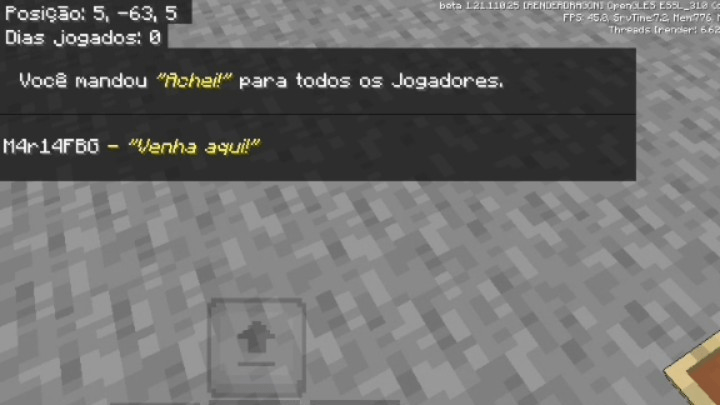
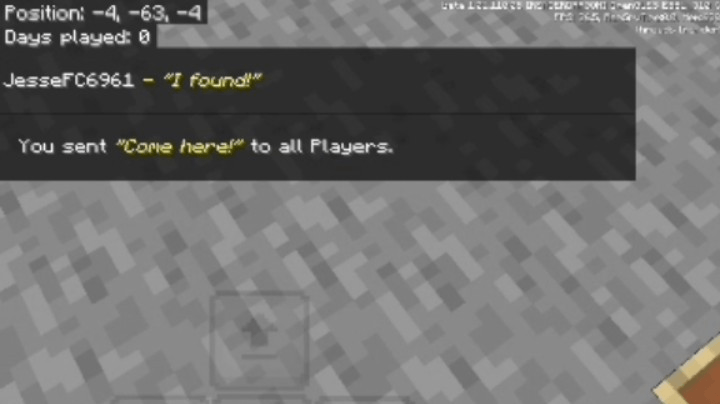
A brief example of its use (I tried using GIF, but it was too big, so just see the 2 Players view in the form of Screenshots):
Player 1 (Selected "PT-BR" and "I found!!!"):
Player 2 (Selected "EN-US" (Default) and "Come here!"):
Well, now comes the compatibility part, well, AddOns-Creator, just do this (I will use the "tellraw" command to illustrate this well):
1 - EN-US: /tellraw @a[tag=!pt_br,tag=!es_es] {"rawtext":[{"text":"§eHi."}]}
2 - PT-BR: /tellraw @a[tag=pt_br] {"rawtext":[{"text":"§eOi."}]}
3 - ES-ES: /tellraw @a[tag=es_es] {"rawtext":[{"text":"§eHola."}]}
ㅤ
JFC-Language Team