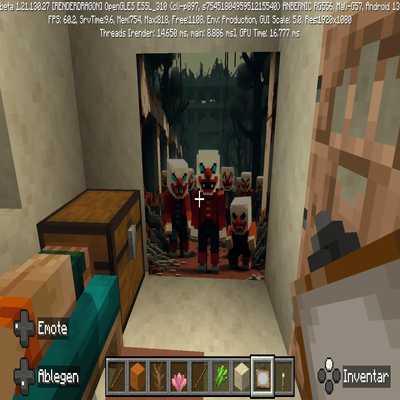
🤡 Mod Description: "Horror Clowns in Chernobyl Wallpapers"
💾 Name: Chernobyl Clown Terror (Wallpaper Overhaul)
Type: Resource Pack for Minecraft Bedrock Edition
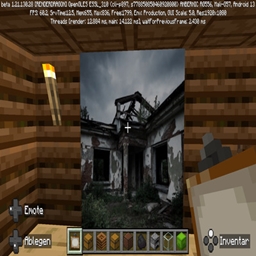
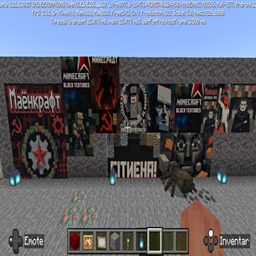
Function: This pack overrides all standard in-game paintings (Wallpapers) with dark, post-apocalyptic horror clown motifs.
💀 Key Features:
* Atmospheric Shift: The cozy vanilla paintings are replaced with an intense collection of horror visuals taken from realistic, unsettling art.
* Theme: Chernobyl / Post-Apocalyptic: The images feature eerie scenes of Horror Clowns situated within ruined, abandoned urban environments, strongly reminiscent of the ghost towns near Chernobyl.
* Visual Impact: The pack uses high-contrast, grim artwork to deliver maximum visual impact, shattering the standard ambient mood of Minecraft.
> "This pack is ideal for horror maps, adventure maps, or players who want to give their base an extreme, frightening, and highly atmospheric edge. Warning: Due to the shocking nature of the motifs, this pack may not be suitable for younger players."
>
⚙️ Installation & Compatibility:
This Resource Pack is designed for Minecraft Bedrock Edition and overrides the original painting texture files. It is generally compatible with most other Addons, provided they do not also modify the painting textures.
🛠️ Installation Guide for CurseForge Bedrock Addons
Since this is a standard Resource Pack, the installation process remains the same as any other Addon downloaded from CurseForge:
1. Downloading the Pack
* Navigate to CurseForge and locate the desired Addon file.
* Download the compatible .mcpack or .mcaddon file for Minecraft Bedrock Edition.
2. Importing into Minecraft
* Double-click the downloaded file. The import process will start automatically when Minecraft launches. You should see a success notification shortly after.
* (Alternative: Manually copy the unzipped folder into the .../com.mojang/resource_packs folder on your device).
3. Activating in Your World
* In Minecraft, go to your World Settings (Edit World).
* Scroll to the "Resource Packs" section on the left.
* Under the "Available" list, find the imported pack (e.g., "Chernobyl Clown Terror") and click "Activate".
* Priority Check: Ensure this pack is at the highest priority (top of the "Active" list) to guarantee it successfully overrides the default Minecraft paintings.
* Launch the world! The new horror clown wallpapers will now be available when you place a painting block.
Cymatrix Technologies
Horrorclowns Wallpapers Version 1 Team