CCCP Wallpapers Addon Version 2
- By
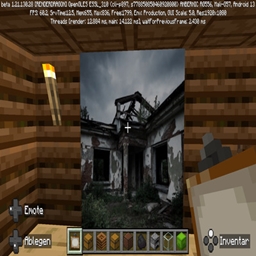
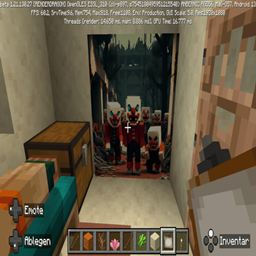
Feel Like in the Soviet Union with this Wallpapers for your Minecraft Home.
☭ CCCP Legacy Wallpapers: Monumental Soviet Art Pack (Bedrock Edition) ☭ Version 2
Attention:
All CCCP Wallpaper Addons overwrite each other.
You can only usw one Wallpapers Addon in the Same world.
Forge Your World's History!
Are you ready to elevate your builds from humble structures to monumental testaments of a bygone era?
The CCCP Legacy Wallpapers Addon transforms your plain Minecraft walls into canvases of powerful, evocative Soviet-era art and propaganda. This pack is not just a texture change—it’s an immersion into history, perfect for builders constructing sprawling historical simulations, clandestine bunkers, cold-war espionage maps, or simply adding a unique, bold aesthetic to your survival base.
Dive deep into the striking visuals of the CCCP era. Each piece is carefully designed to evoke the dramatic scale and unmistakable style of Soviet realism, ready to cover your blocky walls in high-resolution, impactful art.
Ready your hammer and sickle—it’s time to build for the Motherland!
🌟 Key Features
Monumental Art: Replaces standard Minecraft paintings with dozens of high-quality, unique textures featuring authentic Soviet-era themes.
Atmospheric Immersion: Instantly sets a specific, powerful mood for themed builds and roleplay scenarios.
High-Resolution Detail: Crisp, clear textures ensure your wall art looks stunning even on the grandest structures.
Easy Integration: Simple installation via the standard Bedrock .mcpack format.
🛠️ Installation Guide (Minecraft Bedrock Edition)
This guide is for installing the file as a Resource Pack on Minecraft Bedrock Edition (Windows 10/11, Mobile, Console). The pack uses the standard Bedrock .mcpack format for easy installation.
Step 1: Download the Pack
Click the "Download" button on the CurseForge project page.
Save the downloaded file (it will typically be a file ending in .mcpack) to your device.
Step 2: Automatic Installation (Recommended)
Locate the downloaded .mcpack file on your device (e.g., in your Downloads folder).
Double-click (PC/Mac) or tap (Mobile) the .mcpack file.
Minecraft Bedrock Edition should automatically launch and begin importing the pack, displaying a "Successfully imported" message at the top of the screen.
Step 3: Activation
Open Minecraft Bedrock Edition and go to Settings.
Navigate to Global Resources (unter "General" oder "Global Resources" je nach Sprache).
In the "My Packs" section, find the CCCP Legacy Wallpapers pack.
Click on the pack and then click the "Activate" button to move it to the "Active" section
The game will reload, and the new Soviet-era wall art will replace the default paintings
I rely on your feedback to keep improving the atmosphere of the Motherland!
CCCP Wallpapers Addon Version 2 Team