Dynamic Live Health Bar
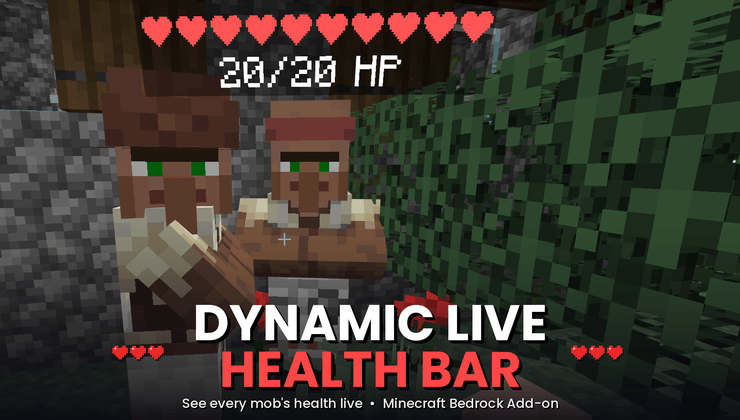
Dynamic Live Health Bar shows the live health of every nearby mob right above its head: a heart bar plus the exact HP. No more guessing how many hits a Ravager or Iron Golem has left, or whether that Creeper is one hit from dying.
Features
● Live heart bar: Mobs show a heart bar and an exact HP number, for example ❤❤❤❤❤❤❤❤❤❤ and 20/20 HP. Mobs with a lot of health are scaled down to 10 hearts, so even bosses stay readable.
● Always on, no hitting required: Every mob within range gets a bar (48 blocks by default), not only the ones you damage.
● Instant updates: The bar changes the moment a mob takes damage or heals.
● Mob names: The first line shows the mob's custom name, or its type (like "Zombie") if it has none. Custom name tags are always preserved and restored.
● Smart cleanup: Bars are removed from mobs that move out of range, and bars never appear on items, XP orbs, arrows, armor stands, NPCs or players.
● Clean death messages: The bar hides on mobs hunting a player at 4 hearts or less, so "slain by…" messages stay readable.
● Customizable in-game: Settings are saved in your world and changed with simple commands (see below).
● Lightweight and stable: Uses the stable scripting API, with no Beta APIs or Experimental Features needed.
Commands
Run these in chat with /scriptevent mhb:<command>:
| Command |
What it does |
status |
Show the current settings |
help |
List all commands |
on / off |
Turn the bars on or off (names are restored when off) |
range 32 |
Set the bar distance (4–64 blocks) |
mode look |
Show bars only on the mob you're looking at (mode proximity for all mobs in range) |
hideatfull on |
Only show bars on damaged mobs |
color on |
Color the HP number green, yellow or red |
name off |
Hide the mob type name line |
combat on |
Keep bars visible even on mobs hunting a low-health player |
uninstall |
Remove all bars and restore names before deleting the pack |
Installation
- Download
Dynamic_Live_Health_Bar_v1_1_0.mcpack.
- Open the file on your device. Minecraft will import it automatically.
- Create a new world or edit an existing one.
- Go to Behavior Packs and activate Dynamic Live Health Bar.
- Load the world and look at any mob to see its health bar.
Requirements
● Minecraft Bedrock Edition 1.26.0 or newer
● Uses the @minecraft/server scripting module, version 2.11.0
Notes
● Don't run this together with other health bar add-ons that rename mobs, because they will overwrite each other's name tags.
● Before removing the pack, run /scriptevent mhb:uninstall so no health bars stay on mobs in your world.