Debug Screen Ultimate: Java F3
- By
Bring the Java F3 debug screen to Bedrock. Tap one item to see coordinates, chunk, biome, light, facing, speed, TPS and the block or mob you look at. Works on mobile, console and PC. Fully customizable.
18920.jpg
Description
Debug Screen Ultimate: Java F3 HUD
Press F3 on Bedrock. Finally.
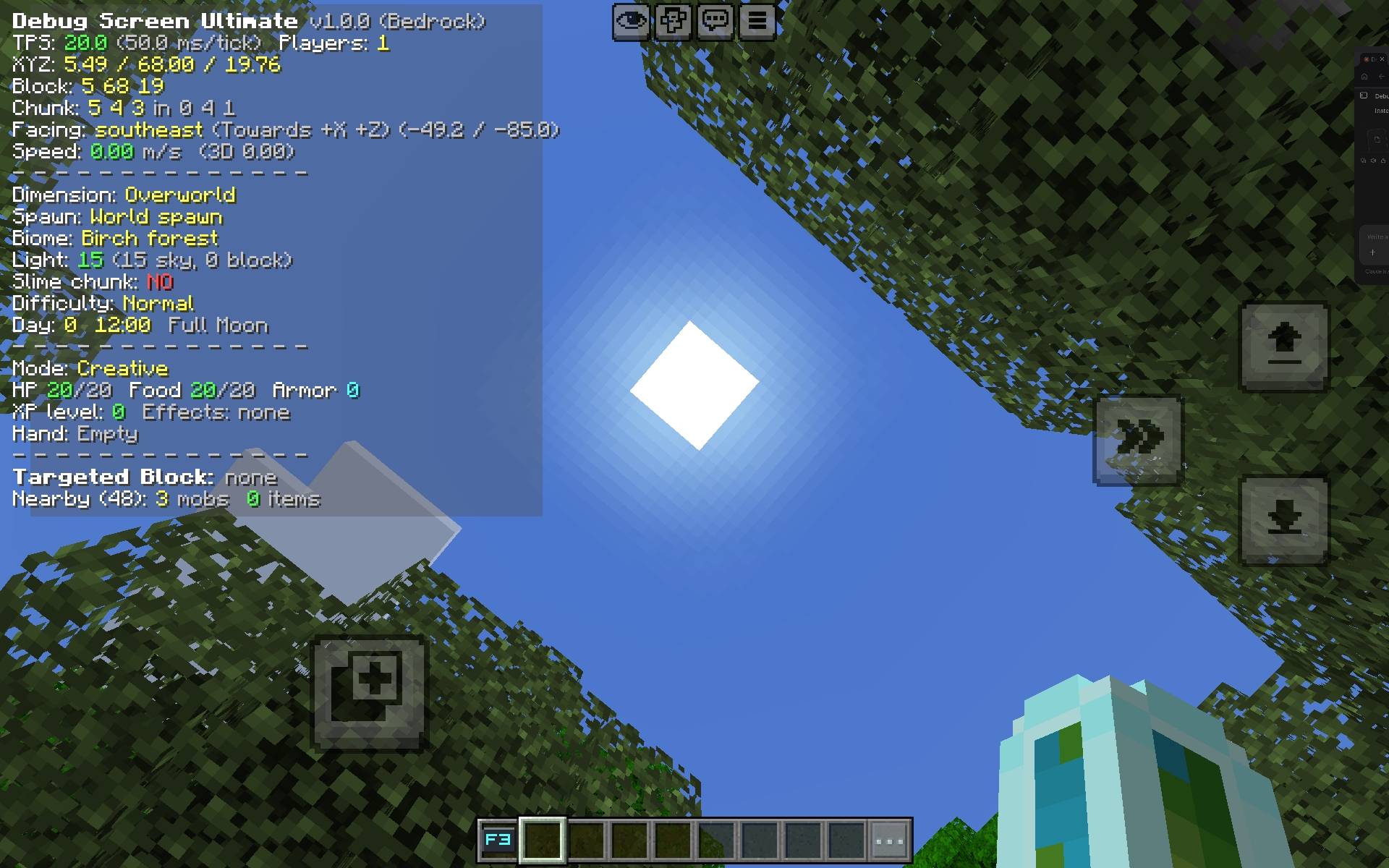
Missing the Java F3 screen on Bedrock? Now you have it. Tap one item and a full debug screen appears in the top-left corner with your coordinates, chunk, biome, light level, facing, speed, TPS and details about the block and mob you are looking at. It works on mobile, console and PC, no commands needed. 🧭📟⛏️
👉 Join the Discord community for updates, bug reports and sneak peeks!
Features
- One-tap F3 Key: tap to show or hide the debug screen, crouch and tap to open the settings
- Java-style panel in the top-left with a dark translucent background
- Position: exact XYZ, block position, chunk and in-chunk coordinates
- Facing: direction, axis, yaw and pitch
- Biome and light: the biome under your feet plus sky light and block light
- Slime chunk finder for the Overworld
- Server TPS and ms per tick, plus player count
- Speed in blocks per second
- Targeted block: position, ID, light, block states and tags, like the right side of Java's F3
- Targeted fluid and targeted entity with its health and distance
- Player info: game mode, sprinting, sneaking, swimming, flying, health, food, armor, XP and active effects
- Held item with count, durability and enchantments
- World info: dimension, spawn point, difficulty, day, clock time and moon phase
- Nearby entities counter (mobs, items and players within 48 blocks)
- 6 color themes and a Compact mode for small screens
- Every line can be turned on or off, and your settings are saved
- Light on performance: the screen refreshes a few times a second and heavy scans are cached
The debug screen 📟
Debug Screen Ultimate v1.0.0 (Bedrock)
TPS: 20.0 (50.0 ms/tick)  Players: 1
XYZ: -480.73 / 67.00 / -122.33
Block: -481 67 -123
Chunk: 15 3 5 in -31 4 -8
Facing: south (Towards +Z) (-17.8 / 72.9)
Speed: 0.00 m/s
Biome: Desert
Light: 15 (15 sky, 0 block)
Targeted Block: -481, 66, -122
minecraft:sand
The lines above are an example. You choose which ones you see.
How to use it 🎮
| Action | What it does |
|---|---|
| Tap the F3 Key | Debug screen on or off |
| Crouch + tap the F3 Key | Opens the settings panel |
The F3 Key is given to you when you join. You can't craft it, you can't drop it, and you keep it when you die. If you ever lose it, open the settings panel and press Get F3 Key.
The settings panel ⚙️
- Toggle Debug Screen: same as tapping the key
- Display Settings: turn each line on or off
- Theme: Java, Aqua, Green, Red, Gold or Purple
- Compact mode: keeps only the important lines, great for phones
- Help: controls and notes
Installation
- Download the
.mcaddonfile. - Open it with Minecraft Bedrock. It imports automatically.
- Create or edit a world and activate both the Behavior Pack and the Resource Pack.
- Load into your world, find the F3 Key in your inventory and tap it.
Requires Minecraft Bedrock 1.21.120 or newer.
Updating from an older version: remove the old Debug Screen Ultimate packs from your world, import the new file, then activate both packs again.
Tips
- Turn on Compact mode if the panel feels too big on your phone.
- Look at a block and check its states and tags to learn how redstone and farming blocks work.
- Use the slime chunk line to find the perfect spot for a slime farm.
- Switch off the lines you don't need for a clean screen when recording.
FAQ
Do I need any experimental features?
No. It uses standard Bedrock scripting.
Does it work on mobile and console?
Yes, anywhere Bedrock supports add-ons with scripting. There is no keyboard needed, because the F3 Key is an item.
Does it work in multiplayer and on Realms?
Yes. Every player has their own screen, theme and settings.
Why is there no FPS or memory line?
Minecraft's add-on scripts cannot read the client's FPS or memory use, so I left them out instead of showing fake numbers. TPS is measured for real.
Is the biome and light level real?
Yes. They are read from the game at your position.
The panel is in the wrong place or too big.
Turn on Compact mode in the settings, and tell us your device and screen size on Discord so we can adjust it.
Can I move or hide the key?
You can move it around your inventory. It can't be dropped, so it can't be lost.
Something is broken. Where do I report it?
Tell us on Discord or in the comments with your Minecraft version, what you did, and any red text from the content log (Settings, Creator, Content Log).
Community 💬
Got a bug to report or an idea for a new line on the screen? Come hang out!
Leaving a comment or a rating on this page also helps a lot. Thank you for the support! ❤️
Press F3 on Bedrock. Finally. 🧭📟⛏️
Debug Screen Ultimate: Java F3 Team