Changeable player name
- By
WANT TO CHANGE YOUR NAMES IN VIDEOS OR TROLL YOU FRIENDS THIS ADDON LET'S YOU DO THAT
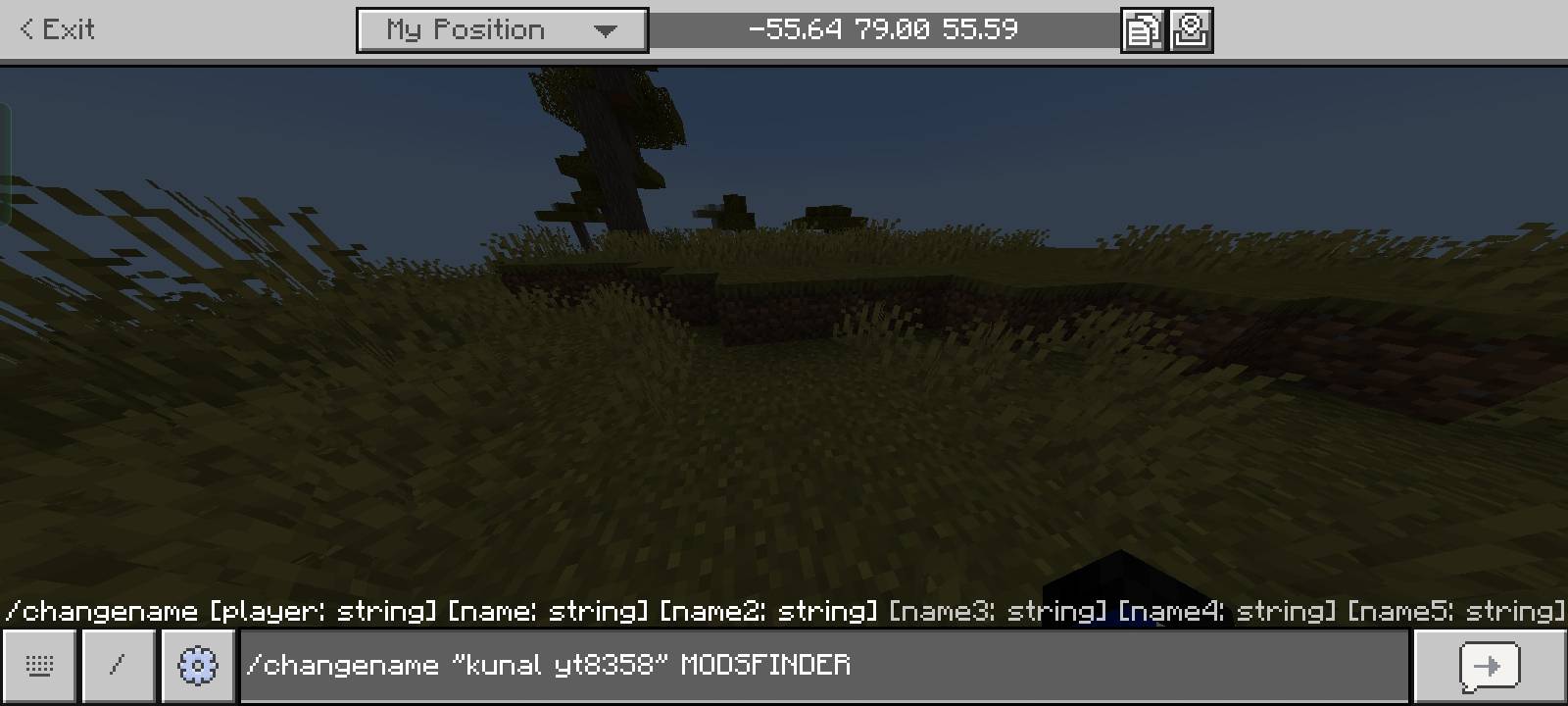
1ecp0yfoi3aa1-1 (1).png
Description
NOTE- IF YOUR NAMES HAS SPACE USE "" OR QUOTES IT SHOULD LOOK THIS "MODS FINDER" OR SEE THE IMAGE
CHANGEABLE PLAYER NAME | MCPE / BEDROCK
Want to customize your player name in Minecraft Bedrock Edition? Want to see your custom name in chat and death messages? Changeable Player Name brings a new way to personalize your Minecraft experience!
This addon is designed for players who want more control over their in-game identity. Customize your player name and enjoy a more personalized experience while playing in your Minecraft world.
✨ FEATURES
📝 Custom Player Name
Change your in-game player name to a custom name of your choice. Personalize your identity and make your character stand out in your world.
💬 Custom Name in Chat
Your customized player name can appear in chat messages, making it easier to identify players by their chosen names instead of their default names.
💀 Death Messages in Chat
See player death messages directly in the chat! When a player dies, the death message can be displayed in chat, helping everyone keep track of what's happening in the world.
Whether someone falls from a high place, gets defeated by a mob, or dies during an adventure, death messages make multiplayer gameplay more informative.
🎮 Multiplayer Experience
Make your Minecraft multiplayer experience more personalized with custom player names and chat-based death messages.
⚡ Simple and Lightweight
The addon is designed to provide its features without unnecessarily complicating your gameplay.
🛠️ Easy Setup
Import the addon, activate the Behavior Pack in your world, and follow the addon-specific instructions to get started.
📦 INSTALLATION
1. Download the addon file.
2. Open the downloaded file to import it into Minecraft Bedrock Edition.
3. Create a new world or edit an existing world.
4. Activate the Changeable Player Name Behavior Pack.
5. Enable any required experimental settings if specified by the addon.
6. Enter your world and follow the instructions provided with the addon.
🌍 COMPATIBILITY
- Edition: Minecraft Bedrock Edition
- Platform: Compatible Bedrock platforms, depending on addon support
- Requirements: Check the supported Minecraft version and addon instructions before installation.
❓ WHY USE THIS ADDON?
If you want more customization in your Minecraft world, this addon offers a way to personalize player names and display death messages in chat.
It's suitable for players who want a different multiplayer experience without completely changing the original gameplay.
📌 IMPORTANT NOTES
- Features may depend on the Minecraft version and world settings.
- Multiplayer behavior can vary depending on server configuration.
- Make sure the addon is enabled correctly before using it.
---
MADE BY MODSFINDER
Changeable player name Team