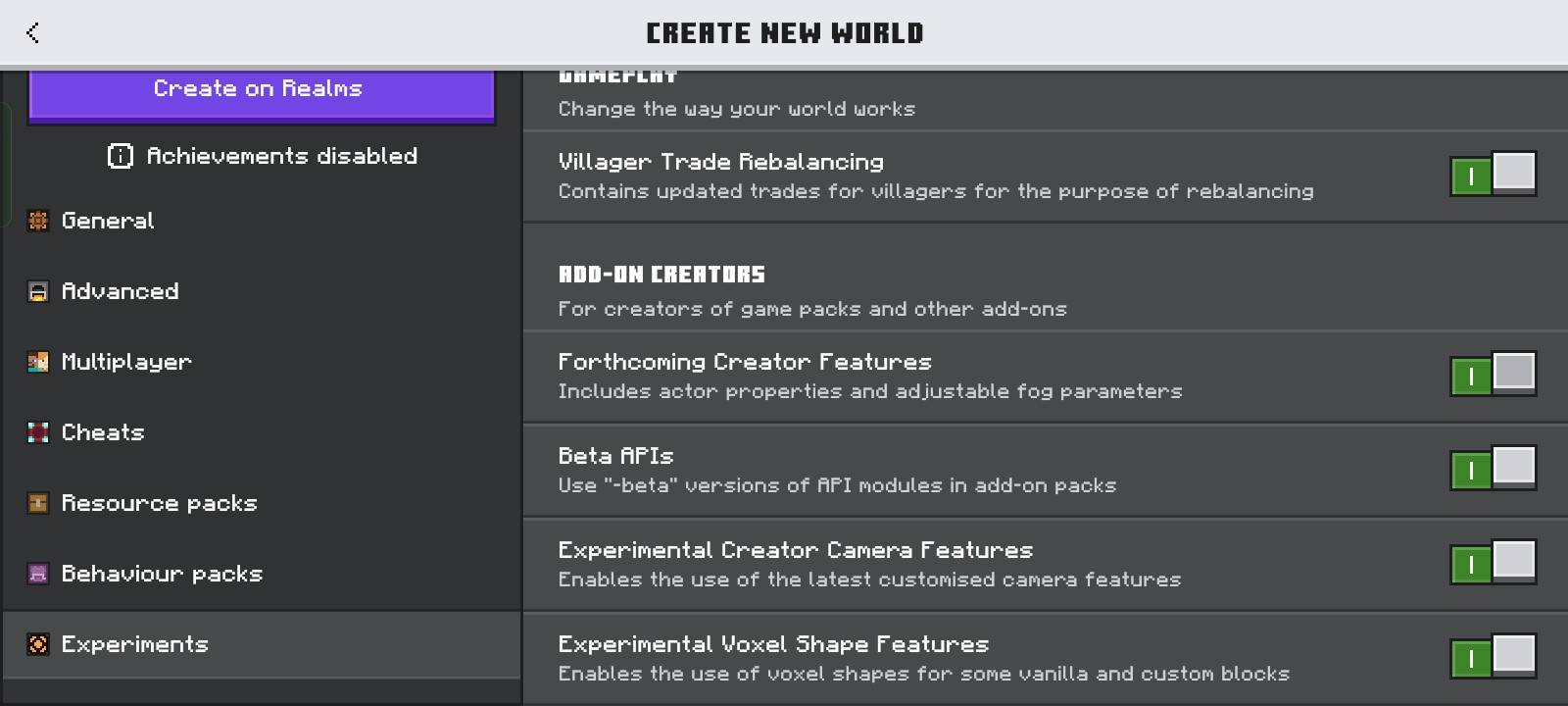
Screenshot_2026-08-29-19-31-35-05_5c8300b655012b1930f2e0a7b81bf6a9.jpg
Description
🎥FLASHBACK ADDON
THE FULL VERSION HAS BEEN RELEASED IT MIGHT STILL HAVE SOME LITTLE BUGS BUT DON'T WORRY I WILL FIX THAT IN FUTURE UPDATED ADDED A CUSTOM SKIN OPTION TOO AND MANY MORE
NOTE: YOU CAN OPEN UI WITH A FEATHER OR USE CMDS AND BTEA APIS SHOULD BE ENABLED
«TELL ME YOUR SUGGESTIONS TOO! I WOULD LOVE TO KNOW WHAT FEATURES YOU WANT TO SEE IN THE FULL VERSION.»
Ever wished Minecraft Bedrock had a proper replay system like Java Edition? Replay Mod Lite brings replay-style gameplay recording and playback to Minecraft Bedrock Edition.
With this addon, you can record your gameplay and watch the recorded session again from an external/free camera. Instead of only seeing your normal first-person perspective, you can use the replay system to view your recorded player and create cinematic shots, gameplay clips, PvP moments, speedruns, builds, and other scenes.
🎬 What Does Replay Mod Lite Do?
Replay Mod Lite records your gameplay while you play and allows you to replay the recorded session later.
During a replay, your recorded player can be viewed from an external perspective instead of being limited to the exact camera perspective you had while playing. This makes it possible to watch your own gameplay like a spectator and get different camera angles.
For example, you can record yourself:
- ⚔️ Fighting mobs
- 🏠 Building a house
- ⛏️ Mining
- 🌎 Exploring
- 🏃 Doing a speedrun
- 🥊 Playing PvP
- ⚙️ Testing farms
- 🎯 Completing challenges
- 🎥 Creating cinematic Minecraft clips
After recording, you can replay the session and watch what happened from different perspectives.
⭐ Features
🎥 Gameplay Recording
Record your Minecraft gameplay and capture the actions that happen during your session.
👤 Actual Player Replay
The replay system uses your recorded player instead of simply showing your current gameplay again. Your player can be viewed from an external perspective during playback.
🎬 Free Camera
Move around the replay from different camera positions and watch the recorded gameplay from angles that would normally be difficult to achieve while playing.
⚔️ Action Replay
Recorded gameplay actions can be viewed again during playback, allowing you to review what happened during the recording.
🐷 Mob Interactions
Interactions with mobs and other gameplay events can be viewed during the replay, making the system useful for testing farms, PvP, challenges, and funny gameplay moments.
💾 Replay Playback
Once you have a recording, you can play it back without having to repeat the entire gameplay session.
🎞️ Cinematic Shots
Use the replay camera to create different camera angles for Minecraft videos, Shorts, montages, build showcases, and cinematic scenes.
📱 Bedrock Edition
Replay Mod Lite is designed specifically for Minecraft Bedrock Edition.
🎥 Perfect For Content Creators
Replay Mod Lite can be useful if you make Minecraft content and want more control over your footage.
You can record your gameplay normally and then use the replay to find interesting moments or create different camera angles.
It can be useful for:
- YouTube videos
- YouTube Shorts
- Minecraft montages
- Cinematic videos
- Build showcases
- PvP clips
- Speedrun recordings
- Challenge videos
- Farm testing
- Gameplay analysis
- Funny moments
Instead of trying to control your character and camera perfectly at the same time, you can record first and work with the replay afterward.
🛠️ How It Works
1. Start a recording.
2. Play Minecraft normally.
3. Perform whatever gameplay you want to capture.
4. Stop the recording when you're finished.
5. Open the replay system.
6. Load the recorded gameplay.
7. Use the replay camera to watch the session.
8. Move around the recorded scene and find the camera angle you want.
🎮 Examples
Want to record yourself killing a mob and then watch it from another angle?
Record the gameplay and open the replay afterward.
Want to show your friends how you built something?
Record the building process and replay it later.
Want a cinematic shot of your character walking through your base?
Record the scene and use the replay camera to view it from outside.
Want to review a PvP fight?
Record the fight and watch the replay to see what happened from a different perspective.
🚀 Why Replay Mod Lite?
Minecraft Bedrock has many useful addons, but creating a proper replay-style system is much more complicated than simply adding a new item or block.
Replay Mod Lite focuses on bringing the core replay experience to Bedrock while keeping the addon relatively lightweight and straightforward to use.
This is a Lite version, so it may not have every feature found in the Java Edition Replay Mod or other advanced replay systems. More features and improvements can be added over time.
⚠️ Beta Version
This release is a Beta Version, so you may encounter bugs, glitches, or unfinished features.
Please report any bugs you find so they can be fixed in future updates.
The full version is planned to be uploaded after further testing and improvements.
You can consider this Beta release a trailer for the full version.
🔮 Future Updates
Replay Mod Lite can continue to receive improvements and new replay features.
Possible future improvements include:
- Better camera controls
- Smoother playback
- Improved recording
- Additional replay controls
- Better performance
- More cinematic tools
- More replay customization options
💬 Suggestions & Feedback
Have an idea for the Replay Mod?
TELL ME YOUR SUGGESTIONS TOO! Your feedback can help decide what features are added to future versions.
If you find a bug or have an idea for a new feature, leave a comment on the project page.
📌 Credits
Replay Mod Lite
Made for Minecraft Bedrock Edition
MADE BY MODSFINDER
FLASHBACK (replay mod) Team