Verocrft:Auction House
- By
Premium auction house addon for Minecraft Bedrock with real-time bidding, secure claim box, and full localization support.
MCPEDL
Description
Verocrft: Auction House Addon
A premium, fully-featured, and highly customizable Player Auction House addon for Minecraft Bedrock Edition (1.20.10+). Players can list items for auction, bid on other players' listings, manage active auctions, and claim their rewards (items/money) from a secure Claim Box.
Styled with a premium medieval slate-charcoal and gold-trimmed GUI, it integrates seamlessly with companion addons like RPG/Dynamic Economy Addons and uses Ducats as its default currency.
Achievement Friendly: no experimental toggles required, so achievements stay fully enabled in your world.
What's New in v1.0.5
Zero-Config Plug & Play Auto-Detection
- Automatic detection of Verocraft ecosystem addons (Dynamic Economy and Verobank) using a world session token (
vc:session_id). - Return to Market and Open Verobank navigation buttons automatically appear in the main menu when the related addon is active, no manual config editing needed.
- The session token mechanism prevents ghost status, buttons automatically disappear if the companion addon is removed.
Full Verobank Companion Integration
- Bank Collateral Auctions: defaulted Verobank loans are automatically listed as public auctions under the seller "[Verobank]", with an automatic 20% discount if no bids come in.
- Seller Trust Badges: displays a customer's bank trust tier (Bronze, Silver, Gold, Platinum) next to their seller name.
- Price & Whitelist Sync: supplies real transaction price estimates and collateral tiers (S, A, B, C) for the bank's loan calculations.
Universal Rebranding & Engine Hardening
- Interface and branding refreshed to be more intuitive for all players.
- All World Dynamic Property keys are now guaranteed to stay under Minecraft Bedrock's hard 32-character limit.
- Cleaned up documentation and non-essential comments for server admins.
Main Auction Menu: the primary listing browser where players see all active auctions, item icons, current bids, and remaining time. 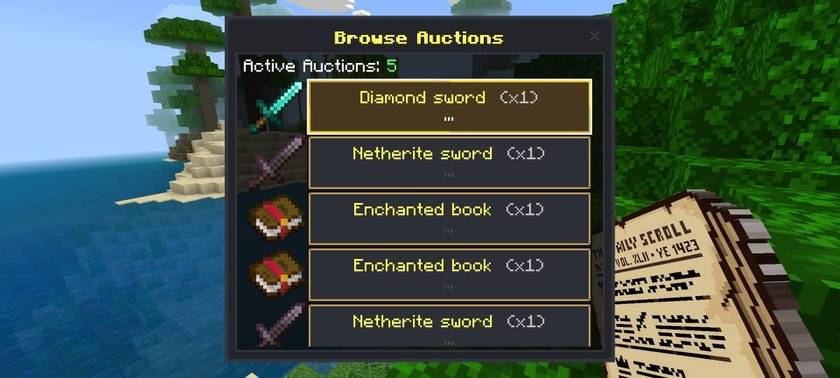
Listing an Item: the form players use to select an item from their inventory, set a starting price, and choose a listing duration. 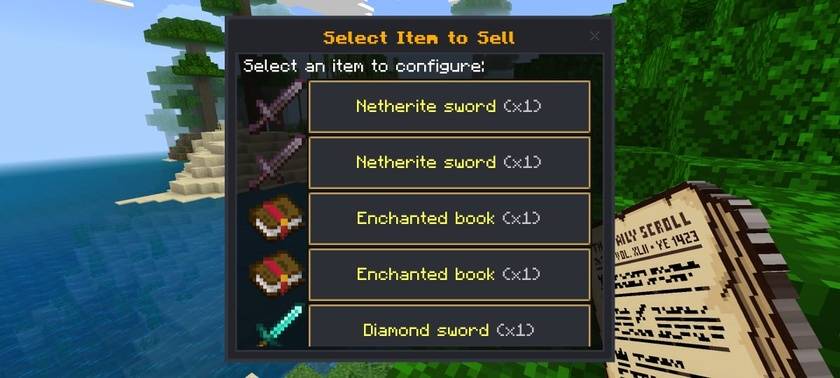
Placing a Bid: the bid screen showing the current highest bid, minimum next bid, and an input field for the player's offer. 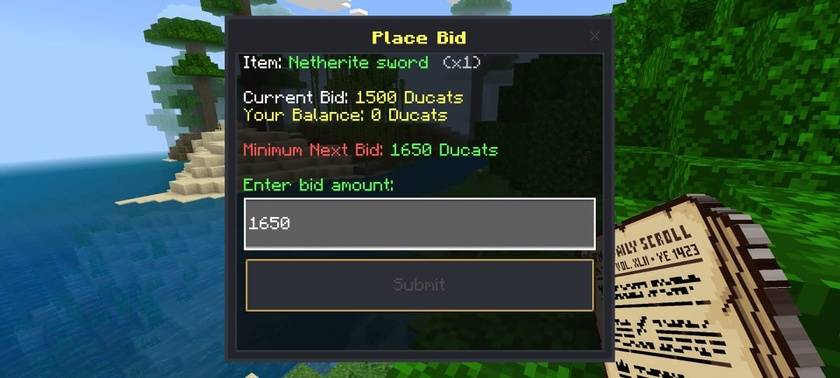
Claim Box: where players collect won items, refunded bids, or Ducats from completed auctions, especially useful for offline transactions. 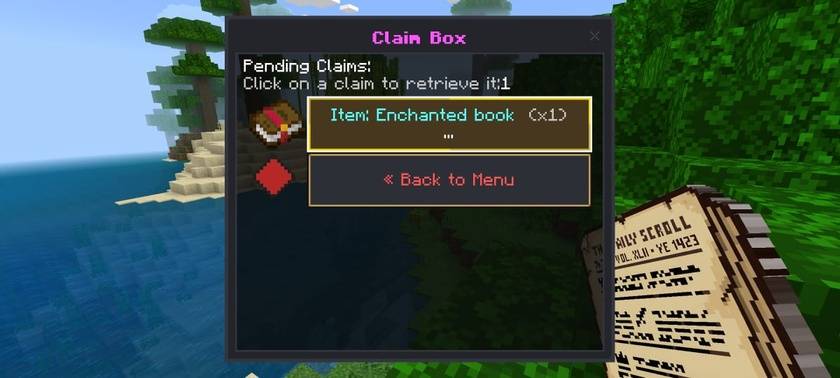
Key Features
-
Dynamic Auction Loop & Bid System Players can list items from their inventory for custom durations. Other players can place real-time bids, with minimum bid increments enforced via a flat value or percentage rate. Outbid players are refunded automatically, if they're offline, the refund is placed safely in their personal Claim Box.
-
Upfront-Fee-Less Listing (Tax-on-Sale) No upfront listing fees, every listing is free. A customizable sales tax (default 5%) is only deducted from the final sale price once an auction is successfully won. A minimum listing price of 50 (customizable) keeps listings high-value.
-
High-Value Whitelist Economy Selling is restricted by default to high-value, non-farmable items (Diamond/Netherite equipment, Elytras, Tridents, Totems, and Enchanted Books), keeping the server economy clean and clutter-free.
-
Multilingual & Localized UI The entire interface, messages, logs, and error warnings are fully localized, with built-in support for English (US) and Indonesian (ID). Fully compatible with in-game language settings using client-side translation keys (
rawtext). -
Dynamic Custom Item Texture Resolver & Interceptor Automatically resolves texture paths for custom items added by other addons. A block path interceptor redirects any block icons to a clean generic fallback (like paper), since Bedrock script forms can't render terrain/block atlas paths directly on buttons. Explicit custom icons can also be set manually in the config.
-
Advanced NBT and Lore Serialization Automatically serializes and deserializes item counts, custom name tags, enchantments, damage/durability, and lore, preventing item duplication and ensuring items return with their exact properties intact.
-
Interactive Audio Feedback Clean success sounds (
random.orb,random.levelup) play when listing, bidding, winning, or claiming, and a warning sound (note.bass) plays on errors like bidding too low, insufficient funds, or a full inventory.
How to Install & Use
Installation
- Double-click the
Gilded_Ledger_v1.0.0.mcaddonfile to import both packs into Minecraft. - Activate both the Behavior Pack and Resource Pack in your World Settings.
- No experimental toggles required, achievements stay enabled.
Accessing the GUI
- Hold the Auction Ledger item (
auction:ledger) and right-click/tap the screen. - Or run
/scriptevent auction:openin chat.
Earning the Ledger
New players automatically receive one Auction Ledger in their inventory on first join.
Customization Guide
Behavior Pack Configuration
File:
Auction_House_BP
/scripts/config.jsmoneyScoreboard: Scoreboard objective used to track player balances (default:"money").currencyName¤cyNamePlural: Your server's currency name (default:"Ducat"/"Ducats").salesTaxRate: Percentage taken from successful sales (e.g.0.05= 5% tax). Set to0to disable.minListingPrice: Minimum price a player can list an item for (default:50).defaultStartPrice: Fallback recommended price for items not explicitly whitelisted.durations: Available listing durations, their timeouts, and matching translation keys.minBidIncrementRate&minBidIncrementFlat: Rules for how much higher a new bid must be than the current one.whitelistNamespaces: Array of prefixes that auto-allow all custom items from other addons (e.g.["custom_addon:", "addon:"]).items: The single-source registry of allowed items, each defined in a clean structure:
  "minecraft:diamond_sword": {
    displayName: "Diamond Sword",
    recommendedPrice: 500,
    icon: "textures/items/diamond_sword.png"
  }
How to Whitelist & Customize Items
1. Adding a vanilla item
"minecraft:golden_apple": {
  displayName: "Golden Apple",
  recommendedPrice: 300,
  icon: "textures/items/apple_golden.png"
}
2. Adding a specific custom item from another addon
"custom_addon:epic_sword": {
  displayName: "Epic Sword",
  recommendedPrice: 2500,
  icon: "textures/items/epic_sword.png"
}
3. Whitelisting all items from another addon in bulk
whitelistNamespaces: [
  "custom_addon:" // Allows any item starting with "custom_addon:"
]
Note: bulk whitelisted items use their default game name tag and fall back to the generic paper icon unless explicitly registered in the items mapping.
Language & Localization
Files:
Auction_House_BP
/texts/en_US.lang & Auction_House_RP/texts/id_ID.lang- Customize all titles, buttons, descriptions, notifications, chat broadcasts, and error dialogs.
- Add your own language file by registering it in
GildedLedg_RP/texts/languages.json.
Companion Addon Integration (Dynamic Economy)
When Dynamic Economy is active in the world, Auction House automatically enables:
- A Return to Market button in the main menu (runs
/scriptevent economy:market). - Shared scoreboard currency (
money/ Ducats).
Configuration options in config.js:
disableLedgerGive: true: stop giving the starting ledger on spawn (recommended when the Dynamic Economy ledger is used instead).enableReturnToMarket: false: force-disable the Return to Market button.
Companion Addon Integration (Verobank)
When Verobank is active in the world, Auction House automatically enables:
- An Open Verobank shortcut button in the main menu.
- Bank Collateral Auctions: defaulted loan collateral is automatically auctioned under the seller "[Verobank]".
- Seller Trust Badges: shows reputation badges (Bronze, Silver, Gold, Platinum) next to seller names.
- Market Price & Whitelist Sync: supplies real-time sale price averages and item tiering to the bank.
Configuration options in config.js:
enableBankIntegration: false: force-disable all Verobank integration and communication.
Verocraft Ecosystem & Recommended Coordinator: Verohub
Auction House is fully integrated into the Verocraft Commercial Ecosystem alongside Dynamic Economy and Verobank.
Why You Should Install Verohub
For the smoothest player experience and clean server management, installing Verohub alongside Auction House is strongly recommended:
- Unified Merchant License (
verohub:merchant_license): when Verohub is active alongside multiple commercial addons, the starterauction:ledgeris automatically suppressed to prevent inventory clutter. Players receive a single Merchant License that gives one-click access to the Auction House, Dynamic Market, and Bank. - Zero-Config Heartbeat Protocol (
vc_status): Auction House automatically announces its presence and streams heartbeats via Minecraft's shared scoreboard engine. - Live Admin Telemetry: admins can inspect integration links, auction activity, and addon health via
/scriptevent vc:panel.
Compatibility
- Integrates seamlessly with the Dynamic Economy and Verobank addons and uses the same Ducat currency system.
- Custom items from other addons are auto-resolved to matching icons without extra setup.
- Requires the Beta APIs experimental toggle to function.
The Verocrft:Auction House Team