Social-Action-Menu
- By
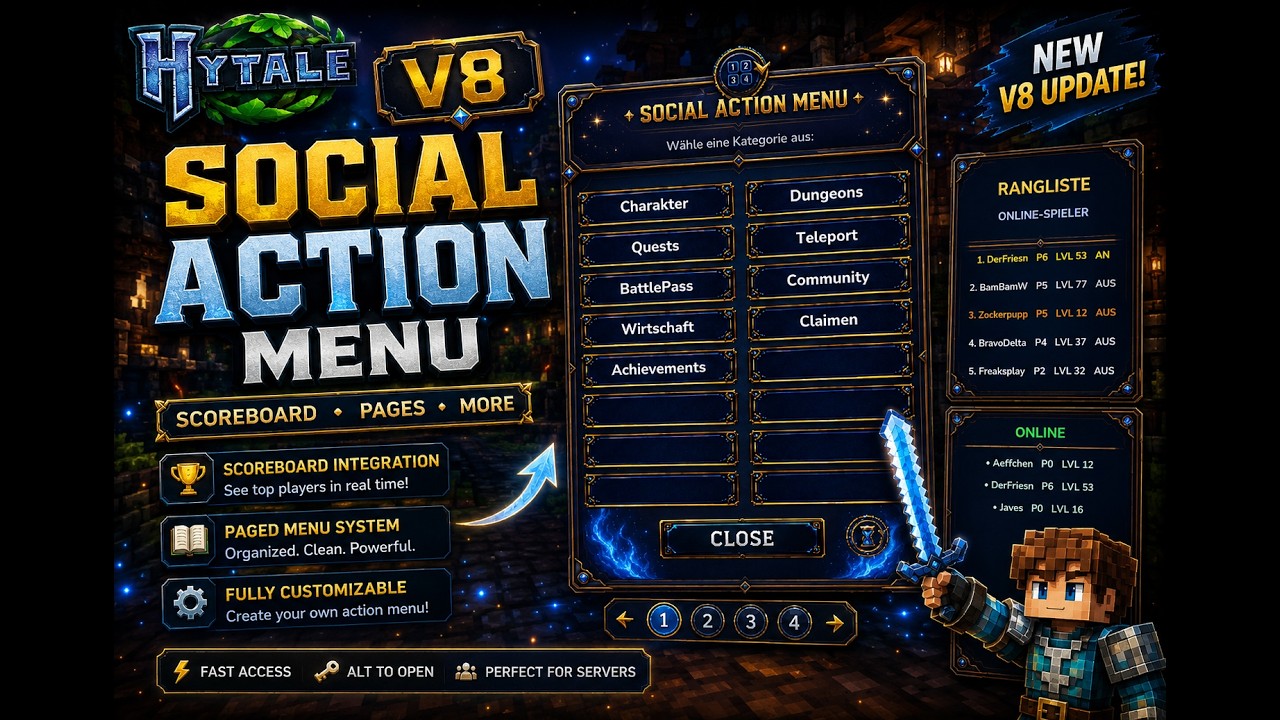
⚡ V11⚡New PM System⚡ALT⚡ support, pages, scoreboard, language config and Endless Leveling ranks.
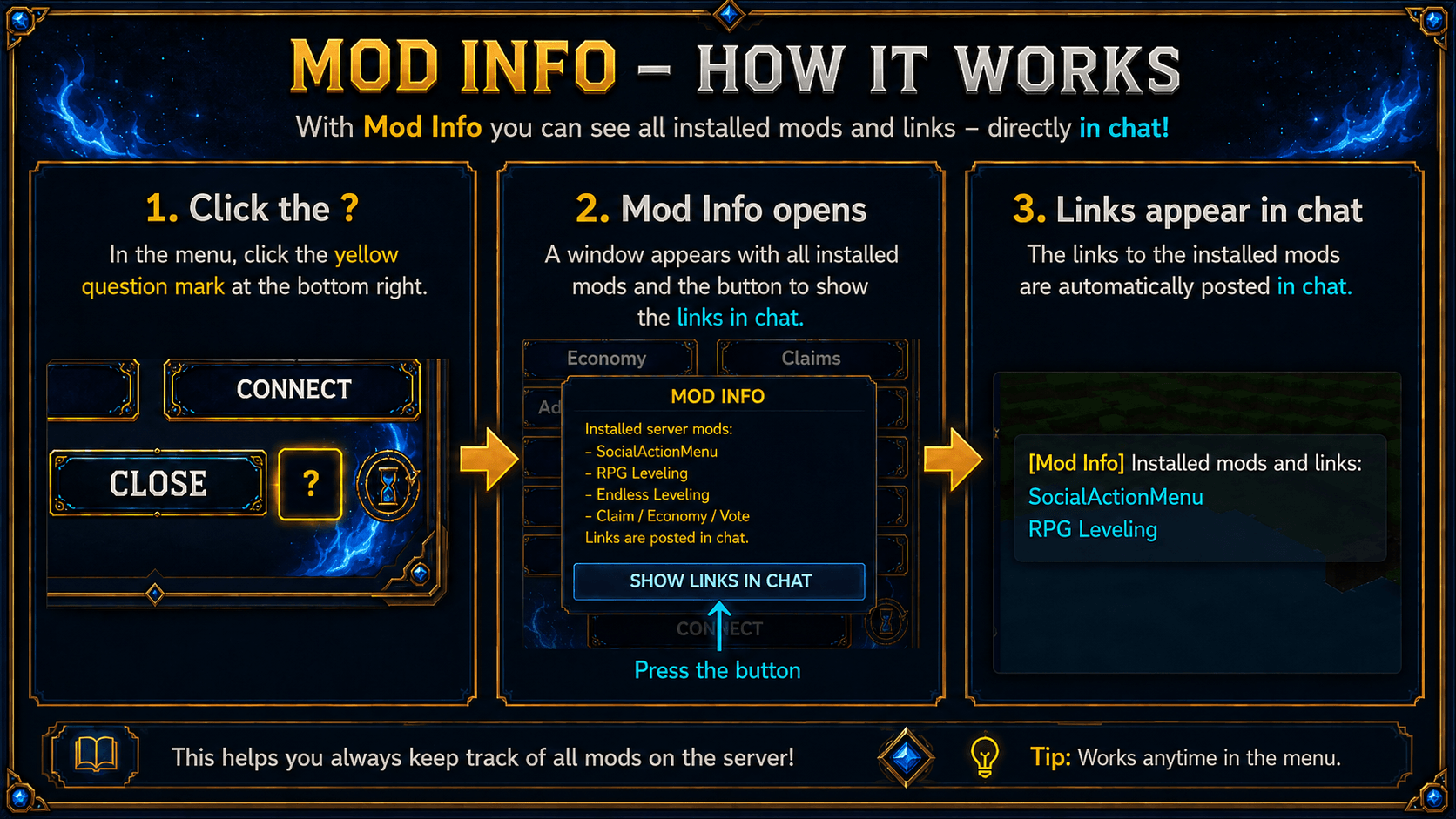
f7368770-aa2f-4a5d-969b-21663d60bbe6.png
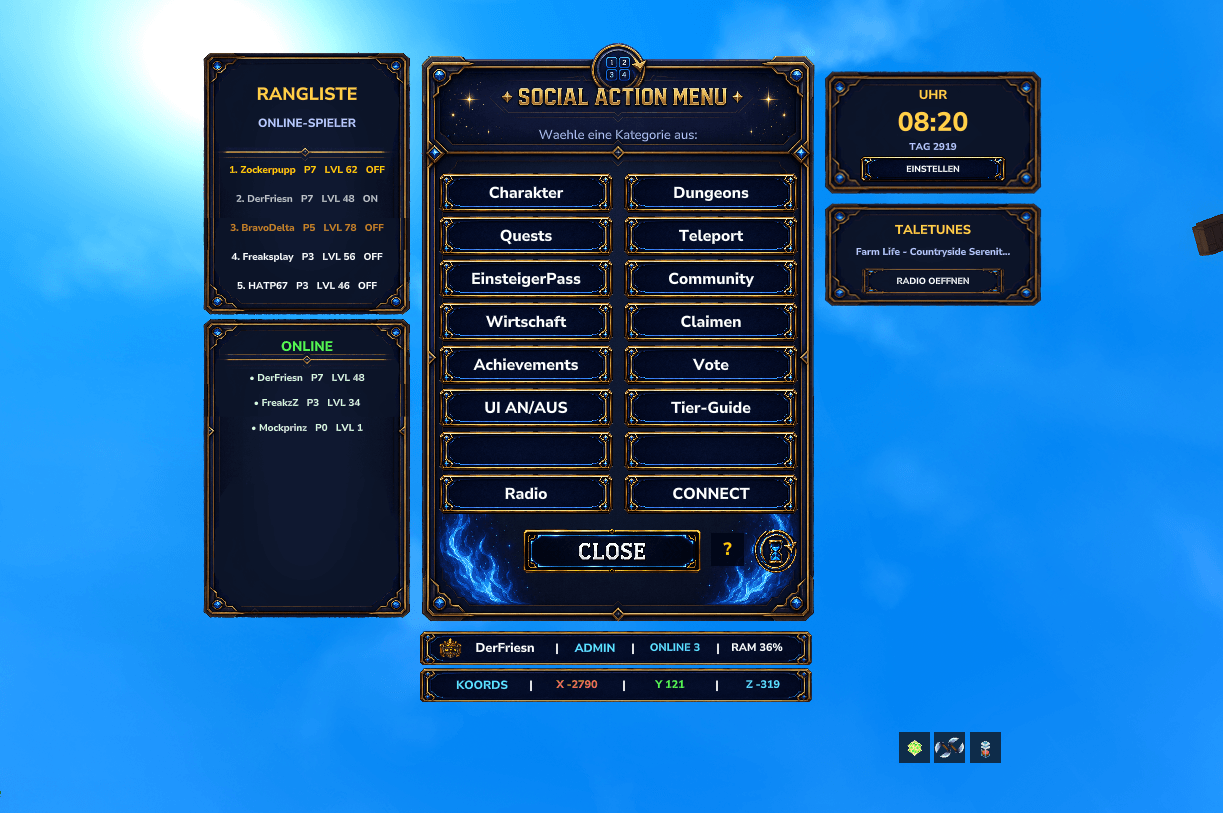
Screenshot 2026-06-26 105600.png
Description


SocialActionMenu V11
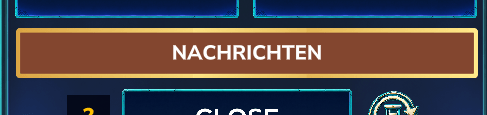
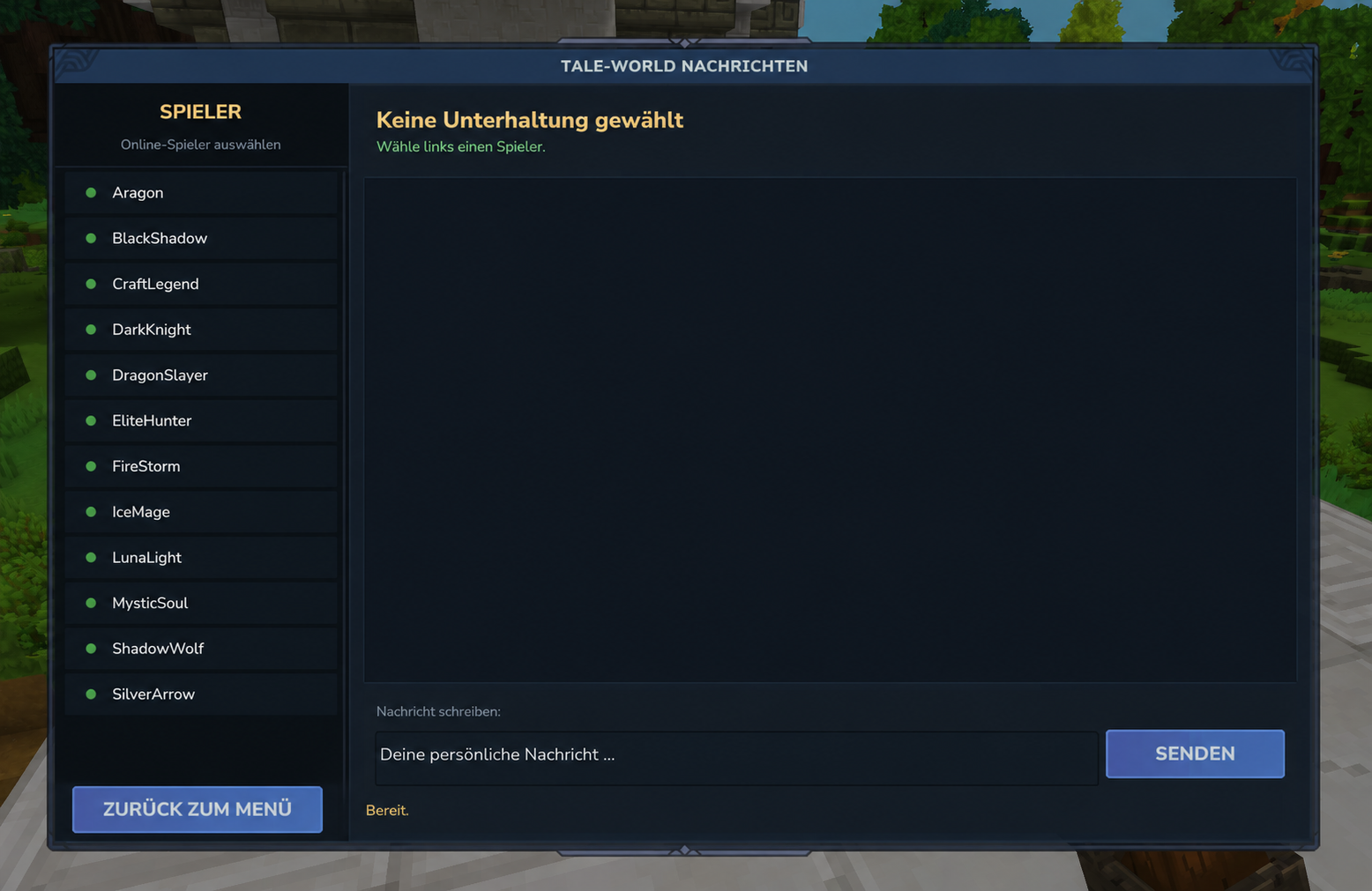
Private Messages System
You can completely change the language in the config.
NEW UI Endless Styl :
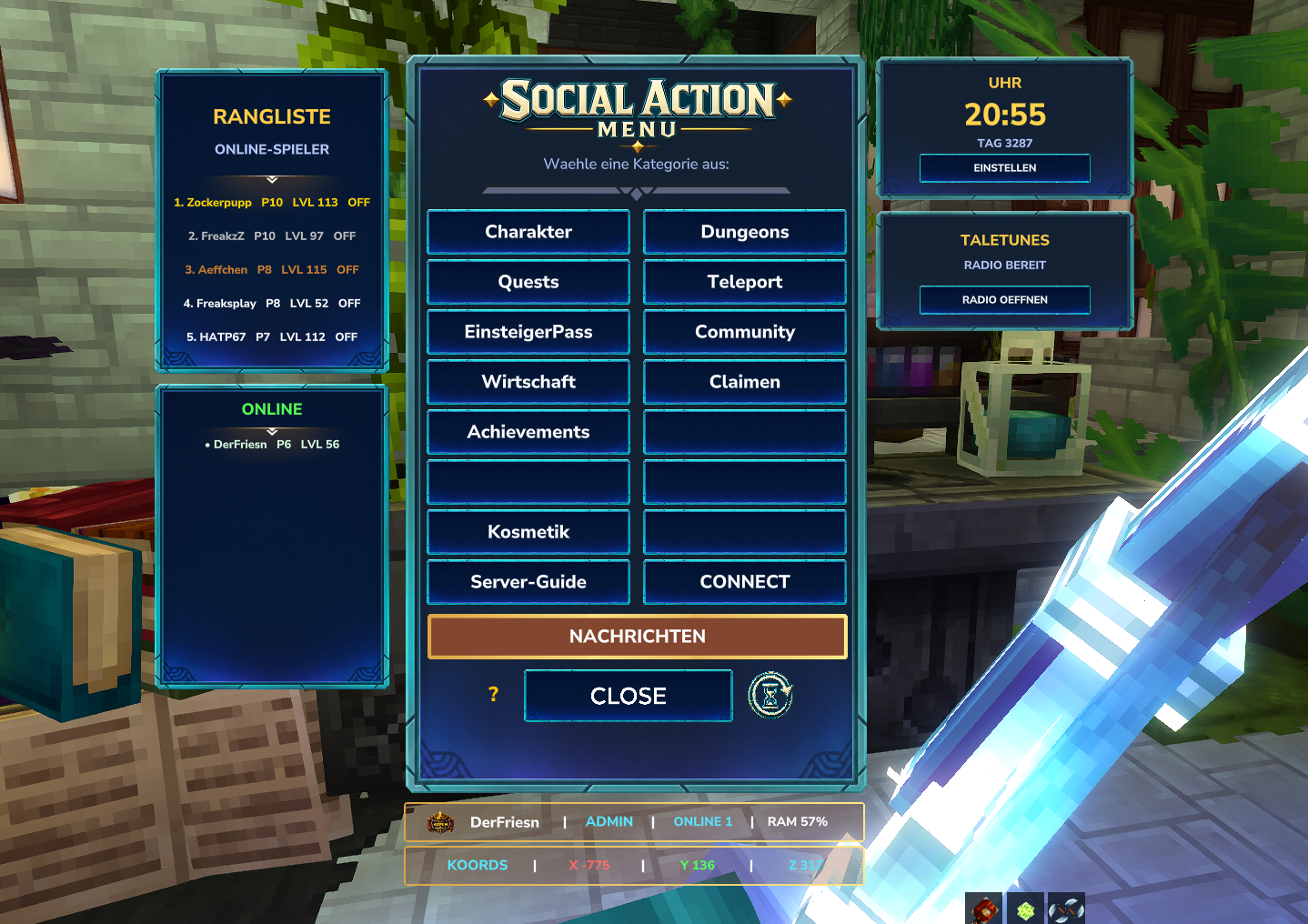
SocialActionMenu V10.9Update
A modern, animated and highly customizable action menu for Hytale servers. Perfect for RPG servers, MMO systems, custom commands, utility menus, server hubs and community integrations.
CurseForge Summary
Adds a customizable Hytale action menu with pages, command buttons, rankings, online player display, coordinates, optional clock, optional TaleTunes panel and German/English config support.
New in V10.9
This update focuses on the extended side UI and the new optional information panels.
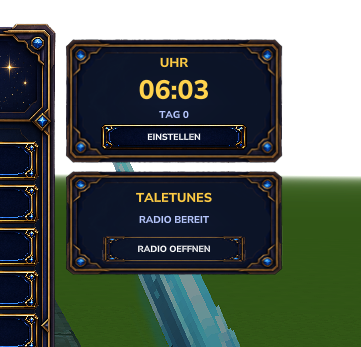
Clock Panel
SocialActionMenu now includes its own clock panel.
The clock can show:
- In-game time
- Real time
- Day display
- 24-hour or 12-hour format
- German or English text labels
- Its own settings page inside the menu
HyClock is no longer required for the SocialActionMenu clock.
TaleTunes Panel
A new optional TaleTunes panel was added below the clock area.
If TaleTunes is installed and enabled on the server, SocialActionMenu can show a small radio panel with a button to open the TaleTunes radio UI.
If TaleTunes is not installed, the TaleTunes panel will not be shown.
Coordinates Display

A new coordinate display was added to the bottom info area.
Players can now see their current position directly inside the SocialActionMenu UI:
X 123 Y 64 Z -456No extra setup is required for the coordinate display.
New Config File for Clock and TaleTunes
Clock and TaleTunes texts are now separated into their own config file:
mods/SocialActionMenu/SocialActionClock.jsonThis makes it easier to translate or customize the clock and TaleTunes UI without touching the main menu config.
Important Update Notes
Please remove older SocialActionMenu .jar files before installing this version.
If you already have an older SocialActionClock.json, the mod will still use fallback defaults, but the new values may not appear inside the file automatically.
If the new config options are missing, you can either:
- Add the missing values manually
- Or delete
SocialActionClock.jsononce and let the mod generate a fresh version
After changing the config, use:
/socialmenureloador restart the server.
Clock and TaleTunes Config
Config file:
mods/SocialActionMenu/SocialActionClock.jsonFull Example Config
{
  "activeLanguage": "de",
  "defaults": {
    "enabled": true,
    "showClockPanel": true,
    "showTaleTunesPanel": true,
    "use24Hour": true,
    "showRealTime": false,
    "showDays": true
  },
  "texts": {
    "de": {
      "panelTitle": "UHR",
      "settingsButton": "EINSTELLEN",
      "disabledTime": "AUS",
      "disabledSubline": "ANZEIGE AUS",
      "realTimeLabel": "ECHTZEIT",
      "gameTimeLabel": "SPIELZEIT",
      "dayPrefix": "TAG",
      "settingsTitle": "UHR EINSTELLUNGEN",
      "settingsDescription": "Eigene SocialActionMenu-Uhr ohne HyClock.",
      "buttonToggleEnabled": "UHR AN/AUS",
      "buttonToggleFormat": "24H / 12H",
      "buttonToggleSource": "SPIELZEIT / ECHTZEIT",
      "buttonToggleDays": "TAG AN/AUS",
      "buttonRefresh": "AKTUALISIEREN",
      "buttonBack": "ZURUECK",
      "taleTunesTitle": "TALETUNES",
      "taleTunesSubline": "RADIO BEREIT",
      "taleTunesButton": "RADIO OEFFNEN"
    },
    "en": {
      "panelTitle": "CLOCK",
      "settingsButton": "SETTINGS",
      "disabledTime": "OFF",
      "disabledSubline": "DISPLAY OFF",
      "realTimeLabel": "REAL TIME",
      "gameTimeLabel": "GAME TIME",
      "dayPrefix": "DAY",
      "settingsTitle": "CLOCK SETTINGS",
      "settingsDescription": "Built-in SocialActionMenu clock without HyClock.",
      "buttonToggleEnabled": "CLOCK ON/OFF",
      "buttonToggleFormat": "24H / 12H",
      "buttonToggleSource": "GAME TIME / REAL TIME",
      "buttonToggleDays": "DAY ON/OFF",
      "buttonRefresh": "REFRESH",
      "buttonBack": "BACK",
      "taleTunesTitle": "TALETUNES",
      "taleTunesSubline": "RADIO READY",
      "taleTunesButton": "OPEN RADIO"
    }
  }
}
Enable or Disable Clock and TaleTunes
Hide the complete clock panel
Set this inside defaults:
"showClockPanel": falseShow the clock panel again
"showClockPanel": trueHide the TaleTunes panel
"showTaleTunesPanel": falseShow the TaleTunes panel again
"showTaleTunesPanel": trueImportant: The TaleTunes panel only appears if TaleTunes is installed and loaded on the server.
Disable only the clock display, but keep the panel/settings available
"enabled": falseEnable the clock display again
"enabled": trueUse 24-hour format
"use24Hour": trueUse 12-hour format
"use24Hour": falseUse real time
"showRealTime": trueUse in-game time
"showRealTime": falseShow day display
"showDays": trueHide day display
"showDays": falseGerman and English Language Support
The clock and TaleTunes texts can be switched between German and English.
German
"activeLanguage": "de"English
"activeLanguage": "en"You can also edit all text entries manually under:
"texts": {
  "de": {
    ...
  },
  "en": {
    ...
  }
}
This allows server owners to fully customize labels, button texts and descriptions.
Coordinates
The coordinate display is shown automatically in the bottom info area of the SocialActionMenu.
It shows the current player position:
X / Y / ZNo extra config is required for coordinates in this version.
Main Features
- Custom command buttons
- Custom pages and categories
- Open the menu with ALT
- Optional ALT HUD
- Toggle ALT HUD ingame with
/socialhud - Page-based menu structure
- Supports subpages
- Supports player commands
- Supports console commands
- Supports player placeholders like
{name} - Clickable and styled chat messages
- Ranking display
- Online player display
- Player info card
- Coordinate display
- Optional clock panel
- Optional TaleTunes panel
- German and English text support for clock/TaleTunes
- Ingame config reload with
/socialmenureload - Good for RPG/MMO servers, hubs, utility menus and community servers
Commands
Open / use the menu
The menu opens with the ALT key.
Toggle ALT HUD
/socialhudUse once to hide the ALT HUD. Use again to show it again.
Reload config
/socialmenureloadThis reloads the SocialActionMenu config and the clock config.
Main Config File
The main menu config controls pages, buttons, ranking, online list, status, HUD and info panel.
mods/SocialActionMenu/SocialActionMenu.jsonThe clock and TaleTunes panel use their own config:
mods/SocialActionMenu/SocialActionClock.jsonButton System
Every button can define what it should do.
Supported Action Types
| Action Type | Description |
|---|---|
PAGE |
Opens another menu page |
COMMAND |
Runs a command |
LINK |
Sends a clickable rich-text link message |
MESSAGE |
Sends a styled chat message |
BACK |
Goes back to the main menu |
CLOSE |
Closes the menu |
NONE |
Empty or disabled button |
Button Options
| Option | Description |
|---|---|
label |
Text displayed on the button |
actionType |
Defines what the button does |
targetPage |
Page ID used by PAGE |
command |
Command used by COMMAND |
runAs |
Defines whether the command runs as player or console |
message |
Styled message used by LINK or MESSAGE |
RunAs Options
| Option | Description |
|---|---|
PLAYER |
Runs the command as the player |
CONSOLE |
Runs the command as the server console |
You can use placeholders like:
{name}Example:
"command": "spawn {name}",
"runAs": "CONSOLE"
Example Button Config
Main Menu Button Opening a Page
"button1": {
  "label": "Character",
  "actionType": "PAGE",
  "targetPage": "character",
  "command": "",
  "runAs": "PLAYER"
}
Subpage Button Running a Command
"button1": {
  "label": "Character Profile",
  "actionType": "COMMAND",
  "targetPage": "",
  "command": "lvl profile",
  "runAs": "PLAYER"
}
Back Button
"button15": {
  "label": "Back",
  "actionType": "BACK",
  "targetPage": "",
  "command": "",
  "runAs": "PLAYER"
}
Close Button
"button16": {
  "label": "Close",
  "actionType": "CLOSE",
  "targetPage": "",
  "command": "",
  "runAs": "PLAYER"
}
Clickable Link Button
{
"label": "Discord",
"actionType": "LINK",
"targetPage": "",
"command": "",
"runAs": "PLAYER",
"message": "<b><color:#B388FF>[DISCORD]</color></b> <color:#FFFFFF>Join our community:</color> <link:https://discord.gg/example><b><color:#FFD700>CLICK HERE</color></b></link>"
}Example SocialActionMenu Config
This is a shortened example. You can add more pages and buttons the same way.
{
  "menu": {
    "description": "Choose a category:"
  },
  "language": {
    "rankingTitle": "RANKING",
    "onlineTitle": "ONLINE PLAYERS",
    "onlineStatusOn": "ON",
    "onlineStatusOff": "OFF",
    "levelPrefix": "LVL",
    "prestigePrefix": "P",
    "statusOnlinePrefix": "ONLINE",
    "statusRamPrefix": "RAM",
    "noRankingData": "No ranking data available",
    "noOnlinePlayers": "No players online",
    "restartAlertMissing": "RestartAlert is currently not available.",
    "pageNotFound": "SocialActionMenu page not found:"
  },
  "ranking": {
    "enabled": true,
    "maxEntries": 5,
    "showPrestige": true,
    "showLevel": true,
    "showStatus": true,
    "debug": false,
    "cache": {
      "maxEntries": 250,
      "maxAgeDays": 180
    }
  },
  "onlineList": {
    "enabled": true,
    "maxEntries": 5
  },
  "status": {
    "showOnline": true,
    "showRam": true
  },
  "hud": {
    "enabled": true,
    "title": "Social Menu",
    "keyText": "ALT",
    "toggleCommand": "socialhud",
    "iconText": "",
    "side": "left",
    "horizontalOffset": 12,
    "topOffset": 276,
    "width": 112,
    "height": 191
  },
  "buttons": {
    "button1": {
      "label": "Character",
      "actionType": "PAGE",
      "targetPage": "character",
      "command": "",
      "runAs": "PLAYER"
    },
    "button2": {
      "label": "Teleport",
      "actionType": "PAGE",
      "targetPage": "teleport",
      "command": "",
      "runAs": "PLAYER"
    },
    "button3": {
      "label": "Community",
      "actionType": "PAGE",
      "targetPage": "community",
      "command": "",
      "runAs": "PLAYER"
    },
    "button16": {
      "label": "Close",
      "actionType": "CLOSE",
      "targetPage": "",
      "command": "",
      "runAs": "PLAYER"
    }
  },
  "pages": {
    "character": {
      "title": "Character",
      "description": "Profile, classes, races, augments and skill points.",
      "buttons": {
        "button1": {
          "label": "Profile",
          "actionType": "COMMAND",
          "targetPage": "",
          "command": "lvl profile",
          "runAs": "PLAYER"
        },
        "button2": {
          "label": "Classes",
          "actionType": "COMMAND",
          "targetPage": "",
          "command": "lvl classes",
          "runAs": "PLAYER"
        },
        "button15": {
          "label": "Back",
          "actionType": "BACK",
          "targetPage": "",
          "command": "",
          "runAs": "PLAYER"
        },
        "button16": {
          "label": "Close",
          "actionType": "CLOSE",
          "targetPage": "",
          "command": "",
          "runAs": "PLAYER"
        }
      }
    },
    "teleport": {
      "title": "Teleport",
      "description": "Quick travel options.",
      "buttons": {
        "button1": {
          "label": "Spawn",
          "actionType": "COMMAND",
          "targetPage": "",
          "command": "spawn {name}",
          "runAs": "CONSOLE"
        },
        "button2": {
          "label": "Home",
          "actionType": "COMMAND",
          "targetPage": "",
          "command": "tp home",
          "runAs": "PLAYER"
        },
        "button15": {
          "label": "Back",
          "actionType": "BACK",
          "targetPage": "",
          "command": "",
          "runAs": "PLAYER"
        },
        "button16": {
          "label": "Close",
          "actionType": "CLOSE",
          "targetPage": "",
          "command": "",
          "runAs": "PLAYER"
        }
      }
    }
  }
}
Config Migration Notice
Older SocialActionMenu versions used a simpler one-page config format.
For newer versions, use the page-based config structure with:
buttonspagesactionTypetargetPagecommandrunAs
If you update from an older version, it is recommended to:
- Back up your old config
- Start the server once with the new version
- Let the mod generate the new example config
- Move your old buttons into the new page structure manually
Perfect For
- RPG servers
- MMO servers
- Community hubs
- Quest systems
- Leveling systems
- Dungeon systems
- Economy menus
- Teleport menus
- BattlePass menus
- Claim menus
- Server utility menus
Recommended: MultipleHUD
This mod is built to work together with:
MultipleHUD helps with:
- Better compatibility
- Shared UI systems
- Easier integration between mods
- Consistent user experience
For the best experience, make sure MultipleHUD is installed.
Inspiration
This mod was inspired by Okey Mod and HyMenu.
Support
If you enjoy this mod, consider leaving a star on CurseForge.
Other Projects
Check out my other Hytale projects here:
The Social-Action-Menu Team