Fantastic Ghost Block Remover- 0.5.6 Update
- By
👻Automatically detects and safely removes ghost blocks on Hytale servers.👻




👻 FantasticGhostBlockRemover - Updare 0.6
FantasticGhostBlockRemover is a small but very useful server-side maintenance tool for Hytale servers./fgbr autocheck true
Automatic checking is now enabled by default on fresh installs, so when an outdated decor/furniture mod has to be removed, Ghost Block Remover can automatically detect and clean up the leftover unknown blocks as those areas are loaded. No more hunting down every single leftover block manually. 👻🧹 The mod can detect, list, manually remove and automatically clean up ghost blocks in loaded world areas. This mod is especially useful after Hytale updates, removed mods, changed block IDs, broken custom blocks or world generation issues where old blocks no longer exist correctly on the server.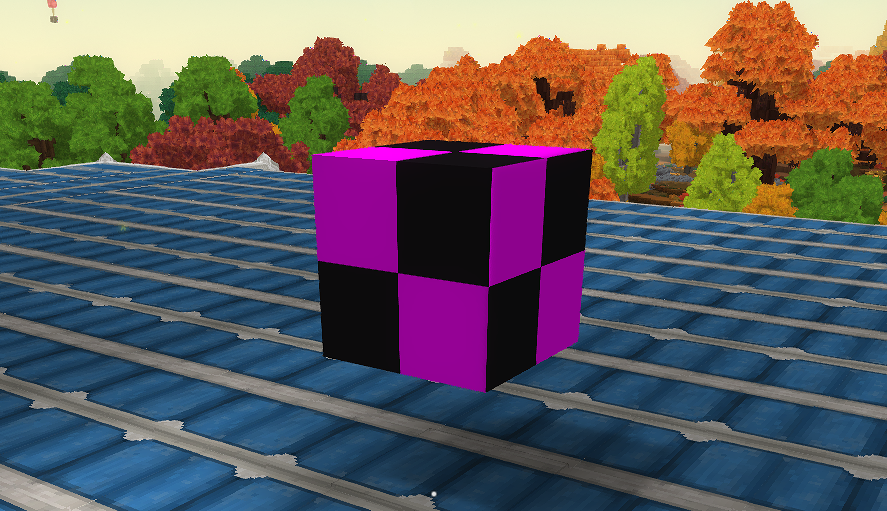
Summary
Automatically detects and removes broken ghost blocks from loaded Hytale server chunks.✨ Features
- ✔️ Scan loaded chunks around the player
- ✔️ Detect unknown, broken or invalid blocks
- ✔️ List detected ghost blocks
- ✔️ Remove detected ghost blocks manually
- ✔️ Replace ghost blocks manually
- ✔️ Automatic ghost block checking
- ✔️ Automatic ghost block removal
- ✔️ Queue-based auto scan system
- ✔️ Configurable scan radius
- ✔️ Configurable auto-remove limits
- ✔️ Console notifications
- ✔️ Admin permission support
- ✔️ Hytale 0.5.6 compatible
- ✔️ Java 25 compatible
- ✔️ Server-side only
🆕 Update 1.0.17 - Auto Cleanup Hotfix
Version 1.0.17 fixes the automatic ghost block cleanup system for Hytale 0.5.6. The mod now uses a safer queue-based system for automatic checking, but when AutoRemove is enabled, detected ghost blocks are removed automatically again. This means admins no longer have to manually run:/fgbr remove all⚠️ Important Config Notice
If you updated from an older version, please check your config file. The most important setting is:"ReplacementBlock": "Empty""hytale:air"fantastic-ghost-block-remover.json✅ Recommended Config for Live Servers
{
  "Enabled": true,
  "RemoveReplacementBlock": "Empty",
  "Scan": {
    "ManualRadiusChunks": 5,
    "MinY": 0,
    "MaxYExclusive": 256
  },
  "AutoCheck": {
    "Enabled": true,
    "InitialRadiusChunks": 4,
    "QueueMaxChunks": 512,
    "WorkerIntervalMillis": 2000,
    "ChunksPerRun": 2
  },
  "AutoRemove": {
    "Enabled": true,
    "Mode": "safe",
    "MaxBlocksPerScan": 10,
    "RequireDoubleCheck": false,
    "NotifyConsole": true,
    "ReplacementBlock": "Empty"
  }
}
Important values
"AutoCheck": {
  "Enabled": true
}"AutoRemove": {
"Enabled": true
}"ReplacementBlock": "Empty""RequireDoubleCheck": false🧹 What are Ghost Blocks?
Ghost blocks are blocks that still exist in the world data but are no longer valid on the server. This can happen when:- A mod was removed
- A block ID changed after an update
- A world was generated with an older mod version
- Hytale changed internal block handling
- A custom block no longer exists
- A chunk loaded with outdated or broken block data
⚙️ Commands
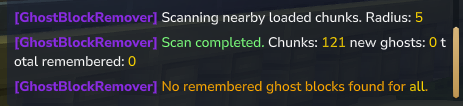
Scan for ghost blocks
/fgbr scanList detected ghost blocks
/fgbr listRemove ghost blocks manually
/fgbr remove <block_id|all>/fgbr remove allReplace ghost blocks manually
/fgbr replace <block_id|all> <replacement>/fgbr replace all EmptyEnable or disable automatic checking
/fgbr autocheck <true|false>/fgbr autocheck trueShow mod status
/fgbr statusReload config
/fgbr reloadClear ghost block cache
/fgbr clear🔁 Command Aliases
You can also use:/fantasticghost
/fgbr
/ghostclean
/ghostblockremover🤖 How Automatic Cleanup Works
The automatic cleanup system only works in loaded chunks. It does not scan your entire world at once. When a chunk is loaded, the mod queues it for a background scan. The worker then checks a small number of chunks per interval and removes detected ghost blocks if AutoRemove is enabled. Default recommended timing:"WorkerIntervalMillis": 2000,
"ChunksPerRun": 2,
"MaxBlocksPerScan": 10Every 2 seconds, the worker processes up to 2 queued chunks.
Up to 10 ghost blocks can be removed per scan.🧭 Scan Range
By default, the manual scan checks a radius around the player. Example:5 chunks radius = 11 x 11 chunks = 121 chunks🔐 Permissions
Recommended LuckPerms permissions:ghostblockremover.command.use
ghostblockremover.command.admin/lp group admin permission set ghostblockremover.command.use true
/lp group admin permission set ghostblockremover.command.admin true📁 Config
The config file is created automatically:fantastic-ghost-block-remover.json"AutoCheck": {
"Enabled": true
},
"AutoRemove": {
"Enabled": true,
"ReplacementBlock": "Empty"
}⚠️ Important Notes
This mod does not scan your entire world instantly. It only scans loaded areas to keep the server safe and stable. For manual cleanup, use:/fgbr scan
/fgbr list
/fgbr remove all/fgbr autocheck true"AutoCheck": {
"Enabled": true
},
"AutoRemove": {
"Enabled": true,
"ReplacementBlock": "Empty"
}✅ Compatibility
- Hytale 0.5.6
- Java 25
- Server-side usage
- Designed for admin and server maintenance
🙌 Inspiration
This mod was inspired by GhostBlockRemover.❤️ Support
If you enjoy this mod, consider leaving a ⭐ on CurseForge!🔗 Check Out My Other Hytale Projects
Take a look at my other Hytale mods and projects here: 👉 DerFriesn CurseForge ProjectsTale-World German Community 
- IP: play.tale-world.com
- https://tale-world.com/
The Fantastic Ghost Block Remover- 0.5.6 Update Team