HynfinityIndexer
- By
Storage network for Hytale: link your chests with glass pipes and search, sort and move all your items from one storage terminal.
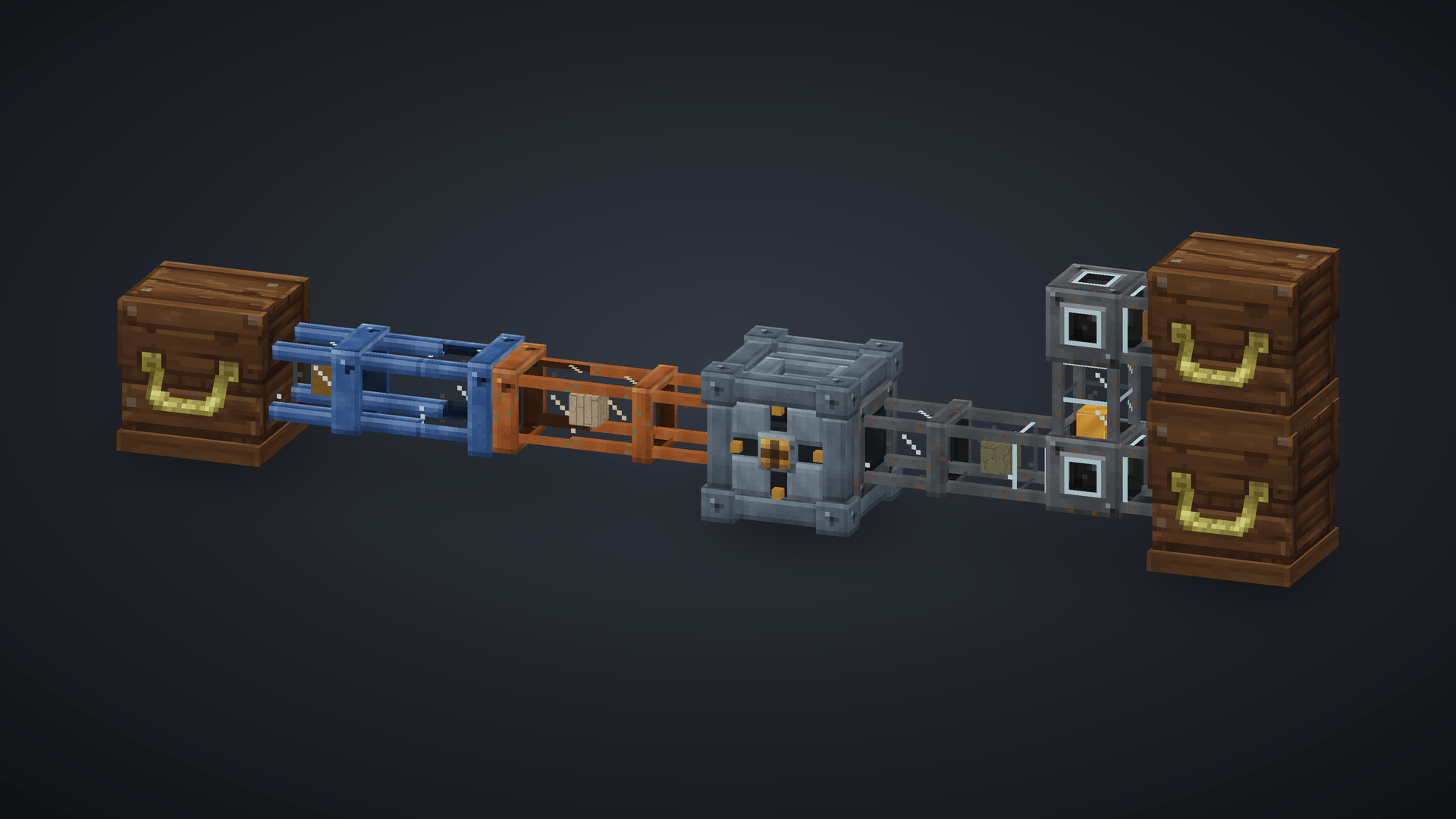
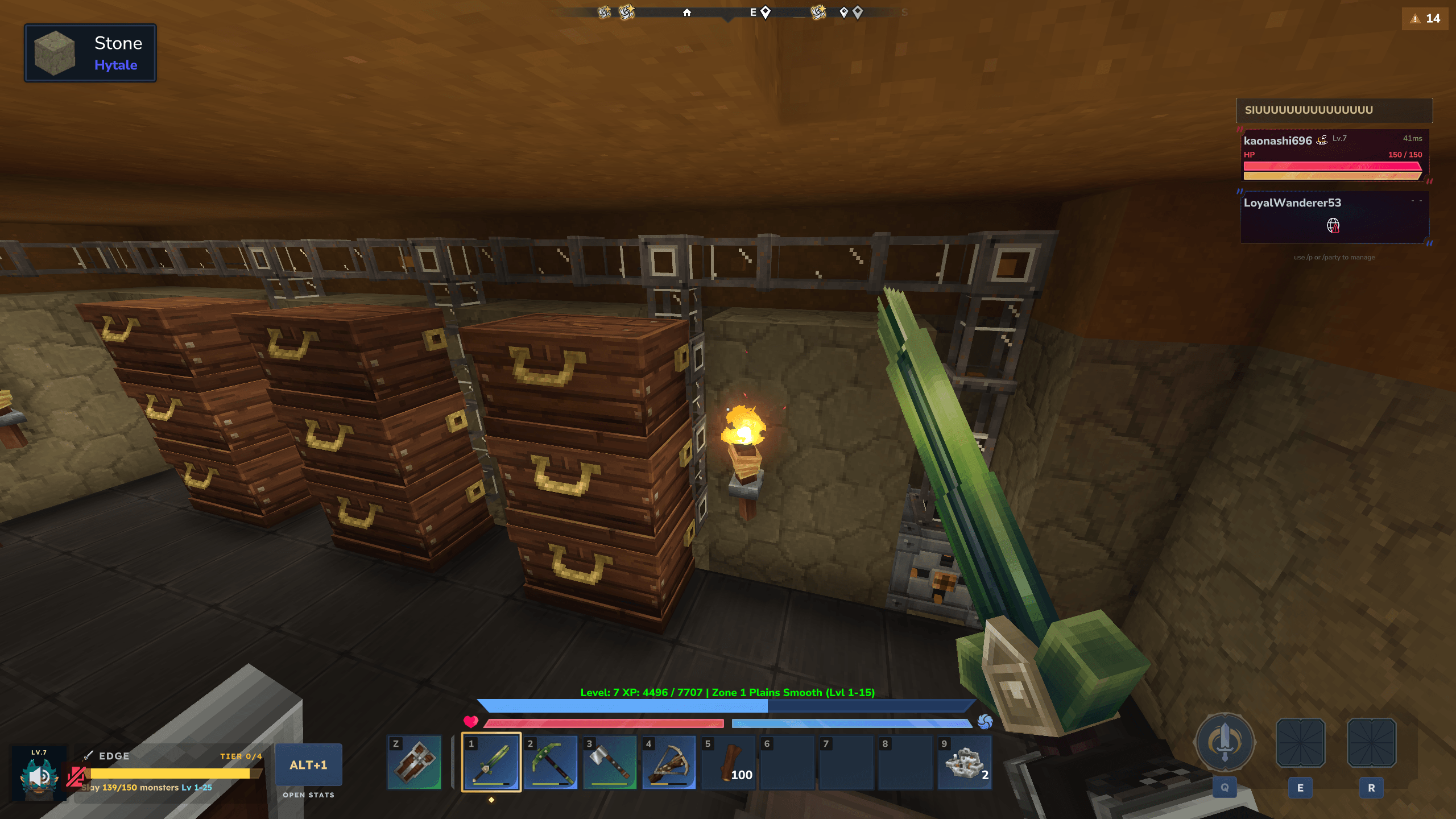
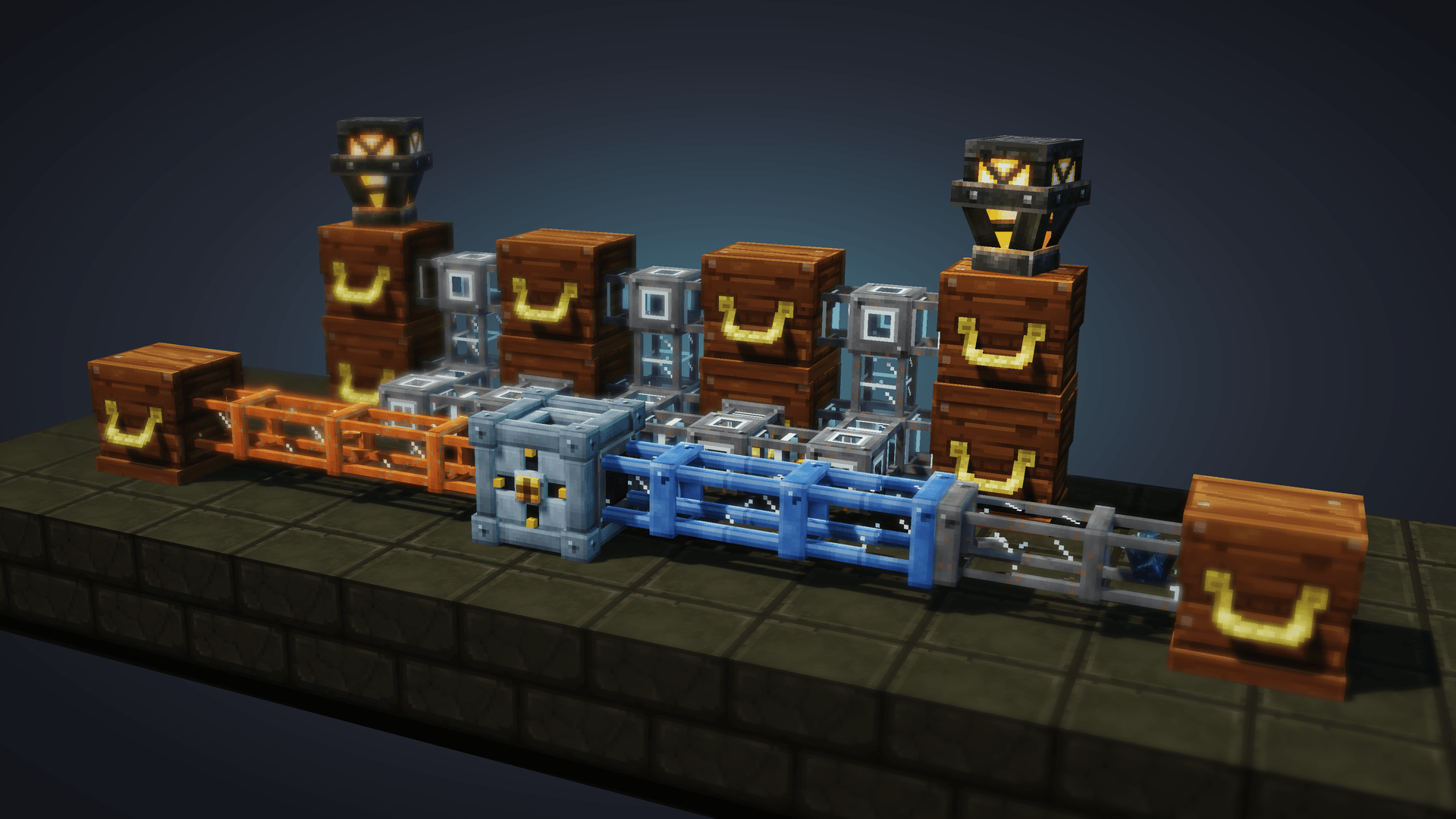
HynfinityIndexer-showcase.png
Description
HynfinityIndexer
Hytale Server
0.7.x(built and tested against0.7.7)
A storage system for Hytale: link your chests into one storage network and search, sort, deposit and withdraw items from a single storage terminal.
Place a central Indexer (the storage terminal), wire your chests together with pipes in three metal tiers and their glass windows, and manage your whole item storage from one screen — while you watch each item physically travel inside the pipes in real time. Chest network, item sorting, mass storage, inventory management: all from one block.
Quick Start
- Download the latest
HynfinityIndexer-*.jarfrom Releases - Drop it in your server's
mods/directory - Start the server
- Craft an Indexer and some pipes (copper, riveted iron or cobalt) at a Workbench (Tinkering)
Features
Central Indexer — your storage terminal
- A riveted routing node that faces you when placed: pipes plug into its back, sides, top and bottom (a fitting appears on each), never into the front with its hub and cross
- Every item going in or out animates the node: the gate on that side drops, a shuttle slides to the hub, the hub kicks and the cross turns
- One terminal that aggregates every chest reachable through its pipe network
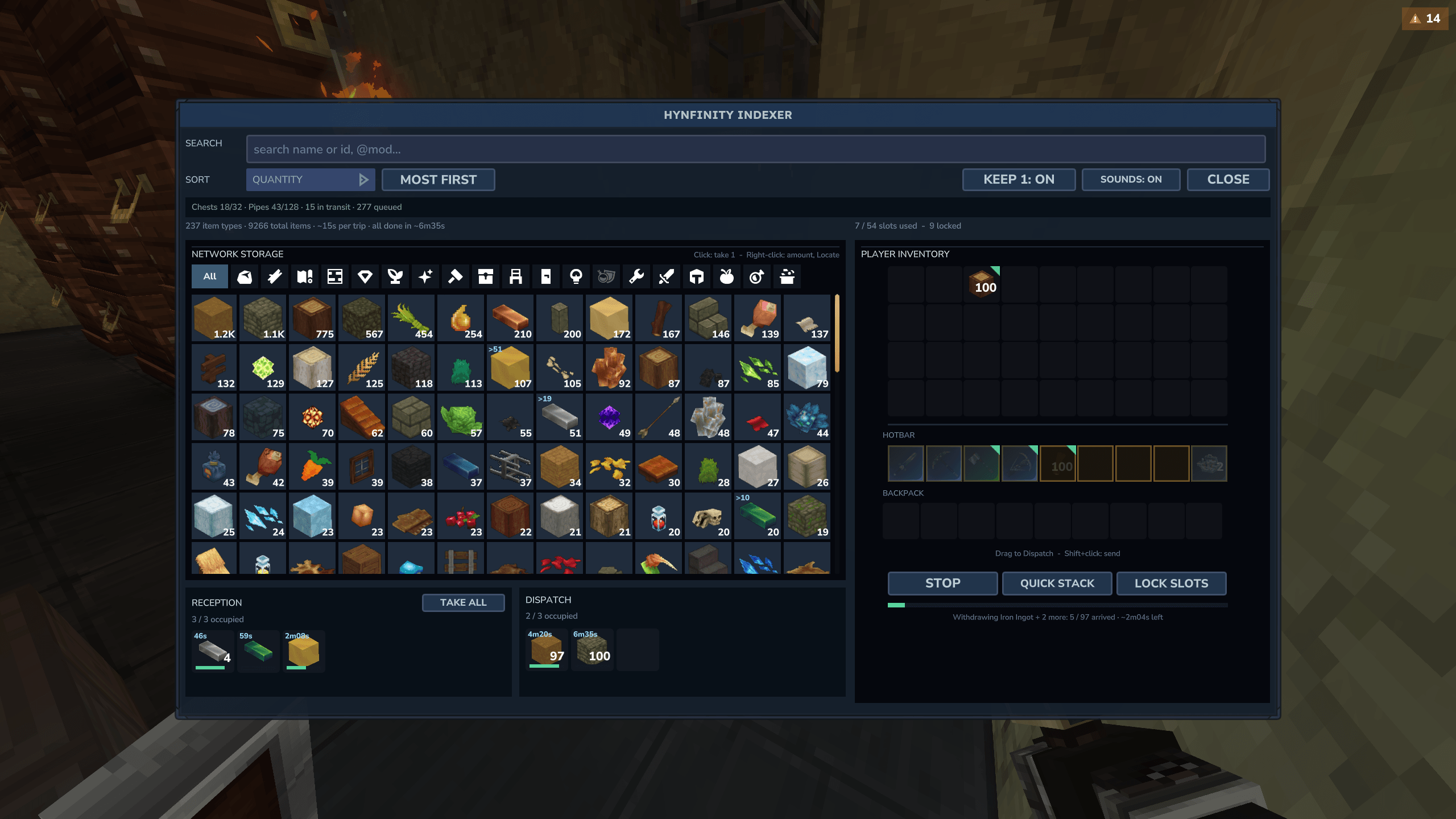
- Browse, search and sort the whole storage in a single UI — items are grouped and counted across all chests; hover one to see which chests hold it
- Withdraw one with a click; right-click opens the quantity menu (1, half, a stack, all but one, or a typed amount) and Locate
- Chest-like screen: drag items between your inventory and the buffers (left button: the stack, right button: one item, the other button mid-drag drops one or all), Shift+click to store; drag Reception onto Dispatch to send arrivals back
- Shift+click and Take all bring Reception items into your inventory, never the hotbar
- A teal corner marks the inventory items the network already holds: those are what Quick stack sends
- Deposit all / Quick stack to empty your inventory into storage; a soft sound and a notification once the last item lands in its chest ("Sounds" toggle, saved with the player)
- Locate (right-click menu): outlines, for you only, every chest holding the item for 10 seconds, multiblock chests included
- Reception + dispatch buffers so transfers queue cleanly under load
- The page closes when you walk away (8 blocks), leave the world, or the Indexer is broken, like a vanilla chest
- Live, flicker-free updates shared by every player at the same Indexer
- Locked slots: "Lock slots" mode, then click inventory slots to lock them (amber). Deposit all and Quick stack never take a locked slot, hotbar included; the hotbar starts locked. Locks are saved with the player.
Pipes — see your items move
- Three tiers: Copper (half the iron speed), Riveted Iron (the base speed) and Cobalt (twice the iron speed); each item moves at the speed of the pipe it is in. A tier also sets how many items may enter a pipe per second: copper half as many as iron, cobalt twice as many
- Jams behave like traffic: where items arrive faster than a pipe lets them in, they slow down, pack up evenly (7 per block, in every tier) and the queue grows back toward the chests or the Indexer, which stop sending only once it reaches them. At a junction the queues of each branch wait on their own arm and take turns; items keep their order, so one waiting for a blocked way holds those behind it. Nothing ever queues inside a junction (three or more pipes), a coupler, a chest or the Indexer: an item waits at the crossing's edge until the pipe after it has room, and branches merging there take turns. Two couplers never join each other; a coupler against a three-way pipe, or two three-way pipes side by side, may still hold an item between them. In a jam that does not move at all, one item per way out may go into the crossing before turning back, so a deadlocked loop can drain
- Two items meeting in a tube keep to their right to pass each other, only when they share that stretch of tube (at a junction, items turning into other arms stay in the middle), and stay aside 1.5 s before easing back, so a stream coming the other way does not make them weave; past a crossing or a turn they ease back at once, within about a block
- Items slide out of the chest or the Indexer they leave and into the one they reach. Their exact spot in the pipes is saved: an unloaded chunk, a restart or a reconnection puts every item back where it was, queues included
- A tier only joins its own tier. One Pipe Coupler block joins any tiers: each of its faces takes the profile of the pipe it meets. Every tier connects straight to chests and to the Indexer; the coupler only to pipes
- Metal conduits with glass windows: the items travelling through are rendered as real, in-world entities riding inside the tube — no guesswork, you see the flow
- A soft glow where the pipe meets the chest each time an item lands in it
- Connection-aware shape: straight runs with a centre band, a riveted junction wherever they branch, and a flange that reaches into chests so no gap shows whatever the chest model
- Connect Indexer ↔ pipes ↔ chests; the network is discovered automatically
Smart routing
- Automatic network discovery (BFS) across pipes, chests, and the Indexer
- Congestion-aware, per-arc directed routing: packets route around busy pipes, so parallel runs roughly double throughput
- Anti ping-pong + ring-deadlock backoff keep items flowing under heavy load
- Configurable pipe speed, per-network limits, and concurrency
Crafting
| Item | Recipe | Output | Bench |
|---|---|---|---|
| Copper Pipe | 2× Copper Bar + 1× Cyan Crystal | ×8 | Workbench (Tinkering) |
| Riveted Iron Pipe | 2× Iron Bar + 1× Cyan Crystal | ×8 | Workbench (Tinkering) |
| Cobalt Pipe | 2× Cobalt Bar + 1× Cyan Crystal | ×8 | Workbench (Tinkering) |
| Pipe Coupler | 1× Copper Bar + 1× Iron Bar + 1× Cobalt Bar | ×2 | Workbench (Tinkering) |
| Indexer | 6× Iron Bar + 4× Cyan Crystal | ×1 | Workbench (Tinkering) |
Commands
| Command | Description | Permission |
|---|---|---|
/indexer status |
Version, config summary, network + known-indexer counts | — |
/indexer network |
List every active network (Indexer position, pipes, chests, validity) | — |
/indexer reload |
Re-read config.json and apply it live (transfers in flight are kept); an invalid file is refused whole |
— |
Alias: /hynfinityindexer.
Configuration
config.json is created on first run in the plugin data folder. It carries a
configVersion; an older file is migrated in place on load (missing keys get
their default, the previous file is kept as config.v<N>.json.bak).
Every value is checked against the range below. Nothing is silently clamped: an
invalid file at startup disables the Indexer (it refuses to open, the reason is
in the server log) until it is fixed and /indexer reload succeeds; an invalid
file on reload is refused and the running config stays. Unknown keys (typos) are
reported in the log.
| Setting | Default | Range | Effect |
|---|---|---|---|
indexerBufferReceptionSize |
3 |
3–36 | Reception buffer slots. A smaller size takes effect once the extra slots are empty |
indexerBufferEnvoiSize |
3 |
3–36 | Dispatch buffer slots (same rule) |
pipeSpeedTicksPerBlock |
5 |
1–100 | Ticks a packet takes to cross one pipe block (lower = faster) |
pipeCapacityPacketsPerSecond |
1 |
1–20 | Packets admitted per second into each iron pipe lane (pipe, direction); copper takes half, cobalt twice |
transferItemLimitPerDirectionPerPipe |
1 |
1–64 | Items carried by one packet. 1 is the intended one-by-one transport; raising it speeds the network up |
maxChestsPerNetwork |
32 |
1–256 | Chests a network tracks beyond which more are ignored |
maxPipesPerNetwork |
128 |
1–1024 | Pipes a network follows beyond which more are ignored |
maxConcurrentTransfers |
128 |
1–128 | Packets in flight at once per Indexer: a safety net, the pipes fill up before it |
networkRecalcCooldownTicks |
10 |
0–200 | Debounce of network rebuilds: the first block change rebuilds at once, further ones within this many ticks are merged into one rebuild (0 = rebuild on every change) |
allowMultipleIndexersPerNetwork |
false |
— | false: placing an Indexer on a network that has one, or a pipe joining two Indexer networks, is refused with a message. true: each Indexer keeps its own network and treats the other Indexer as a boundary |
dropItemsOnNetworkFailure |
true |
— | Drop in-transit items to the world if a network breaks (vs. lose them) |
excludedContainerBlocks |
[] |
up to 64 | Container block ids pipes never connect to, * as a wildcard, case ignored (e.g. ["*Loot*", "Furniture_Dungeon_Chest*"]); added to the built-in list (see Compatibility) |
routingCostAlpha / routingCostBeta / routingCostOccupied |
3.0 / 2.0 / 50.0 |
≥ 0 | Route weights: pipe saturation, reserved arcs, arc currently holding a packet |
deadlockBackoffTicks |
80 |
20–1200 | A packet blocked this long backs off toward its source |
stuckAbortTicks |
300 |
40–6000 | A packet with no route this long is dropped and its transfer aborted |
debugMode |
false |
— | Verbose logging (routing, BFS, per-transfer). Off: only lifecycle and problems are logged |
The defaults are the intended pace: items cross the pipes one at a time, slowly
and visibly. pipeSpeedTicksPerBlock, pipeCapacityPacketsPerSecond and
transferItemLimitPerDirectionPerPipe let an admin speed a server up on purpose.
Compatibility
| Mod version | Hytale Server |
|---|---|
0.7.6-*, 0.7.7-* |
0.7.x (ServerVersion: ^0.7.0) |
0.5.x-* |
0.5.6 – 0.5.9 — does not run on 0.6+ (world crash at boot) |
Updating from an earlier version
- Back up your world first. Placed pipes are redrawn in a new shape format as their chunk loads; older versions don't know it, so going back by swapping the JAR turns them into unknown blocks. To roll back, restore the backup.
- Existing Indexers, buffers, items in transit and settings are kept;
config.jsonis migrated in place (the old file is kept as a.bak). - Pipes already placed become Riveted Iron pipes, at the speed they had.
- An Indexer placed before 0.7.7 with a pipe or chest in front of it turns once, on load, so its front faces a free side and its network stays whole.
Other storage mods
Any block with the game's chest component (ItemContainerBlock) joins a network,
multi-cell ones included: modded chests, wardrobes, barrels and crates work as is.
- Never connected: blocks whose inventory players don't see —
EnderChest,VoidChest,Void_Storage_Chest(per-player or per-channel inventories) andSimpleDrawer_Drawer_Controller(mirrors drawers the network may also reach). - Lock, shop and claim mods are respected: the Indexer asks the game, as if the
player used the chest by hand (
UseBlockEvent.Pre), and never shows, takes from or fills a chest its user could not open. Each chest is asked once while the page is open (again on the next opening), so a mod that answers a refused use with a message sends it once. Known gap: a withdrawal resumed after a restart, before anyone reopened the Indexer, only checks SimpleClaims (see Claims), not other lock or shop mods. - Not seen: storage that isn't an
ItemContainerBlock(e.g. Deepest Storage). - Drawers that hold more than a stack in one slot can be read and emptied, but deposits into them may be refused.
Claims (SimpleClaims)
The Indexer has no permissions of its own. When SimpleClaims is installed (optional, written against 1.0.40), it follows its claims:
- Opening an Indexer needs the right to open chests where it stands.
- Each player only sees, and withdraws from, the network chests they may open.
- A network keeps to its Indexer's claim: chests must stand in the same claim, pipes may also cross unclaimed land. The status line shows where it stops.
- A pipe or an Indexer cannot be placed against the pipes, Indexer or chests of a claim where the player has no rights.
- The Indexer page closes when the player walks away or loses access.
Without SimpleClaims running (absent, or turned off for the world) nothing is restricted. If SimpleClaims runs but its API changed, every Indexer stays closed and the server log says why.
Analytics
This mod reports anonymous server statistics to
HStats (server + mod counts and versions — no usernames,
no IPs, no world data). It's a tiny, best-effort ping and can be disabled
server-wide via the hstats-server-uuid.txt file HStats creates in the server
directory (enabled=false).
HynfinityIndexer Team