HynfinityWebMap
- By
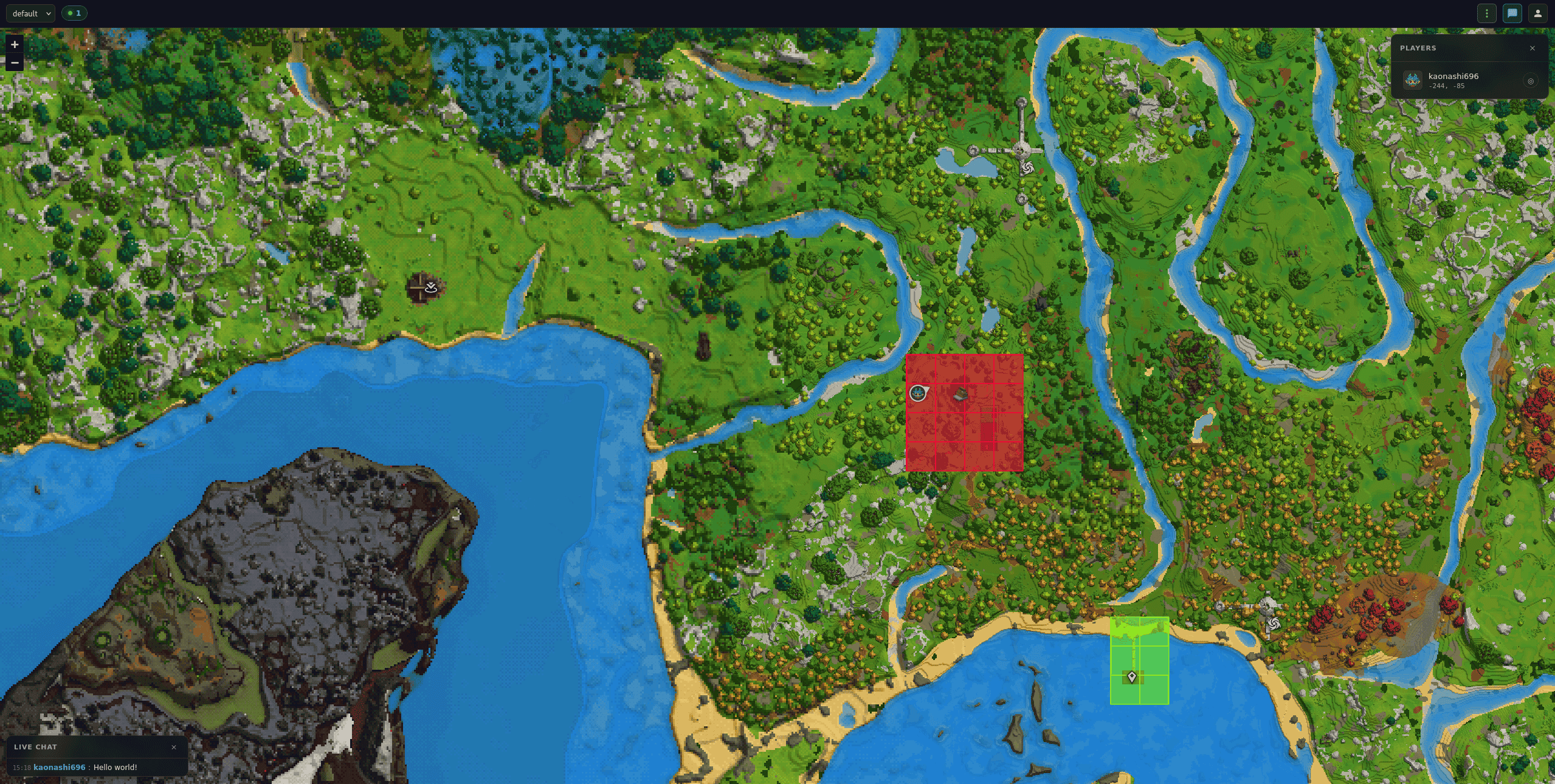
Interactive web-based map viewer for Hytale servers. View your world in real-time from any browser, track player positions, and explore terrain without being in-game.
Screenshot From 2026-04-12 15-19-11.png
Screenshot From 2026-04-12 15-18-50.png
Screenshot From 2026-04-12 15-18-59.png
Description
WebMap
Live demo: https://hynfinity.com/map
Hytale Server
2026.03.26or later
A live web map for your Hytale server. View your world in a browser, track players in real-time, and embed the map on your community website.
Quick Start
- Download the latest
WebMap-*.jarfrom Releases - Drop it in your server's
mods/directory - Start the server
- Open
http://your-server-ip:8080in a browser
Features
World map
- Hytale's native map rendering served as PNG tiles
- Configurable pyramid with averaged downsampling at each zoom level
- Background prewarmer pre-renders the full explored area so the first visitor doesn't wait for tiles
- Changes made in-game (place / break) update the web map within a few seconds — every tile a player edits is re-rendered, and only the tiles that actually changed are written to disk (per-tile content hash skips redundant writes)
- Tile cache on disk, browser cache for repeat views
Player tracking
- Every player is rendered with their real in-game head, composited from the server's character assets using the player's customisation
- Directional arrow above each marker shows where the player is looking (yaw)
- Player list drawer with live coordinates; click to center or follow
- Auto-follow survives temporary invisibility (e.g. crouching) and resumes when the player reappears
- Positions pushed in real-time over Server-Sent Events
Live chat
Public chat messages are relayed to a collapsible chat panel on the web map in
real-time. A speech bubble also appears above the player's marker for 5 seconds.
Players can opt out with /webmap chat. The panel opens by default on desktop
and is collapsed on mobile.
Shareable URLs
Every view is reproducible via the URL hash — world, position, zoom and followed player are all encoded. Copy the URL to share an exact view, or reload to restore your last spot.
#world=overworld&x=-128.5&z=42&zoom=0&follow=<uuid>Multi-world
Switch between worlds from the topbar. Each world has its own tile cache and its own dirty-tile tracker, so edits in one world never trigger re-renders in another.
Website embedding
<iframe src="http://your-server-ip:8080" width="100%" height="600"></iframe>REST API
| Endpoint | Returns |
|---|---|
GET /api/worlds |
World list + metadata (scale, bounds, player count, zoom range) |
GET /api/players |
Current player positions for every world (snapshot) |
GET /api/players/stream |
Real-time SSE stream of player positions |
GET /api/tiles/{world}/{z}/{x}/{y}.png |
Map tile at a given zoom level |
GET /api/players/{uuid}/head.png |
Rendered head PNG (404 if offline or heads disabled) |
GET /api/claims/{world} |
Claim overlay data (404 if SimpleClaims disabled) |
GET /api/markers/{world} |
Map markers / POIs (404 if markers disabled) |
GET /api/shops/{world} |
BarterShop data with trades (404 if BarterShop disabled) |
GET /marker-icons/{name}.png |
Marker icon image (bundled + admin overrides) |
Commands
| Command | Description | Permission |
|---|---|---|
/webmap status |
Server status, SSE client count, cache + prewarm summary | — |
/webmap reload |
Reload config.json |
com.hynfinity.webmap.admin.reload |
/webmap cache stats |
Tile count and disk usage | — |
/webmap cache status |
Detailed cache + ongoing prewarm progress | — |
/webmap cache clear |
Wipe the tile cache | com.hynfinity.webmap.admin |
/webmap cache warm |
Trigger an immediate background prewarm | com.hynfinity.webmap.admin |
/webmap cache regen |
Clear cache then immediately prewarm (full re-render) | com.hynfinity.webmap.admin |
/webmap cache stop |
Cancel the running prewarm / regen | com.hynfinity.webmap.admin |
/webmap hide |
Hide yourself from the map | — |
/webmap show |
Show yourself on the map | — |
/webmap chat |
Toggle whether your chat messages are relayed to the web map | — |
Aliases: /wm, /map. Non-admin commands are unrestricted unless a permission
is explicitly set.
Configuration
The config file is created on first run in the plugin data folder.
{
  "configVersion": 4,
  "httpPort": 8080,
  "httpHost": "0.0.0.0",
  "basePath": "/",
  "threadPoolSize": 4,
  "tileCacheDirectory": "tile-cache",
  "tileCacheMaxEntries": 10000,
  "playerUpdateIntervalSeconds": 3,
  "tileRefreshIntervalSeconds": 300,
  "worldListMode": "whitelist",
  "enabledWorlds": [],
  "showPlayerAltitude": false,
  "showPlayersByDefault": true,
  "allowPlayerToggleVisibility": true,
  "hidePlayersWhenCrouching": true,
  "corsOrigin": "*",
  "minZoom": -3,
  "maxZoom": 4,
  "maxNativeZoom": 0,
  "prewarmEnabled": true,
  "prewarmStartupDelaySeconds": 10,
  "prewarmIntervalMinutes": 30,
  "prewarmThrottleMillis": 50,
  "showPlayerHeads": true,
  "showPlayerDirection": true,
  "characterAssetsPath": "",
  "playerHeadCacheMaxEntries": 500,
  "playerHeadSize": 32,
  "playerHeadProviderUrl": "https://hyvatar-worker.bodyagavril.workers.dev/?username={username}",
  "simpleClaimsEnabled": false,
  "simpleClaimsShowByDefault": true,
  "simpleClaimsFillOpacity": 0.25,
  "simpleClaimsRefreshSeconds": 30,
  "markersEnabled": false,
  "markersShowByDefault": true,
  "markersRefreshSeconds": 60,
  "markersFilterMode": "none",
  "markersFilterPatterns": [],
  "barterShopEnabled": false,
  "renderQuality": "medium",
  "notifyAdminsOnGeneration": true,
  "chatRelayEnabled": true,
  "showChatBubbles": true,
  "hstatsEnabled": true
}
HTTP server
| Setting | Default | Description |
|---|---|---|
httpPort |
8080 |
Web server port |
httpHost |
0.0.0.0 |
Bind address |
basePath |
/ |
URL prefix (set to e.g. /map behind a reverse proxy) |
threadPoolSize |
4 |
HTTP worker thread pool size |
corsOrigin |
* |
Value of the Access-Control-Allow-Origin header |
Tiles & zoom
| Setting | Default | Description |
|---|---|---|
tileCacheDirectory |
tile-cache |
Cache directory (relative to the plugin data folder) |
tileCacheMaxEntries |
10000 |
LRU cap for on-disk tiles |
tileRefreshIntervalSeconds |
300 |
Cache-Control max-age sent with each tile |
minZoom |
-3 |
Furthest zoom-out the client can reach (more negative = wider view) |
maxZoom |
4 |
Closest zoom-in the client can reach |
maxNativeZoom |
0 |
Highest zoom level rendered server-side; above that the client upscales |
prewarmEnabled |
true |
Pre-render the pyramid in the background |
prewarmStartupDelaySeconds |
10 |
Delay before the first prewarm run after start |
prewarmIntervalMinutes |
30 |
Periodic prewarm interval |
prewarmThrottleMillis |
50 |
Sleep between tile renders during prewarm (keeps the tick happy) |
renderQuality |
"medium" |
Tile PNG resolution: "low" (32 px), "medium" (96 px), "high" (192 px). Changing this and reloading clears the tile cache |
notifyAdminsOnGeneration |
true |
Send in-game progress messages to the admin who triggers a prewarm or regen (every ~10 %) |
Players
| Setting | Default | Description |
|---|---|---|
playerUpdateIntervalSeconds |
3 |
How often positions are polled and broadcast |
showPlayerAltitude |
false |
Include the Y coordinate in the UI |
showPlayersByDefault |
true |
Whether players are visible on the map by default |
allowPlayerToggleVisibility |
true |
Allow /webmap hide and /webmap show |
hidePlayersWhenCrouching |
true |
Auto-hide crouching players |
showPlayerDirection |
true |
Draw a directional arrow above each marker |
Player heads
| Setting | Default | Description |
|---|---|---|
showPlayerHeads |
true |
Render each player's in-game head on the map |
characterAssetsPath |
"" |
Path to Hytale character assets; empty = auto-discover |
playerHeadCacheMaxEntries |
500 |
LRU cap on rendered head PNGs |
playerHeadSize |
32 |
Output edge size in pixels (8–256) |
playerHeadProviderUrl |
(hyvatar) | External head provider URL; leave empty to use only the local compositor. {username} is substituted at runtime |
Live chat
| Setting | Default | Description |
|---|---|---|
chatRelayEnabled |
true |
Relay public chat messages to the web map chat panel in real-time |
showChatBubbles |
true |
Show a speech bubble above a player's marker when they send a chat message (auto-dismisses after 5 s) |
Players can opt out of chat relay individually with /webmap chat.
Analytics
| Setting | Default | Description |
|---|---|---|
hstatsEnabled |
true |
Report anonymous server statistics to HStats (OS, Java version, CPU cores, online player count — no usernames or IPs) |
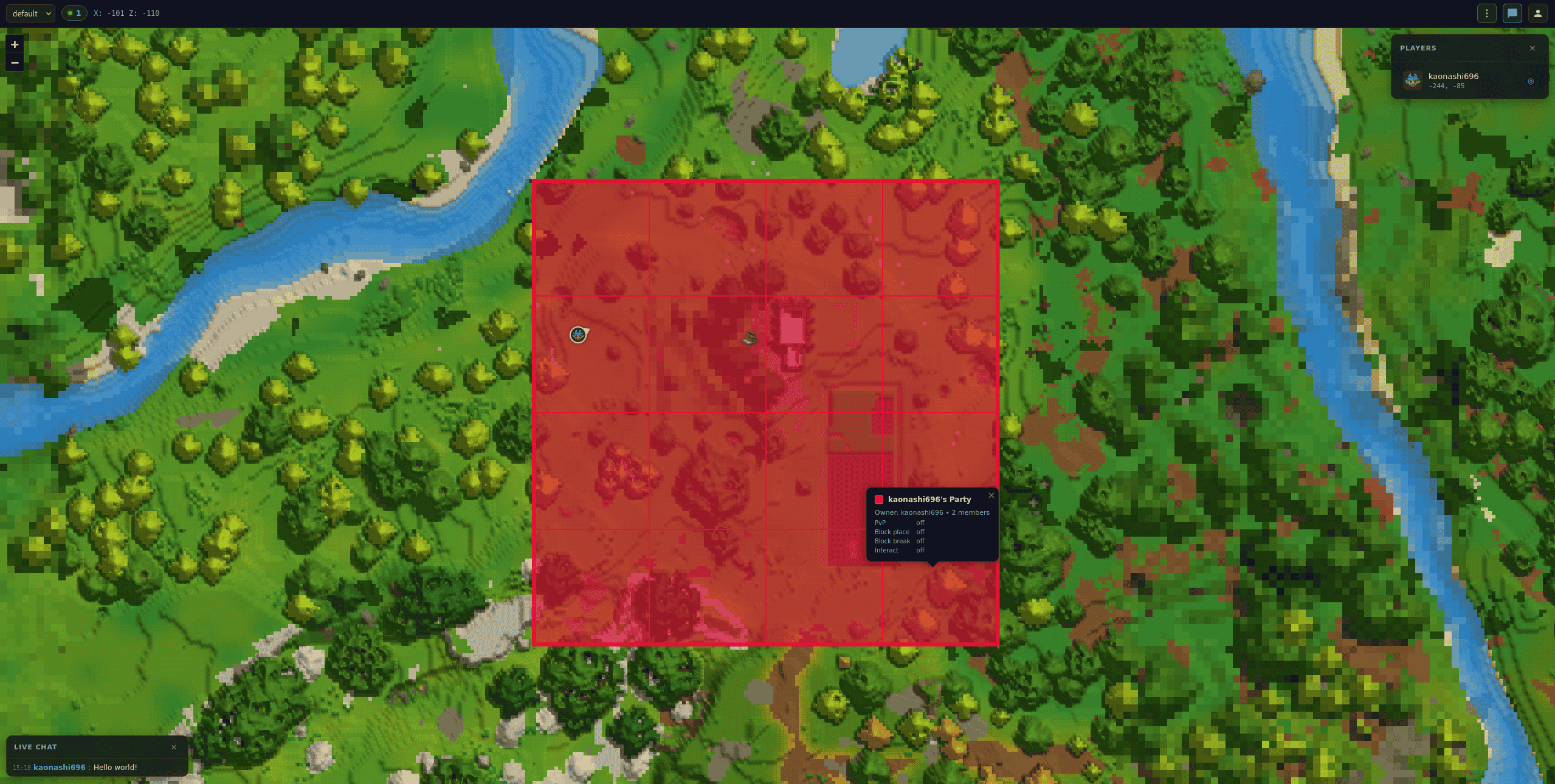
SimpleClaims integration
Off by default. When enabled, WebMap reads claim data from the SimpleClaims plugin via reflection and draws every claimed chunk as a clickable rectangle on top of the map. Clicking a rectangle opens a popup with the party name, owner, member count, PvP flag, and block protection flags.
If SimpleClaims is not installed, the plugin loads cleanly and the integration
stays dormant — /api/claims/{world} returns 404, and the topbar toggle button
is hidden. The rectangles sit on top of whatever the base tiles already show,
so if SimpleClaims has also baked its own tint into the tiles, both remain
visible.
| Setting | Default | Description |
|---|---|---|
simpleClaimsEnabled |
false |
Master toggle. When off, /api/claims/{world} returns 404 and the frontend hides the layer control |
simpleClaimsShowByDefault |
true |
Whether the overlay is visible on page load (users can always toggle it from the topbar) |
simpleClaimsFillOpacity |
0.25 |
Fill opacity of each claim rectangle (0 = outline only, 1 = fully opaque) |
simpleClaimsRefreshSeconds |
30 |
How often the frontend refetches claims so new in-game claims appear on the map without a reload |
The endpoint GET /api/claims/{world} returns one entry per party with the
full chunk list as [[chunkX, chunkZ], ...] pairs. Each chunk is 32 × 32
blocks (Hytale's native chunk size).
Map markers (POIs)
Off by default. When enabled, WebMap displays native Hytale points of interest on the map — spawn points, forgotten temples, portals, shared player markers, and any markers added by other mods. Icons are the real Hytale marker images, bundled in the plugin JAR and auto-extracted from installed mod JARs at startup.
Markers are collected from Hytale's WorldMapManager marker providers when a
player is online. A disk cache preserves markers across player disconnections and
server restarts so the map is never empty.
If no marker-capable mods are installed, only the spawn point is shown.
| Setting | Default | Description |
|---|---|---|
markersEnabled |
false |
Master toggle. When off, /api/markers/{world} returns 404 and the topbar button is hidden |
markersShowByDefault |
true |
Whether the marker layer is visible on page load |
markersRefreshSeconds |
60 |
How often the frontend refetches markers |
markersFilterMode |
"none" |
"none" (show all), "whitelist" (show only matching), or "blacklist" (hide matching) |
markersFilterPatterns |
[] |
Regex patterns matched against each marker's ID and image name. Example: ["Temple", "Spawn"] whitelists only temple and spawn markers |
Admins can place custom icon PNGs in {dataFolder}/marker-icons/ to override
the bundled icons. Files are matched by name (e.g. Spawn.png, Temple_Gateway.png).
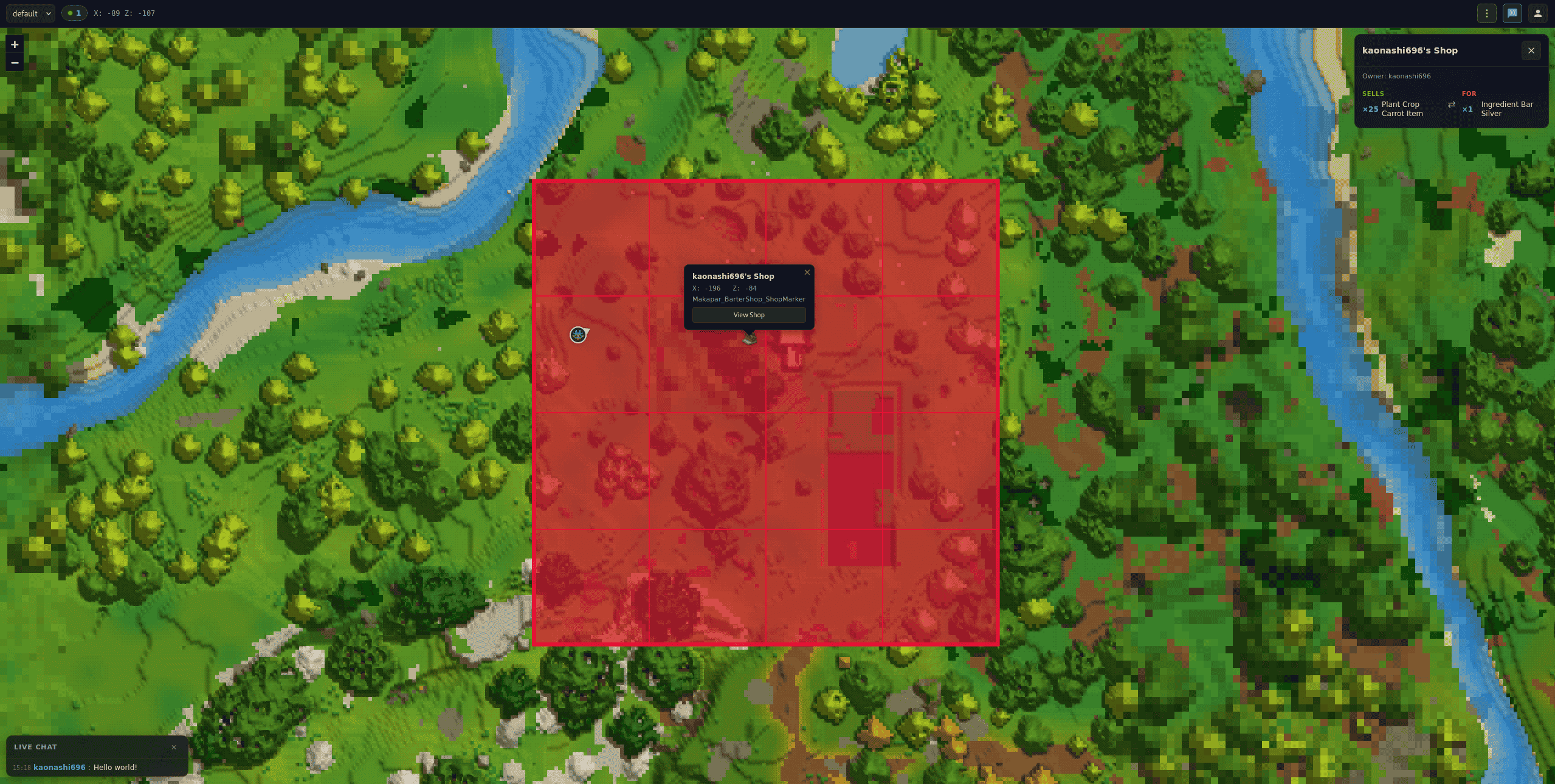
BarterShop integration
Off by default. When enabled, WebMap reads shop data from
Makapar's Barter Shops
directly from its JSON files on disk ({universe}/BarterShop/shops/). Clicking a
shop marker on the map shows a "View Shop" button that opens a detail panel with
every trade the shop offers (items sold / wanted with quantities).
If BarterShop is not installed, the integration stays dormant — the button is
hidden and /api/shops/{world} returns 404. No compile-time dependency on
BarterShop — the plugin reads plain JSON files.
| Setting | Default | Description |
|---|---|---|
barterShopEnabled |
false |
Master toggle for shop detail panels on the map |
Worlds
| Setting | Default | Description |
|---|---|---|
worldListMode |
whitelist |
"whitelist" (empty list = all worlds visible) or "blacklist" |
enabledWorlds |
[] |
Whitelist or blacklist depending on the mode |
Reverse proxy
To serve the map behind nginx at https://play.example.com/map:
- Set
"basePath": "/map"in the config - Add the location block:
location /map/ {
    proxy_pass http://localhost:8080/map/;
    proxy_http_version 1.1;
    proxy_set_header Connection '';
    proxy_buffering off;
    proxy_cache off;
}
FAQ
How do I access the map from another device?
Use the server's IP instead of localhost: http://192.168.1.100:8080.
Why do some areas show as empty? Only explored chunks are rendered by Hytale's map system. Unvisited chunks appear blank until a player walks near them.
Does it work on mobile? Yes. The UI has a horizontal topbar and a right drawer that slides in on narrow viewports.
How do I enable HTTPS? Use a reverse proxy (nginx, Caddy…) to handle TLS termination. The plugin serves HTTP only.
A player built something but the map still shows the old terrain.
The update pipeline re-renders dirty tiles every few seconds in the background.
If a tile hasn't refreshed after ~10s, check /webmap status — the processor
will report how many base and zoom-out tiles are pending. A manual
/webmap cache warm forces a full-world pass.
The HynfinityWebMap Team