💬 DiscordFantastic 5.2.0 - Chat Emotes & Optional Werchat Bridge
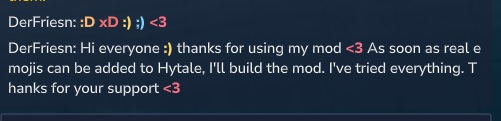
This update adds the final Chat Emotes system directly into DiscordFantastic.
What's New
Added a large colored and bold chat emote palette
Supports classic text emotes like :), ;), :D, XD, <3, :P and many more
Added extra reaction-style emotes like 🔥, :party:, GG, gz, RIP, :druid: and more
Added optional Werchat compatibility bridge
Werchat is not modified
If Werchat is installed, DiscordFantastic detects it and keeps the emote system working
If Werchat is not installed, DiscordFantastic works normally as before
💬 DiscordFantastic 5.1 Update
This update focuses on cleaner message formatting, better placeholder control and important Discord ↔ Hytale chat fixes.
New Placeholder System
%player% now only shows the raw player name.
Example:
DerFriesn
`
For the full player display with enabled level/prestige information, use:
%player_display%
Example:
✦ P0 ⭐ Endless Lv.2 RPG Lv.1 DerFriesn
New PlayerInfo Placeholders
You can now build your own message formats more freely:
%player%             Player name only
%player_display%     Player name with enabled level/prestige info
%endless_prestige%   EndlessLeveling prestige
%endless_level%      EndlessLeveling level
%rpg_level%          RPGLeveling level
%uuid%               Player UUID
Example:
GameToDiscord: "**%player_display%**: %message%"
Join: ":green_circle: **%player%** joined the server"
Leave: ":red_circle: **%player%** left the server"
RPGLeveling + EndlessLeveling Display
RPGLeveling support is now optional and configurable, just like EndlessLeveling.
PlayerInfo:
  ShowEndlessLevel: true
  LevelFormat: "\u2B50 Endless Lv.%level% "
  ShowEndlessPrestige: true
  PrestigeFormat: "\u2726 P%prestige% "

  ShowRpgLevel: true
  RpgLevelFormat: "RPG Lv.%level% "
If RPGLeveling or EndlessLeveling is not installed, DiscordFantastic simply skips that part.
Leave Duplicate Protection
Added protection against duplicate leave messages during server restarts.
Features:
  LeaveDuplicateProtectionSeconds: 5
This helps prevent messages like:
Player left the server
Player left the server
Discord → Hytale Chat Fix
Fixed an issue where Discord messages no longer appeared ingame on some Hytale server versions.
Discord → Hytale and Hytale → Discord chat should now work again correctly.
Notes
Discord ingame message color can still be configured with:
Formats:
  DiscordToGame: "[Discord] %user%: %message%"
  DiscordToGameColor: "#F4A460"
Multi-color Hytale formatting is currently not enabled by default for stability reasons.
Existing Features
DiscordFantastic still includes:
- Hytale chat to Discord
- Discord chat to Hytale
- Join and leave messages
- Server start and stop messages
- Death messages
- Webhook support
- Player avatar thumbnails
- EndlessLeveling support
- RPGLeveling support
- Bot activity/status system
- LuckPerms to Discord role sync
/players, /link and /syncroles support
Security Reminder
Never share your Discord bot token or webhook URL publicly.
If you accidentally shared them, reset your bot token and create a new webhook.
```
# 💬 DiscordFantastic <span style="color:#e67e23">V5</span>
DiscordFantastic V5 adds optional **RPGLeveling support** for Discord messages.
Server owners can now display the player level from RPGLeveling directly in Discord, similar to the existing EndlessLeveling integration.
***
## New in V5
### RPGLeveling Integration

DiscordFantastic can now read and show the RPGLeveling level of a player in Discord messages.
Example:
✦ P0 ⭐ Endless Lv.2 RPG Lv.1 DerFriesn
\`

If RPGLeveling is not installed, nothing extra will be shown.

If the feature is disabled in the config, nothing will be shown either.

***

## Config Options

The new RPGLeveling display can be enabled or disabled in the config:
PlayerInfo: ShowEndlessLevel: true LevelFormat: "\u2B50 Endless Lv.%level% " ShowEndlessPrestige: true PrestigeFormat: "\u2726 P%prestige% "
ShowRpgLevel: true RpgLevelFormat: "RPG Lv.%level% "
***
## EndlessLeveling Label Example
!\[alt text\](
)
You can also customize the EndlessLeveling text in the config.
Example:
LevelFormat: "\u2B50 Endless Lv.%level% "
This will show:
⭐ Endless Lv.2
instead of only:
⭐ Lv.2
***

## Fully Optional

Both level integrations are optional.

You can enable or disable them separately:
ShowEndlessLevel: true ShowRpgLevel: true
If one of the mods is not installed, DiscordFantastic simply skips that part and continues normally.

***

## Existing Features

DiscordFantastic also includes:

*   Hytale chat to Discord
*   Discord chat to Hytale
*   Join and leave messages
*   Server start and stop messages
*   Death messages
*   Webhook support
*   Player avatar thumbnails
*   EndlessLeveling level and prestige display
*   RPGLeveling level display
*   `/players` command
*   `/link` command
*   Bot activity/status system
*   LuckPerms to Discord role sync

***

## Security Reminder

Never share your Discord bot token or webhook URL publicly.

If you accidentally shared them, reset your bot token and create a new webhook.
`
# 💬 DiscordFantastic <span style="color:#e67e23">V4 Update</span>

DiscordFantastic V4 adds automatic **LuckPerms to Discord Role Sync**.

This update connects your in-game ranks with your Discord roles, making server management easier and more automated.

***

## New in V4

### LuckPerms Role Sync

Players can now automatically receive Discord roles based on their LuckPerms groups.

Example:
`
LuckPerms group: vip Discord role: VIP
\`

or:
LuckPerms group: admin Discord role: Admin
If the group and role names match, DiscordFantastic can sync them automatically.

***

## How it works

When a player joins the server or uses the sync command, DiscordFantastic checks the player's LuckPerms groups and searches for matching Discord roles.

If a matching role is found, the bot gives that role to the linked Discord user.

***

## Example Config
RoleSync: Enabled: true AutoNameMatch: true SyncOnJoin: true SlashCommand: true CommandName: "syncroles" DiscordRolePrefix: "" LuckPermsGroupPrefix: "" IgnoreCase: true RemoveOldPrefixedRoles: false IgnoredGroups: "default"
***

## Prefix Example

Some servers use LuckPerms group prefixes like:
b.pionier
But the Discord role is only called:
Pionier
In that case, use:
LuckPermsGroupPrefix: "b."
Then DiscordFantastic will match:
b.pionier -> Pionier
***

## <span style="color:#e67e23">Discord Requirements</span>

The Discord bot needs:
Manage Roles German / Rollen verwalten
<span style="color:#e67e23">The bot role must also be placed <strong>above</strong> the roles it should assign.</span>

If the bot role is below the target role, Discord will block the sync.

undefined

## Use Cases

This is useful for:

*   VIP roles
*   Supporter roles
*   Pioneer or founder roles
*   Team roles
*   Tester roles
*   Server rank channels
*   Discord-only areas based on in-game ranks

***

## Notes

The automatic sync works best when the Discord role name matches the LuckPerms group name.

Example:
LuckPerms group: vip Discord role: VIP
With `IgnoreCase: true`, uppercase and lowercase differences do not matter.

***

## Existing Features

DiscordFantastic also includes:

*   Hytale chat to Discord
*   Discord chat to Hytale
*   Join and leave messages
*   Server start and stop messages
*   Death messages
*   Webhook support
*   Player avatar thumbnails
*   EndlessLeveling level and prestige display
*   `/players` command
*   Bot activity/status system

***

## Security Reminder

Never share your Discord bot token or webhook URL publicly.

If you accidentally shared them, reset your bot token and create a new webhook.

# 💬 DiscordFantastic V3

**DiscordFantastic** is a lightweight Discord relay mod for **Hytale servers**.

It connects your Hytale server chat with Discord and gives server owners configurable chat relay, webhook messages, player avatars, join/leave messages, server status messages, death messages, EndlessLeveling integration and Discord slash commands.

***

## 🆕 V3 Update — Configurable Bot Status

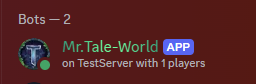
DiscordFantastic V3 adds a configurable Discord bot activity/status.

This is the small activity text shown on the bot profile or in the Discord member list.

Example:
Playing play.example-server.com
or:
Watching 12 players online
### ✅ New in V3
* Configurable Discord bot activity/status
* Supports online player count placeholder
* Supports server name placeholder
* Supports different Discord activity types
* Can be enabled or disabled in the config
* Automatically refreshes after a configurable interval
***
## 🤖 Bot Status Config
BotStatus: Enabled: true Type: "WATCHING" Text: "%online% players online" UpdateIntervalSeconds: 60 ServerName: "My Hytale Server"
### Available Status Types
PLAYING = Playing … WATCHING = Watching … LISTENING = Listening to … COMPETING = Competing in …
### Available Placeholders
%online% Current number of online players %server% Server name from the config
***

## 🎮 Bot Status Examples

### Show your server address
BotStatus: Enabled: true Type: "PLAYING" Text: "play.example-server.com" UpdateIntervalSeconds: 60 ServerName: "My Server"
Discord will show:
Playing play.example-server.com
***

### Show online player count
BotStatus: Enabled: true Type: "WATCHING" Text: "%online% players online" UpdateIntervalSeconds: 60 ServerName: "My Server"
Discord will show:
Watching 5 players online
***

### Show server name
BotStatus: Enabled: true Type: "PLAYING" Text: "on %server%" UpdateIntervalSeconds: 60 ServerName: "Tale-World"
Discord will show:
Playing on Tale-World
***

### Listening example
BotStatus: Enabled: true Type: "LISTENING" Text: "server chat" UpdateIntervalSeconds: 60 ServerName: "My Server"
Discord will show:
Listening to server chat
***

### Competing example
BotStatus: Enabled: true Type: "COMPETING" Text: "Hytale adventures" UpdateIntervalSeconds: 60 ServerName: "My Server"
Discord will show:
Competing in Hytale adventures
***

## 🆕 V2.2 Update — Prestige, Levels, `/players` and Death Messages

DiscordFantastic V2.2 added new server information features and more customization.

### `/players` Discord Command

Added a Discord slash command:
/players
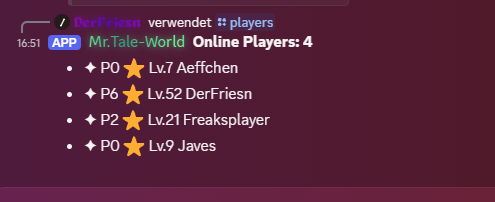
This command shows a list of all currently online players on the Hytale server.

Example output:
Online Players: 3
- ✦ P8 ⭐ Lv.100 DerFriesn
- ⭐ Lv.24 PlayerTwo
- PlayerThree
The command can be enabled, disabled and renamed in the config.
Commands: PlayersCommand: true PlayersCommandName: "players" PlayersTitle: "Online Players: %online%" PlayersEmpty: "No players online."
***

### Fully Customizable Death Messages

Death messages can be customized in the config.
DeathMessages: Enabled: true Format: "💀 %player% died. Cause: %cause%"
Available placeholders:
%player% Player name, including level and prestige if enabled %cause% Detected death cause %message% Full generated death message %uuid% Player UUID
You can translate the death message into your own language.

German example:
DeathMessages: Enabled: true Format: "💀 %player% ist gestorben. Ursache: %cause%"
***

### EndlessLeveling Prestige Support

DiscordFantastic can display EndlessLeveling prestige levels together with normal levels.

Example:
✦ P8 ⭐ Lv.100 DerFriesn
Config:
PlayerInfo: ShowEndlessLevel: true LevelFormat: "\u2B50 Lv.%level% " ShowEndlessPrestige: true PrestigeFormat: "\u2726 P%prestige% "
Both level and prestige display can be enabled or disabled separately.

EndlessLeveling support is optional. If EndlessLeveling is not installed, level and prestige prefixes stay empty.

***

### Improved Webhook Embed Chat

Webhook chat can show the player name, prestige, level, message and avatar inside the Discord embed bubble.

Example:
DerFriesn APP
✦ P8 ⭐ Lv.100 DerFriesn Hello everyone!
Config:
Webhook: Enabled: true Url: "" AvatarUrlFormat: "https://crafthead.net/hytale/avatar/%uuid%/64" ShowAvatarThumbnail: true UseEmbedChat: true
If you prefer the old message style, set:
UseEmbedChat: false
***

## 🆕 V1.1 Update — Webhook Avatar Preview Toggle

You can disable the small avatar preview thumbnail under Discord webhook messages.
Webhook: Enabled: true Url: "YOUR_WEBHOOK_URL" AvatarUrlFormat: "https://crafthead.net/hytale/avatar/%uuid%/64" ShowAvatarThumbnail: false
If you want the avatar preview to stay visible, set:
ShowAvatarThumbnail: true
***

## ✨ Main Features

*   Ingame chat to Discord
*   Discord chat to ingame
*   Join and leave messages
*   Server start and stop messages
*   Webhook support for player names
*   Hytale player avatars via Crafthead
*   Optional avatar thumbnail in webhook embeds
*   Optional embed chat style
*   Customizable death messages
*   EndlessLeveling level display
*   EndlessLeveling prestige display
*   `/players` Discord command
*   Configurable Discord bot activity/status
*   Configurable channels
*   Configurable message formats
*   Simple YAML configuration

***

## 🪝 What does the Webhook do?

The Discord bot token is used to connect the bot and read messages from Discord.

The webhook is used for ingame chat messages going to Discord.

With a webhook, **DiscordFantastic** can display ingame messages like this:
PlayerName: Hello everyone!
instead of:
DiscordFantastic: PlayerName: Hello everyone!
The webhook allows **DiscordFantastic** to use the player's name as the message sender.

It can also show the player's Hytale avatar as an embed thumbnail.

***

## ⚙️ Setup

### 1\. Create a Discord Bot

1.  Go to the Discord Developer Portal.
2.  Create a new application.
3.  Add a bot to the application.
4.  Copy the bot token.
5.  Invite the bot to your Discord server.
6.  Make sure the bot has permission to read and send messages.

The bot needs the following permissions:

*   View Channels
*   Send Messages
*   Read Message History
*   Use External Emojis
*   Embed Links

You also need to enable **Message Content Intent** in the Discord Developer Portal.

***

### 2\. Get your Discord Channel ID

1.  Enable **Developer Mode** in Discord.
2.  Right-click your Discord chat channel.
3.  Click **Copy Channel ID**.
4.  Paste the ID into the config.

***

### 3\. Create a Webhook

The webhook is needed for better looking ingame chat messages in Discord.

1.  Open your Discord server.
2.  Right-click the channel where ingame chat should appear.
3.  Click **Edit Channel**.
4.  Go to **Integrations**.
5.  Open **Webhooks**.
6.  Click **New Webhook**.
7.  Choose the correct channel.
8.  Click **Copy Webhook URL**.
9.  Paste the URL into the config.

Your webhook URL looks similar to this:
https://discord.com/api/webhooks/123456789012345678/xxxxxxxxxxxxxxxxxxxx
Do not share your webhook URL publicly.

***

## 📄 Full Example Config
Discord: Token: "" ChatChannelId: "" JoinLeaveChannelId: "" StatusChannelId: ""
Webhook: Enabled: false Url: "" AvatarUrlFormat: "https://crafthead.net/hytale/avatar/%uuid%/64" ShowAvatarThumbnail: true UseEmbedChat: false
Features: ChatToDiscord: true DiscordToChat: true JoinLeave: true ServerStatus: true
DeathMessages: Enabled: false Format: "💀 %player% died. Cause: %cause%"
PlayerInfo: ShowEndlessLevel: false LevelFormat: "\u2B50 Lv.%level% " ShowEndlessPrestige: false PrestigeFormat: "\u2726 P%prestige% "
Commands: PlayersCommand: true PlayersCommandName: "players" PlayersTitle: "Online Players: %online%" PlayersEmpty: "No players online."
BotStatus: Enabled: false Type: "WATCHING" Text: "%online% players online" UpdateIntervalSeconds: 60 ServerName: "Hytale Server"
Formats: DiscordToGame: "[Discord] %user%: %message%" GameToDiscord: "%player%: %message%" Join: ":green_circle: %player% joined the server" Leave: "🔴 %player% left the server" ServerStart: "✅ Server started" ServerStop: ":octagonal_sign: Server stopped"
Debug: Enabled: false
***

## 🔍 Config Explanation

### Discord
Token: ""
Your Discord bot token.
ChatChannelId: ""
The Discord channel ID used for chat messages.
JoinLeaveChannelId: ""
The Discord channel ID used for join and leave messages. If empty, the chat channel is used.
StatusChannelId: ""
The Discord channel ID used for server start and stop messages. If empty, the chat channel is used.

***

### Webhook
Enabled: true
Enables webhook messages for ingame chat.
Url: ""
Your Discord webhook URL.
AvatarUrlFormat: "https://crafthead.net/hytale/avatar/%uuid%/64"
The avatar URL format used for Hytale player avatars.
ShowAvatarThumbnail: true
Shows the avatar image inside the Discord embed.
UseEmbedChat: true
Shows player name, level, prestige, message and avatar inside an embed bubble.

Available avatar placeholders:
%uuid% Player UUID %player% Player name
***

### Features
ChatToDiscord: true
Sends ingame chat messages to Discord.
DiscordToChat: true
Sends Discord messages to the ingame chat.
JoinLeave: true
Sends join and leave messages to Discord.
ServerStatus: true
Sends server start and stop messages to Discord.

***

### DeathMessages
DeathMessages: Enabled: true Format: "💀 %player% died. Cause: %cause%"
Available placeholders:
%player% Player name, including level and prestige if enabled %cause% Detected death cause %message% Full generated death message %uuid% Player UUID
***

### PlayerInfo
ShowEndlessLevel: true
Shows EndlessLeveling level in Discord messages.
ShowEndlessPrestige: true
Shows EndlessLeveling prestige in Discord messages.
LevelFormat: "\u2B50 Lv.%level% " PrestigeFormat: "\u2726 P%prestige% "
You can customize the displayed level and prestige prefix.

***

### Commands
PlayersCommand: true
Enables the `/players` Discord slash command.
PlayersCommandName: "players"
Changes the command name.
PlayersTitle: "Online Players: %online%"
Title of the online players list.
PlayersEmpty: "No players online."
Message shown when nobody is online.

***

### BotStatus
Enabled: true
Enables the Discord bot activity/status.
Type: "WATCHING"
Activity type. Supported values:
PLAYING WATCHING LISTENING COMPETING
undefined
Text: "%online% players online"
Status text. Supports `%online%` and `%server%`.
UpdateIntervalSeconds: 60
How often the status updates.
ServerName: "Hytale Server"
Server name used for `%server%`.

***

### Formats

You can customize the text of standard messages.

Available placeholders:
%player% Hytale player name %user% Discord username %message% Chat message %uuid% Player UUID
Example:
DiscordToGame: "[Discord] %user%: %message%"
***

## 🛠️ Updating From Older Versions

If you already had an older config, it will not be overwritten automatically.

Please add the new sections manually if needed:
Commands: PlayersCommand: true PlayersCommandName: "players" PlayersTitle: "Online Players: %online%" PlayersEmpty: "No players online."
BotStatus: Enabled: false Type: "WATCHING" Text: "%online% players online" UpdateIntervalSeconds: 60 ServerName: "Hytale Server"
For EndlessLeveling display:
PlayerInfo: ShowEndlessLevel: false LevelFormat: "\u2B50 Lv.%level% " ShowEndlessPrestige: false PrestigeFormat: "\u2726 P%prestige% "
For custom death messages:
DeathMessages: Enabled: false Format: "💀 %player% died. Cause: %cause%" ```
🔐 Important Security Notice
Never share your Discord bot token or webhook URL.
Do not upload your real config file with your token or webhook URL to CurseForge, GitHub, Discord or any public place.
If you accidentally shared your token or webhook URL:
- Reset your bot token in the Discord Developer Portal.
- Delete the old webhook in Discord.
- Create a new webhook.
- Update your config with the new values.
🛠️ Troubleshooting
Discord messages do not appear ingame
Check:
- The bot token is correct.
- Message Content Intent is enabled.
- The bot is invited to your Discord server.
- The bot can read the selected channel.
DiscordToChat is set to true.
Ingame messages do not appear in Discord
Check:
ChatToDiscord is set to true.ChatChannelId is correct.- The webhook URL is correct.
- The bot and webhook both use the correct Discord channel.
/players does not appear
Check:
- The bot is online.
Commands.PlayersCommand is set to true.- Restart the server after changing the command config.
- Discord can take a short moment to show newly registered slash commands.
Bot status does not update
Check:
BotStatus.Enabled is set to true.- The bot is online.
UpdateIntervalSeconds is not too low.- Restart the server after changing the bot status config.
Avatars are not shown as profile pictures
Discord can be strict with webhook avatar URLs.
DiscordFantastic also adds the Hytale avatar as an embed thumbnail so the player's avatar is still visible in the message.
🙌 Inspiration
This mod was inspired by Relay Mod.
❤️ Support
If you enjoy this mod, consider leaving a ⭐ on CurseForge!
🔗 Check Out My Other Hytale Projects
Take a look at my other Hytale mods and projects here:
👉 DerFriesn CurseForge Projects
Tale-World German Community