ClaimPro
- By
The most complete chunk-claim system for Hytale servers. Built from the ground up for performance, polished UX, and pluggable group support Parties, Guilds, Factions or anything else you ship over API
Dashboard.png
Levelsystem.png
achievements.png
community.png
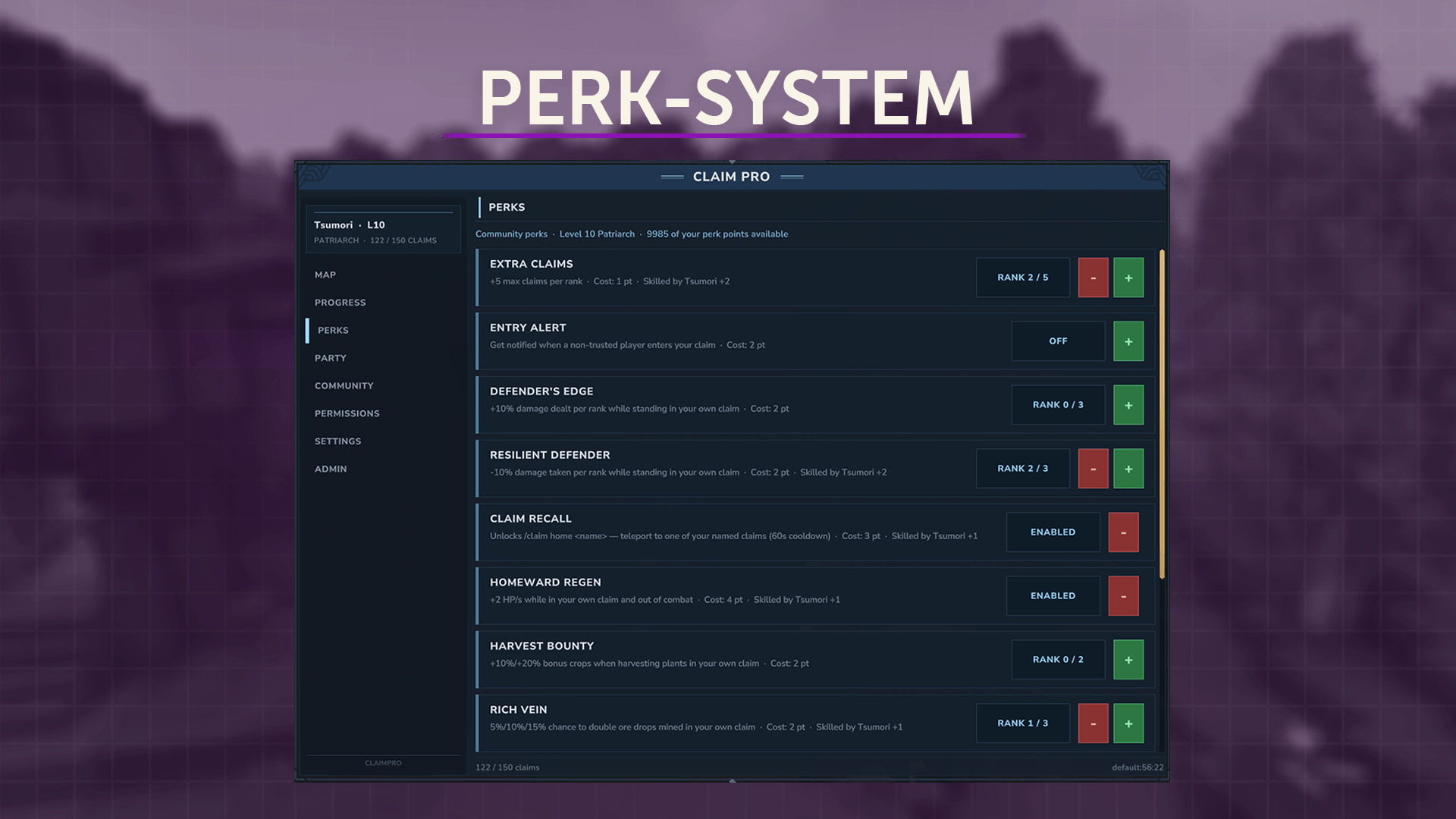
Perksystem.png
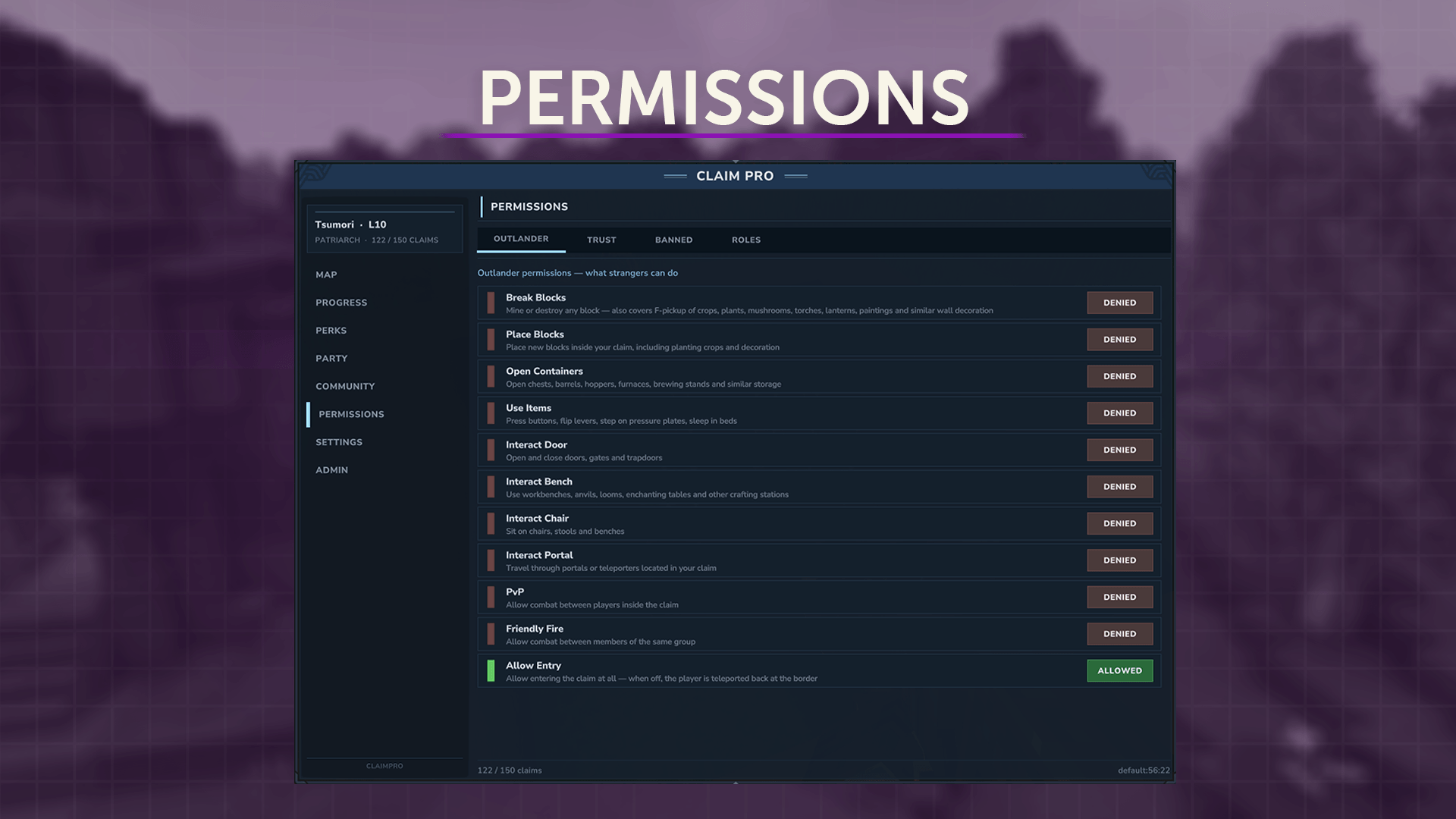
Permissions1.png
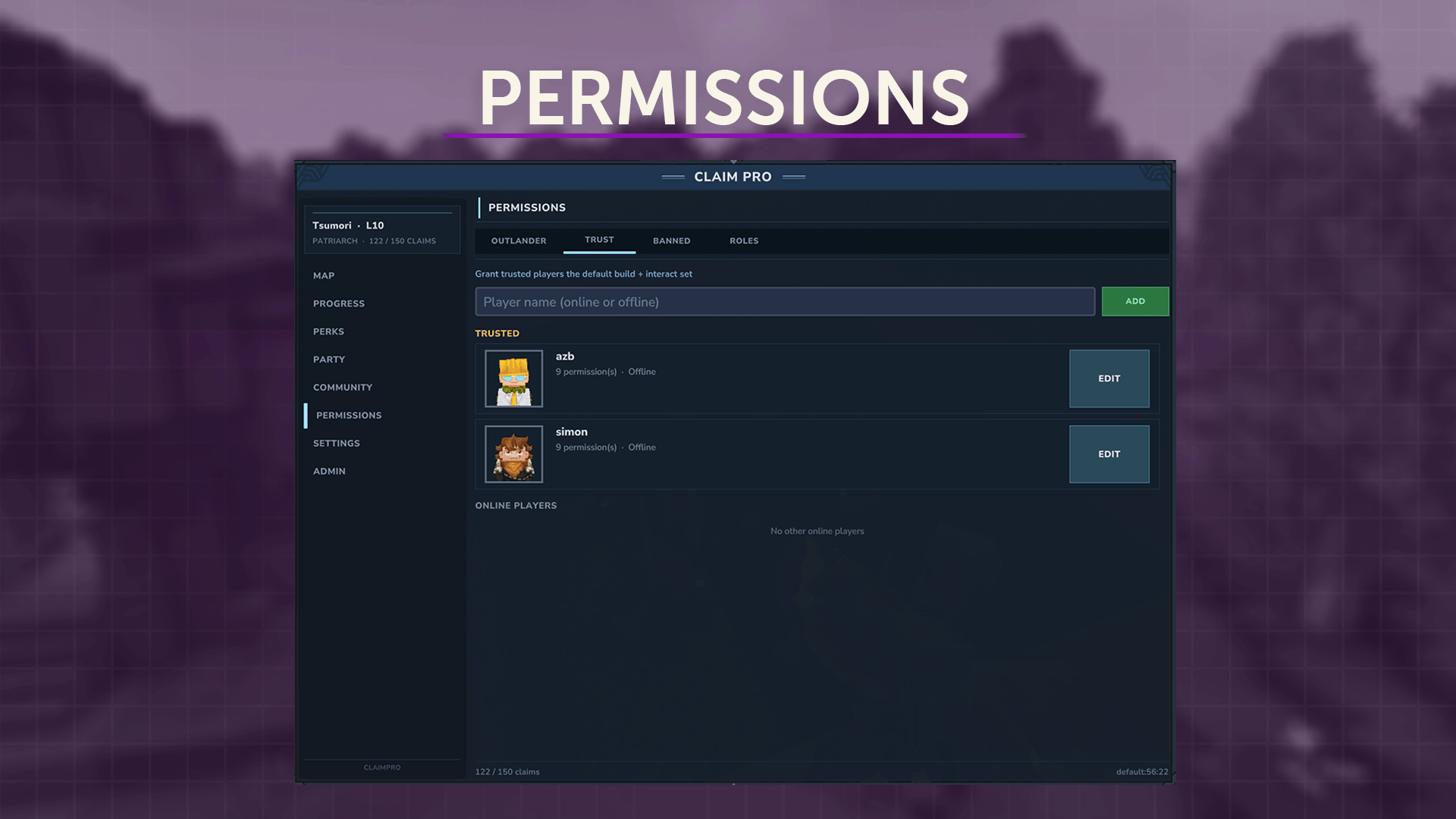
Permissions2.png
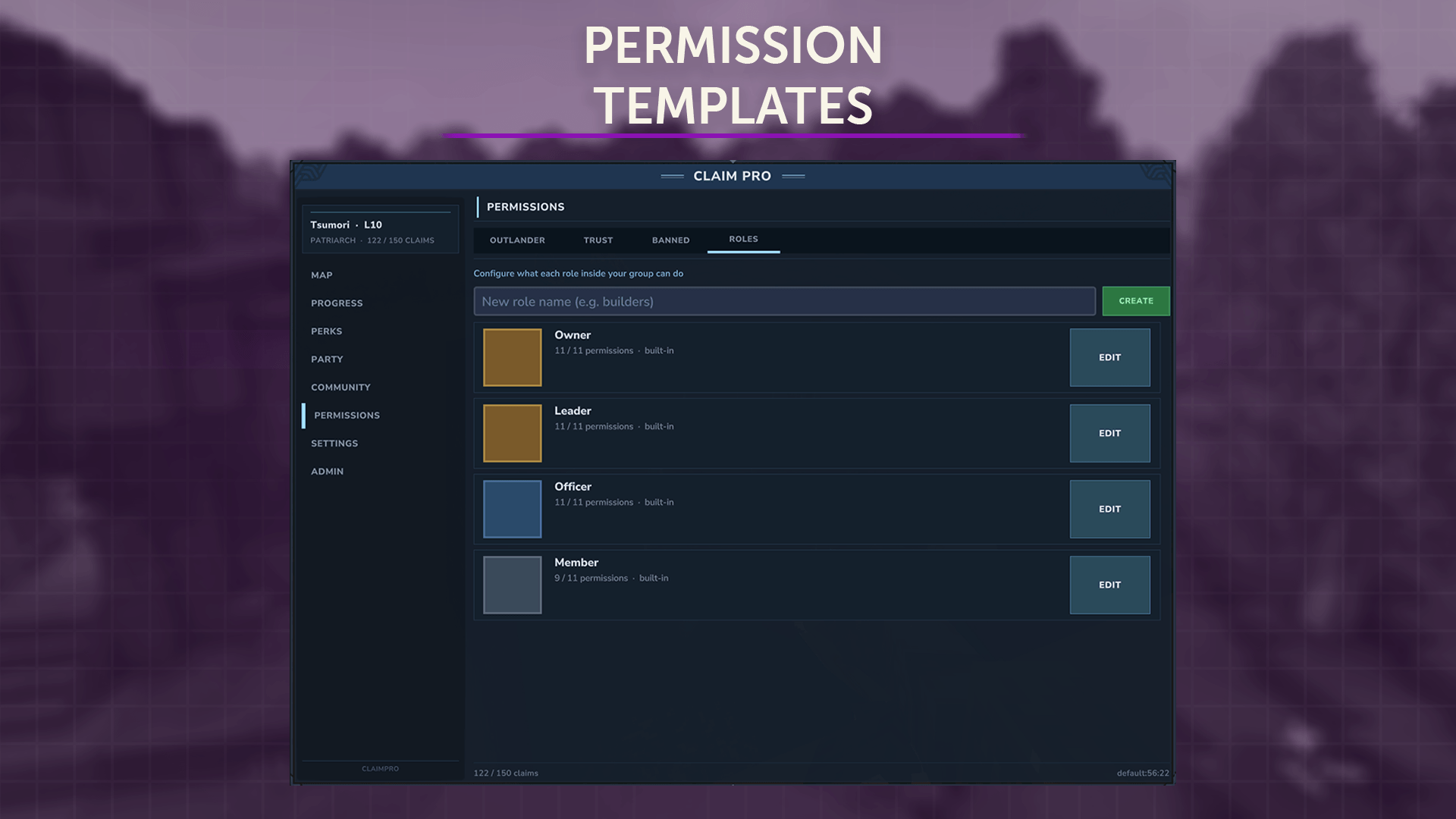
Permissions3.png
SCImport.png
Adminpanel.png
Description
🏰 ClaimPro — Land Protection for Hytale
A complete chunk-claim system for Hytale servers, built around performance, a clean UI, and group support you can extend yourself: parties, guilds, factions, or whatever your own plugins bring to the table.
Drop one JAR onto your server and you get visible claims on the map, full block protection out of the box, an in-game GUI, an XP and perk progression system, shared community claims, and a public API that other plugins can hook into.
✨ Why ClaimPro?
Drop-in protection
Install the JAR, restart, and players can claim chunks right away. You never have to touch the config to get going, but it's all there when you want to dig in.
Built like a real product
No console-only commands, no menus spammed into chat. Every interaction lives in a proper tab or panel with tooltips and visual feedback.
Pluggable owner types
Implement the OwnerProvider interface and your party, guild, or faction plugin becomes a first-class claim owner. One class is all it takes.
Built for scale
SQLite for solo servers and small networks, MySQL for clusters. Map updates are batched per world, permission checks are cached, and the 17×17 chunk grid renders without a hitch.
🎮 Player Features
Visual chunk grid GUI
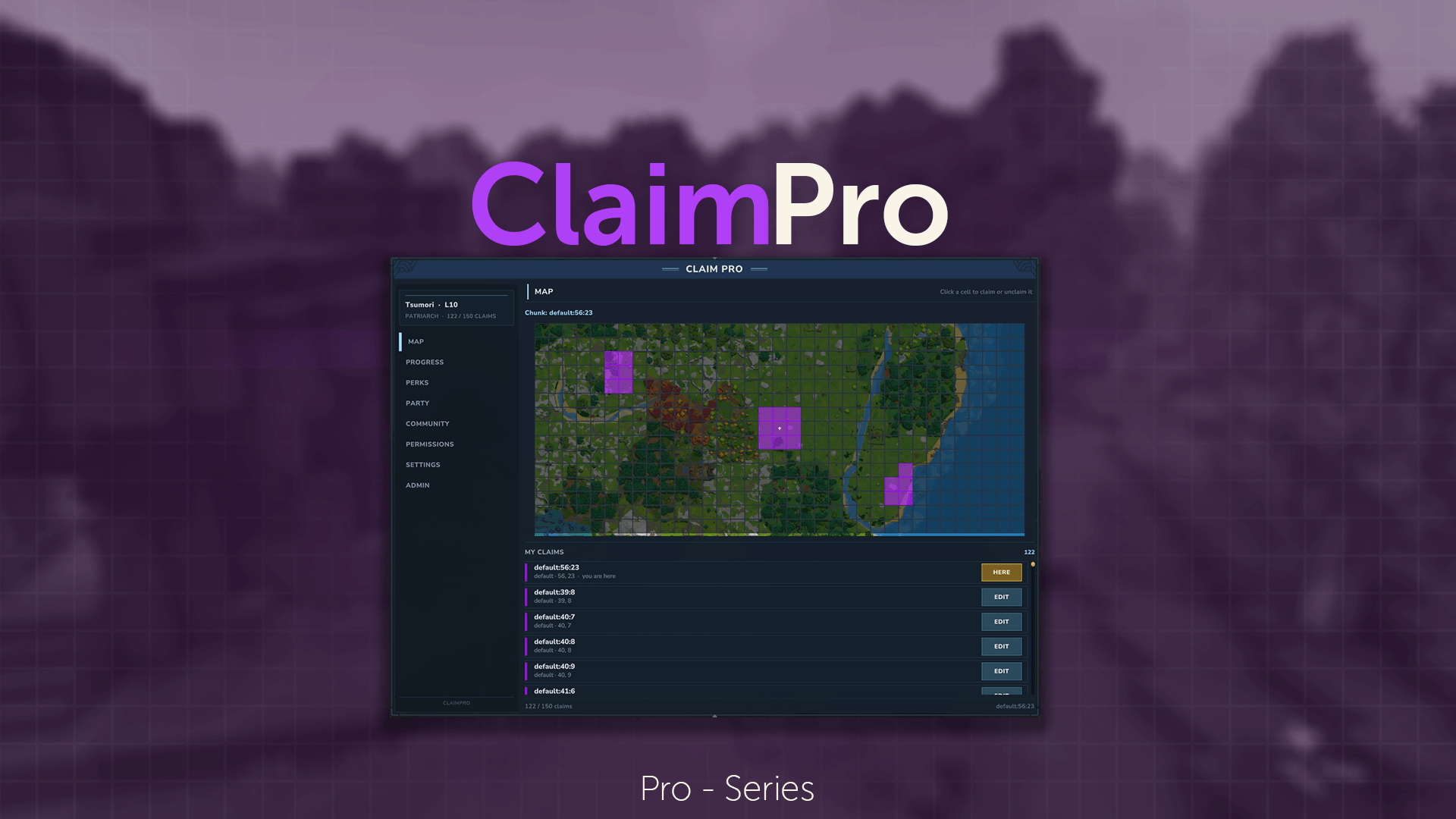
/claim opens a 17×17 grid centered on you. Click a cell to claim or unclaim it. Cells show owner colors, per-cell tooltips, and a marker for the chunk you're standing in.
Full block protection
Covers breaking, placing, and using blocks (doors, chests, benches, portals, levers, signs, beds, crop harvesting, change-block, cycle-block-group). Each permission is gated on its own, and everything fails closed.
Trust & ban lists
Manage them globally or per owner.
Per-claim names and colors
Name your BASE, tint your TOWN, then glance at the map and know whose land you're standing on.
Live world-map overlay
Claimed chunks are tinted with the owner's color, borders between different owners are drawn stronger, and owner labels render in a pixel font.
Chunk border particles
Walk near the edge of a claim and you'll see border particles in the owner's color, so you know whose territory you're about to step into.
Claim home teleport
/claim home <name> teleports you to any of your named claims. Perk-gated to keep things balanced.
Fly permission (a premium feature you can sell)
Give your premium members the tsumori.claimpro.command.fly permission and they can double-tap space to fly inside their own claims.
🔁 SimpleClaims Import
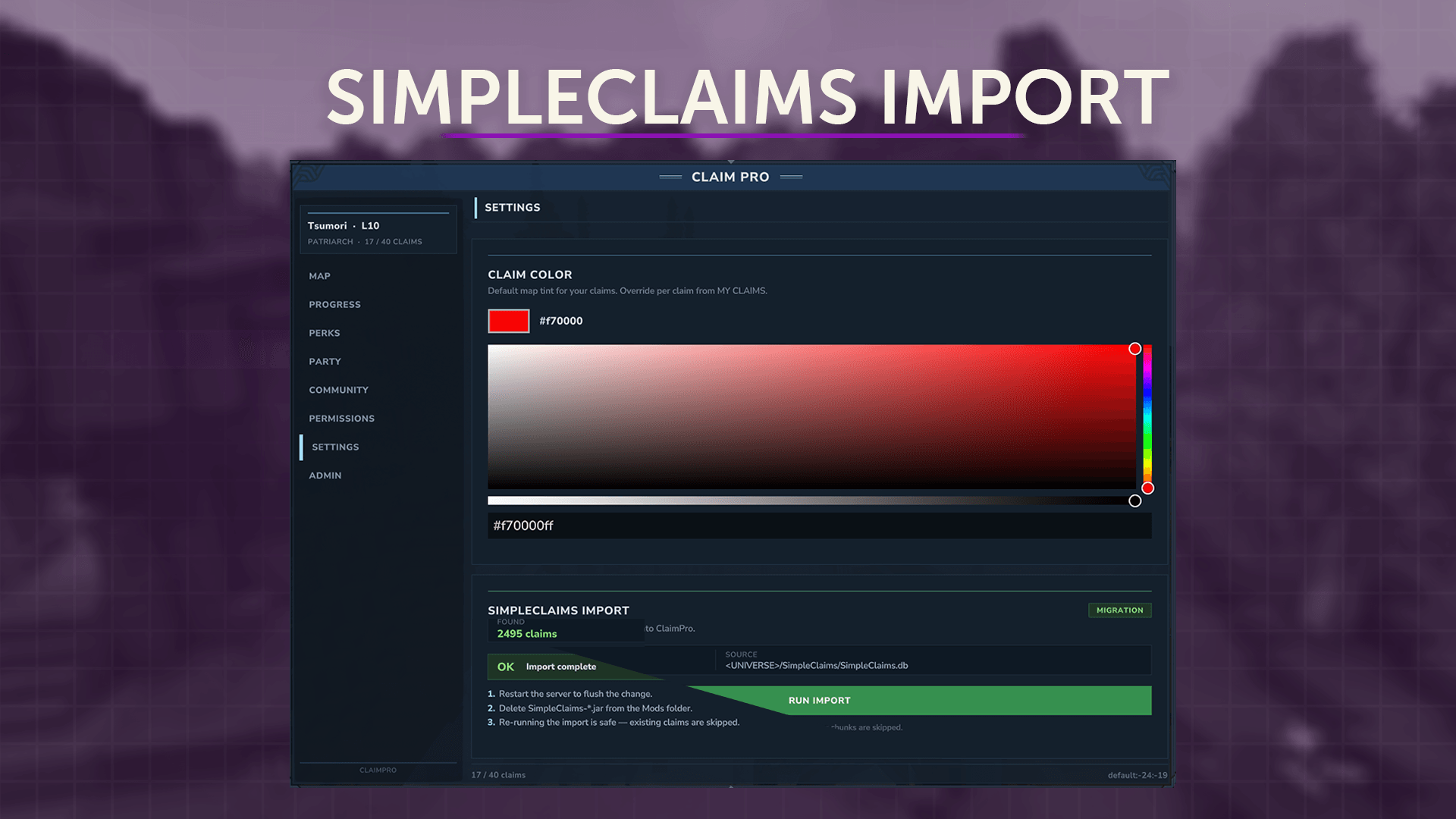
The importer pulls in every claim and user limit, and flags any errors it hits along the way. Drop ClaimPro.jar into your mods folder, start the server, open the Settings tab, click Import, and follow the steps in-game.
You don't have to remove SimpleClaims afterwards (ClaimPro blocks it completely), but we'd recommend it anyway. :)
One thing to note: SimpleClaims parties aren't imported. The claim limit goes to the party owner instead. If you want something close to the old party setup, create a Community in ClaimPro.
🛡️ Admin Toolkit
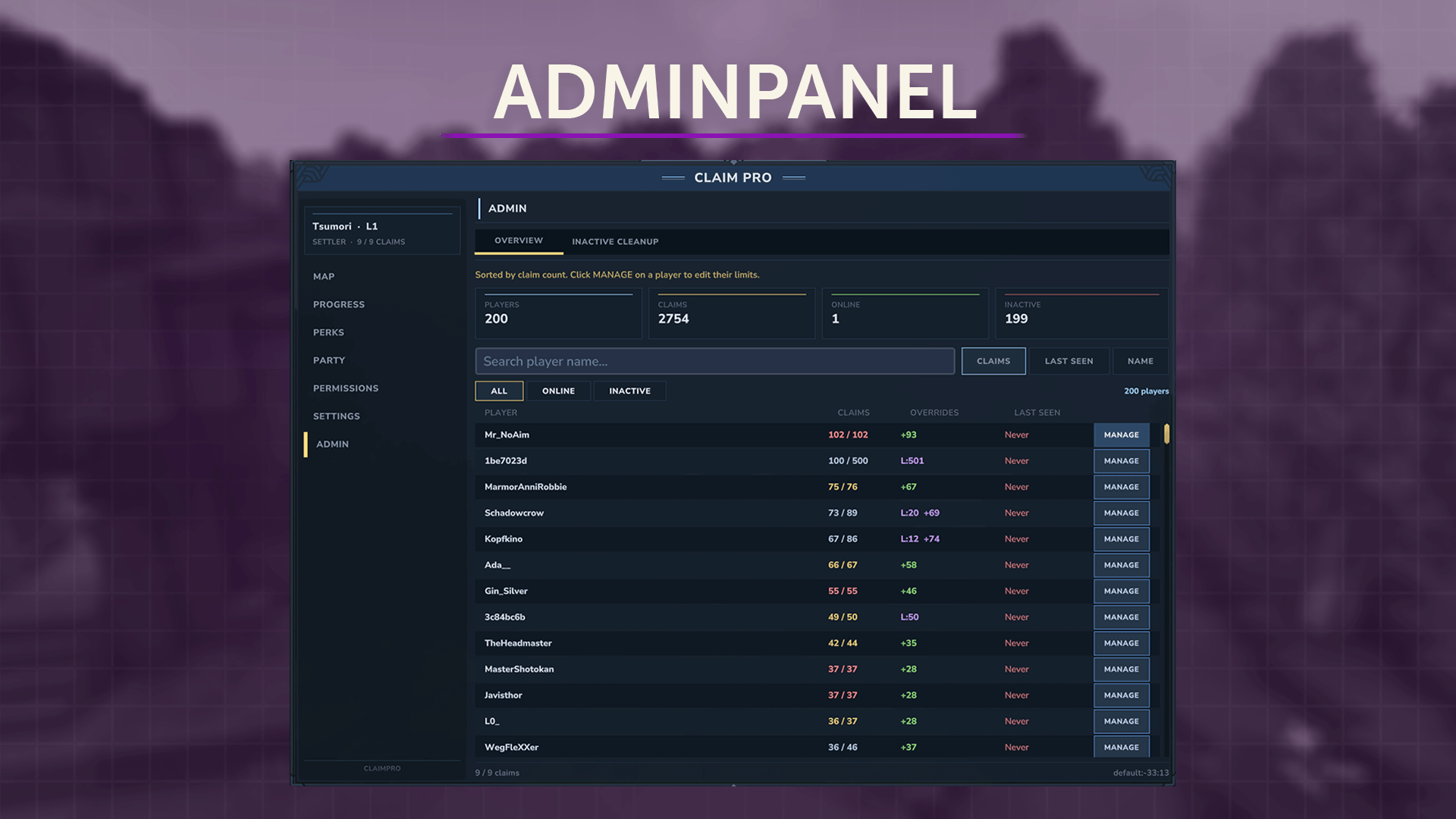
| Command | What it does |
|---|---|
/claim admin-claim <player> |
Claim a chunk for someone — bypasses spawn protection, neighbour spacing, claim limit |
/claim admin-unclaim / admin-unclaimall <player> |
Force-release a chunk, or wipe everything owned by a player |
/claim admin-transfer <player> |
Reassign chunk ownership (the claim ID stays stable) |
/claim admin-info |
Detailed dump: claim ID, owner, name, color, assignee |
/claim admin-setlimit <player> <amount> |
Replace the base claim allowance (-1 to clear) |
/claim admin-grant <player> <amount> |
Stack bonus claims on top of base + perks + level |
/claim admin-import |
One-click migration from SimpleClaims |
/claim reload |
Hot-reload config and language files |
Every command has its own permission node (tsumori.claimpro.command.* and .admin.*). There's no all-powerful wildcard you're forced to hand out, and no console-only fallback, so you can give each role exactly what it needs.
⚡ XP, Perks, Levels & Achievements
Progression in ClaimPro is more than a single claim-limit number.
Earn XP
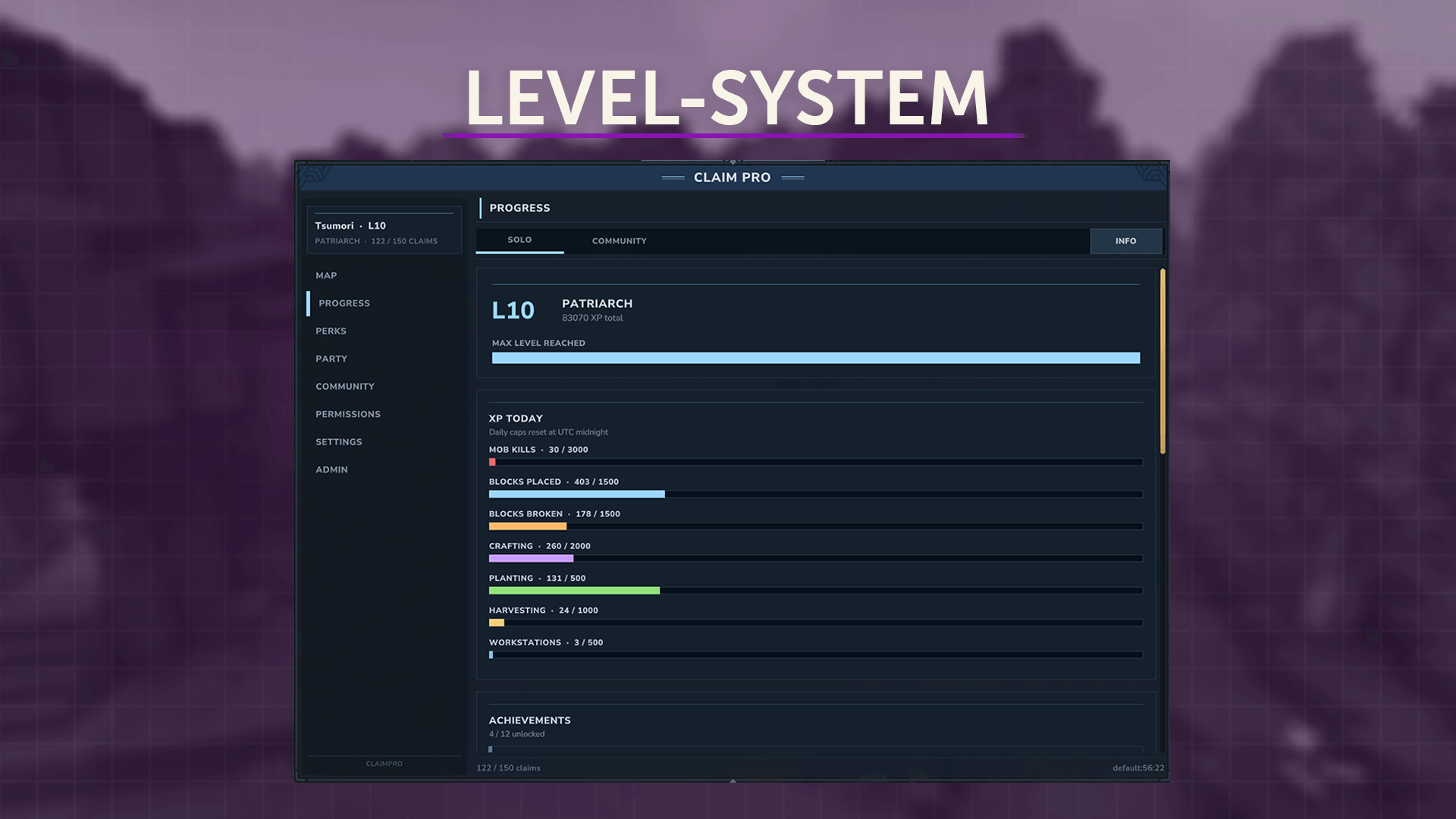
You gain XP for breaking blocks, placing blocks, killing mobs, and crafting recipes. It only counts inside your own claims, so nobody grinds it out on random terrain.
Ten levels
Each level hands out perk points, with bonus rewards at milestones.
Perk tree
Spend perk points across stacked ranks: more claims, shorter claim-home cooldown, a bigger trust list, and so on.
Daily XP caps
Per-source caps keep bots and grinders in check, and they're configurable.
Achievements
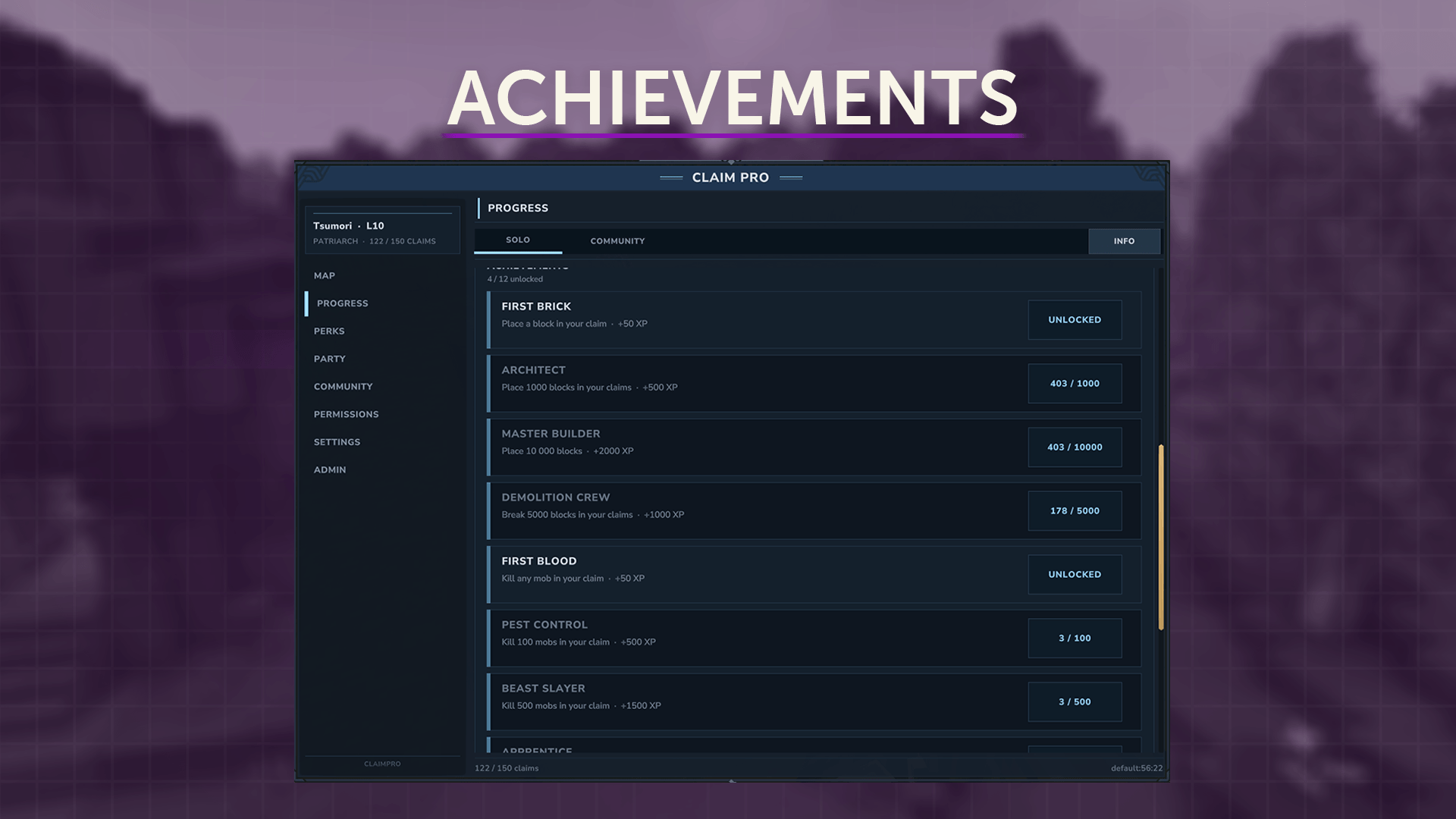
Lifetime counters with toast notifications when you cross a threshold.
Community pool
Shared claims get joint XP totals and community-level milestones.
🤝 Communities — Shared Claims Done Right
The SimpleClaims party replacement.
Communities are ClaimPro's built-in answer to "we want to build together, but we're not a full guild yet." A Community is a first-class owner, sitting on the same level as a player or a guild. Land claimed under a Community belongs to the Community, not to any single member. When someone leaves, their access and their share of the land go with them.
It's a real shared-ownership model, not a dressed-up trust list.
Why a Community over just trusting your friends?
Trust lists hand other players permissions on YOUR claims. The land still belongs to you: your claim limit, your responsibility. Go inactive or get banned and the whole base goes down with you.
A Community owns the land together. Every member is automatically trusted on every Community claim. It has its own claim limit and its own perk pool, and members can come and go without breaking anything.
Everything goes into one pot
The whole idea of a Community is shared ownership, so the rules are spelled out up front. The in-game info card lays them out before you join:
- Your existing claims move into the shared pool. They're owned by the Community now, not by you personally.
- Every member can claim, edit, and release any chunk in the pool. No per-chunk trust toggles, no whitelists. If you're in, the whole pool is yours to work on.
- Claim limits stack. Everyone adds their personal slots to a shared cap. Five players with 25 claims each gives the Community a cap of 125. Bigger group, more land.
- Anyone can invite or kick, within their role permissions. Only the Owner can transfer leadership or disband.
- When you leave, the Community releases as many of your most-recently-placed chunks as your personal cap, so the pool drops back under its new limit.
That last rule is the one that matters. Joining a Community is a real commitment, not a free trial. When someone leaves, the pool shrinks to a fair size for everyone still in it, and the chunks that get released are the leaver's newest ones, not the founding base.
Shared XP pool
Every bit of XP a member earns on Community land also feeds the Community's own pool. The pool has its own level (a cosmetic milestone), its own progress bar, and its own collective achievements. Active communities pull ahead of dormant ones, which gives leaders something to show off and members something to work toward.
The personal daily XP cap still applies first, so alts can't farm the pool.
Claim bonuses
- Members' personal perks don't count toward the Community (perks stay personal).
- Community-owned perks do (for example, EXTRA_CLAIMS bought from the Community pool).
- Admin grants and limit overrides work on Communities just like they do on players.
- The global cap (
globalMaxClaimsPerOwner) applies to Communities too.
Full lifecycle from chat
/claim community create <name>          # spin up a new Community, you become Leader
/claim community invite <player>         # send a join invite
/claim community accept <name>           # invitee accepts (auto-declines other pending invites)
/claim community leave                   # leave the Community (Leader must transfer first)
/claim community kick <player>           # Leader/Officer kicks a member
/claim community transfer-leader <player># hand the keys to someone else
/claim community disband                 # Leader nukes the whole Community (asks for confirmation)
/claim community info                    # roster, claim count, level, leader, member list
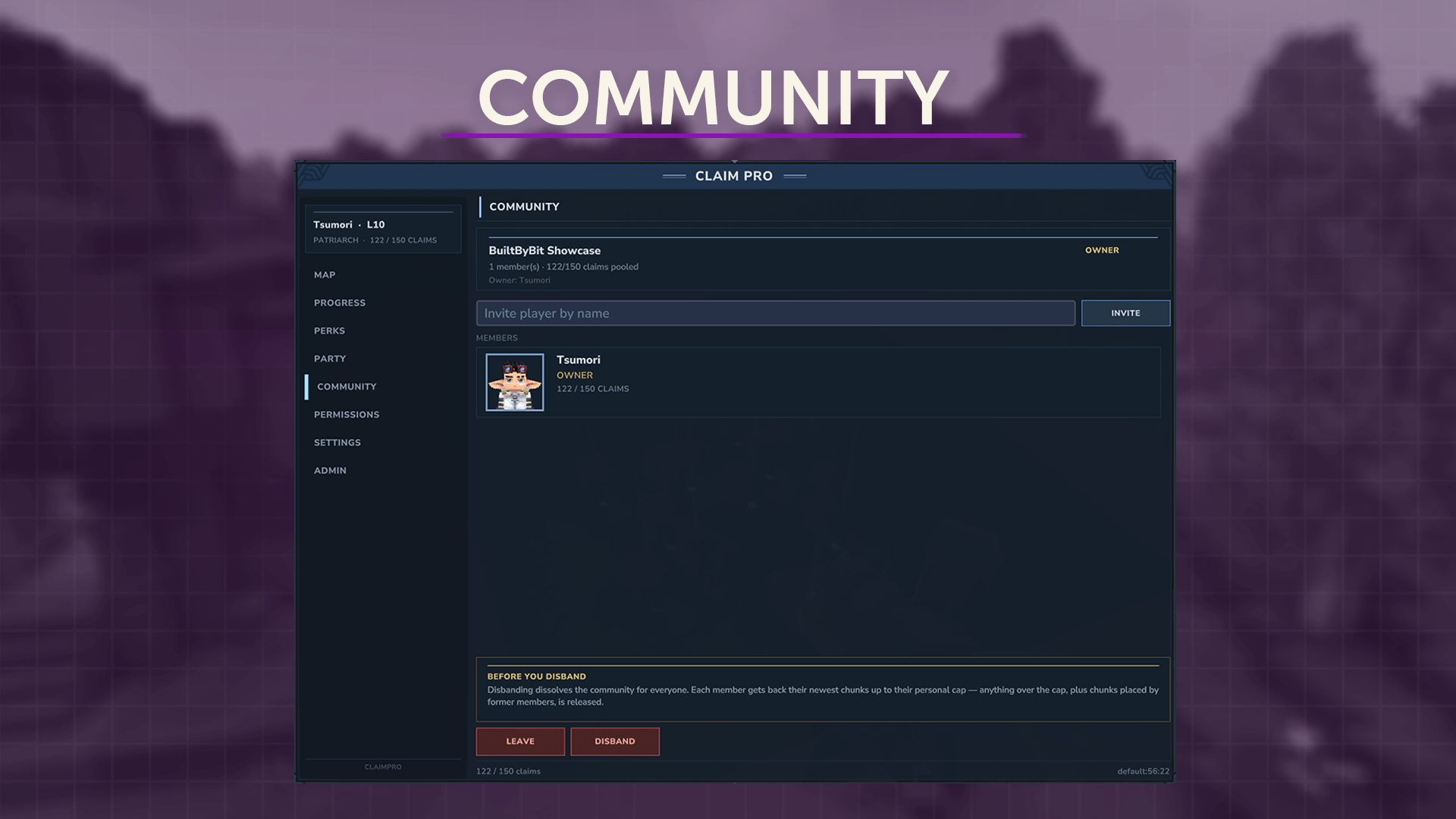
Every step also has a button in the Community panel of the /claim GUI, so you can click through all of it if you'd rather not type commands.
When not to use Communities
If your server already runs a party, guild, or faction plugin, those should register as ClaimPro owners through the OwnerProvider API (below) rather than using Communities. Communities are meant for the gap in between: small friend groups who don't want to spin up a heavyweight guild plugin just to share a base.
You can run both at once. A player can be in a party, in a Community, and own personal claims all at the same time. ClaimPro treats each one as a separate owner.
🎨 In-Game GUI
The /claim GUI is the core of the plugin, and it's a lot more than a list.
Map tab
17×17 chunk grid with the terrain underneath, owner tints, your position marker, and full hover tooltips.
My Claims
A sortable list of your claims, with rename and color-pick.
Trust / Ban tabs
Decide who can do what on your land, either per permission or with ready-made role profiles.
Roles
Build your own permission profiles (say, "Builder" or "Visitor") instead of setting permissions one at a time.
Perks panel
The perk tree laid out visually, with rank progress and hints for your next unlock.
Progress / Achievements
XP bar, daily counters, and the achievement track.
Community panel
Create and manage communities without leaving the GUI.
Players see avatars on every list (cached and fetched async). The interface adapts to every aspect ratio.
🎉 Party Integration (PartyPro out of the box)
ClaimPro comes with built-in support for PartyPro. Drop both JARs on your server and they find each other automatically, with no config flag and no register step.
What you get for free
- A "Party" permission tier shows up in every claim's trust panel, next to owner, officer, member, and stranger. Set up once what your party-mates can do on your land (build, open chests, use doors, edit the claim, and so on) and those rules apply across every party.
- Auto-trust between party members. Anyone in your active party gets the Party-tier permissions on your claims for as long as they're in it. Leave the party and you lose the access; join again and it comes back. No trust lists to maintain by hand.
- Live updates. Invites, kicks, leader changes, and disbands all take effect immediately. Kick someone and they lose access the moment they're gone.
- A Party tab in the
/claimGUI showing your current roster with avatars, role badges, and who's online in your claim right now.
Other party plugins welcome
The integration runs on a clean SPI (PartyProvider) rather than a hard dependency. PartyPro is just the default implementation. If you run a different party, squad, or friends plugin, you can register your own provider in about 30 lines:
public class MySquadProvider implements PartyProvider {
    public String  getKey()                            { return "squad"; }
    public UUID    getPartyOf(UUID player)             { return SquadAPI.partyOf(player); }
    public List<UUID> getMembers(UUID party)           { return SquadAPI.membersOf(party); }
    public UUID    getLeader(UUID party)               { return SquadAPI.leaderOf(party); }
    public String  getPartyName(UUID party)            { return SquadAPI.nameOf(party); }
}

PartyProviderRegistry.register(new MySquadProvider());
ClaimPro only ever talks to the registry, never to your plugin directly, so the Party tier works on its own whether PartyPro is loaded, your custom plugin is loaded, both, or neither.
If PartyPro isn't installed, the Party tier just hides itself. No errors, no missing-class spam in the log. ClaimPro stays a single drop-in JAR.
🔌 Owner Provider API
Other plugins integrate by implementing a single interface:
public class MyGuildOwnerProvider implements OwnerProvider {
    public String  getKey()                              { return "guild"; }
    public String  getDisplayName(UUID guildId)          { ... }
    public boolean exists(UUID guildId)                  { ... }
    public Set<UUID> getMembers(UUID guildId)            { ... }
    public String  getMemberRole(UUID guildId, UUID p)   { ... }
    public boolean isManagementMember(UUID g, UUID p)    { ... }
    public int     getMaxClaims(UUID guildId)            { return -1; }
}

ClaimProAPI.get().registerOwnerProvider(new MyGuildOwnerProvider());
That's all it takes. Your guild can now own claims, members get auto-trust, leaders get management rights, and the GUI shows guild-tinted chunks on the map.
⚙️ Configuration Highlights
{
  "storageType": "sqlite",
  "baseClaimsPerProvider": { "player": 25, "party": 50, "guild": 200 },
  "globalMaxClaimsPerOwner": 500,
  "spawnProtectionChunks": 5,
  "minChunkDistanceBetweenOwners": 0,
  "disabledWorlds": [],
  "showClaimBorders": true,
  "language": "en"
}
Every value hot-reloads with /claim reload, so there's no restart needed.
🏷️ Rights Hierarchy
Permissions are layered clearly, from most to least authority:
- Community members (Owner)
- Trusted players
- Party members
🎚️ Permissions
Player commands (tsumori.claimpro.command.*)
tsumori.claimpro.command.gui— Opens the main ClaimPro GUI (/claim)tsumori.claimpro.command.claim— Claim the chunk you're standing intsumori.claimpro.command.unclaim— Release the chunk you're standing in (must be owner)tsumori.claimpro.command.info— Show info about the current chunk's claimtsumori.claimpro.command.list— List your own claimstsumori.claimpro.command.trust— Grant another player default trust permissionstsumori.claimpro.command.untrust— Remove a player's trust permissionstsumori.claimpro.command.ban— Ban a player from interacting with your claimstsumori.claimpro.command.unban— Lift a player's ban from your claimstsumori.claimpro.command.name— Set a name for the current claim (use "-" to clear)tsumori.claimpro.command.color— Set the global map color for your claims (e.g. #ff5500)
Perk-gated commands
tsumori.claimpro.command.home—/claim home <name>, teleport to a named claim. Perk: Claim Recall (XP level >= 5, costs 3 PP). 60-second per-player cooldown.tsumori.claimpro.command.fly— Auto-flight inside your own claim. Driven by ClaimFlyEnforcerSystem (no command).
Community commands
tsumori.claimpro.command.community
Admin commands
tsumori.claimpro.command.admin.*
🌍 Languages
Bundled translations: English, German, Spanish, Brazilian Portuguese, French, Hungarian, and Russian.
Need another language? Drop a new JSON file into the lang folder and reload.
📦 Installation
- Drop
ClaimPro-x.x.x.jarinto yourMods/folder. - Start the server once. This generates
ClaimPro/config.jsonand the SQLite database. - (Optional) Edit
config.jsonfor MySQL, claim limits, or disabled worlds. - Run
/perm group add Default tsumori.claimpro.command.*to hand everyone the player commands.
No external dependencies, and no database setup needed if you're on SQLite.
✅ Compatibility
- Ready for Hytale Pre-Release Update 5 (and works on stable) as of 26 May 2026.
- Runs alongside SimpleClaims, with a one-click import or
/claim admin-import. - API-first, so other plugin authors can hook in without forking anything.
💬 Support & Updates
- Actively maintained. Every Hytale patch gets tested against ClaimPro before it goes out.
- Bug reports via Discord.
- Feature requests welcome in the discussion thread.
- Free updates for the lifetime of the plugin.
Done with griefers wrecking your builds? Drop ClaimPro in, walk into a chunk, type /claim claim, and it's yours.
The ClaimPro Team