PartyPro - RPGLeveling/MMOSkillTree/SimpleClaims Integration
- By
A complete party system with HUD, compass tracking, ping beacons, teleportation, and persistent groups for multiplayer servers.
Sizes.jpg
HUDPosition.jpg
API.jpg
Partychat.jpg
Description
ClaimPro - Release! https://www.curseforge.com/hytale/mods/claimpro
💬 Support & Feedback
Documentation: https://pro-hytale-mods.gitbook.io/pro-hytale-mods-docs/getting-started/quickstart
PartyPro
Team up in Hytale. PartyPro adds a complete party system with real-time HUD, map tracking, ping system, party chat, XP sharing, statistics, and leaderboards.
Works standalone — no dependencies required.
Optional integrations with RPGLeveling, MMOSkillTree, and SimpleClaims activate automatically when installed.
📖 Full Documentation: https://pro-hytale-mods.gitbook.io/pro-hytale-mods-docs/getting-started/quickstart
---
⚔️ Party System
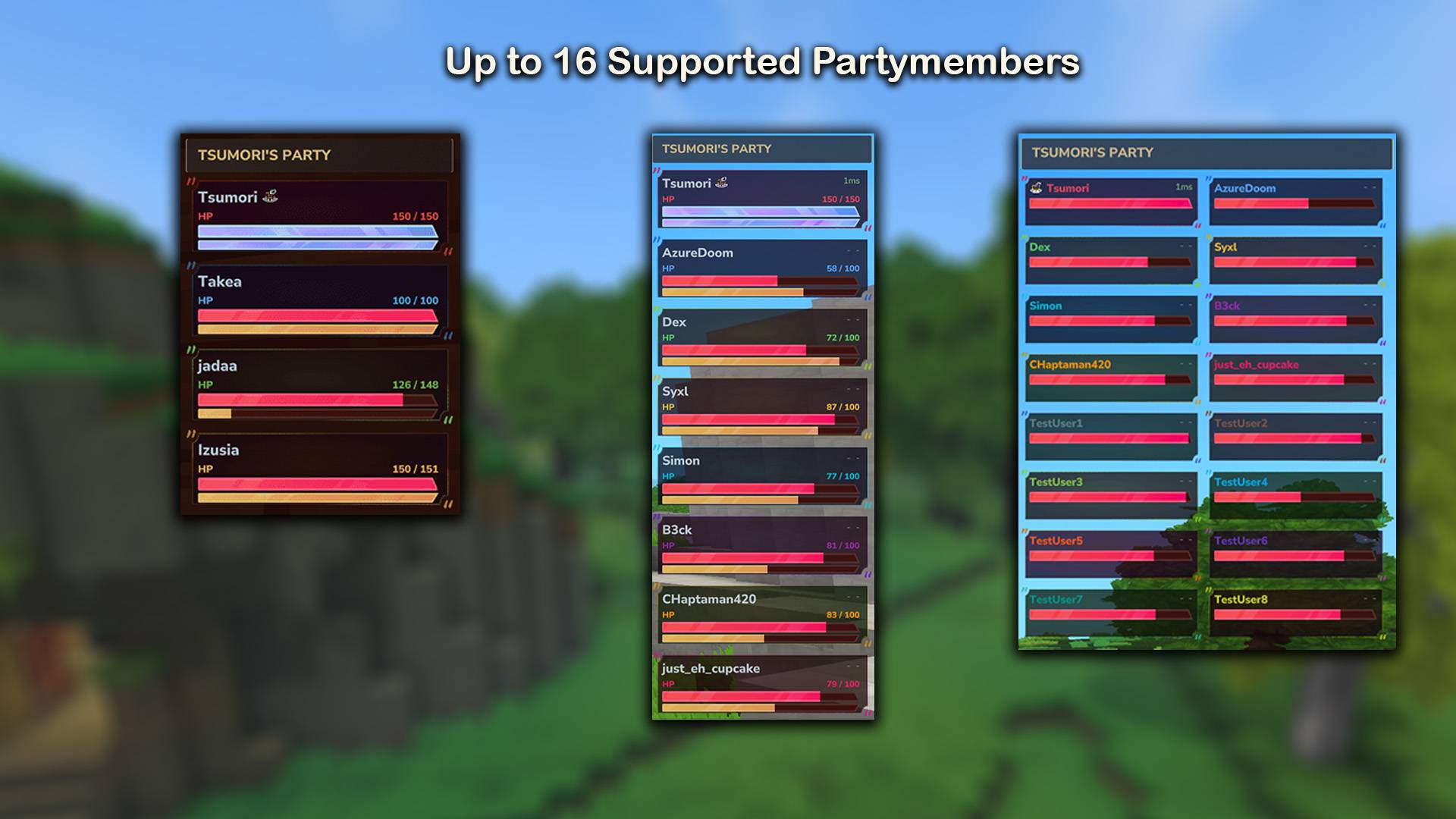
- Create and manage parties with up to 16 players
- Public parties anyone can join, or private with password protection
- Invite system with auto-accept and auto-decline modes
- Leadership transfer, member kicking, party renaming
- Parties persist across server restarts
- Configurable offline timeout to auto-remove inactive players
🖥️ Real-Time Party HUD
- Health and energy bars for every member
- Network ping (color-coded: 🟢 green / 🟡 yellow / 🔴 red)
- Distance or exact coordinates to each member
- Online/offline indicators and leader icon
- Normal and Compact display modes
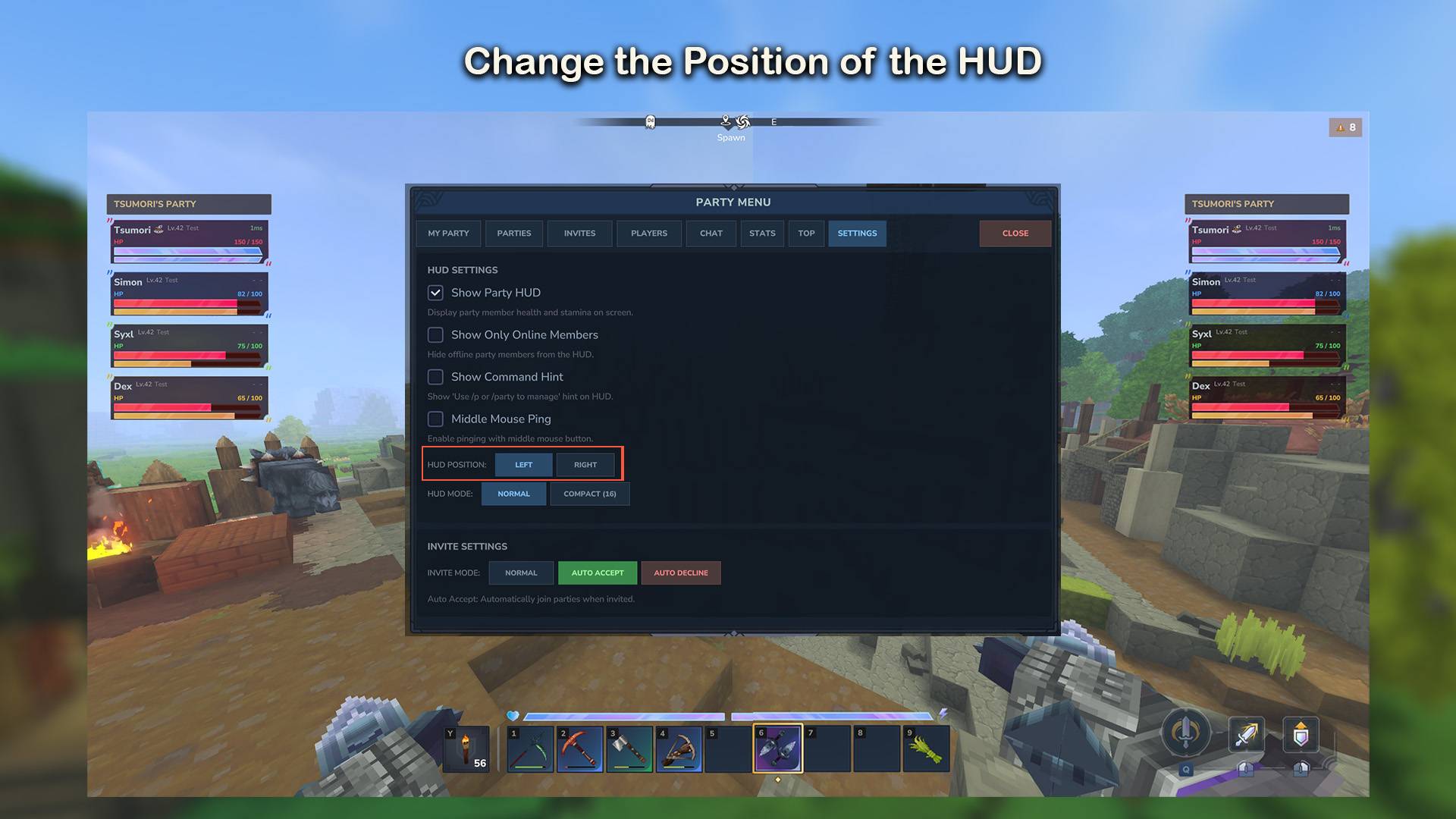
- Fully customizable position (left/right, X/Y offset) per player
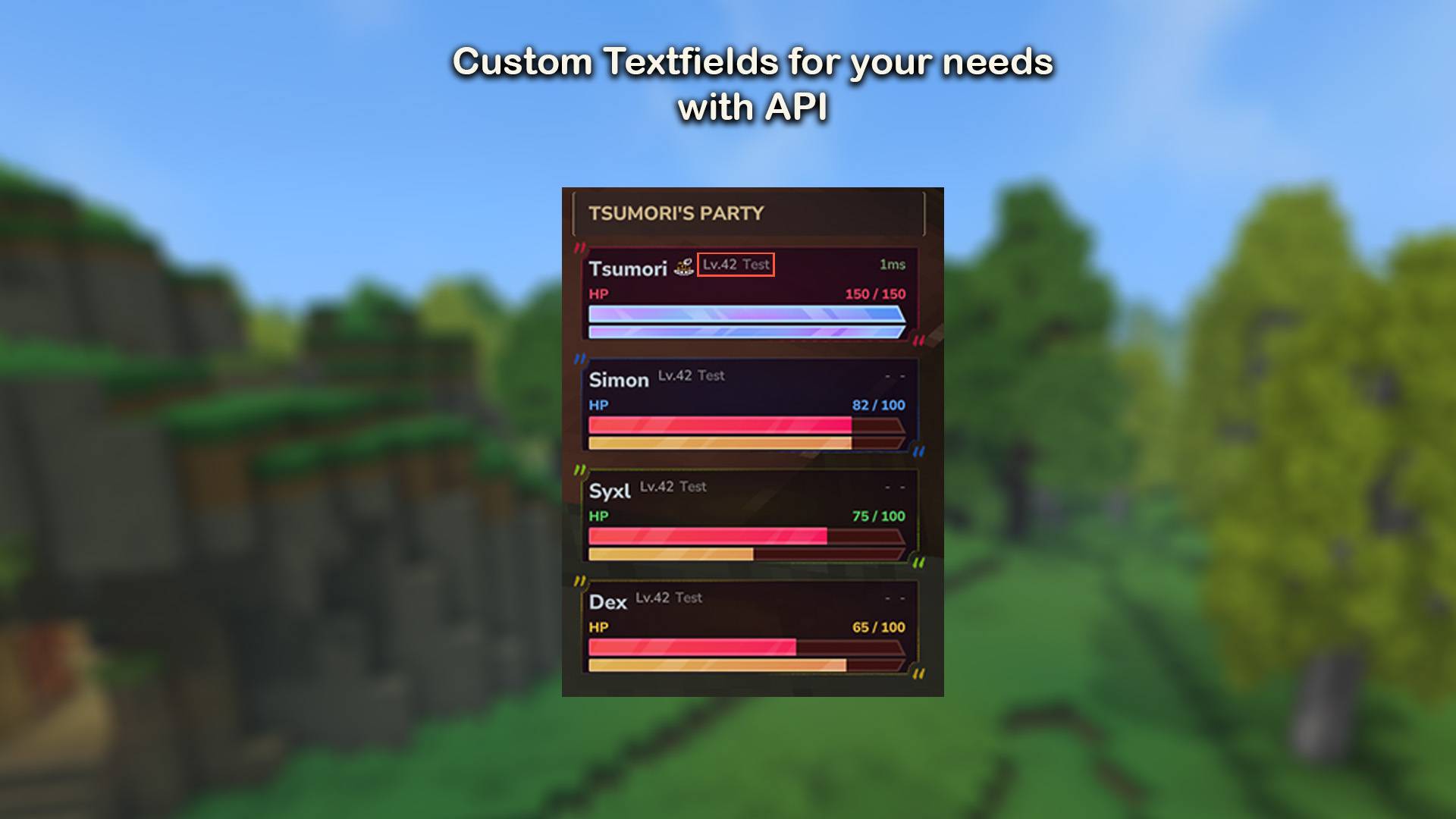
- Custom text slots for levels, classes, or ranks
🗺️ Map Tracking
- Party members shown as colored icons on the world map
- Distance labels on each marker
- Three waypoint modes: all players, party only, or hidden
- 16 unique member colors
📍 Ping System
- Middle-click any block to ping it for your party
- Colored beacon particle visible in the world (30s duration)
- Ping markers on the world map
- Unique color per member, configurable cooldown
💬 Party Chat
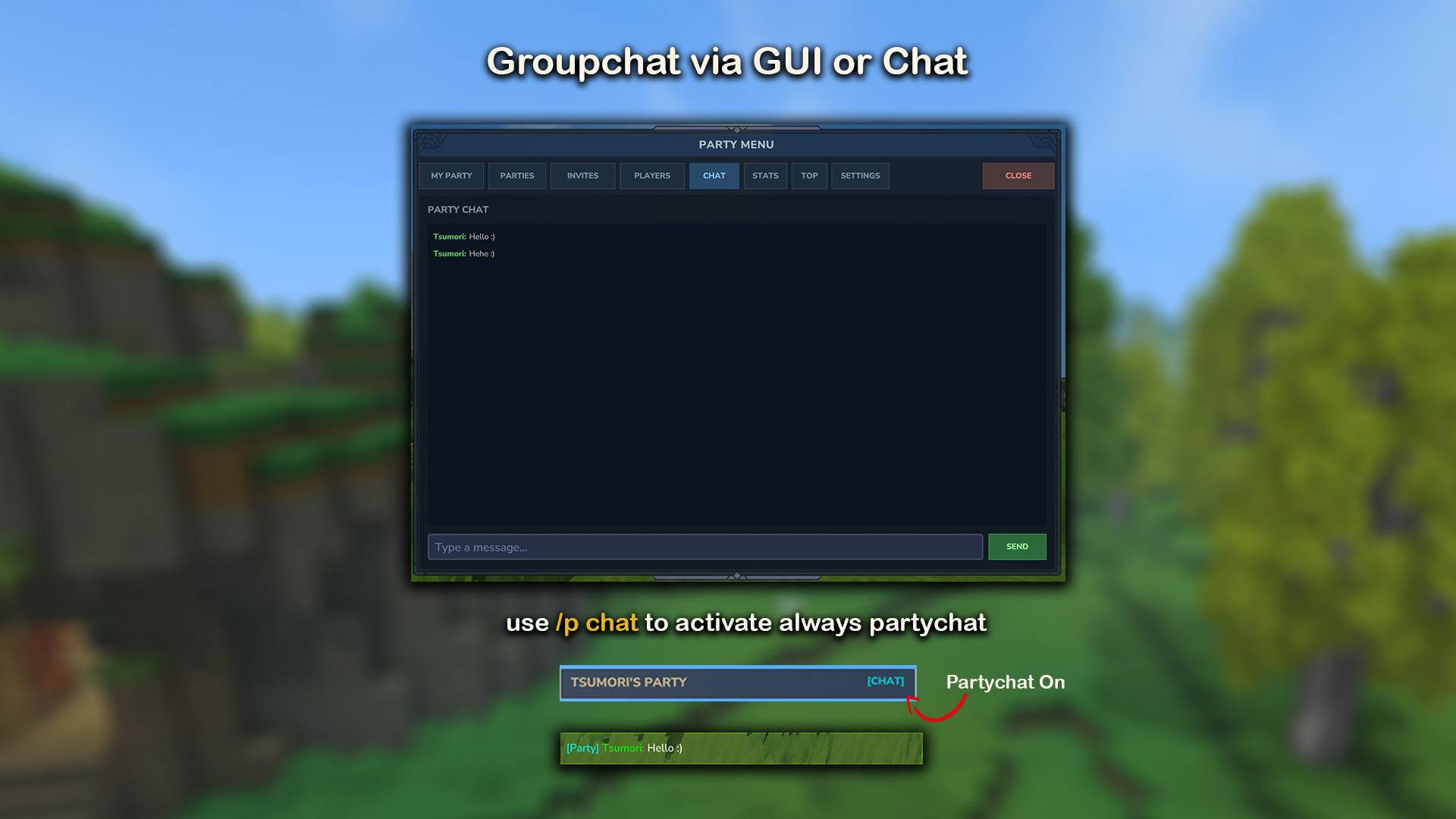
- Toggle with `/p chat` — messages go only to party members
- `[Party]` prefix formatting
- Chat history viewable in the Party Browser GUI
📋 Party Browser GUI
Open with `/p` — a full interactive menu:
- My Party — members, settings, kick/transfer/disband
- Parties — browse and search public parties, join with password
- Invites — accept or decline pending invites
- Players — see online players, invite them
- Chat — party chat with message history
- Stats — per-member and combined statistics
- Top — leaderboard comparing all server parties
- Settings — HUD, waypoints, invite mode
- Integrations — RPGLeveling, MMOSkillTree, SimpleClaims
📊 Statistics & Leaderboards
Tracked per player and per party:
- Mob kills, player kills, deaths
- Damage dealt and taken
- Blocks placed and broken
- Items collected and crafted
- Distance traveled, pings sent, teleports used
- Time spent together
Leaderboard ranks all parties by kills, damage, blocks, distance, or time. Top 3 highlighted in 🥇 gold, 🥈 silver, 🥉 bronze. Configurable auto-reset (daily or monthly).
🛡️ PvP Protection
Friendly fire between party members is blocked by default. The party leader can toggle PvP on or off.
🧑🤝🧑 Player Avatars
The Party Browser shows player headshot avatars next to names. Skins are fetched from a configurable API and cached locally.
---
Commands & Permissions
All commands use `/p` (alias: `/party`).
Party Commands — Permission group: Adventure
`/p` — Opens the Party Browser (`tsumori.partypro.command.p`)
`/p create ` — Creates a party (`tsumori.partypro.command.p.create`)
`/p invite ` — Invites a player (`tsumori.partypro.command.p.invite`)
`/p accept` — Accepts an invite (`tsumori.partypro.command.p.accept`)
`/p decline` — Declines an invite (`tsumori.partypro.command.p.decline`)
`/p leave` — Leaves your party (`tsumori.partypro.command.p.leave`)
`/p kick ` — Kicks a member, leader only (`tsumori.partypro.command.p.kick`)
`/p transfer ` — Transfers leadership (`tsumori.partypro.command.p.transfer`)
`/p disband` — Disbands the party, leader only (`tsumori.partypro.command.p.disband`)
`/p rename ` — Renames the party, leader only (`tsumori.partypro.command.p.rename`)
`/p tp ` — Teleports to a member (`tsumori.partypro.command.p.tp`)
`/p chat` — Toggles party chat (`tsumori.partypro.command.p.chat`)
`/p info` — Shows party info (`tsumori.partypro.command.p.info`)
`/p invites` — Shows pending invites (`tsumori.partypro.command.p.invites`)
`/p browse` — Browse parties/players (`tsumori.partypro.command.p.browse`)
Utility Commands
`/pping` — Pings the block you're looking at (`tsumori.partypro.command.ping`)
Admin Commands — Permission group: Creative (OP)
`/p debug` — Debug tools (`tsumori.partypro.command.p.debug`)
Wildcards: `tsumori.partypro.command.*` grants all commands, `tsumori.partypro.command.p.*` grants all `/p` subcommands.
Aliases: `/p join` = accept · `/p deny` = decline · `/p remove` = kick · `/p promote` = transfer · `/p teleport` / `/p goto` = tp · `/p status` / `/p list` / `/p members` = info · `/p browser` / `/p find` / `/p players` = browse · `/p pending` = invites
---
🔗 Integrations
RPGLeveling
- Player levels displayed in the party HUD
- XP sharing among party members (split or bonus mode)
- Per-party-size multipliers and distance limits
- Config: `RPGLeveling_x_PartyPro.json`
MMOSkillTree
- Selected skill level displayed in the HUD
- Skill XP sharing (same-skill or all-skills mode)
- Per-party-size multipliers
- Config: `MMOSkillTree_x_PartyPro.json`
SimpleClaims
- Party members auto-added as claim allies
- Auto-removal when leaving the party
- Configurable in the Integrations tab
---
🌍 Languages
7 languages included: English · German · Spanish · Portuguese (BR) · Hungarian · French · Russian
Set `"language": "DE"` in `config.json`. All language files in `PartyPro/language/` are fully editable. New translation keys are merged automatically on updates your customizations are preserved.
---
⚙️ Per-Player Settings
Each player controls their own experience via the Settings tab in the Party Browser:
- HUD on/off, left/right side, normal/compact mode
- Custom X/Y offset for HUD position
- Show only online members
- Show coordinates instead of distance
- Middle-mouse ping on/off
- Map waypoint mode (all / party only / none)
- Invite mode (normal / auto-accept / auto-decline)
All settings persist across sessions.
---
📦 Installation
1. Drop `partypro-x.x.x.jar` into your server's `Mods` folder
2. Start the server
3. Done
Config files are created automatically on first run. No dependencies required.
---
🔧 For Developers
PartyPro provides a public API for other mods:
```java
if (PartyProAPI.isAvailable()) {
PartyProAPI api = PartyProAPI.getInstance();
boolean together = api.areInSameParty(player1, player2);
api.setPlayerCustomText1(playerId, "Lv.42");
api.registerListener(new PartyEventListener() {
@Override
public void onMemberJoin(PartyMemberJoinEvent event) {
// react to party changes
}
});
}
```
Query party data, display custom text in the HUD, and listen to 6 event types (create, disband, join, leave, leader change, settings change).
The PartyPro - RPGLeveling/MMOSkillTree/SimpleClaims Integration Team