Buff Effects
- By
A status-effect engine: timed or permanent buffs and debuffs on players and NPCs. Mods apply effects through it; it owns timers, stacking and cures. /bfx commands, an editor window, and caps the server owner sets. MIT.
bfx-01-window.png
bfx-07-settings.png
bfx-02-editor.png
bfx-03-on-player.png
bfx-04-active.png
Description
BuffEffects
A status-effect engine for Hytale servers. Timed or permanent buffs and debuffs on players and NPCs: faster or slower movement, more or less damage, resistances, healing over time, damage over time, can't jump, can't attack, a see-through ghostly look, and more. Other mods apply effects through BuffEffects, and it owns the timers, stacking, cures and removal, so no mod has to keep its own.
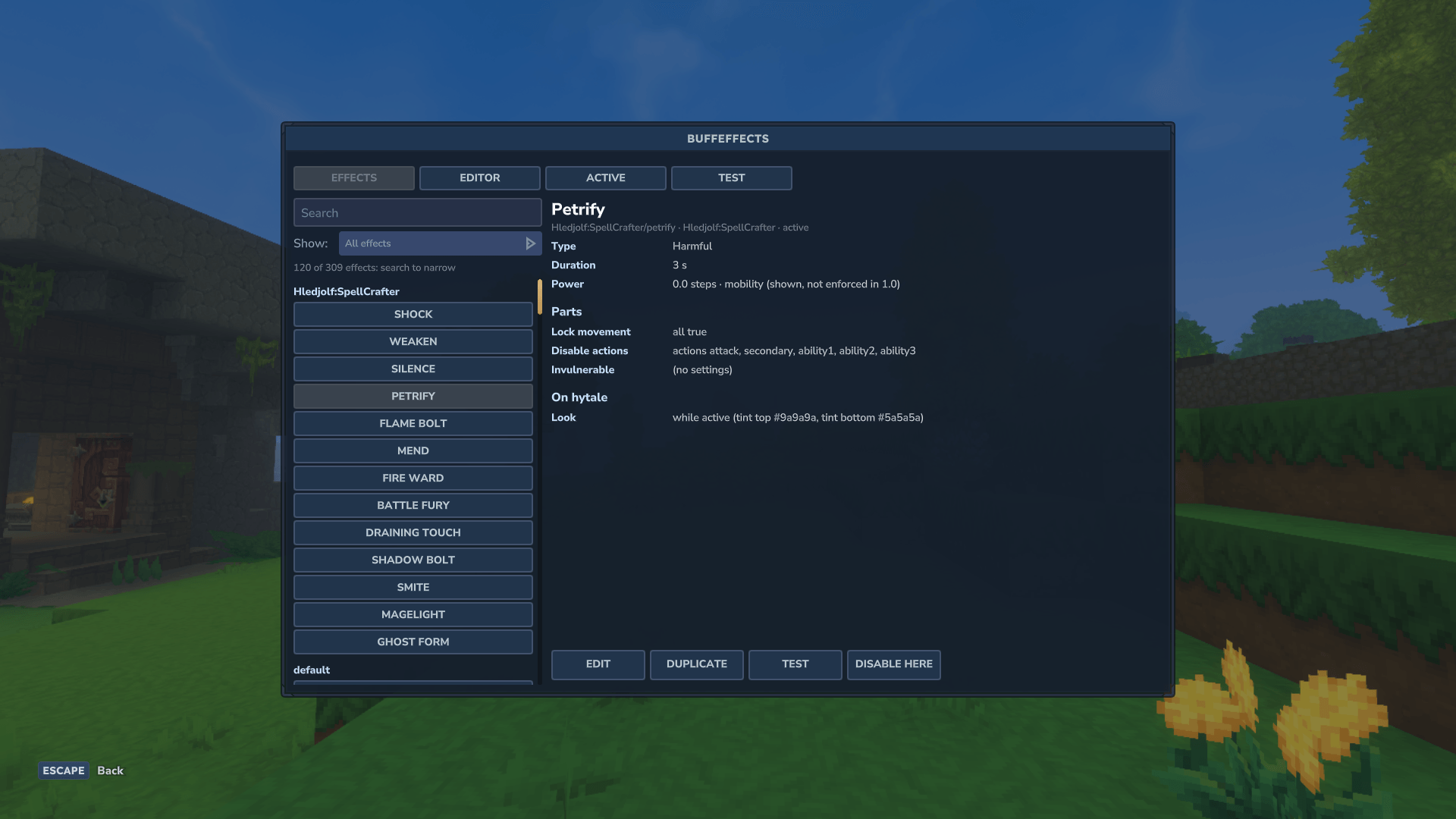
Operators get the /bfx commands and an editor window, opened with /bfx, to browse every loaded effect, build new ones, test them on themselves, and see who carries what.
Requires Mod Settings Manager and CommandDeck 1.2.0 or later. Released alongside SpellCrafter 1.0 and CommandDeck 1.2.0.
Features
- One owner for every effect. Mods apply, remove and cure effects through BuffEffects. It keeps the timers, the stacking rules and the record of who applied what, and tells the mod when an effect ends.
- Timed or permanent. Effects last a set time or until removed. They pause while a player is offline, survive a server restart, and each effect says what happens on death: cleared, kept with the time that was left, or restarted.
- What an effect can do: change a stat's maximum (health, stamina, mana), heal or restore once, regenerate over time (broken by damage unless the effect says otherwise), damage over time, a single hit through resistances, resistance or weakness to a damage type, more or less damage dealt, speed, locked movement (all, jump or sprint), disabled actions (attack, abilities, use and more), knockback taken, invulnerable, intangible (passes through creatures, unseen by NPCs, and can't attack), and a coloured light around the bearer. Seven damage types beyond the game's own: shadow, holy, arcane, mind, sonic, disease and chaos, each with its own damage colour. Plus chat messages when an effect starts, wears off, is cured or while it lasts.
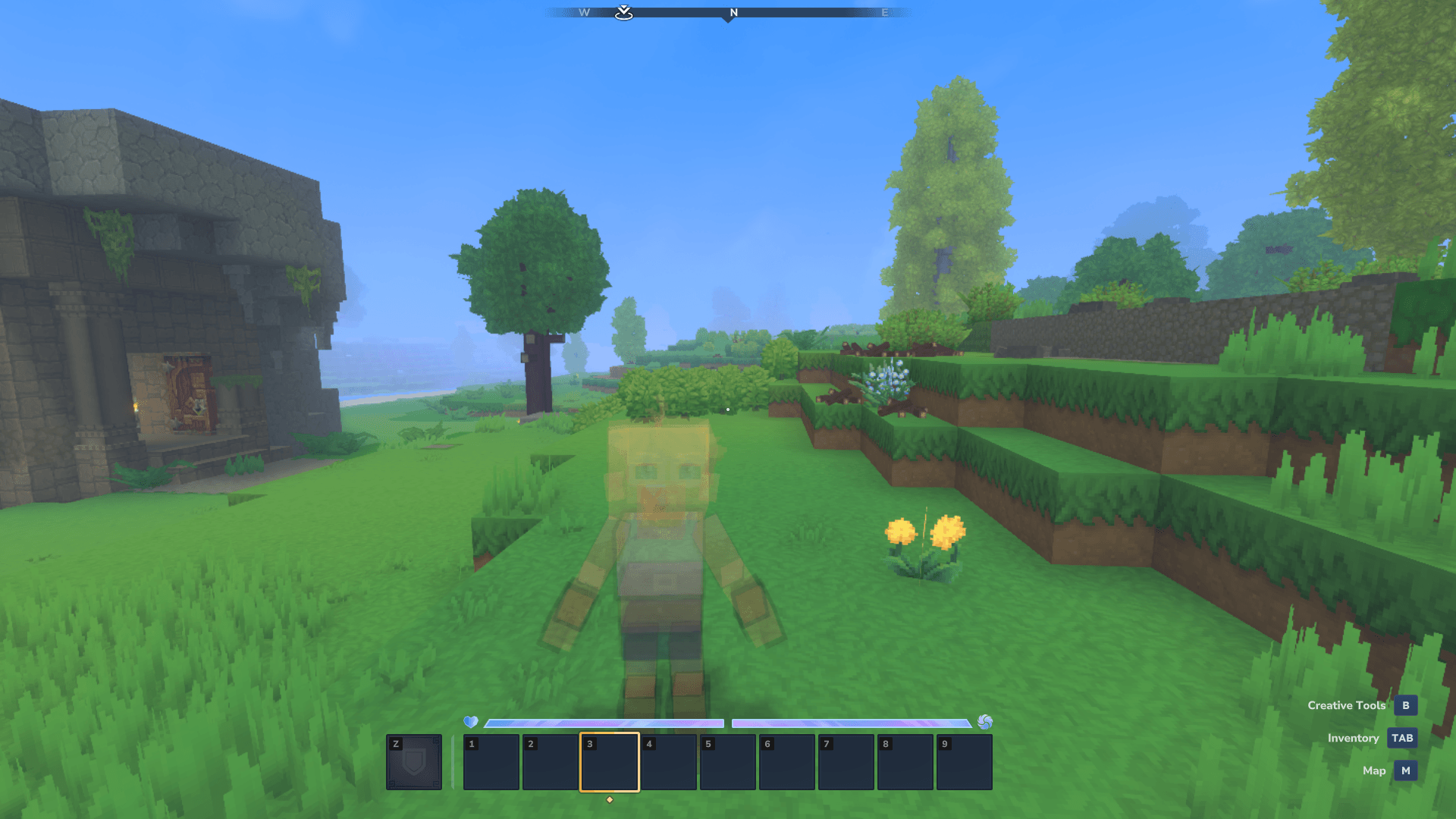
- Looks from the game: tints, particles, model effects, screen overlays, icons, sounds, animations and model changes, plus a see-through look (up to 90%) for ghosts.
- The game's own effects too. Hytale's effects, such as Burn, can be applied by their own id, and the window describes them like any other.
- Stacking and refreshing. Each effect says what applying it again does: refresh, extend, stack or ignore. Stacking categories keep, for example, two speed effects from piling up.
- Cures. Cure every harmful effect, effects with a tag such as
poison, or one effect by name. - Caps the server owner sets. Resistance per damage type (90% by default), how long invulnerable, stun and root can last, with diminishing returns on repeated stuns and roots, and regeneration. Every refusal names the cap. The game's own effects, applied by their id, keep their own values.
- Power ratings, shown. Every effect is rated in steps of power, shown in the window and in
/bfx info. In 1.0 the ratings are information only; nothing is switched off because of them. - Logged. Every application, removal and command is logged, with who did it and which mod asked.
The editor window
Type /bfx (operators). Four tabs:
- Effects: every loaded effect, grouped by mod, with search and filters. The game's own effects are a "Hytale" group. Pick one to see what it does, how long it lasts and its rating.
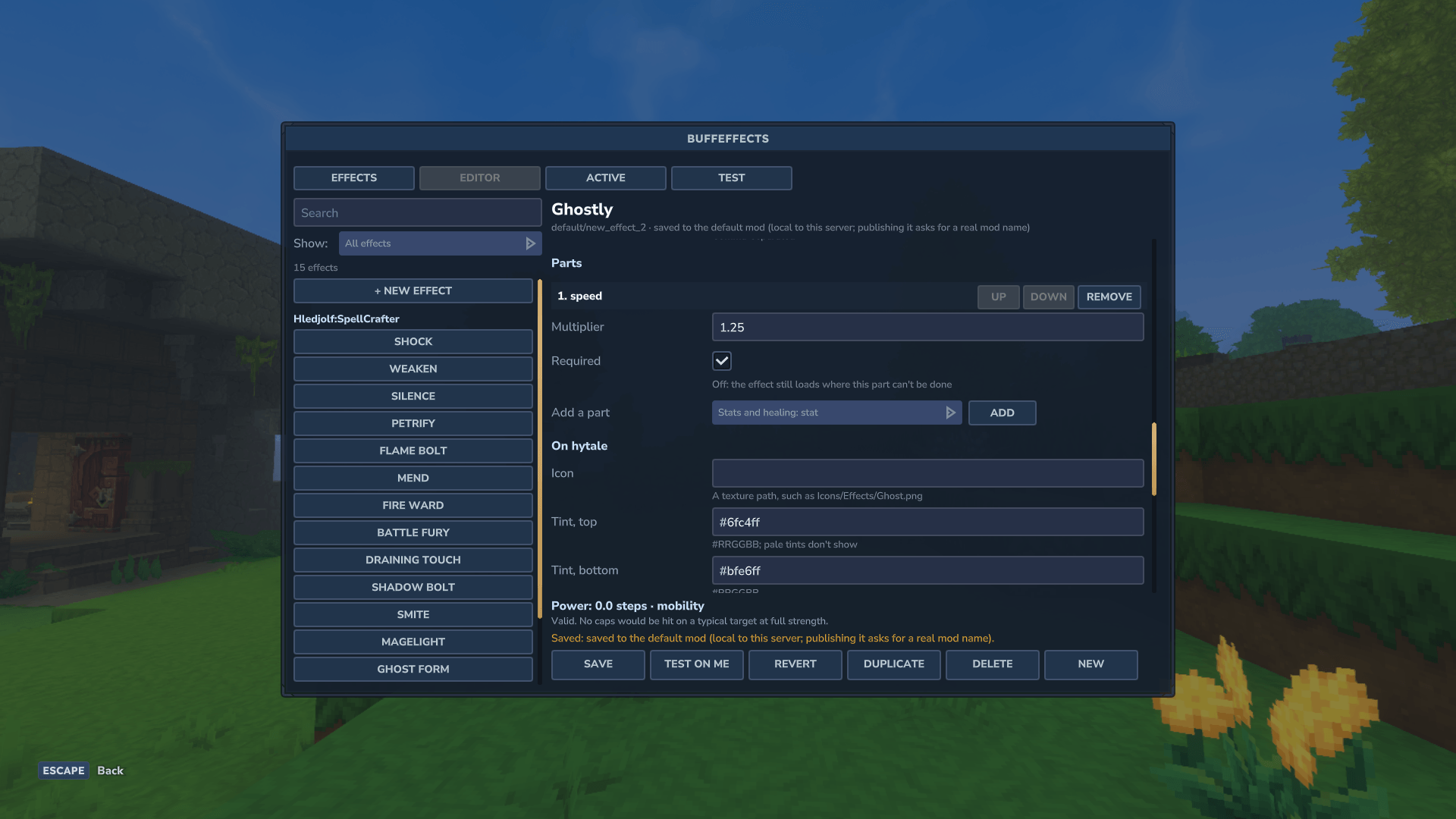
- Editor: build or change an effect: its name, duration and stacking, its parts, and its look on Hytale (tints as
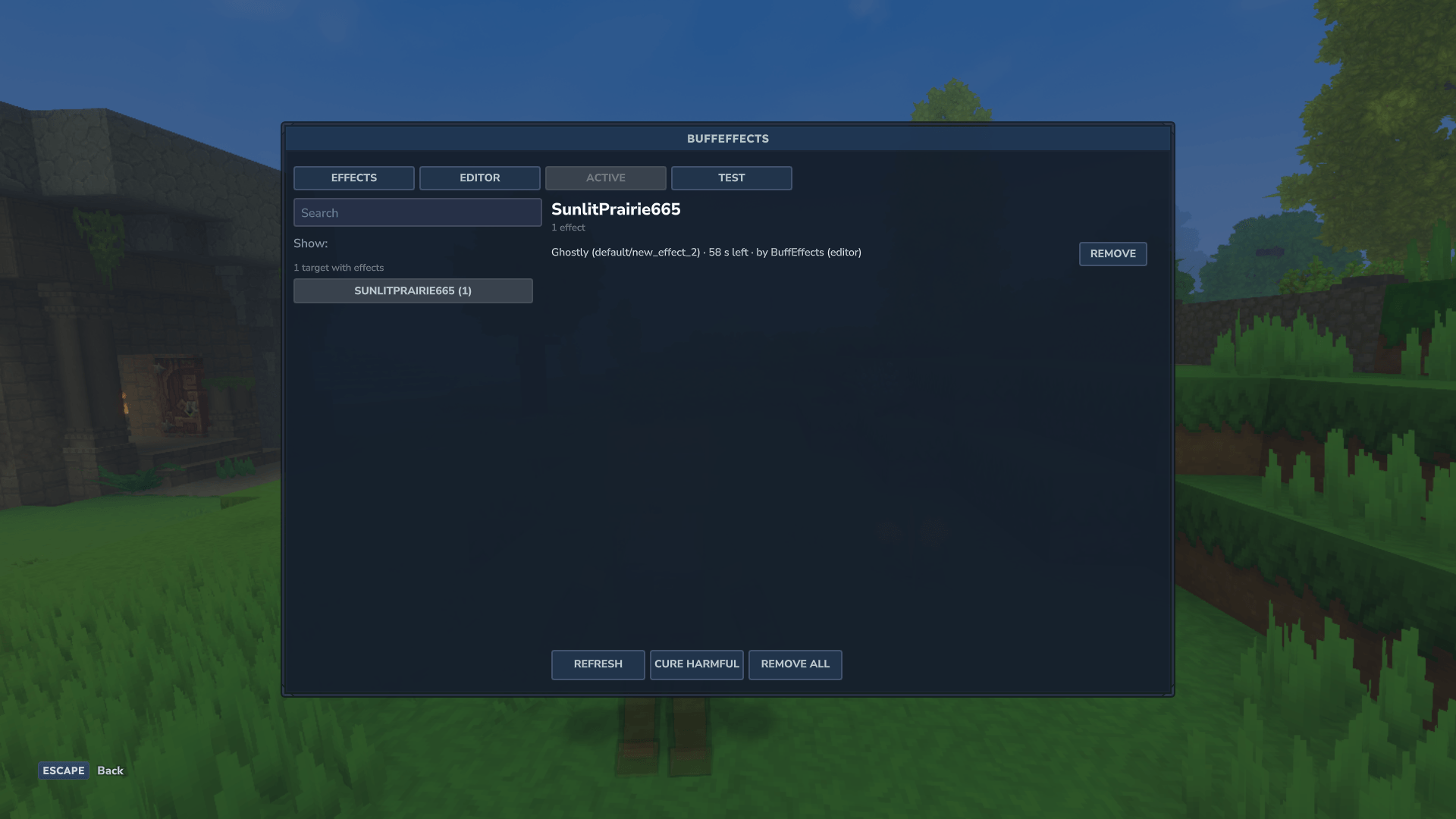
#RRGGBB, particles, model effects, sounds and models picked from the game's live lists). "Wrap in new effect" starts from one of the game's own. Save writes it to the server's localdefaultmod, or to an override of another mod's effect. Test on me applies it to you. - Active: who carries what right now, with time left, stacks and source, and a Remove button.
- Test: apply any loaded effect to yourself or a named player, or do a dry run that says what would happen, and why it would be refused, without applying anything.
Install
- Install Mod Settings Manager and CommandDeck 1.2.0 or later.
- Put
BuffEffects-1.0.0.jarin your server'smodsfolder (singleplayer:%APPDATA%\Hytale\UserData\Mods\). - Type
/bfx.
BuffEffects itself ships no effects of its own: on its own it offers the game's effects and the ones you build in the window. Mods that use it bring their own.
Commands and permissions
One root command, /bfx (also /buffeffects).
| Command | What it does |
|---|---|
/bfx or /bfx editor |
Opens the window |
| `/bfx list [\ | tag:\ |
/bfx info <effect> |
What an effect does, its duration, games and power rating |
/bfx show [player] |
The effects on you, or on another player, with time left and their source |
/bfx apply <player> <effect> [seconds] [strength] |
Applies an effect |
| `/bfx remove <effect\ | all>` |
| `/bfx cure [harmful\ | tag:\ |
/bfx check <player> <effect> [seconds] [strength] |
The dry run: what apply would do, and why it would refuse |
/bfx help |
Shows the commands |
Effects are named by their full id, <mod id>/<id>, or by the short id when that's unambiguous. The game's own are hytale:<id>, such as hytale:Burn.
Permissions: everyone may use /bfx list, /bfx info and /bfx show for themselves. buffeffects.show.others lets a player see someone else's effects. buffeffects.editor opens the window, buffeffects.apply applies and dry-runs, buffeffects.remove removes and buffeffects.cure cures; operators have them all. Each effect also has its own node, buffeffects.apply.<mod id>.<id> by default, checked as well whenever a person applies it, so a server can let everyone apply a harmless costume effect to themselves.
Settings
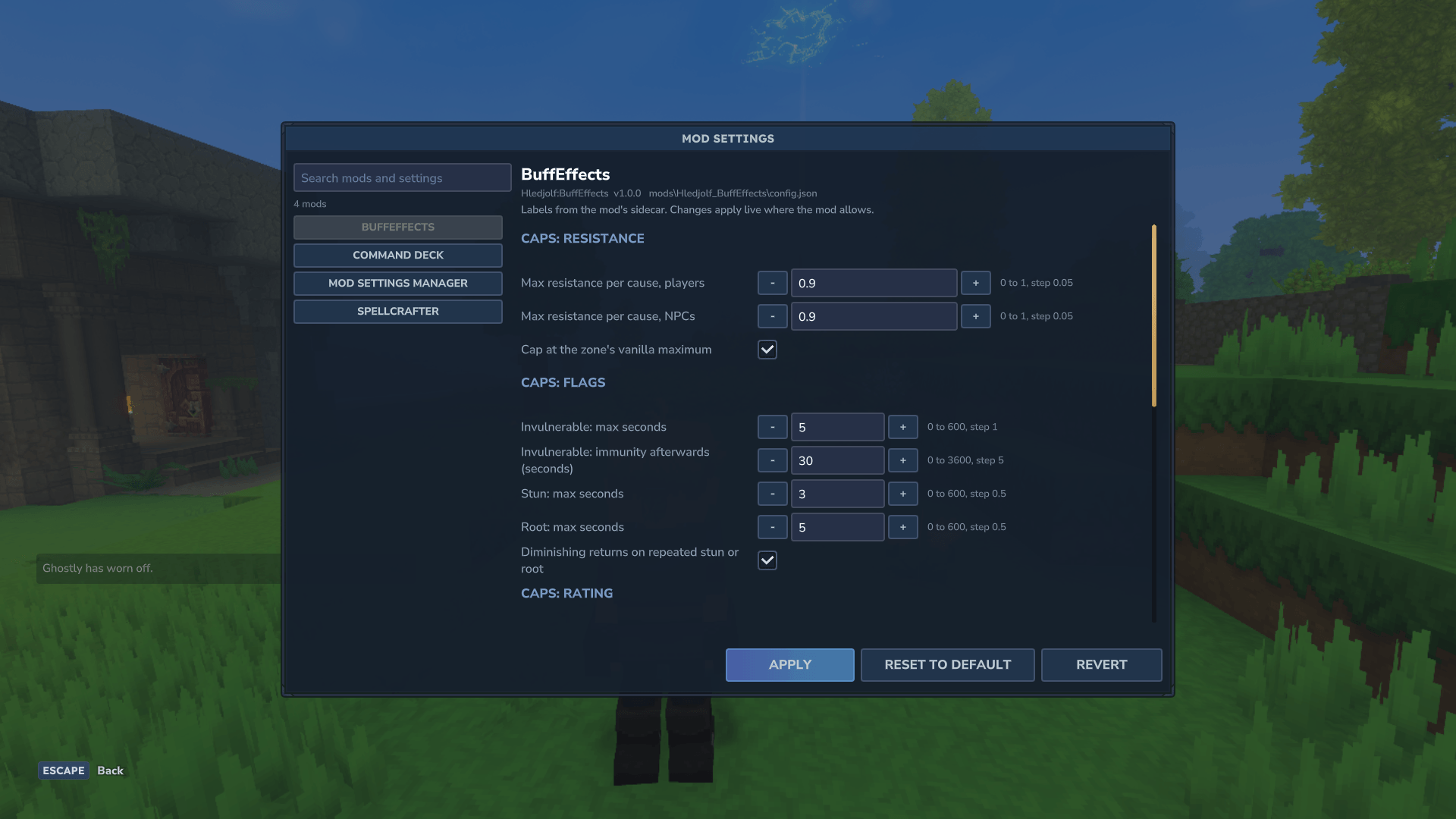
BuffEffects' settings are in Mod Settings Manager (/modsettings):
- Caps: resistance per damage type for players and NPCs, whether it's held to the zone's vanilla maximum, how long invulnerable lasts and the immunity afterwards, the longest stun and root, diminishing returns, rating caps, and regeneration below the zone's incoming damage.
- Messages: whether effects may send messages, the generic wear-off line for effects without their own ("Spooked has worn off."), and the radius for messages to players nearby.
- Log: how many days to keep the log.
The caps are visible and changeable only by the server owner and the people they choose.
Compatibility
- Hytale server 0.7.6.
- Dedicated servers and singleplayer.
- Requires Mod Settings Manager and CommandDeck 1.2.0 or later.
Known issues
- The status icon's timer may look full or wrongly proportioned after a reload or a respawn, or when an effect was applied for a different time than its default. The time itself is kept correctly;
/bfx showhas it. - Pale tints barely show, for example the blue-white on a ghost look. Use saturated colours.
- The floating pose lets the feet touch the ground: an effect can't raise the body yet.
- The game's own "clear effects" leaves an effect's pose stuck (that's the game's behaviour). Removing the effect through BuffEffects ends the pose.
- Light is much stronger than its radius suggests: a light part lights far beyond its radius. Use small radiuses (2 to 4) for now; the scale is fixed in a later version.
For mod authors
Your mod defines its effects in a sidecar file in its jar, Effects/<Group>_<Name>.effects.json, and applies them through BuffEffects' Java API. Each effect is a list of game-neutral parts, plus a binding with its look on Hytale.
For example, an effect spooked, named Spooked, harmful, in the category Halloween, lasts 30 seconds and refreshes when applied again. Its parts are a speed multiplier of 0.8, a message when it's applied ("You feel watched.") and one when it wears off ("The feeling passes."). Its Hytale binding gives it a blue tint while it lasts.
- The sidecar is plain data, validated at load. A mistake refuses only that effect, with a message naming the file, the effect and the field, and never stops the server or another mod's effects.
- List BuffEffects as an optional dependency, never a required one. Without BuffEffects installed, nothing reads the sidecar, and your mod should keep working.
- The API (
buffeffects.api) applies, removes and cures effects, asks what a target carries, does dry runs, describes effects, and sends events when an effect is applied, refused or ends. Callers can re-word an effect's messages for one application, so a spell or a quest reward can give the same effect its own words. Every effect is also registered as a Hytale effect with a stable name,BFX_<mod id>_<id>, so NPC roles can name it. - Operators can change your effects without editing your mod, through server overrides that replace or disable one effect.
License
MIT, copyright (c) 2026 Hledjolf.
Questions and bug reports: the comments on this page.
Buff Effects Team