Zurk Maps
- By
Ever wish you could just click a minimap to announce enemy movements? Now you can!

Description
Zurk Maps
See the fight. Make the call. Keep playing.
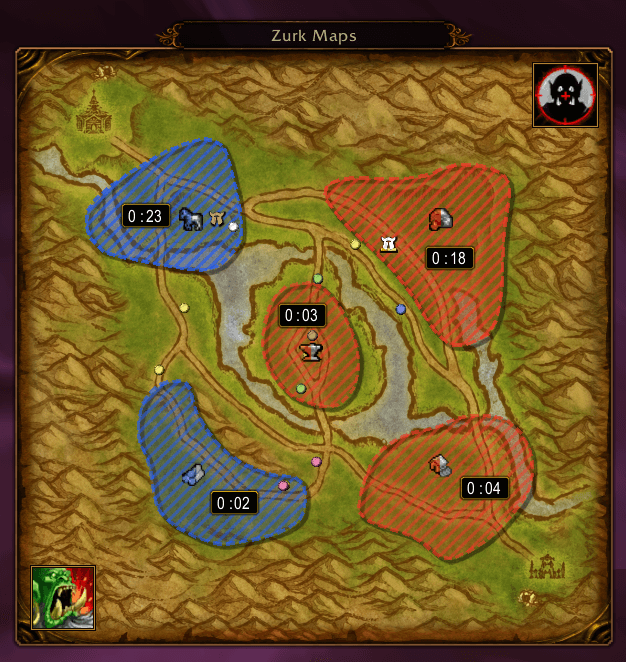
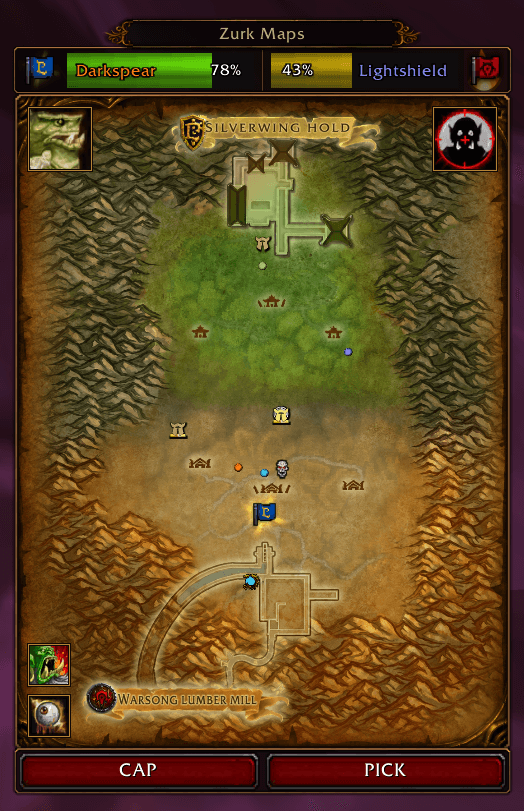
Zurk Maps brings interactive battleground maps to Warsong Gulch, Arathi Basin, and Alterac Valley. Track enemy movement, follow teammates, monitor objectives, predict the outcome of a match, and keep tabs on your honor grind without stopping to type.
You shouldn't have to keep opening the battleground map when you could be watching the fight. Zurk Maps keeps the information that matters visible while you stay on target, rotate, peel, defend, chase kills, and keep farming honor.
It also covers the jobs many PvPers use Ranker and Capping for:
- Get Ranker-style weekly honor progress, breakpoints, projected rank results, and estimated battlegrounds remaining directly in-game.
- Get Capping-style Arathi Basin & Alterac Valley timers, and estimated game time remaining for Arathi Basin
- See those numbers beside the actual fight: players, objectives, capture timers, enemy movement, and incoming calls.
- Honor estimates use your own recorded battleground results to show roughly how many more games you need for the next breakpoint.
- Click the information on the map to call it directly to your team.
Ranker can tell you how much honor you need. Capping can tell you where a match is headed. Zurk Maps gives you that information while also showing you the people, flags, bases, timers, and fights.
Warsong Gulch

Keep track of the flag fight and communicate where help is needed.
- Clickable location calls: Report the enemy flag carrier through named regions covering tunnels, ramps, rooftops, graveyards, flag rooms, second floors, midfield, huts, bananas, and more.
- Friendly carrier tracking: Follow your friendly flag carrier with a live flag marker.
- Carrier health frames: Monitor both carriers through targetable frames with class-colored names, faction flags, and health displays.
- Quick carrier calls: Shift-click carrier frames to request help or report the enemy carrier’s health.
- Automatic EFC health calls: Optionally coordinate enemy carrier health reports at critical thresholds without multiple Zurk Maps users spamming the same update.
- PICK / CAP: Send urgent flag calls.
- Turtle: Report defenders stacked in the enemy flag room, including how many enemies are visible with the carrier.
- Focus: Send faction-aware class-priority calls.
- Eyes on EFC: Ask your team for the enemy carrier’s location.
- Teammate callout highlights: Friendly reports can light up the reported WSG location directly on your map so you can react immediately.


Arathi Basin


Coordinate rotations, protect flags, follow capture progress, and see where the resource race is headed.
- See contested-base highlights and capture timers directly on the map.
- Use base-area callouts to report Safe or 1+ through 7+ Incoming at friendly bases and enemy numbers Visible at hostile bases.
- Click a base marker to call SPIN, right-click for HELP, or shift-click to report a WEAK defense.
- Report enemy movement through roads, bridges, intersections, water, and other named areas.
- Use contextual warnings to tell teammates to get out of exposed areas.
- Click an active capture timer to share the remaining time with your team.
- See a live projected winner and estimated time remaining once the first base is secured. Zurk Maps recalculates the race as base control changes using the current AB scoring situation.
- Click the projection bar to call out the projected winner and remaining time to your team.
- A five-base hold transforms the projection bar into a faction-colored lightning display that advances with the resource race and powers down smoothly if control is broken.
- Player blips, rank helmets, and assigned markers stay visually above base icons, so you can see exactly who is fighting on a flag.
- Base icons keep mouseover and callout priority, including a small buffer around the objective, so overlapping players never stop you from making an urgent SPIN/HELP/WEAK call.
This gives you the match projection people commonly run Capping for, but attached to the battlefield itself. You can see who is winning, how long the current base situation takes to end the game, which flags are changing hands, who is standing on them, and where the next fight is developing.
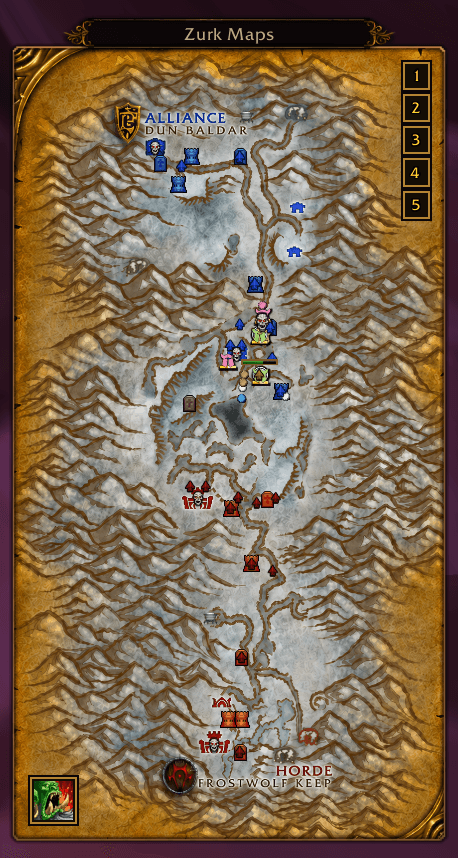
Alterac Valley

Follow the objectives, the raid, and the honor still available across the battlefield.
- Track towers, bunkers, graveyards, mines, captains, and faction bosses.
- See your raid’s position with support for up to 40 friendly players.
- Follow contested towers and graveyards with capture countdowns and contextual callouts.
- Locate honor NPCs through dedicated markers, including Lieutenants and Commanders.
- View NPC health, combat activity, and death states when that information is available.
- Left-click honor NPC markers to target them; right-click to report their status.
- Inspect patrol information for moving honor NPCs.
- Save frequently used calls in editable AV quick-message buttons. Left-click to send; right-click to edit.
Class-Colored Teammates and Rank Helmets


Recognize your teammates at a glance.
- Choose traditional gold blips or Warcraft-style class-colored markers.
- Class-colored blips feature faceted centers and forged rims that fit the Classic UI.
- Rank 12, 13, and 14 teammates receive their distinctive PvP rank helmets.
- With Class Colors enabled, only the helmet is recolored. The original rank-14 background and rank-13/14 gold bars stay intact.
- Mouse over teammates for class-colored names and matching rank icons.
- Manual player assignments take priority over automatic rank badges.
- Special player markers stay readable when players pile onto objectives.
Mark Your Overgeared Friends

Right-click friendly players to assign Raid Boss, Elite, Star, Circle, Diamond, Triangle, Moon, Square, Cross, or Skull.
- Mark a geared teammate, pocket healer, flag carrier, target caller, or anyone else you want to find instantly.
- Assignments are remembered between battlegrounds and restored when that player appears again.
- Select individual players from a class-colored submenu when markers overlap.
- Elite markers retain their distinctive dragon treatment.
Honor Progress and Rank Milestones


Keep the honor grind visible while you PvP.
- Track weekly honor, completed breakpoints, and progress toward your next milestone.
- Solid faction color shows honor that has already completed a breakpoint; striped segments show honor earned toward the next one.
- Hover over breakpoints for projected rank results, remaining honor, and estimated battlegrounds needed.
- Estimates automatically follow the battleground you've most recently been playing—WSG, AB, or AV.
- Battleground estimates use your own recorded honor results, including your recent honor-per-game average.
- Shift-click a breakpoint to tell your team approximately how many more games and how much honor you need.
- Choose Attached, Persistent, or Off for the Honor Bar.
- Persistent mode keeps your honor progress available even when the battleground map itself is closed.
- Move and resize the bar in horizontal or vertical layouts.
- Celebrate rank milestones with an animated popup, honor-progress display, glow, and fanfare.
- Milestones reached inside a battleground wait until you leave before displaying the celebration.
For rankers, this puts the information you'd normally check in Ranker right beside the thing generating the honor. See the next breakpoint, the exact honor still needed, your recent honor-per-game average, and approximately how many more battlegrounds stand between you and the next milestone—then get back to killing people.
Battlecry

Give your team a rallying cry of your own.
- Right-click the Battlecry button to edit your message.
- Left-click to send it.
- Custom emotes are supported.
Compact Options, Flexible Layout
Right-click an unoccupied area of the map to open Options. Player and objective markers retain their own contextual actions.
- Callout Channel: Switch between
/bgand/RWusing the toggle switch. Raid Warning requires Leader or Assist; otherwise callouts fall back to battleground chat. - Teammate Blips: Choose Gold or Class Colors.
- Honor Bar: Choose Attached, Persistent, or Off, and lock or unlock its position.
- Test Mode: Explore map features, player movement, captures, timers, and other battleground behavior outside a live match.
- Reset Position & Size: Restore the selected map’s layout.
- Map Opacity: Adjust transparency from 10% to 100%. The original appearance is 72%; 100% makes the map fully opaque.
Zurk Maps automatically selects the appropriate map when you enter a supported battleground. Maps can be moved and resized, with position, scale, and appearance settings saved between sessions.
The goal is simple: stop opening the battleground map and start watching the battleground. Keep track of the objectives, know where your team is, see where enemies are moving, know how the game is trending, know how much honor you still need—and spend the rest of your attention actually PvPing.
Commands
Use the command for the map you want to control.
| Action | Warsong Gulch | Arathi Basin | Alterac Valley |
|---|---|---|---|
| Show command help | /wsg |
/ab |
/av |
| Show map | /wsg show |
/ab show |
/av show |
| Hide map | /wsg hide |
/ab hide |
/av hide |
| Reset position and size | /wsg reset |
/ab reset |
/av reset |
Additional Commands
/wsg clear— Clear detected flag carriers./av refresh— Refresh AV objective information./zurkcelebrate— Preview the rank-up celebration.
Zurk Maps. One-click callouts.
The Zurk Maps Team