Zum Hone
- By
A companion to my EllesmereUI setup: EUI profile import, chat tabs sync, chat bar, quick focus markers, M+ info, map labels and the EUI nameplate arrow. It fills the gaps of a specific addon ecosystem and requires EllesmereUI.
Description
Localization
The interface fully supports English, Simplified Chinese and Traditional Chinese, and follows your game client language automatically.
多语言支持
界面完整支持简体中文、繁体中文与英文,并自动跟随游戏客户端语言。
Zum Hone is a companion addon built around my personal UI setup (EllesmereUI-based).
Before you download
This addon requires EllesmereUI. It is a supplement to a specific addon ecosystem — mine — and every module fills a gap in that setup. If you run a different UI, or already have similar tools installed, most modules will either duplicate what you have or feel incomplete to you.
Modules — all disabled by default, enable only what you need:
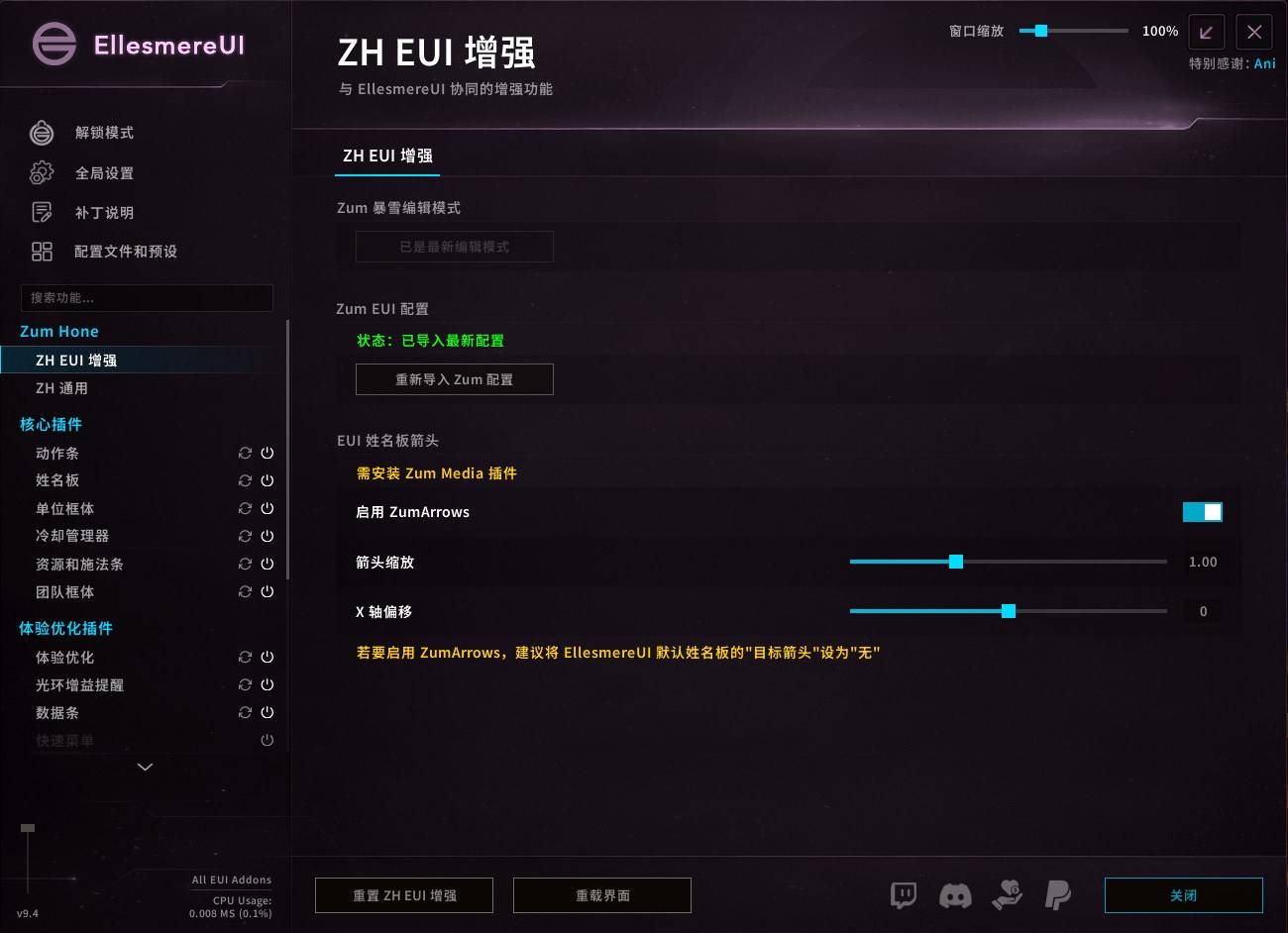
Settings panel embedded directly into the EllesmereUI options window.
- EUI Profile Import: one-click import of my EllesmereUI profile — saves you hours of addon tuning, so you can just enjoy Azeroth. Importing my profile also enables most Zum Hone modules automatically.
- Edit Mode Import: one-click import of my Blizzard Edit Mode layout, tuned to match my UI setup.
- EUI Nameplate Arrow (ZumArrows): a target indicator arrow for EllesmereUI nameplates, with adjustable scale and X offset. The arrow texture is provided by my other addon, Zum Media.
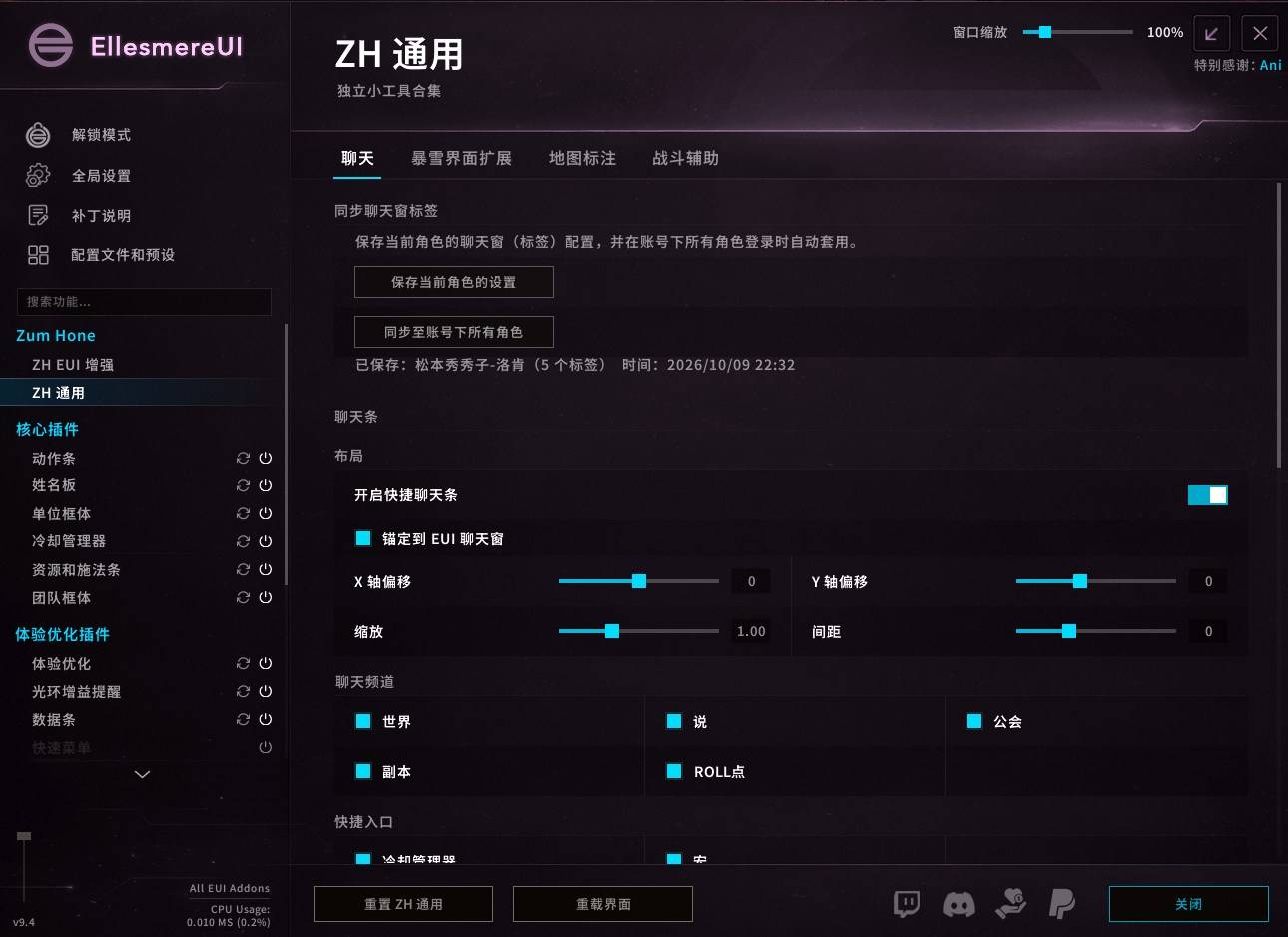
- Chat Tabs Sync: syncs your chat window tab layout across every character on the account.
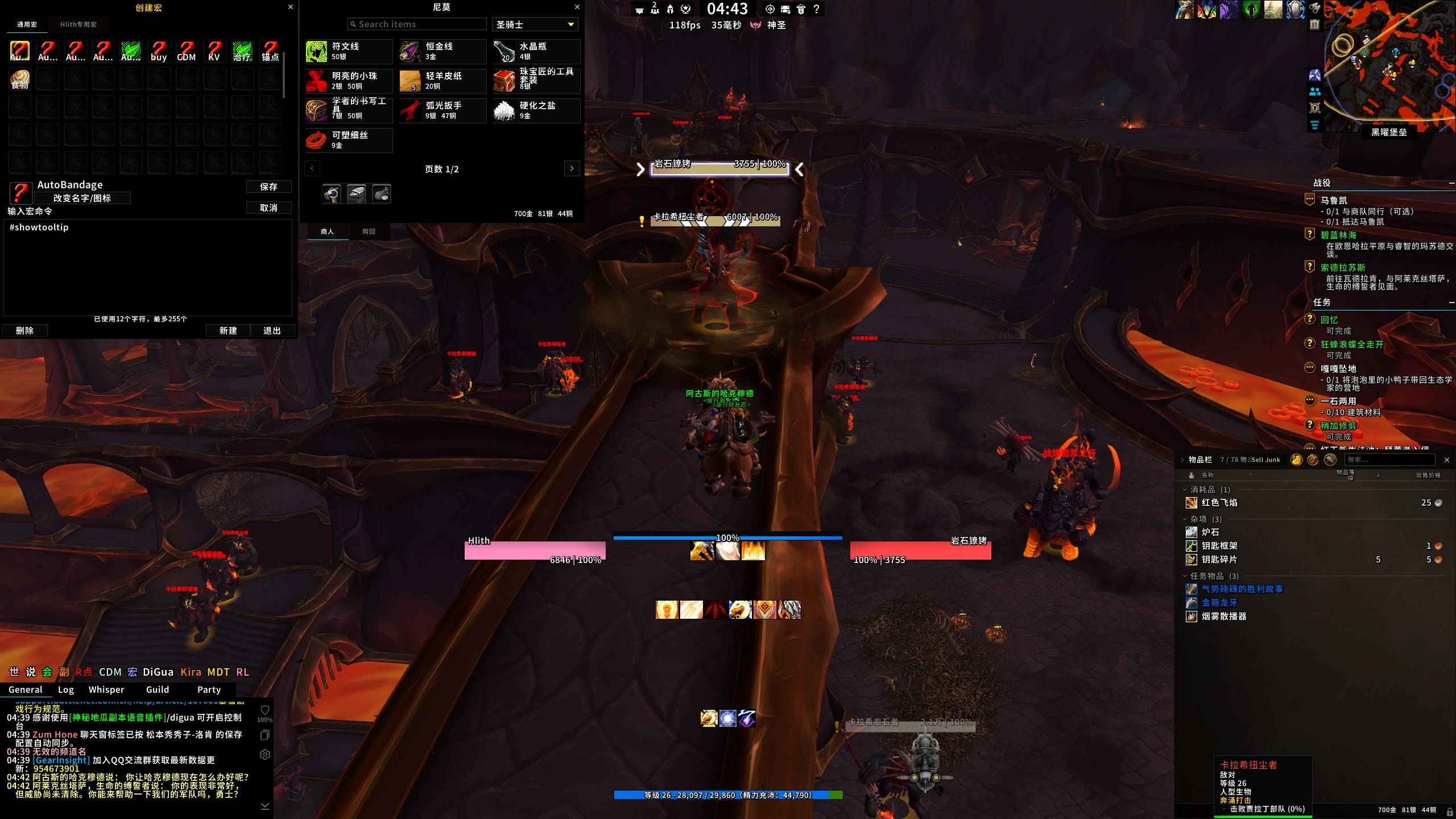
- Chat Bar: a lightweight text-button bar anchored to the EUI chat frame, with built-in channel buttons and up to 4 custom slash-command shortcuts.
- Blizzard UI Tweaks: macro frame enlarged to 10 columns; a this-week Mythic+ records panel with dungeon abbreviations and a customizable teleport announce message; season M+ records shown in player tooltips; merchant frame expanded to 3 or 4 columns.
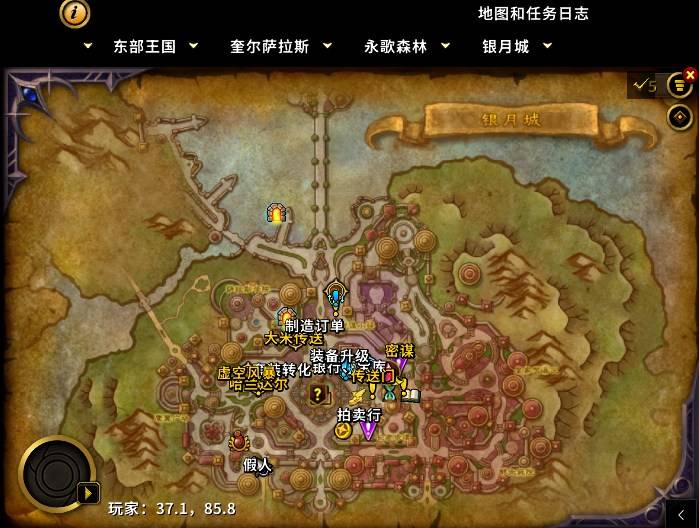
- Map Labels: text labels on the world map for season dungeon/raid entrances and portals, plus the bank, vault, auction house, target dummies and other utilities; each category can be toggled from the top-right corner of the world map.
- Focus Marker: set focus and raid markers with a modifier-click; modifier key, mouse button and marker rules are all configurable.
Usage
Type /zh, click the minimap icon, or open the panel directly from the EllesmereUI options window.
Requirements
- EllesmereUI: Zum Hone is built around it and will not load without it.
Optional
- Zum Media: provides the ZumArrows texture used by the nameplate arrow module.
My Full UI Setup
My complete addon configuration is shared via import codes:
- wclbox: 01321077
- ModUs: 113c78e20a2be032
Enter the code in the corresponding app to import my full setup. Note that both are Chinese community tools with Chinese-only UIs.
References
Chat tabs sync and chat bar draw design ideas from SettingsSync and SeUI.
--------------------------------------------
Zum Hone 是围绕我个人界面方案(基于 EllesmereUI)打造的配套插件。
下载前须知
本插件必须依赖 EllesmereUI。它是为我的个人插件生态量身打造的补充工具,每个模块都在补这套配置的特定缺口。如果你使用其他界面方案,或已安装同类工具,大部分模块要么功能重复,要么会让你觉得残缺。
功能模块 —— 全部默认关闭,按需在设置面板中开启:
- 设置页内嵌进EUI设置窗口
- EUI 配置导入:一键导入我的 EllesmereUI 配置,节省大量调试插件的时间,尽情享受艾泽拉斯。若导入我的配置,Zum Hone的绝大部分功能会自动开启;
- 编辑模式导入:一键导入我的暴雪编辑模式布局,与我的界面方案配套调校。
- EUI 姓名板箭头(ZumArrows):EllesmereUI 姓名板的目标指示箭头,缩放与 X 轴偏移可调,箭头材质由我的另一款插件 Zum Media 提供。
- 聊天标签同步:将聊天窗口的标签布局同步到账号下所有角色。
- 聊天条:锚定 EUI 聊天窗的轻量文字按钮条,内置频道按钮,并支持最多 4 个自定义斜杠命令快捷入口。
- 暴雪界面扩展:宏界面扩展为 10 列;本 CD 大秘境记录面板(副本缩写、可自定义传送喊话内容);鼠标提示显示玩家赛季大秘境记录;商人界面扩展为 3 / 4 列。
- 地图标注:在世界地图上添加文字标注,包括赛季副本 / 团本入口与传送门,以及银行、宝库、拍卖行、训练假人等实用设施;可在世界地图右上角按类别开关。
- 快捷焦点标记:组合键点击即可设置焦点与团队标记,修饰键、鼠标按键、标记规则均可自定义。
使用方法
输入 /zh、点击小地图图标、或直接在EUI窗口打开设置面板。
必需依赖
- EllesmereUI:本插件围绕它开发,未安装将无法加载。
可选搭配
- Zum Media:为姓名板箭头模块提供 ZumArrows 材质。
我的整套配置
完整插件配置通过分享码导入:
- 新手盒子:01321077
- ModUs:113c78e20a2be032
在对应 App 中输入分享码即可导入我的整套插件配置(两者均为中文社区工具,仅有中文界面)。
参考
聊天标签同步与聊天条的功能设计参考了 SettingsSync 与 SeUI。
Zum Hone Team