ZPrat
- By
Modernize your WoW chat with a clean interface, persistent history, searchable messages, custom alerts, and a spam filter that learns.
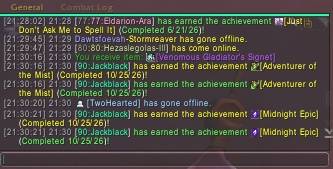
Zprat sample.jpg
Description
Zprat
A cleaner chat. A more personal experience.
Give your chat a modern look with Zprat—featuring persistent history, customizable player names, keyword alerts, searchable messages, and a spam filter that learns from your feedback.
From the layout to the sounds, make your chat work the way you want.
Get started: Open Options → AddOns → Zprat, or type /zprat.
Look & Layout
-
Modern styling — Flat, dark panels with a class-colored accent line, clean tabs, and a matching edit box.
-
Move and lock — A lock icon on every chat window lets you unlock it, drag it into place, and secure its position.
-
Flexible resizing — Use the corner grip, Width/Height sliders, Bigger/Smaller buttons, or slash commands.
-
Custom fonts — Choose your font, size, outline, monochrome rendering, and shadow. Supports SharedMedia fonts and your own
.ttffiles. -
Display controls — Adjust message fading, fade delay, and scroll speed, or hide the side buttons.
-
Edit box placement — Position your input below chat, above the tabs, or free-floating anywhere, with adjustable height, text size, and opacity.
-
Unread indicators — Let tabs change color, flash, or both when new messages arrive.
History & Search
-
Chat history that stays with you — Each character keeps its own history between sessions. Choose how much to save and restore.
-
Search your messages — Search the current window, all saved history, or blocked spam.
-
Easy copying — Copy an entire chat window, or click a timestamp to copy a single message.
Messages & Player Names
-
Custom timestamps — Choose the timestamp format that suits you.
-
Shorter channel labels — Customize abbreviations such as Trade → T and Guild → G, or use an icon-only label for Newcomer Chat.
-
Smarter player names — Color names by class, level, or channel, with optional levels, brackets, class icons, and raid markers.
-
Main and alt identification — Link characters manually or read relationships from guild notes such as “alt of Zeek.”
-
Link icons — Display item and achievement icons beside their links.
-
Clickable web links — Click a URL to copy it.
-
Quick invites — Use clickable invite words such as “inv,” or Alt+click a player’s name to invite them.
Alerts & Sounds
-
Keyword alerts — Highlight your name or any words you choose, play a sound, and optionally show a mid-screen popup.
-
Channel-specific sounds — Set separate sounds for whispers, party, raid, instance, guild, officer, say/yell, and channels.
-
Outgoing message sound — Add an optional sound when you send a message.
A Spam Filter That Learns
-
Learning text classifier — Filters Trade, General, Say, Yell, and whispers from strangers.
-
Train it as you play — Learns “not spam” from guild, group, and friends chat. Ctrl+click a player’s name to teach it what spam looks like.
-
Repeat-message filtering — Hide repeated messages to reduce clutter.
-
Review and correct — Browse blocked messages and mark mistakes as not spam.
Extra Tools
-
Shared or per-character settings — Use one setup across your characters or customize each individually.
-
Sticky channels — Configure which chat channels remain selected.
-
Target whispers — Use
/tt messageto whisper your current target. -
Command aliases — Create short commands that run other commands.
-
Custom text filters — Hide, highlight, or play a sound for matching text.
-
Optional auto-grats — Automatically congratulate guild or group members on achievements.
Slash Commands
| Command | Action |
|---|---|
/zprat |
Open settings. |
/zprat search [text] |
Open search and history, optionally with a search term. |
/zprat copy |
Copy the current chat window. |
/zprat lists |
Manage alert words, channel names, aliases, filters, alts, grats, invite words, and fonts. |
/zprat lock |
Toggle the chat window lock to move or secure it. |
/zprat bigger |
Increase the chat window size. |
/zprat smaller |
Decrease the chat window size. |
/zprat size W H |
Set a specific width and height—for example, /zprat size 500 220. |
/zprat unlock |
Unlock the free-floating edit box for repositioning. |
/zprat spamlog |
Review messages blocked by the spam filter. |
/zprat alt Alt Main |
Link an alt to a main character. |
/zprat clear |
Delete the current character’s saved chat history. |
/tt message |
Whisper your current target. |
Compatibility & Notes
Restricted chat during encounters
During boss encounters, Mythic+, and rated PvP, World of Warcraft hides chat text from addons. Zprat leaves those messages as Blizzard displays them and does not save or filter them.
Lite Mode
If you encounter errors in that content, enable Lite Mode under General settings, then type /reload. Lite Mode retains styling, history, and spam filtering where available while avoiding message-text rewriting.
Other chat addons
Disable other chat addons, such as Prat or Chattynator, to prevent conflicts from multiple addons rewriting chat.
Player levels
Levels are available only for guild members, group members, friends, and players you have targeted or moused over.
Alias limitations
Aliases cannot run protected commands such as /cast, /use, or /target. Use a standard WoW macro for those commands.
Feedback & Support
Have a suggestion or found a bug? Leave a comment on this page. For bug reports, include your game version, what happened, and any Lua error message.
ZPrat Team