ZonePorts.png
Description
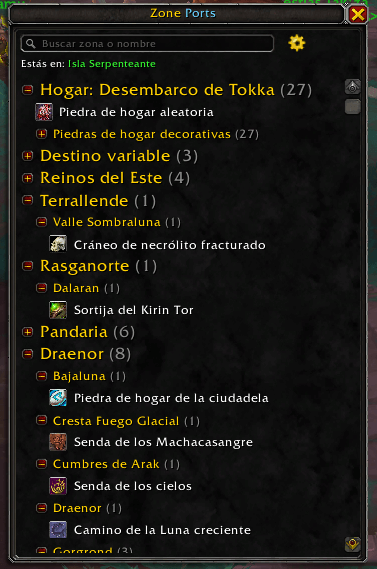
Type /zoneports (or /zp), click the minimap button or set a key binding to open a window with all the toys, items and spells you can use to teleport, grouped by continent → destination zone:
- Favorites at the top (right click any teleport to add it)
- Home: your hearthstone and its decorative variants, with a random hearthstone button
- Variable destination: player housing, Return to Camp, Mole Machine…
- Continents and zones, in expansion order; the zone you are in is shown in green
- Destination to discover: new teleports whose destination ZonePorts does not know yet
Left click uses the teleport. Rings, cloaks and tabards are equipped for you, and your previous gear is put back after teleporting. The search box filters by zone or name, in your game language.
When you open the world map, a small panel lists the teleports that take you to the zone you are looking at. Click its title to minimize it so it doesn't cover the map; it stays minimized until you click it again. It sits in the bottom right corner; drag its title to move it, right click the title to put it back.
ZonePorts reads the description of every toy, bag item and equipped item you own. If it talks about teleporting ("Teleports you to…", in your game language), it is listed even if the addon's database doesn't know it yet. New dungeon teleports in the spellbook appear automatically too.
The first time you use one of them, ZonePorts writes down where you landed and moves it to that zone. Teleports with several destinations (for example the Lightveil Recall Beacon: Naigtal or Val) appear in every zone they reach.
/zoneportsopen or close the window/zoneports configoptions/zoneports checkshow data problems and learned destinations (useful after a patch)/zoneports restoreput your previous gear back now
- Teleports can't be used in combat, so the window closes when combat starts
- Zone names come from the game, so they are always in your language
Zone Ports Team