GoldTrash.png
Description
Know at a glance what loot is worth picking up
When you open a corpse, the loot window highlights:
- Gold background: poor (grey) items whose vendor value is above a minimum (10 gold by default).
- Green background: profession items (trade goods such as meat, cloth, herbs, ore, leather, reagents and recipes).
Configuration
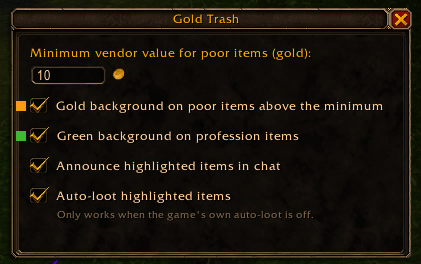
Type /goldtrash in chat to open the options window:
- Minimum vendor value (in gold) for poor items
- Toggle each highlight on or off
- Announce highlighted items in chat
- Auto-loot highlighted items (only when the game's own auto-loot is off)
Considerations
- The vendor value takes the whole stack into account (price × quantity)
- Works with the default Blizzard loot window (not with loot replacements such as ElvUI or XLoot)
Gold Trash Team