ZAngler Forever
- By
ZAngler simplifies fishing in WoW Forever with a movable Cast/Reel button. Click to cast, then click again when a fish bites to reel it in. Position and lock the window wherever you like.
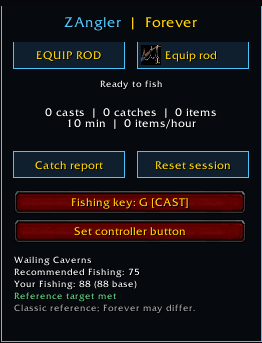
Zangler 2.png
Description
🎣 ZAngler — Fishing Made Simple
Spend more time fishing and less time digging through your bags. ZAngler brings rod selection, lure preparation, casting controls, fishing statistics, and zone guidance together in one convenient addon for WoW Forever.
One Fishing Control
Use the on-screen button, a keyboard binding, or a controller binding to work through your fishing routine:
-
Equip your rod: Automatically selects the best fishing pole in your bags, or uses a rod you specify.
-
Prepare your lure: Selects the strongest supported lure your Fishing skill allows, skipping application when your rod already has an active temporary enchantment.
-
Cast and reel: Clear button indicators show your next action.
Each action requires your button press. ZAngler does not automatically cast, apply lures, or reel in fish.
Compact Mode
Keep your screen clear by minimizing ZAngler into a single gear-swap icon.
-
Click to equip your fishing rod or restore your saved weapons.
-
Right-click to reopen the full window.
-
Shift-drag to move the icon.
-
Show or hide the helpful “Right-click to open” note.
-
Your minimized state is saved through
/reload.
Switch Back to Your Weapons
ZAngler remembers your main-hand and off-hand weapons when you equip a fishing rod—even when you make the swap outside the addon. When you finish fishing, use the gear button to put your weapons back on.
Know Where You Can Fish
The built-in zone guide displays your current Fishing skill, equipment bonuses when available, and the recommended skill for your location. See whether you meet the recommendation or how many more skill points you need.
Recommendations use Classic reference values; WoW Forever requirements may differ.
Track Your Catches
Check your catch report or view lifetime statistics for each character, including:
-
Total casts
-
Total catches
-
Your top 20 caught items
Hear the Splash
Optional splash sound boost raises sound effects and temporarily mutes music and ambience during a cast. Your previous settings return afterward, and sound changes you make during the cast are preserved.
Keyboard and Controller Support
Set separate keyboard and controller bindings, including controller modifier combinations, to fish with your preferred controls.
Supported Lures
Shiny Bauble, Nightcrawlers, Bright Baubles, Flesh Eating Worm, and Aquadynamic Fish Attractor.
Easy Configuration
Open settings through Esc → Options → AddOns → ZTV Addons → ZAngler, or access the addon through the ZTV Launcher and AddOn compartment.
Useful commands:
-
/za help— Show available commands. -
/za mini— Toggle compact mode. -
/za lifetime— View lifetime fishing statistics. -
/za lure onor/za lure off— Toggle automatic lure preparation. -
/za sound off— Disable splash sound boost. -
/zangler autorod off— Disable automatic rod equipping. -
/zangler rod ITEM_ID— Select a specific fishing rod.
Developed by BIOWARE INC. — ZTV Addons by Ezequiel Marrero.
ZAngler Forever Team