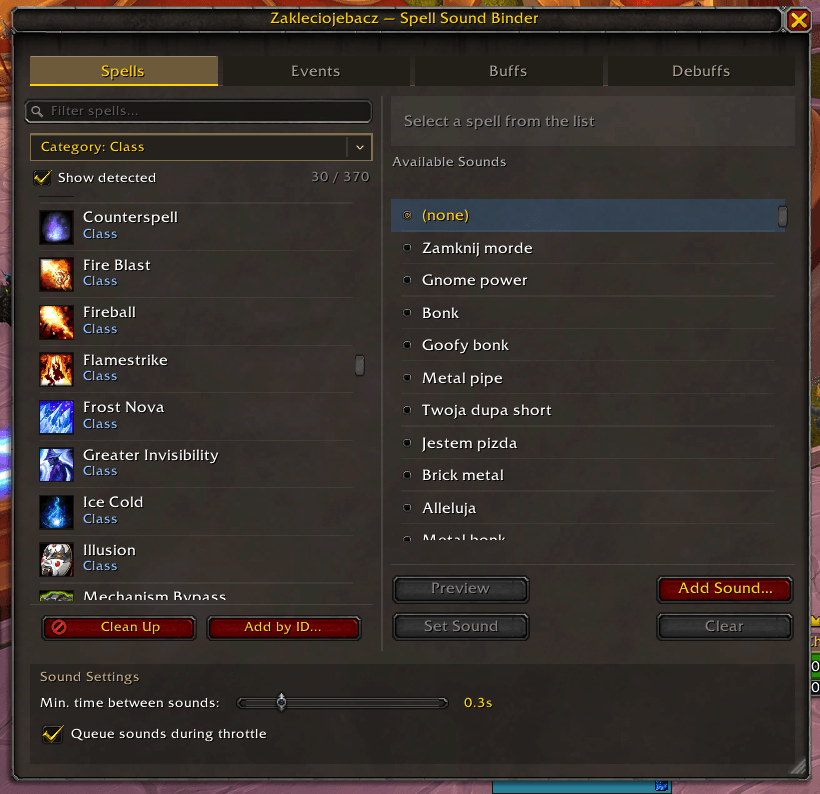
spells.png
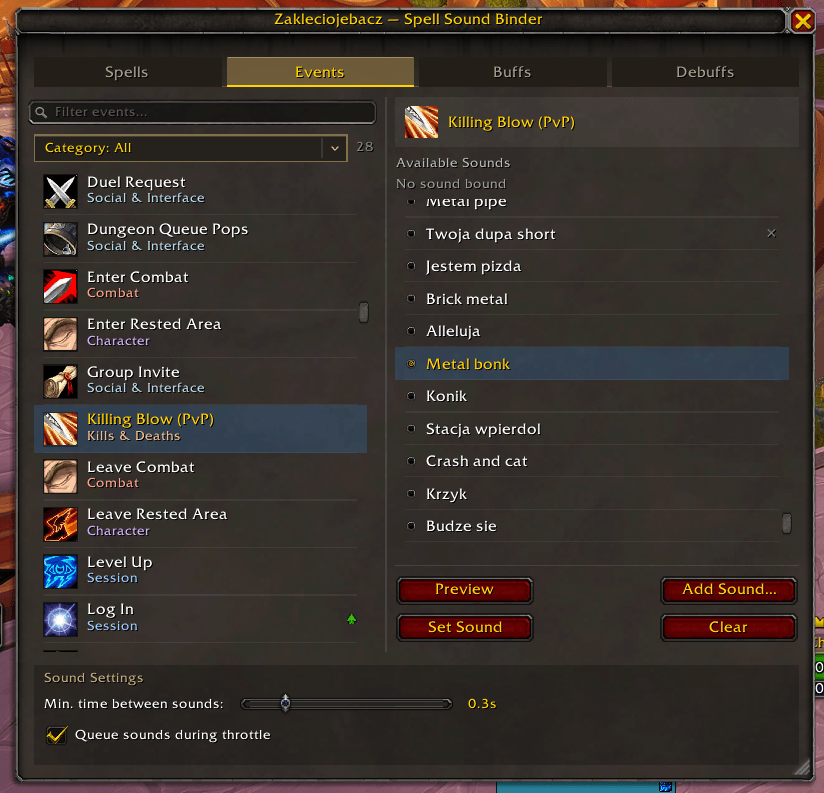
events.png
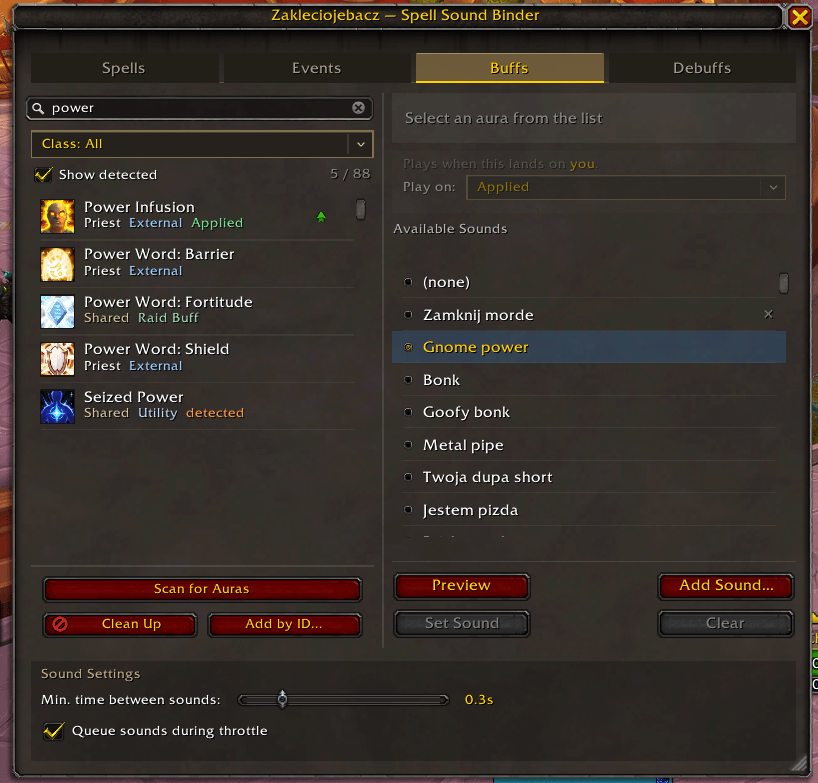
buffs.png
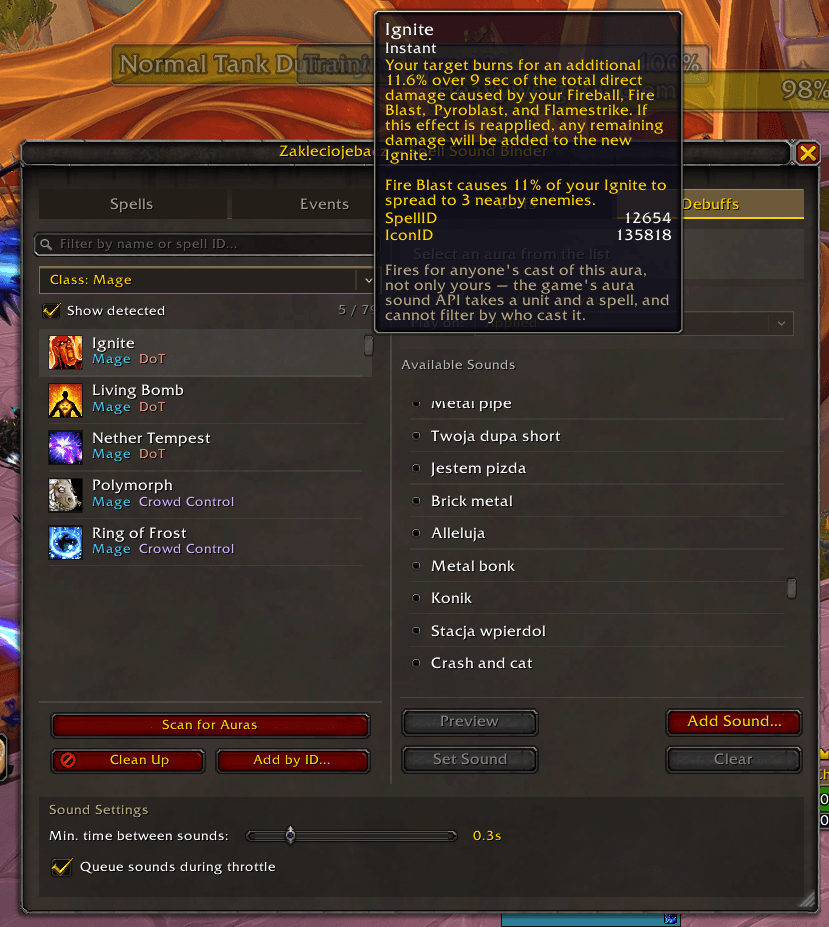
debuffs.png
new_buff.png
Description
Zakleciojebacz
Bind custom sounds to your spells, to game events, and to the buffs and debuffs you care about — they play when you cast, level up, get a killing blow, press a cooldown, or land a DoT.
Features
- Bind any sound file to any spell in your spellbook
- Bind sounds to game events — 28 of them, from logging in to ready checks
- Bind sounds to buffs on you — cooldowns you press, procs, raid buffs, and externals other players cast on you
- Bind sounds to debuffs on your target — your DoTs, crowd control, raid utility debuffs
- Over 200 buffs and debuffs ship ready to bind, covering all thirteen classes
- Bind sounds to specific spell IDs (useful for items, toys, mounts, NPC abilities)
- Every entry is labelled by category, with a search box and filter dropdown
- Automatic detection of spells that change form mid-combat, and of buffs and debuffs you have not seen before
- Throttle control so rapid casts don't cut each other off, with optional queueing
- Preview sounds before assigning
- Sounds play on Master channel (respects your volume settings)
- Movable, resizable window; draggable minimap button; addon compartment entry
- Account-wide saved settings (shared by all your characters)
Requires patch 12.1 or newer for the buff and debuff tabs. Everything else works on 12.0.
Installation
- Extract to
Interface/AddOns/Zakleciojebacz/ - Create the sounds folder:
Interface/ZakleciojebaczSounds/ - Add your sound files (.ogg, .mp3, .wav) to that folder
- Launch WoW and type
/zj, click the minimap button, or use the addon compartment
Usage
The window has four tabs:
| Tab | What it binds |
|---|---|
| Spells | anything you cast |
| Events | things that happen to you — logging in, dying, a ready check |
| Buffs | buffs that land on you |
| Debuffs | debuffs that land on your current target |
All four share the same sound library, so a sound you add once can be bound to any of them.
- Open the window with
/zjor the minimap button - Pick a tab and select a row from the list
- Click "Add Sound…" and enter your sound filename (e.g.
mysound.ogg) - Click "Set Sound" to bind it
Clear removes a binding. Preview plays a sound without binding it.
Spells Tab
The list holds your spellbook, any spell IDs you added yourself, and anything the addon detected you casting. It's one flat alphabetical list — entries the addon added itself carry a small badge saying detected or added, so you can tell them apart at a glance.
Three controls narrow it down, and they combine:
- Search box — matches the name
- Category dropdown — one category at a time, with counts
- Show detected — untick to hide auto-detected spells, leaving just your spellbook and what you added by ID
Categories are: Class, Racial, Profession, Mount, Pet, Item, Toy, World, System and Other. Most are worked out for you; Mount, Item and Toy are set by you when adding a spell by ID.
Clean Up at the bottom removes every detected spell with no sound bound to it. Anything you've bound is kept, and anything removed comes straight back the next time it's cast.
Adding Spells by ID
You can bind sounds to any spell ID, even one that isn't in your spellbook:
- Click Add by ID…
- Type the spell ID (e.g.
12345) — a live preview shows the name and icon it resolves to as you type, and tells you if it's already in your list - Optionally pick a category, or leave it on Auto
- Click Add, then assign a sound as usual
Useful for items with spell effects, toys, mounts, and any ability with a known spell ID.
Events Tab
Sounds for things that happen to you rather than things you cast. All 28 are listed from your first login — there's nothing to discover.
| Category | Events |
|---|---|
| Session | Log In · UI Reload · Zone Change · Level Up |
| Character | Change Specialization · Change Talents · Mount Up · Dismount · Enter Rested Area · Leave Rested Area |
| Combat | Enter Combat · Leave Combat · PvP Match Starts · PvP Match Ends |
| Kills & Deaths | Killing Blow (PvP) · Your Target Dies · Boss Kill · You Die · You Resurrect |
| Progress | Achievement Earned · Quest Turned In · Loot Window Opens |
| Social & Interface | Ready Check · Dungeon Queue Pops · Group Invite · Duel Request · Merchant Window · Mailbox |
Hovering an event tells you what it does and, where it matters, whether the sound plays at the start or the end of it — "Enter Combat" fires at the start, "Boss Kill" at the end.
A few notes:
- Log In fires at most once per session, and not on
/reload— that's what the separate UI Reload trigger is for. - Some events share the same underlying game event, so only one of them fires each time. The tooltip names the others.
- Events are suppressed for two seconds after a loading screen, so zoning doesn't set off a burst of unrelated sounds.
- Anything your client won't hand to addons is greyed out and marked "Not available on this client" rather than silently doing nothing.
Buffs and Debuffs Tabs
Two tabs for auras rather than casts — a sound when Bloodlust lands on you, when the cooldown you just pressed actually goes off, or when your DoT falls off the boss.
They work in raids, dungeons, Mythic+ and PvP. Since patch 12.1 the game hides aura data from addons in exactly that content, so Zakleciojebacz doesn't read it: it hands the game a rule — this unit, this spell, this sound file — and the game plays the sound itself. Nothing about your combat state ever reaches the addon.
Which unit each tab watches is fixed, and it is not a setting:
- Buffs fire only when the aura lands on you. Not your pet, not your party, not your raid.
- Debuffs fire only when the aura lands on your current target. Not your focus, not a boss you aren't targeting, not an arena opponent.
Over 200 auras ship in the list from your first login. Buffs are grouped as:
| Group | What's in it | Shown to |
|---|---|---|
| Raid Buff | Bloodlust, Heroism, Time Warp, Fortitude, Arcane Intellect, Battle Shout, Mark of the Wild… | everyone |
| External | Power Infusion, Ironbark, Blessing of Protection, Life Cocoon, Rallying Cry, Innervate… | everyone |
| Cooldown | the buttons you press — Shadow Blades, Combustion, Avenging Wrath, Pillar of Frost, Ascendance… | your class only |
| Proc | the ones that light up on their own — Hot Streak, Maelstrom Weapon, Killing Machine… | your class only |
Debuffs are not filtered by class — a rogue wants to hear a mage's Polymorph break as much as the mage does. They're grouped as DoT, Crowd Control, Silence, Healing Reduction and Utility (Chaos Brand, Mystic Touch, Exhaustion and friends).
Use the Class dropdown to narrow the list by hand, and the search box to match a name or a spell ID.
Choosing when the sound plays
Selecting an aura and binding a sound reveals Play on, with three choices:
- Applied — the aura lands. The default, and what you want most of the time.
- Gains a stack — an existing aura ticks up another application.
- Falls off — the aura expires or is removed. Good for "your DoT dropped".
Scan for Auras
The list can't know about encounter debuffs, trinket procs, set bonuses, or anything added after this release. Scan for Auras looks at the buffs currently on you and the debuffs currently on your target, and adds anything new.
- Cast the ability, or get the buff — the aura has to be active to be found
- Click Scan for Auras
- The new entry appears in the list, badged detected
Scanning only works in the open world, out of combat: the game hides aura data in combat, encounters, Mythic+ and PvP. The button greys itself out and says so when that's the case. Sounds you've already bound keep working — it's only discovery that pauses.
Clean Up removes every discovered aura with no sound bound to it, keeping anything you've bound.
Adding Auras by ID
Add by ID… is the escape hatch, and it comes with a catch worth knowing.
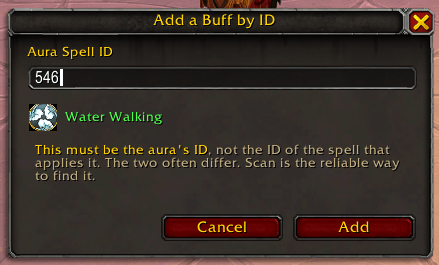
The spell ID printed on a tooltip or a database site is frequently the ID of the cast, not of the aura it applies — Rallying Cry casts 97462 and applies 97463. Type the cast ID and the dialog will resolve a real spell name, the binding will save cleanly, and the sound will never play, with every part of the UI reporting success.
Scan is the reliable route, because it reports the ID of the aura itself. Use Add by ID for auras you can't get onto yourself or your target to be scanned.
One thing the game won't let any addon do
A rule names a unit and a spell. It has no caster field, so a tracked debuff fires for anyone's cast of that spell ID — if a second warlock is running Corruption on your target, you'll hear it. There is no API to filter by who cast it, and reading it yourself is blocked in exactly the content where it would matter.
The Min. time between sounds throttle below also doesn't apply to aura sounds, because the game plays them rather than the addon. With one unit per rule that rarely matters — an aura can only land on you once.
Sound Settings
- Min. time between sounds — the shortest gap allowed between two sounds, so a fast rotation doesn't have each sound cutting off the last. Defaults to 0.3s; set it to Off to disable. Does not apply to the Buffs and Debuffs tabs (see above).
- Queue sounds during throttle — on by default: sounds triggered inside that gap are queued and played in sequence. Turn it off to skip them instead.
Adding Custom Sounds
- Place your sound files in the
Interface/ZakleciojebaczSounds/folder - In-game, click "Add Sound…" and enter the filename
- If you just added the file, type
/reloadfirst
Important: The sounds folder must be created and files placed before launching the game. The game only picks up new directories on a full restart — /reload is not sufficient.
Note: The sounds folder is separate from the addon folder to prevent your sounds from being deleted during addon updates.
Removing a sound from the list also clears every binding that used it, on all four tabs.
Morphing Spells (Combat Forms)
Some spells change into a different spell during combat depending on buffs, resources, or form. For example:
- Retribution Paladin: Templar Strike can morph into Templar Slash; Wake of Ashes can morph into Hammer of Light
- Feral Druid: abilities morph based on form and combo points
Morph variants have their own spell IDs, and the addon detects them as you cast:
- Cast your abilities normally — watch for
Zakleciojebacz: Detected new spell: Templar Slash (ID: 12345) - They join the Spells list under their own names, badged detected
- Bind a different sound to each variant, or leave them alone
Detections persist across /reload and game restarts. If a bound spell morphs into a decorated version of itself — "Empowered Fireball" from a bound "Fireball" — the original sound plays anyway, so you only need a separate binding when you actually want a different sound.
Commands
| Command | Description |
|---|---|
/zj |
Toggle main window |
/zj scan |
Scan for new buffs and debuffs without opening the window |
/zj catalog |
Report the shipped aura list, and any spell IDs your client doesn't recognise |
Troubleshooting
Spell sounds stop during raids, dungeons or PvP
Patch 12.0 (Midnight) introduced Secret Values, which hide combat data from addons. Zakleciojebacz carries a safety net on the Spells tab: if the game ever stops telling it which spell you cast, it goes quiet and prints a one-time notice rather than throwing errors.
At the time of writing this does not happen — player spellcasts are not restricted, so spell sounds work normally in raids, Mythic+ and PvP. You can confirm it on your own client:
/dump C_Secrets.ShouldUnitSpellCastBeSecret("player", 133)false means casts are readable and the addon is unaffected. If a future patch flips that to true, the addon will degrade to silence instead of breaking — and no addon would be able to work around it.
The Buffs and Debuffs tabs are built differently and are not affected: the game plays those sounds itself, so there's nothing for it to hide.
An aura is in the list but its sound never plays
Almost always the wrong spell ID — specifically, the ID of the spell that applies the aura rather than the aura itself. Nothing about that failure is visible: the dialog resolved a real name and the binding saved.
Remove the entry, get the aura onto yourself or your target, and use Scan for Auras instead. The scan reports the ID the game actually uses.
If it was a Cooldown or Proc entry that shipped with the addon, run /zj catalog — it lists any shipped IDs your client doesn't recognise, which is what a spell renumbered by a patch looks like.
Scan finds nothing
The aura has to be active when you scan — cast the ability first, then click the button.
If the button is greyed out, the game is hiding aura data: you're in combat, in an encounter, in a Mythic+ run or in a PvP match. Scanning works in the open world, out of combat. Sounds you've already bound are unaffected.
A debuff sound fires when someone else applies it
Expected, and not fixable by any addon. The rule the addon gives the game names a unit and a spell; it has no caster field, and reading who cast an aura is blocked in exactly the content where you'd want to know. If another player of your class is running the same DoT on your target, you'll hear both.
An expected buff or debuff isn't in the list
Three possibilities, in order of likelihood:
- It's another class's Cooldown or Proc — those are filtered to your class on purpose, since a self-buff can only ever land on the class casting it. Add it by ID if you genuinely want it.
- Your client doesn't know the ID that shipped.
/zj catalogwill say so. - It simply isn't in the shipped list. Get it onto yourself or your target and Scan for Auras.
"Your Target Dies" never fires in dungeons or raids
Expected, and not fixable by any addon. Inside instances the game hides unit identity, so there's no way to tell that the thing that died was your target. It works in the open world. Boss Kill and Killing Blow (PvP) are unaffected.
Spell not triggering sound
Some spells are "wrapped" by Blizzard's internal spells and won't trigger sounds as expected. For example, Metamorphosis may appear as "Void Metamorphosis" in your spellbook but actually casts a different internal spell ID.
Workaround: Cast the spell once and see whether the addon detects it — the detected entry carries the real ID. Otherwise use Add by ID… with the correct spell ID, which you can find via:
- Combat log (enable with
/combatlog, then checkWoWCombatLog.txtin your WTF folder) - Addons like Spy or SpellID
- Websites like Wowhead
License
MIT License
Zaklęciojebacz Team